
Auditing and Enforcing Encryption in Transit with VPC Encryption Controls
AWS VPC Encryption Controls audits encryption in transit through VPC flow logs and enforces it by blocking non-Nitro instances. A monitor-to-enforce walkthrough.

Proving that traffic inside a VPC is encrypted in transit has long been a matter of inference. Nitro-based instances already encrypt traffic between each other at the hardware layer, but nothing confirmed which flows were protected, and nothing let you require it across the VPC. Compliance frameworks like HIPAA, PCI DSS, and FedRAMP ask for evidence, not assurances.
VPC Encryption Controls, released at re:Invent 2025, addresses this. It audits the encryption status of every flow in a VPC, identifies the resources still permitting cleartext, and can enforce encryption by blocking any resource that would carry unencrypted traffic. It relies on the Nitro system's hardware encryption, and it records the result directly in VPC flow logs.
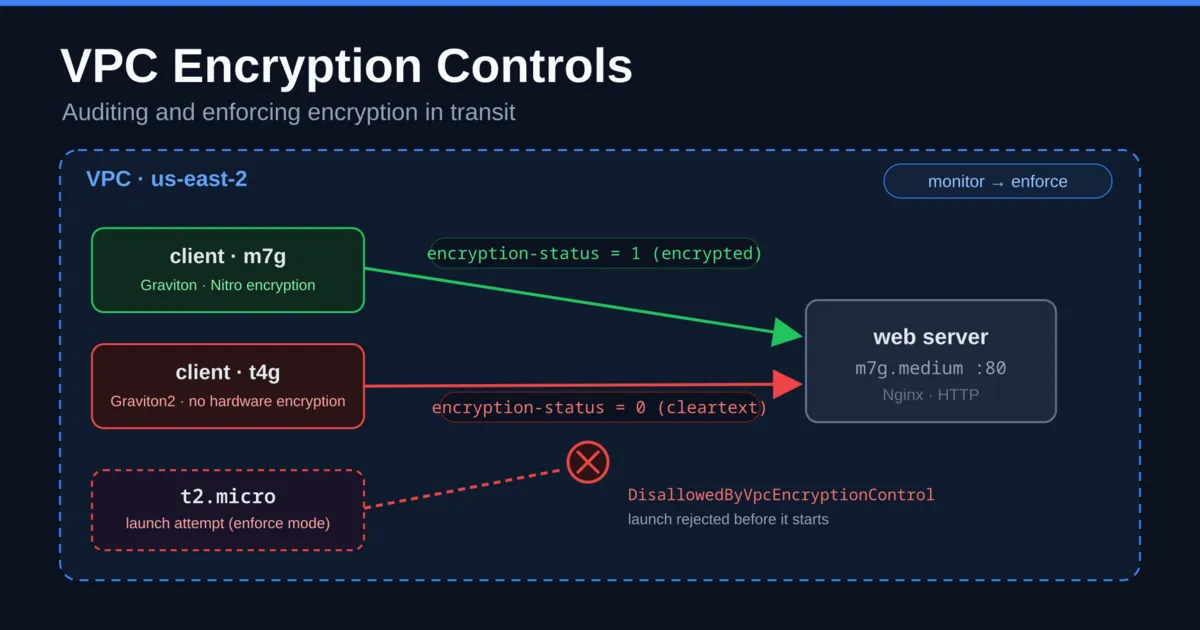
To test it, I built a VPC in us-east-2 that was deliberately half-compliant, with one client on hardware that encrypts in transit and one that does not. Same subnet, same web server, same request. One client's traffic was reported as encrypted and the other as cleartext, with no TLS configured on either. What follows is that evidence, the remediation required before enforcement, the switch to enforce mode, and the operational limits and pricing worth understanding first.
What VPC Encryption Controls does
Nitro-based instances already encrypt traffic between each other at the hardware layer, using AES-256-GCM, with no performance penalty and nothing to configure. That has been true for a while. What was missing was a way to see it, prove it, and require it. Demonstrating to an auditor that everything inside a VPC was encrypted in transit meant stitching together assumptions and spreadsheets.
VPC Encryption Controls closes that gap with two modes:
- Monitor mode adds an
encryption-statusfield to VPC flow logs and lists the resources in your VPC that still allow cleartext. It changes nothing about how traffic flows; it only reports. - Enforce mode blocks the creation or attachment of anything that would carry unencrypted traffic. If you launch an instance type that cannot do hardware encryption, the API rejects it.
The encryption itself reaches past plain EC2. AWS extends it to Fargate tasks, Application and Network Load Balancers, EKS control planes, and Transit Gateway. For most of them you take no action. Turning on monitor mode migrates them to encryption-capable hardware automatically.
One rule shapes the whole workflow. An existing VPC has to start in monitor mode. You can move it to enforce only once every resource is compliant or explicitly excluded. New VPCs can be created directly in enforce mode, but existing ones have to get there.

The VPC console Encryption controls tab showing the demo VPC's control in monitor mode, state available
The demo setup
I built a throwaway VPC in us-east-2 with a single public subnet and three instances, all on the same Amazon Linux 2023 arm64 image:
vpcenc-web-server, anm7g.mediumrunning Nginx, serving a plain HTML page over HTTP on port 80.vpcenc-client-m7g, anm7g.medium, curling that page every two seconds.vpcenc-client-t4g, at4g.medium, running the same curl loop.
The
m7g instances use the current Graviton generation, which supports Nitro hardware encryption. The t4g is Graviton2, which does not. The workload and the cleartext HTTP application are identical, so the underlying hardware is the only variable that matters here.Turning on monitor mode is a single call:
1
aws ec2 create-vpc-encryption-control --vpc-id vpc-09a69d651a5fa62d2
To read the result I created a fresh flow log with the new field. The
encryption-status field is not added to existing flow logs, so a new one is required:1
2
3
4
5
6
7
aws ec2 create-flow-logs \
--resource-type VPC --resource-ids vpc-09a69d651a5fa62d2 \
--traffic-type ALL --max-aggregation-interval 60 \
--log-destination-type cloud-watch-logs \
--log-group-name /vpc/enc-demo-flowlogs \
--deliver-logs-permission-arn arn:aws:iam::…:role/vpcenc-demo-flowlogs-role \
--log-format '${flow-direction} ${traffic-path} ${srcaddr} ${dstaddr} ${srcport} ${dstport} ${protocol} ${encryption-status}'
EC2 console instances list showing the three demo instances in one us-east-2 subnet: an m7g web server, an m7g client, and a t4g client
Auditing traffic with monitor mode
After a few minutes of traffic I ran a CloudWatch Logs Insights query over the flow logs, grouping by source, destination, and the
encryption-status field:1
2
3
4
fields
| parse "* * * * * * * *" as direction, path, src, dst, sport, dport, proto, enc
| filter dport = "80"
| stats count() as flows by src, dst, encThe result matched the setup exactly:
| Source | Destination | encryption-status | Flows |
|---|---|---|---|
| 10.20.1.9 (m7g client) | 10.20.1.237 (server) | 1 | 3391 |
| 10.20.1.193 (t4g client) | 10.20.1.237 (server) | 0 | 189 |
Same server, same port, same HTTP request. The
m7g client's traffic is 1, encrypted at the network layer by Nitro. The t4g client's traffic is 0, cleartext. The field values are:0= cleartext1= Nitro hardware encryption (network layer)2= application-layer TLS (port 443)3= both-= controls off, or the status was not determined for that record
A handful of early records showed
- while the control was still initializing, which is expected. Once the control settled, every request from the Graviton2 instance was reported as 0.That table is the compliance artifact. It is not an assumption about what should be encrypted. It is a per-flow record of what was.

CloudWatch Logs Insights showing the m7g client flows tagged encryption-status 1 and the t4g client flows tagged 0, to the same web server
Identifying resources that block enforcement
Flow logs describe traffic. Moving to enforce mode requires knowing which resources stand in the way, which is a separate call:
1
aws ec2 get-vpc-resources-blocking-encryption-enforcement --vpc-id vpc-09a69d651a5fa62d2
The response paginates, so page through all of it. This VPC returned two resources:
1
2
internet-gateway  igw-02e5401654f12ab76   excludable=True
interface         eni-0c42273566ebebed3   excludable=False
The ENI is the
t4g client's network interface. It is excludable=False, so that instance cannot run in an enforced VPC. There is no workaround. The internet gateway is excludable=True, because traffic leaving through it exits the AWS network, where encryption becomes the application's responsibility, not the network's.That distinction matters. Enforce mode lets you exclude exactly eight resource types, all of them things that carry traffic off the AWS network or handle their own encryption: internet gateways, NAT gateways, egress-only internet gateways, virtual private gateways, VPC peering to a non-enforced VPC, Lambda in your VPC, VPC Lattice, and EFS. Everything else must be compliant. An older instance type is not excludable, so it has to be upgraded before enforcement is possible.
Remediating, then enforcing
Remediating this VPC meant removing the Graviton2 instance:
1
aws ec2 terminate-instances --instance-ids i-0efd86dd7dd7e8334
Once it was gone, the blocking list dropped to just the internet gateway, so I could switch to enforce and exclude the gateway in the same call. The flag takes the control ID, not the VPC ID, and exclusions take
enable/disable:1
2
3
4
aws ec2 modify-vpc-encryption-control \
--vpc-encryption-control-id vpcec-0e24dac9d9ade2fa9 \
--mode enforce \
--internet-gateway-exclusion enableThe transition has one caveat worth documenting. The control moved to
enforce-in-progress and stayed there. The internet-gateway exclusion showed enabling for over ten minutes while the Mode field still read monitor. If you script this and wait for Mode: enforce before continuing, budget real time for it, otherwise it looks stalled.It had not stalled. Enforcement was already active for new resources while the transition completed in the background, as the next test confirmed.

The VPC console showing the control in Mode: Enforce, state Available, with the internet gateway exclusion enabled
Enforce mode blocks non-compliant launches
With the control still mid-transition, I attempted to launch a
t2.micro. The t2 family is not Nitro and cannot do hardware encryption in transit, so it is precisely what enforce mode exists to reject:1
2
3
aws ec2 run-instances --instance-type t2.micro \
--image-id ami-0742fcde83639b335 \
--subnet-id subnet-0b3ec87e1a2fe7ca6 …1
2
An error occurred (DisallowedByVpcEncryptionControl) when calling the
RunInstances operation: Instance type does not support required VPC encryptionThe instance was never created. The rejection happened at the control plane, before anything launched. That is the difference between a policy that reports a violation after the fact and a control that prevents it. Enforcement applied to new launches even while the mode switch was still officially in progress.

The RunInstances call for a t2.micro rejected with DisallowedByVpcEncryptionControl
Operational limits to know before enabling it
The demonstration is straightforward. Production has additional constraints:
- Some services cannot run in an enforced VPC at all. Gateway Load Balancer and AWS Network Firewall are not supported in enforce mode. Local Zone subnets are not supported either and have to be removed. A VPC that runs those has to stay in monitor mode.
- Network Load Balancer loses TLS offload. You cannot terminate TLS at the NLB when the VPC enforces encryption. The targets perform the TLS work instead.
- Redshift needs a rebuild. You cannot enable enforce on a VPC with an existing Redshift cluster in place. You snapshot and restore into the enforced VPC.
- Transit Gateway is opt-in and has a billing implication. Encrypting traffic between VPCs over a Transit Gateway means explicitly enabling encryption support on the gateway. Through CloudFormation, this needs the extra
ec2:ModifyTransitGatewaypermission, or the stack fails on create. - Existing VPCs always start in monitor mode. Enforcement comes only after every resource is compliant or excluded.
Pricing
The free preview ended February 28, 2026. Since March 1 it has been a flat hourly rate per non-empty VPC, meaning a VPC that has at least one network interface, with controls in either mode. In us-east-1, us-east-2, and us-west-2 that is $0.15 per VPC per hour. Empty VPCs are free.
Turn on encryption support for a Transit Gateway and the arithmetic shifts. Every VPC attached to that gateway is billed at the per-VPC rate, whether or not it has controls enabled, and even if it is empty. A VPC attached to several encryption-enabled gateways is billed once. You also cannot attach an enforce-mode VPC to a Transit Gateway that has encryption support turned off.
The full demo, three instances plus the control for a couple of hours, came to under two dollars. At scale, encrypting every VPC is a line item to model before enabling it account-wide. At $0.15 per VPC-hour, a hundred VPCs running all month is roughly $10,800 a year for the controls alone.
Why application-layer TLS still matters
VPC Encryption Controls covers traffic inside the AWS network. The eight excludable resources define the boundary. The moment a packet heads for an internet gateway, a NAT gateway, or a peered VPC you do not control, hardware encryption is no longer what protects it. Beyond that boundary, protection depends on the application's TLS, or on nothing.
This is not a replacement for encrypting at the application layer. It is the layer underneath, the one you previously could not see or require. For sensitive paths, the target state is a status of
3, Nitro at the network layer with TLS on top. That is defense in depth, with an auditable record.When to enable it
For an organization under a HIPAA, PCI DSS, or FedRAMP obligation, this is the feature that turns "we believe our traffic is encrypted" into a per-flow log and a control that blocks the exceptions. Start in monitor mode across your VPCs, read the
encryption-status field, identify the old instance types and the paths sitting at 0, and remediate those before enabling enforce mode.Even without a compliance driver, monitor mode is worth a few dollars for a week to learn which parts of your network are running cleartext. Most environments have an equivalent of the
t4g.The feature does something valuable and unglamorous. It makes an invisible property of your network visible, then lets you require it. No PKI, no key rotation, no certificates, just a record of what is encrypted and a control to enforce it.
Enjoyed reading this content? Let the author know!
Your likes, comments, shares, and saves help creators reach more builders.

Loading recommendations
Loading article