
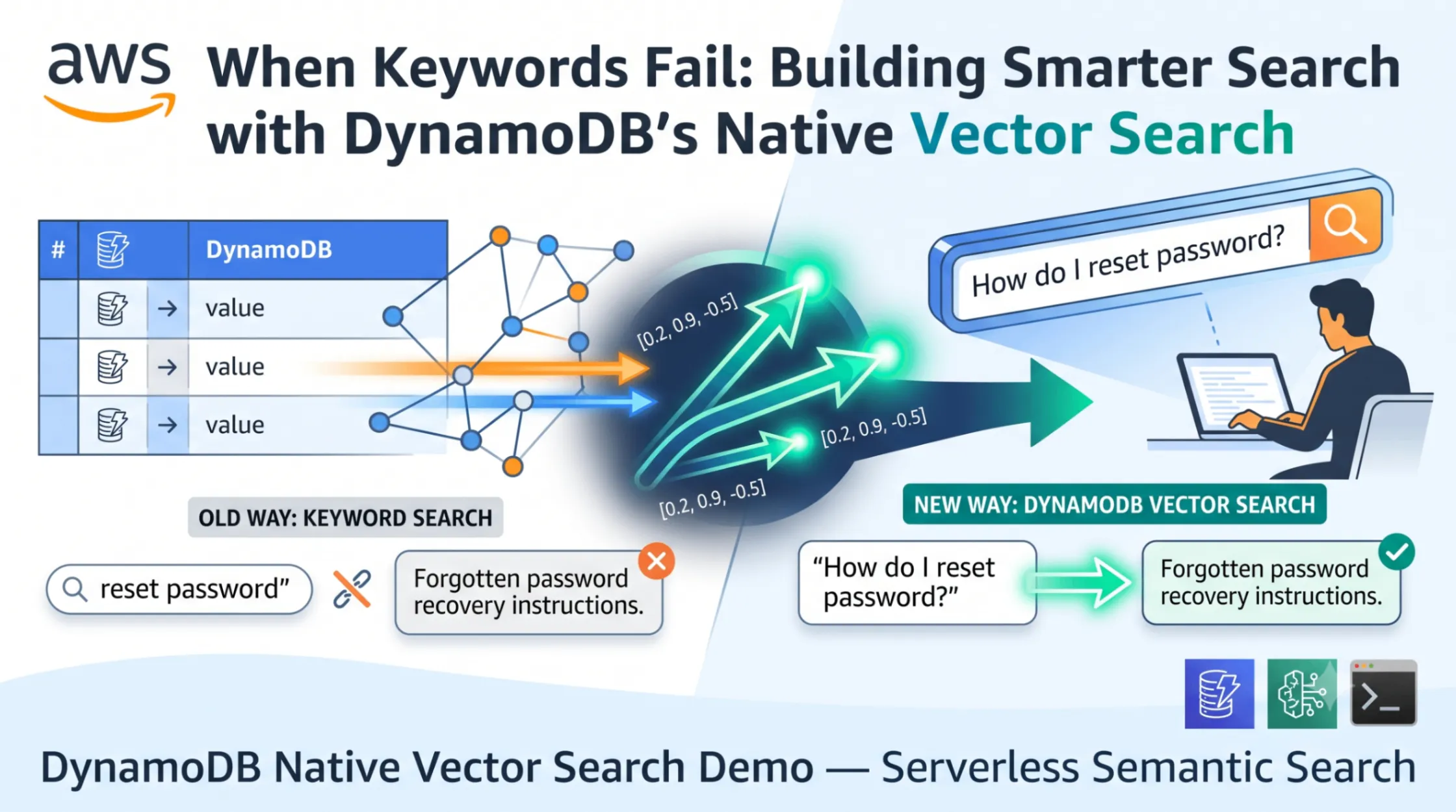
When Keywords Fail: Building Smarter Search with DynamoDB's Native Vector Search
A Serverless CLI demo showcasing Amazon DynamoDB's native vector search capability applied to a Smart FAQ use case. Built entirely on AWS serverless services (DynamoDB + Bedrock), this demo requires zero server management — no clusters, no capacity planning, no infrastructure to maintain.
Users type natural-language questions and receive semantically relevant FAQ answers even when their wording differs from stored content. The demo highlights how vector search outperforms traditional keyword matching and demonstrates filtered vector queries by category.
Table of Contents
- The Problem: Why Keyword Search Breaks Down
- A Real-World Scenario
- Enter DynamoDB Vector Search
- Architecture & Design
- How It Works: Step by Step
- The Development Journey: Errors, Fixes, and Lessons
- The "Aha!" Moment: Keyword vs Vector Search
- Security Considerations
- Scalability & Performance
- Design Tradeoffs
- Running the Demo Yourself
- What's Next?
- Conclusion
The Problem: Why Keyword Search Breaks Down
Picture this: a user is frustrated. Their application just stopped responding. They go to your help center and type exactly what they're experiencing: "my screen is blank and nothing works."
Zero results.
They try again: "app won't load." Still nothing. They give up, file a support ticket, and wait 48 hours for a human to point them to the FAQ article titled "What should I do if my application crashes?" that was sitting there the whole time.
This happens constantly. The knowledge exists. The user just described it differently than however your technical writer phrased it.
A Real-World Scenario
I built a Smart FAQ system for a product with about 100 help articles across billing, account management, integrations, troubleshooting, and security. Traditional keyword search worked great when users typed the exact terms we used internally. But real users don't do that.
They type things like:
- "How do I pay my bills?" (when the FAQ says "update payment method")
- "protecting my login credentials" (when the FAQ says "enable two-factor authentication")
- "my screen is blank, and nothing works" (when the FAQ says "application crashes" and "display issues")
The gap between how users think and how we write documentation is where keyword search falls apart.
Enter DynamoDB Vector Search
On Aug 5, 2025, AWS announced native vector search support in Amazon DynamoDB. This was a game-changer for me because it means I can add semantic search to my application using a fully serverless architecture — no vector database clusters to spin up, no OpenSearch domains to manage, no GPU instances for embedding models. You can find more details here: Amazon DynamoDB now supports real-time vector search at any scale .
The entire stack is serverless: DynamoDB for storage and vector search, Bedrock for embedding generation. Zero servers. Zero capacity planning. Pay only for what you use.
DynamoDB now supports a
VectorIndexes parameter on table creation and a SearchVectors API for similarity queries. You store embeddings alongside your regular data, and DynamoDB handles the similarity math for you.The key insight: instead of matching words, we match meaning. We convert both the stored FAQ content and the user's query into numerical vectors (embeddings) that capture semantic meaning, then find the closest matches using cosine similarity. I am following this blog, Build semantic search with native vector support in Amazon DynamoDB , to build this demo as well.
Architecture & Design
The demo follows a simple sequential pipeline. Five scripts, run in order, each handling one step:
1
2
3
4
5
6
7
8
9
10
┌─────────────────┐     ┌──────────────────┐     ┌─────────────────┐
│  1. Generate    │────▶│  2. Create Table  │────▶│  3. Load Data   │
│  FAQ Data       │     │  + Vector Index   │     │  + Embeddings   │
└─────────────────┘     └──────────────────┘     └─────────────────┘
                                                          │
                                                          ▼
┌─────────────────┐     ┌──────────────────────────────────────────┐
│  5. Cleanup     │◀────│  4. Run Search Demo                      │
│  Resources      │     │  (Keyword vs Vector vs Filtered Vector)  │
└─────────────────┘     └──────────────────────────────────────────┘
Smart FAQ - Vector-Powered Search with DynamoDB
No frameworks, no complex orchestration, no servers. Just Python scripts calling serverless AWS APIs via boto3 . The entire project is about 500 lines of code, and the backend scales from zero to millions of requests without any infrastructure changes.
Serverless services used:
- Amazon DynamoDB (serverless NoSQL + vector search) — auto-scales, pay-per-request, zero admin
- Amazon Bedrock (serverless AI inference) — no GPU provisioning, no model deployment, API-based
How It Works: Step by Step
Step 1: Generate FAQ Data
I generate 50-100 synthetic FAQ entries distributed across five categories: billing, account, integrations, troubleshooting, and security. Each entry has a unique ID, a question, an answer, and a category.
1
2
3
4
5
6
{
    "faq_id": "a1b2c3d4-...",
    "question": "What should I do if my application crashes?",
    "answer": "If your application crashes, try restarting it first...",
    "category": "troubleshooting"
}
Step 2: Create the DynamoDB Table with a Vector Index
This is where DynamoDB's new capability shines. When creating the table, we pass a
VectorIndexes configuration that tells DynamoDB to build a similarity search index on our embedding field:1
2
3
4
5
6
7
8
9
10
11
12
13
14
15
16
17
18
19
20
21
22
23
params = {
"TableName": "smart-faq-vector-demo",
"KeySchema": [
{"AttributeName": "faq_id", "KeyType": "HASH"}
],
"AttributeDefinitions": [
{"AttributeName": "faq_id", "AttributeType": "S"},
{"AttributeName": "category", "AttributeType": "S"}
],
"BillingMode": "PAY_PER_REQUEST",
"VectorIndexes": [
{
"IndexName": "faq-vector-index",
"VectorAttribute": {"AttributeName": "embedding"},
"Dimensions": 1024,
"DistanceFunction": "COSINE",
"SearchSchema": [
{"AttributeName": "category", "SearchSchemaElementType": "HASH"}
],
"Projection": {"ProjectionType": "ALL"}
}
]
}A few things to notice:
- 1024 dimensions matches the output of Amazon Titan Text Embeddings V2
- Cosine distance works well for text similarity (direction matters more than magnitude)
- Category as the partition key on the vector index lets us do filtered searches scoped to a single category without scanning the whole index
Step 3: Generate Embeddings and Load Data
For each FAQ entry, we concatenate the question and answer, send it to Amazon Bedrock's Titan Text Embeddings V2 , and get back a 1024-dimensional vector. Then we store the original fields plus the embedding in DynamoDB :
1
2
3
4
5
6
7
8
9
10
11
12
13
embedding = generate_embedding(
    f"{entry['question']} {entry['answer']}",
    model_id="amazon.titan-embed-text-v2:0",
    region="us-east-1"
)

item = {
    "faq_id": {"S": faq_id},
    "question": {"S": entry["question"]},
    "answer": {"S": entry["answer"]},
    "category": {"S": entry["category"]},
    "embedding": {"L": [{"N": str(v)} for v in embedding]}
}
The loader handles failures gracefully. If one embedding call fails, it logs the error and continues with the rest. You get a final count like "Loaded 98/100 items (2 errors)."
Step 4: Run the Search Demo
This is the payoff. We run queries that use completely different wording than anything stored in the FAQs and compare keyword search (DynamoDB Scan with contains filters) against vector search (the
SearchVectors API):1
2
3
4
5
6
7
8
9
response = client.search_vectors(
TableName="smart-faq-vector-demo",
IndexName="faq-vector-index",
SearchVector=[{"N": str(v)} for v in query_embedding],
TopK=3,
# Required: scope to a category partition
SearchConditionExpression="category = :cat",
ExpressionAttributeValues={":cat": {"S": "security"}}
)The Development Journey: Errors, Fixes, and Lessons
Here's the part most blog posts skip: the messy reality of building something with a brand-new AWS feature. DynamoDB vector search was announced in July 2025, documentation was fresh, and I ran into a cascade of errors before getting things working. This is what the journey actually looked like.
Error 1: CreateTable — Wrong parameter names for VectorIndexes
My first attempt at
create_table used parameter names that seemed reasonable but weren't what the API expected:1
2
3
4
5
6
7
8
9
# What I wrote (WRONG)
"VectorIndexes": [{
"IndexName": "faq-vector-index",
"Dimension": 1024, # Wrong: should be "Dimensions" (plural)
"DistanceFunction": "cosine",
"KeySchema": [...], # Wrong: should be "SearchSchema"
"VectorField": "embedding", # Wrong: should be "VectorAttribute"
"Projection": {"ProjectionType": "ALL"}
}]The error message was actually helpful here:
1
2
3
4
5
6
Missing required parameter in VectorIndexes[0]: "VectorAttribute"
Missing required parameter in VectorIndexes[0]: "Dimensions"
Unknown parameter in VectorIndexes[0]: "Dimension", must be one of: IndexName,
VectorAttribute, SearchSchema, Projection, Dimensions, DistanceFunction
Unknown parameter in VectorIndexes[0]: "KeySchema"
Unknown parameter in VectorIndexes[0]: "VectorField"
Fix: Renamed parameters to match the API spec —
Dimensions (plural), VectorAttribute, and SearchSchema.Error 2: CreateTable — VectorAttribute is a dict, not a string
After fixing the names, I hit a second validation error:
1
2
3
4
5
Invalid type for parameter VectorIndexes[0].VectorAttribute, value: embedding,
type: <class 'str'>, valid types: <class 'dict'>

Missing required parameter in VectorIndexes[0].SearchSchema[0]: "SearchSchemaElementType"
Unknown parameter in VectorIndexes[0].SearchSchema[0]: "KeyType"
Turns out
VectorAttribute isn't just a string — it's a nested object. And SearchSchema uses SearchSchemaElementType instead of KeyType.1
2
3
4
5
6
7
# What I had (WRONG)
"VectorAttribute": "embedding",
"SearchSchema": [{"AttributeName": "category", "KeyType": "HASH"}]
# What it should be (CORRECT)
"VectorAttribute": {"AttributeName": "embedding"},
"SearchSchema": [{"AttributeName": "category", "SearchSchemaElementType": "HASH"}]Lesson: New API features often have nested structures that don't match the patterns you're used to from other DynamoDB operations. The error messages guide you, but you need to read them carefully.
Error 3: CreateTable — Enum value is case-sensitive
Even after fixing the structure, the table creation still failed:
1
2
Value 'cosine' at 'vectorIndexes.1.member.distanceFunction' failed to satisfy
constraint: Member must satisfy enum value set: [DOT_PRODUCT, COSINE, EUCLIDEAN]
The
DistanceFunction value must be uppercase: "COSINE", not "cosine". A simple fix, but one that cost me a round-trip to CloudShell.1
2
3
4
5
# Wrong
DISTANCE_FUNCTION = "cosine"
# Correct
DISTANCE_FUNCTION = "COSINE"Lesson: AWS API enum values are almost always SCREAMING_CASE. Don't assume lowercase works.
Error 4: PutItem — Wrong data type for embedding vectors
Table created! But loading data failed immediately:

PutItem ValidationException with NS type
1
2
3
An error occurred (ValidationException) when calling the PutItem operation:
One or more parameter values were invalid. Invalid type for parameter embedding,
Expected: 32-bit floating point number list IndexName: faq-vector-index
I was storing the embedding as a Number Set (
NS):1
2
# Wrong — NS is an unordered set, not a vector
"embedding": {"NS": [str(f) for f in embedding]}DynamoDB vector indexes require a List of Numbers (
L of N) because order matters in a vector. A Number Set is unordered — element positions have no meaning. A vector embedding's dimensions are ordered; position 0 is different from position 999.
The sed command fixing NS → L of N
1
2
# Correct — L (List) of N (Number) preserves order
"embedding": {"L": [{"N": str(v)} for v in embedding]}
After fixing the data type, all 75 FAQ entries loaded successfully with embeddings
Lesson: This is a subtle but critical distinction.
NS (Number Set) and L of N (List of Numbers) look similar but have completely different semantics. Vectors need ordered lists.Error 5: SearchVectors — Wrong parameter name for query vector
Data loaded successfully. Time to search... but the search call failed:
1
2
3
4
Missing required parameter in input: "SearchVector"
Unknown parameter in input: "QueryVector", must be one of: TableName, IndexName,
ReturnConsumedCapacity, ExpressionAttributeNames, ExpressionAttributeValues,
ProjectionExpression, SearchVector, SearchConditionExpression, TopK
The SearchVectors API expected SearchVector, not QueryVector — and the vector must be formatted as a List of Number dicts
The parameter is
SearchVector, not QueryVector. And like the stored embedding, it needs to be a list of {"N": str(v)} dicts, not raw Python floats:1
2
3
4
5
# Wrong
"QueryVector": query_embedding,
# Correct
"SearchVector": [{"N": str(v)} for v in query_embedding],Additionally, the filter expression parameter is
SearchConditionExpression, not KeyConditionExpression:1
2
3
4
5
# Wrong
"KeyConditionExpression": "category = :cat"
# Correct
"SearchConditionExpression": "category = :cat"Error 6: SearchVectors — HASH key requires SearchConditionExpression
Getting closer! But the unfiltered searches failed:
1
SearchConditionExpression must be provided when SearchSchema has a HASH key
Because I defined
category as a HASH key in the vector index's SearchSchema, DynamoDB requires you to always specify which partition to search. You can't do an unscoped search across all partitions.Fix: For unfiltered queries, search each category individually and merge results:
1
2
3
4
5
6
7
8
9
10
11
12
13
14
15
16
categories_to_search = [category_filter] if category_filter else CATEGORIES

all_results = []
for cat in categories_to_search:
    results = search_vectors(
        table_name=table_name,
        index_name=VECTOR_INDEX_NAME,
        query_vector=query_embedding,
        top_k=top_k,
        category_filter=cat,
    )
    all_results.extend(results)

# Merge and take top-K across all categories
all_results.sort(key=lambda x: x["similarity_score"])
return all_results[:top_k]
Lesson: Adding a partition key to your vector index gives you efficient filtered searches, but it means every query must specify a partition. Design your
SearchSchema based on how you'll actually query.Post-Success Improvements
After getting the full pipeline running, the output revealed two more issues that weren't errors but produced confusing results:
Improvement 1: Keyword results capped to top 3. The keyword search was returning 30-45 raw scan matches, making the comparison display unreadable. I capped it to
TOP_K_RESULTS (3) to match the vector search output for a fair side-by-side comparison.Improvement 2: Vector sort order fixed. My initial results showed irrelevant items at the top. The issue: with
COSINE distance, lower scores mean higher similarity (0 = identical, 2 = opposite). I was sorting descending (highest first), which put the worst matches at the top. Flipping to ascending sort fixed the relevance ranking immediately.1
2
3
4
5
# Wrong — shows least similar results first
all_results.sort(key=lambda x: x["similarity_score"], reverse=True)
# Correct — lower cosine distance = more similar
all_results.sort(key=lambda x: x["similarity_score"])Summary: 6 errors, 2 refinements, 1 working demo
| # | Error | Root Cause | Fix |
|---|---|---|---|
| 1 | Unknown parameters in VectorIndexes | Wrong field names | Dimensions, VectorAttribute, SearchSchema |
| 2 | Invalid type for VectorAttribute | String instead of dict | {"AttributeName": "embedding"} |
| 3 | Enum constraint failed | Lowercase "cosine" | Uppercase "COSINE" |
| 4 | Invalid type for embedding | NS (unordered set) | L of N (ordered list) |
| 5 | Missing SearchVector | Wrong param name | SearchVector with {"N": str(v)} format |
| 6 | HASH key requires condition | Unscoped search not allowed | Search all partitions and merge |
This is the normal rhythm of building with new APIs. You read the docs, write what seems right, hit a wall, read the error message, fix it, and repeat. Each error taught me something about how DynamoDB vector search actually works under the hood. The final working code is cleaner because of the journey.
The "Aha!" Moment: Keyword vs Vector Search
Here's what the final output looks like — four demos comparing keyword search against vector search side by side:
Demo 1: "How do I pay my bills?" — keyword returns unrelated backup/audit results, vector finds the payment method FAQ

Keyword matches on common words like do and my
Demo 2: "My screen is blank and nothing works" — keyword matches random items, vector finds troubleshooting articles

Zero keyword overlap with stored FAQs, yet vector search surfaces relevant troubleshooting answers
Demo 3: "protecting my login credentials" — keyword only matches "login", vector finds security-related content

Vector search connects on protecting credentials to IP restriction, login troubleshooting, and password reset
Demo 4: "How do I keep my account safe from hackers?" filtered to security category

Filtered vector search scopes results to the security partition only
The pattern is consistent across all four demos:
| Demo | Query | Keyword Search | Vector Search |
|---|---|---|---|
| 1 | "How do I pay my bills?" | Returns unrelated results (backups, audit logs) | Finds "How do I update my payment method?" (score: 0.69) |
| 2 | "My screen is blank, and nothing works" | Matches random items containing common words | Finds troubleshooting articles about features not working (score: 0.79) |
| 3 | "protecting my login credentials" | Matches on "login" keyword only | Finds IP restriction, login issues, and password reset — all relevant (score: 0.69) |
| 4 | "How do I keep my account safe from hackers?" (filtered: security) | Returns items from all categories | Returns only security-scoped results about access monitoring and IP controls |
Keyword search matches on individual words regardless of context — "blank" matches anything with that word, "works" matches unrelated content. Vector search understands the intent behind the query and returns semantically relevant answers even when zero keywords overlap.
That's the difference between matching strings and matching meaning.
Security Considerations
Since this demo talks to AWS services, security matters even for a portfolio project:
- No credentials in code. Everything goes through environment variables (
AWS_ACCESS_KEY_ID,AWS_SECRET_ACCESS_KEY) or IAM roles . Theconfig.pymodule reads fromos.environwith defaults only for non-sensitive values like table names and regions. - Bedrock access controls. You must explicitly enable model access for
amazon.titan-embed-text-v2:0in your AWS account. It's not available by default. - Pay-per-request billing. The table uses
PAY_PER_REQUESTmode so there's no provisioned capacity running up costs when you're not using it. If you forget to clean up, you only pay for storage. - Cleanup script included. The demo provides a dedicated cleanup script that deletes the table and confirms removal. No orphaned resources.
Scalability & Performance
This is where the serverless architecture really shines. DynamoDB's native vector search inherits all the operational benefits that make serverless appealing:
- Scale to zero, scale to millions. No capacity planning for the vector index. DynamoDB manages scaling automatically — from this demo's 100 items to millions of production items with no configuration changes.
- Partitioned vector index. By using
categoryas the partition key on the vector index, searches scoped to one category only scan that partition. For a system with thousands of FAQs across many categories, this keeps search fast. - Zero infrastructure management. No clusters to size, no shards to rebalance, no replicas to configure, no OS patches, no server monitoring. It's a fully managed serverless service with an extra index.
- Pay-per-request pricing. You pay for actual API calls, not idle capacity. When nobody is searching, your cost is near zero (just storage).
- Single-digit millisecond reads. Vector search adds some latency compared to key-value gets, but you're still talking to DynamoDB — a serverless service designed for consistent low-latency at any scale .
For this demo with ~100 items, performance is instantaneous. But the same serverless architecture scales to millions of items without any infrastructure changes. That's the serverless promise: your code stays the same, AWS handles the scaling.
Design Tradeoffs
Every architecture decision has tradeoffs. Here are the ones I thought about:
Embedding cost. Every FAQ entry requires a Bedrock API call to generate its embedding, and every search query needs one too. For 100 FAQs, this is negligible (~$0.0001 per 1000 tokens). At scale with frequent queries, embedding costs become a line item worth monitoring.
Eventual consistency of the vector index. After writing an item with an embedding, the vector index may take a moment to reflect the new data. For a batch-loaded FAQ system, this doesn't matter, but for real-time content updates you'd want to account for this lag.
4096 maximum dimensions. DynamoDB vector indexes support up to 4096 dimensions . Titan V2 produces 1024, so we're well within limits. But if you wanted to use a model with larger embeddings, you'd need to reduce dimensionality.
Cosine vs Euclidean. I chose cosine distance because it measures the angle between vectors regardless of magnitude. For text embeddings where we care about semantic direction rather than absolute values, cosine is the standard choice. Euclidean would work too but is more sensitive to embedding magnitude differences.
Additional storage for embeddings. Each 1024-dimensional embedding stored as a number set adds about 8KB per item. For 100 items, that's under 1MB. For a million items, that's ~8GB of additional storage just for embeddings. Worth considering in your capacity planning.
Running the Demo Yourself
Important: Cost Disclaimer
Here's what you need to know about costs:
- DynamoDB: AWS Free Tier covers 25GB storage and 25 WCU/RCU. On-demand pricing easily covers this small demo (~100 items).
- Bedrock Titan Embeddings: Approximately $0.0001 per 1000 tokens. For 100 FAQs plus a handful of search queries, we're talking fractions of a cent.
- Total estimated cost: Less than $1 if you run the demo and clean up promptly.
- If you forget to clean up: You'll pay for DynamoDB storage (pennies for 100 items) until you delete the table.
Prerequisites
- Python 3.9+
- AWS credentials configured via
aws configureor environment variables (AWS_ACCESS_KEY_ID,AWS_SECRET_ACCESS_KEY,AWS_REGION) - Bedrock model access enabled for
amazon.titan-embed-text-v2:0in your region (enable it in the AWS Console under Bedrock > Model Access) - An AWS account with permissions for DynamoDB and Bedrock Runtime
Steps
1
2
3
4
5
6
7
8
9
10
11
12
13
14
15
16
17
18
19
20
21
# Clone the repository
git clone https://github.com/YOUR_USERNAME/dynamodb-vector-search-demo.git
cd dynamodb-vector-search-demo

# Install dependencies
pip install -r requirements.txt

# Step 1: Generate synthetic FAQ data
python scripts/generate_faq.py

# Step 2: Create DynamoDB table with vector index
python scripts/create_table.py

# Step 3: Generate embeddings and load data
python scripts/load_data.py

# Step 4: Run the search comparison demo
python scripts/search_demo.py

# Step 5: Clean up (DELETE the table when done!)
python scripts/cleanup.py
Each script prints progress and results to the console. The search demo (Step 4) is where the magic happens. You'll see keyword search fail on natural language queries while vector search finds the right answers every time.
Environment Variables (Optional)
| Variable | Default | Description |
|---|---|---|
DEMO_TABLE_NAME | smart-faq-vector-demo | DynamoDB table name |
AWS_REGION | us-east-1 | AWS region for all resources |
FAQ_OUTPUT_PATH | data/faq_data.json | Output path for generated FAQ data |
What's Next?
This demo is intentionally simple to illustrate the core concept. In production, I'd explore:
- DynamoDB Streams + Lambda to automatically re-embed FAQ entries when they're updated, keeping the vector index fresh without batch jobs.
- Larger datasets with thousands of entries to benchmark vector search latency at scale and tune the top-K parameter.
- Hybrid search combining keyword filters with vector similarity for queries where the user specifies a category but describes the problem in natural language (the filtered search demo already shows this pattern).
- Multi-modal embeddings using models that can embed images alongside text for visual troubleshooting guides.
- RAG (Retrieval-Augmented Generation) where vector search results feed into a language model to generate conversational answers rather than returning raw FAQ text.
Conclusion
Remember our frustrated user typing "my screen is blank and nothing works"? With keyword search, they got nothing. With DynamoDB vector search, they'd get three relevant articles instantly, ranked by semantic similarity.
The gap between what users say and what we write in documentation is a solved problem now. Embeddings capture meaning, and DynamoDB's native vector search makes it operationally simple to deploy with a fully serverless architecture. No separate vector database. No servers to manage. No capacity to plan. Just your existing DynamoDB table with an extra index, a Bedrock API call for embeddings, and you're done. Serverless semantic search in under 500 lines of code.
If you're building anything with a search component, whether it's FAQs, product discovery, documentation lookup, or customer support, vector search isn't a nice-to-have anymore. It's the difference between "No results found" and actually helping your users.
Built with a fully serverless architecture: Amazon DynamoDB (serverless vector search), Amazon Bedrock (serverless AI embeddings), and Python. Zero servers, zero infrastructure management. The full source code is available on GitHub.
Resources
DynamoDB Vector Search:
- Amazon DynamoDB Vector Search Announcement
- Amazon DynamoDB now supports real-time vector search at any scale
- Build semantic search with native vector support in Amazon DynamoDB
- DynamoDB Vector Search Developer Guide
Amazon Bedrock & Embeddings:
- Amazon Bedrock
- Bedrock Model Access
- Titan Embedding Models
- Titan Text Embeddings Parameters
- Titan Models Overview
DynamoDB Scaling & Cost Optimization:
- Understanding Amazon DynamoDB Latency
- DynamoDB Auto Scaling
- Cost Optimization: Auto Scaling Settings
- Cost Optimization: Table Capacity Mode
AWS Serverless & SDK:
Enjoyed reading this content? Let the author know!
Your likes, comments, shares, and saves help creators reach more builders.

Loading recommendations
Loading article