
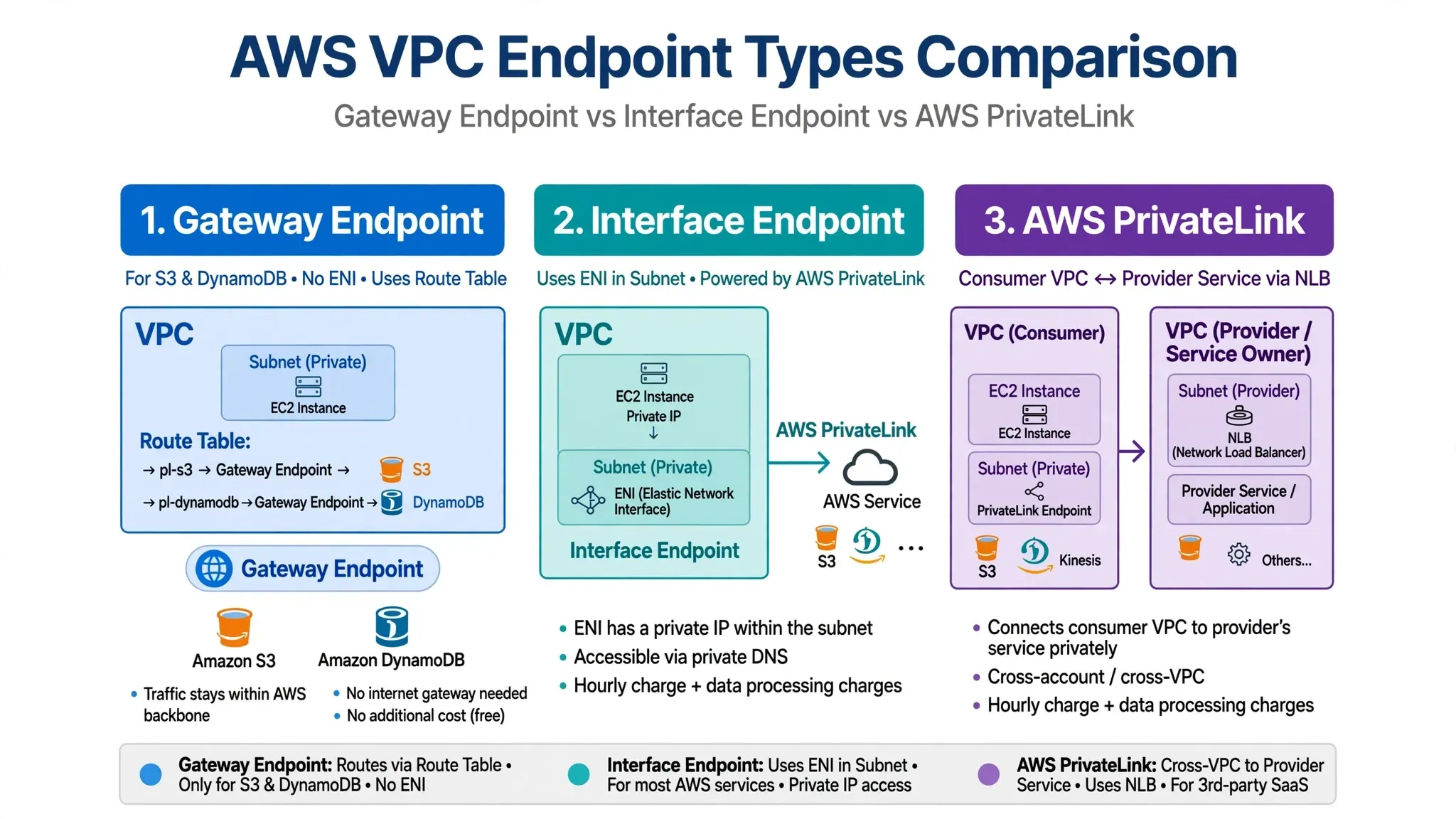
VPC Endpoint Showdown: Gateway vs Interface vs PrivateLink — Explained in 5 Minutes
Stop sending private AWS traffic over the internet. Learn when to use the free route-based option, the private ENI option, and when to build your own private service

Keep private traffic private. No IGW. No NAT. No internet.
If your resources are in a private subnet and they talk to S3, CloudWatch, or another VPC — you do not need to open them to the internet. VPC Endpoints keep traffic on the AWS backbone. But AWS gives you 3 ways to do it.
This post settles it in 5 minutes. No demo, just clarity.
- What is a VPC Endpoint?
A VPC Endpoint is a private backdoor from your VPC to AWS services or other VPCs. Your data never leaves the AWS network. - The Three Contenders
A. Gateway Endpoint - The Free Highway for S3 & DynamoDB
This is the oldest type. It only works for S3 and DynamoDB.
How it works: You do not create an IP. You add a route in your VPC Route Table like pl-s3 -> vpce-xxxx. That route sends traffic directly to S3/DynamoDB.
Pros:
First Item - It is FREE
Second Item - Highly available and auto-scales
Cons:
First Item - Only for S3 and DynamoDB
Second Item - No Security Groups, only Endpoint Policy
Third Item - Does not work easily from on-premise
Use when: Any workload in a private subnet needs S3 or DynamoDB.
First Item - It is FREE
Second Item - Highly available and auto-scales
Cons:
First Item - Only for S3 and DynamoDB
Second Item - No Security Groups, only Endpoint Policy
Third Item - Does not work easily from on-premise
Use when: Any workload in a private subnet needs S3 or DynamoDB.
B. Interface Endpoint - The Private Door for Everything Else
This is what most people mean when they say VPC Endpoint. It is an ENI (Elastic Network Interface) with a private IP in your subnet. It is powered by AWS PrivateLink.
This is what most people mean when they say VPC Endpoint. It is an ENI (Elastic Network Interface) with a private IP in your subnet. It is powered by AWS PrivateLink.
How it works: AWS drops an ENI in your subnet. It gets a private IP and a DNS like vpce-xxxxx.sqs.us-east-1.vpce.amazonaws.com. When your app calls SQS, KMS, Secrets Manager, it resolves to that private IP.
Pros:
First Item - Works for 100+ AWS services
Second Item - Supports Security Groups and Endpoint Policies
Third Item - Works from on-premise via Direct Connect / VPN
Cons:
First Item - Paid - per hour per AZ + data processing
Use when: You need private access to any AWS service except S3/DynamoDB.
First Item - Works for 100+ AWS services
Second Item - Supports Security Groups and Endpoint Policies
Third Item - Works from on-premise via Direct Connect / VPN
Cons:
First Item - Paid - per hour per AZ + data processing
Use when: You need private access to any AWS service except S3/DynamoDB.
C. AWS PrivateLink - The Service Builder
This is not just an endpoint. This is the technology behind Interface Endpoints.
This is not just an endpoint. This is the technology behind Interface Endpoints.
Gateway and Interface Endpoints let you consume AWS services privately. PrivateLink lets you be the provider.
How it works: You have your own service behind a Network Load Balancer (NLB) in your VPC. You create a PrivateLink Service. Your consumer creates an Interface Endpoint in their VPC to connect to you. No VPC Peering, no IP overlap.
Pros:
First - Build your own private SaaS
Second - Secure cross-account and cross-VPC connectivity
Cons:
First - You manage the provider side (NLB + Endpoint Service)
Use when: You are building a shared platform for other teams, accounts, or customers.
First - Build your own private SaaS
Second - Secure cross-account and cross-VPC connectivity
Cons:
First - You manage the provider side (NLB + Endpoint Service)
Use when: You are building a shared platform for other teams, accounts, or customers.
- The Final Showdown
1
2
3
4
5
6
7
8


Feature | Gateway Endpoint | Interface Endpoint | PrivateLink

----------------|------------------|--------------------|------------------

What it is | Route Table Entry | ENI in your Subnet | Tech to build private services

Supports | Only S3, DynamoDB | 100+ AWS services | Your own service / SaaS

Networking | Route Table | Private IP + Private DNS | NLB -> Consumer ENI

Security | Endpoint Policy only | SG + Endpoint Policy | Provider + Consumer control

Cost | FREE | Paid | Paid- Question : How to Choose in 10 Seconds
Question 1: What are you accessing?
If S3 or DynamoDB -> Gateway Endpoint. It is free. Always start there.
Question 2: Who owns the service?
If it is an AWS service like SQS, KMS, ECR -> Interface Endpoint
If it is your service or a partner SaaS -> PrivateLink
If it is an AWS service like SQS, KMS, ECR -> Interface Endpoint
If it is your service or a partner SaaS -> PrivateLink
Pro Tip: For S3, you can now use Interface Endpoint if you need Security Groups or on-premise access. But inside a VPC, Gateway is cheaper.
2 Mistakes Everyone Makes
First Item - Forgetting Endpoint Policies - By default it allows full access. Always lock it down.
Second- Not enabling Private DNS - For Interface Endpoints, if Private DNS is off, your app still goes public.
Second- Not enabling Private DNS - For Interface Endpoints, if Private DNS is off, your app still goes public.
Second Item - Not enabling Private DNS - For Interface Endpoints, if Private DNS is off, your app still goes public.
TL;DR
Gateway = Free door for S3/DynamoDB. Uses Route Table.
Interface = Paid private IP for everything else. Uses ENI.
PrivateLink = The magic that lets you create your own private service.
Gateway = Free door for S3/DynamoDB. Uses Route Table.
Interface = Paid private IP for everything else. Uses ENI.
PrivateLink = The magic that lets you create your own private service.
Stop sending private traffic over public roads.
Enjoyed reading this content? Let the author know!
Your likes, comments, shares, and saves help creators reach more builders.

Loading recommendations
Loading article