
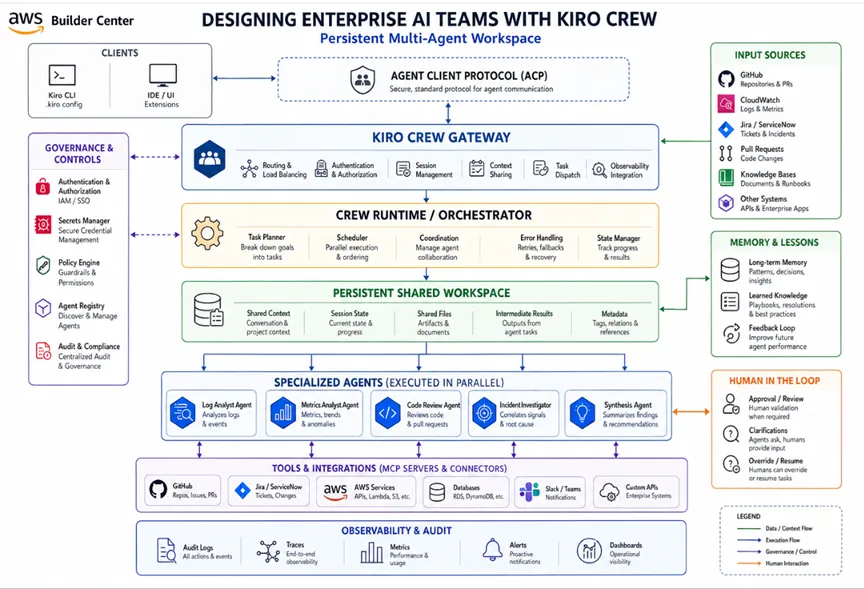
Designing Enterprise AI Teams with Kiro Crew: A Practical Architecture Guide
Learn how Kiro Crew helps architect enterprise AI teams by coordinating specialized agents across incidents, migrations, and code reviews. This article explains the differences between Kiro Subagents and Kiro Crew and shares practical architectural patterns for enterprise software development.

Enterprise software work rarely happens in one place. A latency spike can send you across logs, metrics, pull requests, test results, and tickets. A migration can stretch across repositories, approvals, retries, and checkpoints. Kiro Crew is built for that reality , it is a separately installed, open-source workspace that coordinates agent-driven work across sessions, schedules, memory, and parallel conversations instead of forcing everything back into one chat thread. It runs on the Kiro CLI through ACP, and your existing
.kiro configuration carries over automatically.Why enterprise AI needs teams instead of one general-purpose agent
A single AI agent is useful when the task is narrow. But enterprise work is usually not narrow. One person may need to investigate the issue, another to implement the fix, another to validate the change, and another to decide whether it is safe to release. When one agent is asked to do all of that at once, context gets crowded and responsibilities blur. Kiro Crew is designed to reduce that friction by keeping work moving across multiple conversations and letting specialized agents handle different parts of the workflow in parallel.
A practical example makes this clearer. Suppose a production incident affects a customer-facing service.

One agent can inspect logs, another can compare recent changes, another can check metrics, and another can synthesize the findings into a likely cause. The point is not only speed. The point is to let each agent focus on one concern while the overall workflow keeps moving. Kiro Crew is built around that shape of work.
Kiro already had subagents for focused parallel work
Before Kiro Crew, Kiro already supported subagents. Agents that run in their own isolated context, while the main agent delegates focused parts of a task and then combines the results. Kiro also supports built-in context-gathering and general-purpose subagents, and custom agents can be used in the same way.
That is task-level parallelism. If you ask Kiro to analyze several modules, compare implementation choices, or research multiple hypotheses at the same time, it can split the work into independent tracks and bring the findings back together. The IDE docs explicitly say subagents can run in parallel and are useful for refactoring multiple files, researching several topics, or running independent analysis tracks.
How Kiro Crew is different from Kiro subagents
Kiro subagents help the main agent complete a task faster. Kiro Crew goes further and coordinates the workflow around the task. The Crew documentation describes Crew as one Gateway with many ways to reach it, using a desktop app, web dashboard, or CLI, with the same memory, skills, lessons, and cron jobs across sessions. It also says Crew orchestrates agents over ACP and can expose live activity for each step.
So the simplest way to explain the difference is
Kiro subagents = parallelize a task
Kiro Crew = coordinate work that continues beyond one task
Kiro Crew = coordinate work that continues beyond one task
That matters in enterprise settings. A workflow may need to continue after a meeting, survive a laptop close, or resume after human approval. Crew is designed for that kind of persistent orchestration, while subagents remain the right fit for bounded parallel execution inside a task.
What Kiro Crew looks like in practice
I think of Kiro Crew as a separate workspace for ongoing engineering work, not just another chat surface. It can be installed in different ways, and it gives you a place to keep work moving across sessions instead of restarting from scratch every time. The same workspace can flow through different surfaces, so the work stays continuous even when the interaction point changes.
What makes that interesting for enterprise work is the continuity. A task does not have to live only in one prompt or one browser tab. It can move through the app, the dashboard, or the CLI, while still keeping the same state, progress, and handoffs intact. That is what makes Crew feel more like an operating model for engineering work than a simple feature add-on.
A practical architecture for enterprise crews
For me, the best way to use Kiro Crew is to start with the workflow, not with a generic “AI assistant.” I want each crew to have one clear purpose, clear responsibilities, and clean handoffs between steps. That fits the way Crew is designed: it keeps work moving across sessions, coordinates multiple agents in parallel, and carries context forward through memory, lessons, skills, and schedules.
In practice, that means I would design the crew around the kind of work the team already does. An incident response crew can separate log analysis, metrics analysis, recent-change analysis, and root-cause synthesis. A migration crew can split into repository inventory, dependency analysis, build analysis, and validation. A pull-request review crew can divide architecture review, security review, test validation, and documentation updates. These are not abstract AI ideas; they are the same kinds of parallel work that fit naturally into a workspace built to coordinate multiple conversations and agents.
Skills, steering, and custom agents fit naturally into the model
Crew is especially practical because it reuses the Kiro ecosystem rather than starting from scratch. The Kiro site says the agent supports ACP, Skills.md, and MCP, and the Crew docs say existing
.kiro configuration carries over automatically, including steering files, skills, and custom agents. That means teams can bring their existing conventions and workflows into Crew instead of rebuilding them.This is where the design becomes powerful. Skills can hold reusable instructions and instructions can be loaded when relevant, which helps keep context scoped to the actual responsibility of each agent. A security-oriented agent does not need the same context as a build-validation agent. A migration agent does not need the same context as an incident analyst. Crew makes it easier to organize those responsibilities cleanly.
What makes Kiro Crew enterprise-friendly
What I like about Kiro Crew is that it does not treat security and visibility as extras. It is built with guardrails from the start, so the workspace can handle real engineering work without feeling like a black box. The workflow is visible, the actions are controlled, and the important steps still stay under human oversight.
That matters in enterprise environments because AI is not just writing text anymore. It may touch code, trigger tools, inspect repositories, or move work through approvals. For that to be useful in a real team, you need trust in what it is doing and clear control over what happens next. Kiro Crew feels enterprise-friendly because those controls are part of the design, not something added later.
Final takeaway
In my view, Kiro Crew addresses one of the biggest challenges in enterprise AI development, fragmented work spread across multiple tools, sessions, and engineering activities. Instead of developers manually coordinating prompts, tools, and follow-up actions, Crew provides a persistent workspace where specialized agents can continue work across sessions while keeping progress visible and organized.
Enjoyed reading this content? Let the author know!
Your likes, comments, shares, and saves help creators reach more builders.

Loading recommendations
Loading article