
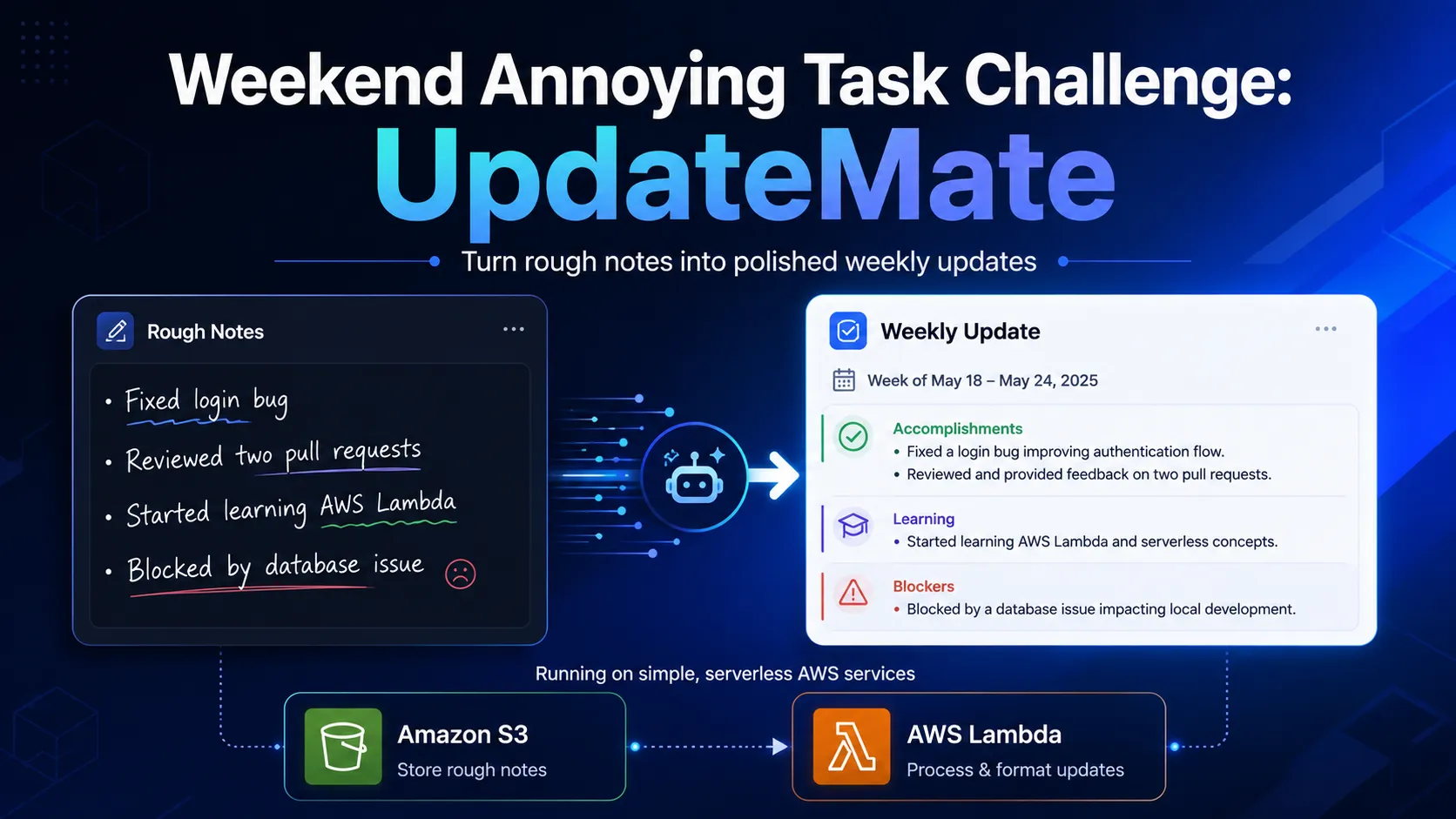
Weekend Annoying Task Challenge: UpdateMate
UpdateMate turns rough weekly work notes into polished, ready-to-send progress updates using a lightweight Amazon S3 and AWS Lambda architecture. This article covers how I built, deployed, and debugged the productivity tool including a real-world CORS fix.
Series: AWS Weekend Challenges (2 articles)
- 1Weekend Annoying Task Challenge: UpdateMate This article

Every Friday, I have the same deceptively small task: turn a week of scattered notes into a useful progress update. The work is already done, but writing a clear summary still means opening a blank message, deciding what belongs together, and trying to phrase a blocker constructively. It is easy to put off, even when the notes are only a few lines long.
I built UpdateMate to remove that friction. It is a small web app that turns rough, line-by-line notes into a polished weekly update. A user can paste notes such as “Fixed login bug,” “Reviewed two pull requests,” “Started learning AWS Lambda,” and “Blocked by database issue,” choose a tone, and copy a ready-to-send result. The app is deliberately focused: it does one recurring task quickly, predictably, and without storing the user’s notes.
Try the live app: UpdateMate
Vision and what the app does
UpdateMate is for anyone who regularly sends a status update: developers reporting to a manager, students recording project progress, open-source contributors, or teams sharing a weekly check-in. It does not try to create work that did not happen or make broad claims on the user’s behalf. Instead, it makes the work they have already noted easier to communicate.
The flow is intentionally short:
- Paste one rough note per line.
- Select Professional, Short, or Casual tone.
- Select Generate update and copy the result.
Behind the scenes, the app removes empty lines, bullet characters, and list numbering. It recognizes notes beginning with terms such as “blocked,” “blocker,” “waiting on,” and “awaiting,” then separates those from completed or in-progress items. It joins each group into readable sentences. The Short tone returns a compact update with a separate blocker line, while Professional and Casual tones use different introductions around the same user-provided facts.
I intentionally chose transparent, rule-based formatting instead of generative AI. AI would be useful for a future version that rewrites long or ambiguous notes, but it was unnecessary for the core problem. The rules make output predictable, fast, and easy to test. They also keep the architecture and cost small for a weekend project.
How I built it
I started by defining the smallest useful workflow: a text area, tone selector, Generate button, output panel, and Copy button. I built the interface with plain HTML, CSS, and JavaScript. That avoided dependencies and a build pipeline, which made the app easy to publish as static files. I designed the page as two visual panels: a light workspace for rough notes and a dark result panel that makes the finished update easy to find and copy.
The frontend sends the notes and selected tone to a Lambda Function URL as JSON. The Node.js Lambda handler validates the request, limits notes to 5,000 characters, cleans each line, detects blockers with a regular expression, and formats the final response. I kept the formatter as small helper functions for cleaning, classifying, capitalization, and joining items. This made it possible to write dependency-free tests for the three tones as well as invalid requests.
An early deployment issue turned into my most useful debugging lesson. The browser showed a
200 response but still blocked the request because Access-Control-Allow-Origin appeared twice. I had configured CORS on the Lambda Function URL and also returned CORS headers from my handler. The fix was to let the Function URL manage CORS and remove the duplicate CORS headers from the application response. After redeploying the handler, the S3-hosted frontend could call the function successfully.I also updated the handler to accept both the Function URL event format and a direct Lambda console test event. That made the function easier to verify before testing from the live browser app.
AWS services used and architecture overview
UpdateMate uses only two AWS services:
- Amazon S3 hosts the static website files: HTML, CSS, JavaScript, and a small configuration file containing the Function URL.
- AWS Lambda runs the Node.js formatting function. A Lambda Function URL exposes that function directly, so this project does not need API Gateway.
1
2
3
4
5
6
7
8
9
10
User
  │ enters rough notes and chooses a tone
  ▼
Amazon S3 static website
  │ POST { notes, tone }
  ▼
AWS Lambda Function URL
  │ validate → clean → group blockers → format
  ▼
Formatted weekly update in the browser
The agent or automation trigger in this design is the Generate update button. When the user selects it, browser JavaScript makes a POST request to the Lambda Function URL. Lambda returns the formatted text, which the frontend displays immediately and makes available through the Copy button. No database is used and the app does not persist notes.
For the public challenge demo, the Function URL is configured with public invocation and CORS for browser access. That is appropriate for this small, no-account tool, but a production version that handled private work updates should restrict CORS to the known site origin and add authentication. The S3 website is also public-read so visitors can open the app link.
What I learned
This challenge reinforced that a useful AWS app does not need a large architecture. Amazon S3 static website hosting was a fast way to publish a real frontend, and Lambda Function URLs were a good fit for a single backend endpoint. I avoided adding API Gateway, a database, authentication, and a model service until there is a concrete need for them.
I also learned to treat browser integration as part of backend work. A Lambda function can work perfectly in the console and still fail in the live app because of CORS. Seeing the browser reject a
200 response made the duplicate-header problem especially clear. Testing at three levels formatter helpers, Lambda requests, and the deployed browser flow helped me locate and fix it quickly.Most importantly, UpdateMate reminded me that deterministic code can be the best solution for a narrow productivity problem. The user controls every input, the result is easy to understand, and the app removes a recurring Friday annoyance in a few seconds.
Link to app & repo
Series: AWS Weekend Challenges (2 articles)
- 1Weekend Annoying Task Challenge: UpdateMate This article
Enjoyed reading this content? Let the author know!
Your likes, comments, shares, and saves help creators reach more builders.

Loading recommendations
Loading article