
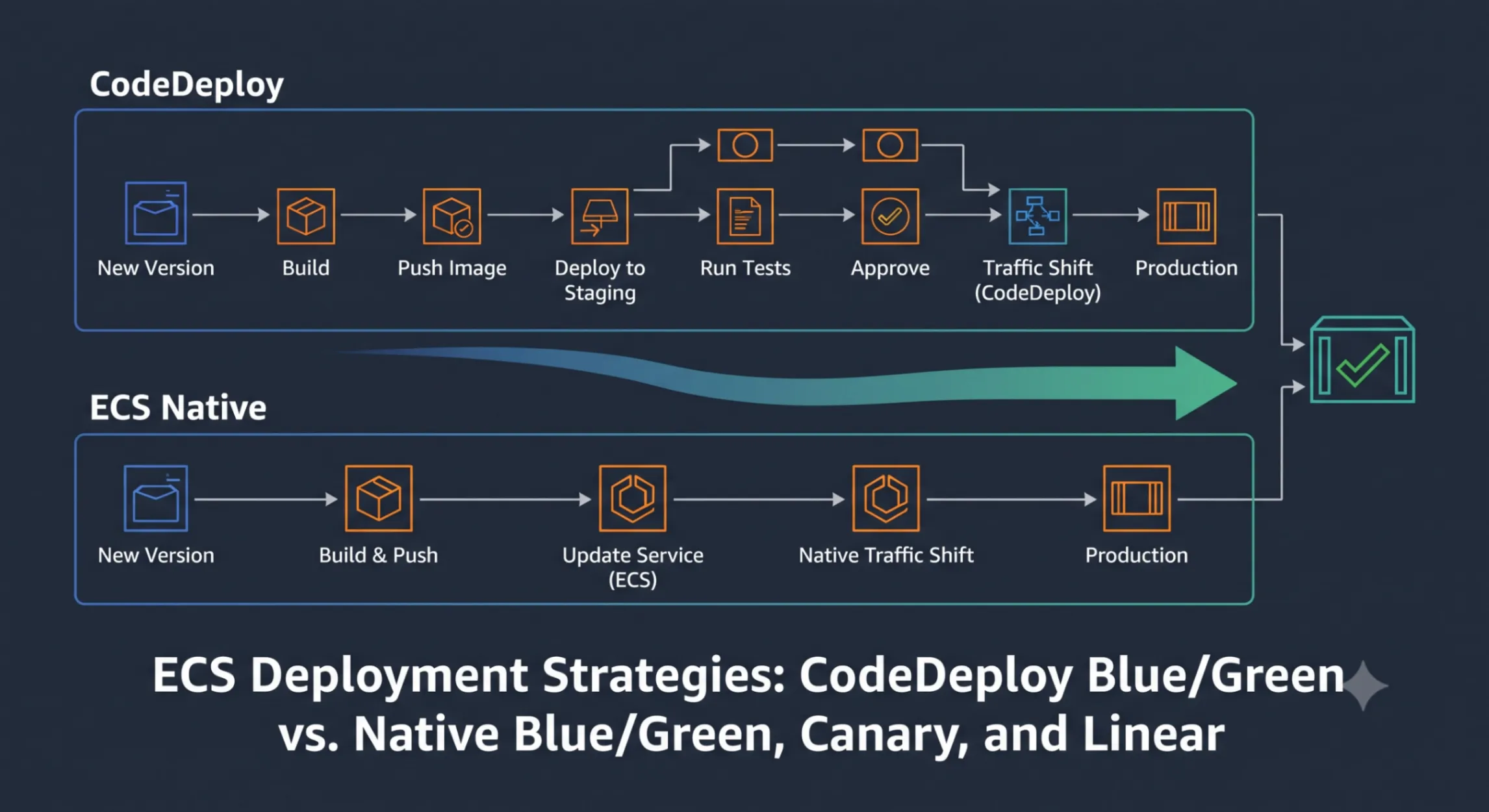
ECS Deployment Strategies: CodeDeploy Blue/Green vs. Native Canary and Linear
Deploy the same ECS Fargate application using CodeDeploy blue/green and ECS-native blue/green, compare lifecycle hooks, traffic shifting strategies, and rollback mechanics side by side, then use a decision framework to choose the right approach for your workload.

You're running a production service on ECS and need safe deployments — the ability to validate a new version before real users see it, and instant rollback if something goes wrong. ECS offers three deployment strategies, each with a different trade-off between simplicity and safety:
- The rolling update is the default — ECS launches new tasks, waits for health checks, then drains old ones. Simple, but it provides no instant rollback and no test traffic validation.
- CodeDeploy blue/green is the original advanced option — full lifecycle hooks, a test listener for pre-production validation, and alarm-based rollback. It works, but requires setting up a separate CodeDeploy application, deployment group, AppSpec file, and service role.
- ECS-native blue/green (launched July 2025) provides the same capabilities — Lambda lifecycle hooks, test listeners, canary/linear traffic shifting — with significantly less configuration and tighter ECS integration.
This post deploys the same application using both CodeDeploy and ECS-native approaches, compares the mechanics, and provides a decision framework for choosing between them.
Prerequisites
To follow along, you'll need:
- AWS CLI v2 configured with credentials that have permissions for ECS, EC2, ELB, IAM, CodeDeploy, CloudWatch, and Lambda
- An AWS account — estimated cost is ~$1–2 USD (Fargate tasks running for a few hours, ALB)
- A VPC with at least two public subnets in different Availability Zones (the default VPC works)
All lab files (CloudFormation templates, task definitions) are in the companion repository . Clone it to follow along:
git clone https://github.com/nuxero/ecs-deployment-strategies-lab.gitcd ecs-deployment-strategies-labECS Deployment Concepts
Before diving into strategies, a few concepts that both approaches share:
Task definition is a blueprint for your application. It specifies the container image, CPU/memory, port mappings, environment variables, and logging configuration. Each change to a task definition creates a new numbered revision (e.g.,
my-app:1 , my-app:2 ). Deploying = pointing a service at a new revision.Service maintains a desired number of running tasks from a task definition. It handles scheduling, health checks, and integration with load balancers. The service's deployment controller determines how updates roll out.
Deployment controller determines who manages deployments:
ECS (rolling update or native blue/green/canary/linear), CODE_DEPLOY (CodeDeploy-managed), or EXTERNAL .Task sets are groups of tasks within a service. Blue/green deployments maintain two task sets simultaneously — the blue (current) set serving production traffic, and the green (replacement) set being validated.
Target groups are how an ALB routes traffic to tasks. Two target groups enable blue/green switching — one for the current tasks, one for the replacement.
Production listener routes real user traffic (typically port 80/443).
Test listener routes to the replacement task set on a separate port (e.g., 8080). This allows you to validate the new version before any real users see it.
Fargate is the serverless compute engine for ECS. You define CPU and memory in the task definition; AWS manages the underlying infrastructure. All examples in this post use Fargate.

Approach 1 — CodeDeploy Blue/Green
Prerequisites — CloudFormation Template
This template provisions the full infrastructure: an ECS Fargate service running a simple web application that returns "Hello World v1", an ALB with two target groups and two listeners (production on port 80, test on port 8080), and all CodeDeploy resources including a lifecycle hook Lambda function.
The key resources and their purpose:
Resource | Purpose |
|---|---|
ECS Cluster + Service | Fargate service with CODE_DEPLOY deployment controller |
ALB + 2 Target Groups | Blue/green traffic switching via production and test listeners |
CodeDeploy Application + Deployment Group | Manages blue/green lifecycle and traffic shifting |
Lambda Function | AfterAllowTestTraffic hook that validates the green task set via the test listener |
The full template is in the companion repo. Here are the key sections that make it a CodeDeploy blue/green deployment — the parts that differ from a standard ECS service:
  # ECS Service — deployment controller set to CODE_DEPLOY  Service:    Type: AWS::ECS::Service    DependsOn: ProductionListener    Properties:      ServiceName: deploy-lab-service      Cluster: !Ref Cluster      TaskDefinition: !Ref TaskDefinition      DesiredCount: 2      LaunchType: FARGATE      # CODE_DEPLOY deployment controller — CodeDeploy manages blue/green      DeploymentController:        Type: CODE_DEPLOY      NetworkConfiguration:        AwsvpcConfiguration:          AssignPublicIp: ENABLED          Subnets: !Ref SubnetIds          SecurityGroups: [!Ref TaskSecurityGroup]      LoadBalancers:        - ContainerName: app          ContainerPort: 80          TargetGroupArn: !Ref BlueTargetGroup
  # CodeDeploy deployment group — wires together service, target groups, listeners  DeploymentGroup:    Type: AWS::CodeDeploy::DeploymentGroup    Properties:      ApplicationName: !Ref CodeDeployApplication      DeploymentGroupName: ecs-deploy-lab-dg      ServiceRoleArn: !GetAtt CodeDeployServiceRole.Arn      DeploymentConfigName: CodeDeployDefault.ECSAllAtOnce      DeploymentStyle:        DeploymentType: BLUE_GREEN        DeploymentOption: WITH_TRAFFIC_CONTROL      ECSServices:        - ClusterName: !Ref Cluster          ServiceName: !GetAtt Service.Name      LoadBalancerInfo:        TargetGroupPairInfoList:          - TargetGroups:              - Name: ecs-deploy-lab-blue              - Name: ecs-deploy-lab-green            ProdTrafficRoute:              ListenerArns:                - !Ref ProductionListener            TestTrafficRoute:              ListenerArns:                - !Ref TestListener      # Keep blue task set alive for 5 minutes after traffic shifts (rollback window)      BlueGreenDeploymentConfiguration:        TerminateBlueInstancesOnDeploymentSuccess:          Action: TERMINATE          TerminationWaitTimeInMinutes: 5        DeploymentReadyOption:          ActionOnTimeout: CONTINUE_DEPLOYMENT          WaitTimeInMinutes: 0
The template also includes a Lambda function (
CodeDeployHook_ecs-deploy-lab-test-traffic ) that acts as the AfterAllowTestTraffic hook. It hits the test listener URL and reports success or failure back to CodeDeploy:// AfterAllowTestTraffic hook — validates the green task set via test listenerexports.handler = async (event) => { const deploymentId = event.DeploymentId; const lifecycleEventHookExecutionId = event.LifecycleEventHookExecutionId; let status = "Failed";
try { // Wait for ALB to finish routing test listener to green target group await new Promise(resolve => setTimeout(resolve, 10000));
// Hit the test listener to validate the green task set const response = await fetch(process.env.TEST_URL); const body = await response.text(); if (response.ok) { console.log("Test traffic validation passed — HTTP", response.status); console.log("Response from green task set:", body.trim()); status = "Succeeded"; } } catch (err) { console.error("Test traffic validation error:", err); }
// Report result to CodeDeploy await codedeploy.send(new PutLifecycleEventHookExecutionStatusCommand({ deploymentId, lifecycleEventHookExecutionId, status, }));};Deploy the stack and wait for the service to stabilize:
aws cloudformation deploy \ --template-file ecs-codedeploy-prerequisites.yaml \ --stack-name ecs-codedeploy-lab \ --capabilities CAPABILITY_NAMED_IAM \ --parameter-overrides \ VpcId=<YOUR_VPC_ID> \ SubnetIds=<SUBNET_1>,<SUBNET_2>Store outputs for later use:
ALB_DNS=$(aws cloudformation describe-stacks --stack-name ecs-codedeploy-lab \  --query 'Stacks[0].Outputs[?OutputKey==`ALBDns`].OutputValue' --output text)
# Verify v1 is serving trafficcurl http://$ALB_DNS# Expected: Hello World v1
Deploy v2 with CodeDeploy
To trigger a blue/green deployment, register a new task definition revision and create a CodeDeploy deployment referencing it. The new task definition changes
APP_VERSION from 1 to 2 . This makes the application respond with "Hello World v2":Note: In a real project, deploying a new version means building a Docker image, pushing it to Docker registry (i.e. ECR, DockerHub, etc), and updating theimagefield in the task definition. This lab uses an inlinenode -ecommand with an environment variable to simulate version changes without requiring a Docker build workflow — keeping the focus on deployment mechanics.
task-definition-v2.json — identical to v1 except APP_VERSION changes from "1" to "2" . Grab it from the companion repo ( codedeploy/task-definition-v2.json ).Fill in the execution role ARN and register it:
# Inject the execution role ARN into the JSON fileEXEC_ROLE=$(aws iam get-role --role-name ecs-deploy-lab-execution-role \  --query 'Role.Arn' --output text)
sed -i "s|<EXECUTION_ROLE_ARN>|$EXEC_ROLE|" task-definition-v2.json
# Register the new task definition revisionNEW_TASK_DEF=$(aws ecs register-task-definition \  --cli-input-json file://task-definition-v2.json \  --query 'taskDefinition.taskDefinitionArn' --output text)
echo "New task definition: $NEW_TASK_DEF"
The AppSpec File for ECS
The ECS AppSpec declares which task definition to deploy and how to wire it to the load balancer. The
Hooks section references Lambda functions to run at each lifecycle stage. Here's the structure:# AppSpec structure for ECS CodeDeploy deploymentsversion: 0.0Resources: - TargetService: Type: AWS::ECS::Service Properties: # The new task definition ARN to deploy TaskDefinition: "arn:aws:ecs:us-east-1:123456789:task-definition/ecs-deploy-lab:2" LoadBalancerInfo: ContainerName: "app" # Must match container name in task definition ContainerPort: 80 # Must match container port mappingHooks: # Runs after test listener routes to green — validate before production shift - AfterAllowTestTraffic: "CodeDeployHook_ecs-deploy-lab-test-traffic"The available lifecycle hooks for ECS CodeDeploy deployments, in execution order:
- BeforeInstall — before the replacement task set is created
- AfterInstall — after the replacement task set is created and tasks are healthy
- AfterAllowTestTraffic — after the test listener routes to the green task set (this is where you validate)
- BeforeAllowTraffic — before production traffic shifts to green
- AfterAllowTraffic — after production traffic is fully on green
AfterAllowTestTraffic is the most important hook — it's your chance to validate the new version using real infrastructure (ALB, networking, container config) without affecting production users.Now create the deployment, passing the AppSpec inline with the
$NEW_TASK_DEF variable from the previous step:Note: In a real project, you'd store the AppSpec in S3 and reference it with--s3-location bucket=...,key=appspec.yaml,bundleType=YAML. We're passing it inline here to keep the lab self-contained.
# Create the deployment with inline AppSpec referencing $NEW_TASK_DEFDEPLOY_ID=$(aws deploy create-deployment \  --application-name ecs-deploy-lab \  --deployment-group-name ecs-deploy-lab-dg \  --revision '{"revisionType": "AppSpecContent", "appSpecContent": {"content": "{\"version\": 0.0, \"Resources\": [{\"TargetService\": {\"Type\": \"AWS::ECS::Service\", \"Properties\": {\"TaskDefinition\": \"'"$NEW_TASK_DEF"'\", \"LoadBalancerInfo\": {\"ContainerName\": \"app\", \"ContainerPort\": 80}}}}], \"Hooks\": [{\"AfterAllowTestTraffic\": \"CodeDeployHook_ecs-deploy-lab-test-traffic\"}]}"}}' \  --query 'deploymentId' --output text)
echo "Deployment: $DEPLOY_ID"
Watch the deployment progress through each lifecycle stage:
# Poll deployment statuswhile true; do STATUS=$(aws deploy get-deployment --deployment-id $DEPLOY_ID \ --query 'deploymentInfo.status' --output text) echo "$(date +%H:%M:%S) $STATUS" if [ "$STATUS" != "InProgress" ] && [ "$STATUS" != "Created" ]; then break; fi sleep 10doneOnce the deployment succeeds, check the hook's CloudWatch Logs to confirm it validated the new version via the test listener:
# Fetch the most recent log stream from the hook functionaws logs tail /aws/lambda/CodeDeployHook_ecs-deploy-lab-test-traffic --since 10mYou should see output like:
INFO Test traffic validation passed — HTTP 200INFO Response from green task set: Hello World v2This log proves the test listener was routing to the green task set during
AfterAllowTestTraffic . The hook invoked port 8080, received "Hello World v2" from the new tasks, and reported Succeeded — triggering the production traffic shift.After the deployment completes, production traffic (port 80) now serves v2:
curl http://$ALB_DNS# Expected: Hello World v2The deployment sequence:
- Green task set spins up with the new task definition
- Tasks register in the green target group and pass ALB health checks
- CodeDeploy switches test listener (port 8080) to the green target group
-
AfterAllowTestTraffichook fires → Lambda hits port 8080, confirms "Hello World v2"
- Hook reports
Succeeded→ production listener (port 80) shifts to green
- 5-minute termination wait → blue task set terminates
Note: In our testing, the ALB listener switch (step 3) takes a few seconds to propagate before traffic actually routes to the new target group. CodeDeploy marks the switch as complete and fires the hook immediately, but the ALB hasn't finished routing yet. This is a known ALB behavior — changes take a few seconds to propagate. The hook includes a 10-second wait to account for this. In production hooks running full test suites, the setup time before the first HTTP request should naturally cover this delay.
Traffic Shifting Options with CodeDeploy
The deployment configuration controls how production traffic shifts from blue to green after hooks pass:
-
CodeDeployDefault.ECSAllAtOnce— instant switch. All traffic moves to green in one step.
-
CodeDeployDefault.ECSCanary10Percent5Minutes— 10% to green for 5 minutes. If no alarms fire, remaining 90% shifts.
-
CodeDeployDefault.ECSCanary10Percent15Minutes— same but with 15-minute observation window.
-
CodeDeployDefault.ECSLinear10PercentEvery1Minute— 10% every minute over 10 minutes.
-
CodeDeployDefault.ECSLinear10PercentEvery3Minutes— 10% every 3 minutes over 30 minutes.
All options still use the test listener and hooks for pre-validation. The traffic shifting strategy only affects what happens after hooks succeed.
To change the strategy, update the deployment group:
# Switch to canary — 10% for 5 minutes, then the restaws deploy update-deployment-group \ --application-name ecs-deploy-lab \ --current-deployment-group-name ecs-deploy-lab-dg \ --deployment-config-name CodeDeployDefault.ECSCanary10Percent5MinutesAutomatic Rollback
You can attach CloudWatch alarms to the deployment group (via
alarm-configuration ). If an alarm fires during the deployment — whether during the canary/linear traffic shifting phase or right after the full switch — CodeDeploy stops the deployment and switches the production listener back to the blue target group. This is instant because the blue task set remains alive during the termination wait period (5 minutes in our template). No new tasks need to launch; the ALB just flips back.Two rollback triggers exist:
DEPLOYMENT_FAILURE (hook reports failed, tasks won't start) and DEPLOYMENT_STOP_ON_ALARM (CloudWatch alarm fires during deployment). Both result in the same outcome — production traffic reverts to blue.Approach 2 — ECS Native Blue/Green
CodeDeploy blue/green works — but as you saw, it requires a CodeDeploy application, deployment group, service role, AppSpec file, and Lambda hooks wired together through CodeDeploy's own lifecycle. What if ECS could handle all of this natively?
How It Differs from CodeDeploy
ECS native blue/green provides the same deployment safety without a separate CodeDeploy application. The key differences:
- Deployment controller:
ECS(notCODE_DEPLOY)
- No AppSpec file — deployment configuration is part of the ECS service definition
- No CodeDeploy application/group/role — significantly less infrastructure to manage
- Native lifecycle hooks — ECS invokes Lambda functions directly at 8 lifecycle stages (vs. CodeDeploy's 5)
- Pause hooks — deployment can pause and wait for
ContinueServiceDeploymentAPI call (useful for manual approvals or external CI/CD integration)
- Same result — test listener validation, canary/linear traffic shifting, alarm-based rollback
The ECS native lifecycle stages, in order:
-
RECONCILE_SERVICE— service configuration reconciled
-
PRE_SCALE_UP— before green task set scales up
-
POST_SCALE_UP— green task set is healthy
-
TEST_TRAFFIC_SHIFT— test listener shifts to green
-
POST_TEST_TRAFFIC_SHIFT— after test traffic is on green (validate here)
-
PRE_PRODUCTION_TRAFFIC_SHIFT— before production traffic moves (recurring for canary/linear)
-
PRODUCTION_TRAFFIC_SHIFT— production traffic shifts (recurring for canary/linear)
-
POST_PRODUCTION_TRAFFIC_SHIFT— after all production traffic is on green
Deployment Configuration — CodeDeploy Concepts Mapped to ECS Native
With CodeDeploy, deployment behavior is spread across multiple resources: the deployment group defines target groups, listeners, and termination wait time; the deployment config defines the traffic shifting strategy; the AppSpec wires in the hooks.
With ECS native, all of this collapses into a single deployment configuration on the ECS service itself. You specify:
- Deployment type: blue/green (two task sets with ALB switching)
- Production listener: which ALB listener serves real traffic
- Test listener: which ALB listener routes to the replacement task set for validation
- Target groups: the two target groups to switch between
- Termination wait time: how long to keep the old task set alive after traffic shifts (rollback window)
- Circuit breaker: auto-rollback on health check failures (replaces CodeDeploy's alarm + auto-rollback config)
CodeDeploy concept | ECS native equivalent |
|---|---|
Deployment group (target groups, listeners) | Blue/green configuration on the service |
Deployment config ( ECSCanary10Percent5Minutes ) | Traffic shifting configuration (shown in canary/linear section below) |
TerminateBlueInstancesOnDeploymentSuccess | Termination wait time |
Alarm + auto-rollback config | Deployment circuit breaker + CloudWatch alarms |
AppSpec hooks | ECS deployment lifecycle hooks (configured via API/CLI) |
Prerequisites — CloudFormation Template (Native)
This template provisions the same base infrastructure (cluster, ALB, two target groups, two listeners) but without any CodeDeploy resources. The service starts with a rolling update strategy — we'll upgrade it to blue/green via CLI in the next step.
The full template is in the companion repo. Here are the key resources that differ from the CodeDeploy approach:
  # ECS infrastructure role — allows ECS to manage load balancer resources for blue/green  ECSInfrastructureRole:    Type: AWS::IAM::Role    Properties:      RoleName: ecs-native-deploy-lab-infra-role      AssumeRolePolicyDocument:        Version: '2012-10-17'        Statement:          - Effect: Allow            Principal:              Service: ecs.amazonaws.com            Action: sts:AssumeRole      ManagedPolicyArns:        - arn:aws:iam::aws:policy/AmazonECSInfrastructureRolePolicyForLoadBalancers
  # Service starts with default rolling update — upgraded to blue/green via CLI  Service:    Type: AWS::ECS::Service    DependsOn: ProductionListener    Properties:      ServiceName: native-deploy-lab-service      Cluster: !Ref Cluster      TaskDefinition: !Ref TaskDefinition      DesiredCount: 2      LaunchType: FARGATE      DeploymentController:        Type: ECS      NetworkConfiguration:        AwsvpcConfiguration:          AssignPublicIp: ENABLED          Subnets: !Ref SubnetIds          SecurityGroups: [!Ref TaskSecurityGroup]      LoadBalancers:        - ContainerName: app          ContainerPort: 80          TargetGroupArn: !Ref BlueTargetGroup
The
ECSInfrastructureRole is for ECS to manage ALB resources during blue/green deployments (replaces the CodeDeploy service role).Deploy the stack:
aws cloudformation deploy \  --template-file ecs-native-prerequisites.yaml \  --stack-name ecs-native-lab \  --capabilities CAPABILITY_NAMED_IAM \  --parameter-overrides \    VpcId=<YOUR_VPC_ID> \    SubnetIds=<SUBNET_1>,<SUBNET_2>
# Store outputsNATIVE_ALB=$(aws cloudformation describe-stacks --stack-name ecs-native-lab \  --query 'Stacks[0].Outputs[?OutputKey==`ALBDns`].OutputValue' --output text)PROD_LISTENER=$(aws cloudformation describe-stacks --stack-name ecs-native-lab \  --query 'Stacks[0].Outputs[?OutputKey==`ProductionListenerArn`].OutputValue' --output text)TEST_LISTENER=$(aws cloudformation describe-stacks --stack-name ecs-native-lab \  --query 'Stacks[0].Outputs[?OutputKey==`TestListenerArn`].OutputValue' --output text)BLUE_TG=$(aws cloudformation describe-stacks --stack-name ecs-native-lab \  --query 'Stacks[0].Outputs[?OutputKey==`BlueTargetGroupArn`].OutputValue' --output text)GREEN_TG=$(aws cloudformation describe-stacks --stack-name ecs-native-lab \  --query 'Stacks[0].Outputs[?OutputKey==`GreenTargetGroupArn`].OutputValue' --output text)INFRA_ROLE=$(aws cloudformation describe-stacks --stack-name ecs-native-lab \  --query 'Stacks[0].Outputs[?OutputKey==`ECSInfrastructureRoleArn`].OutputValue' --output text)
# The update-service API requires Listener Rule ARNs, not Listener ARNs.# Each listener has a default rule — retrieve those rule ARNs:PROD_RULE=$(aws elbv2 describe-rules --listener-arn "$PROD_LISTENER" \  --query "Rules[0].RuleArn" --output text)TEST_RULE=$(aws elbv2 describe-rules --listener-arn "$TEST_LISTENER" \  --query "Rules[0].RuleArn" --output text)
# Verify v1 is serving trafficcurl http://$NATIVE_ALB# Expected: Hello World v1
Enabling Blue/Green on the Service
The service currently uses rolling update. Upgrade it to blue/green by updating the load balancer configuration (to wire in the alternate target group and listeners) and the deployment strategy. This requires two settings:
-
--load-balancerswithadvancedConfiguration— tells ECS which alternate target group, listener rules, and IAM role to use for traffic shifting
-
--deployment-configurationwithstrategy: BLUE_GREEN— enables the blue/green deployment strategy with a bake time
Important: TheproductionListenerRuleandtestListenerRulefields require Listener Rule ARNs, not Listener ARNs. Every listener has at least one default rule — that's what you pass here. The rule ARN has an additional/rules/<rule-id>segment compared to the listener ARN.
# Upgrade the service from rolling update to blue/greenaws ecs update-service \ --cluster ecs-native-deploy-lab \ --service native-deploy-lab-service \ --load-balancers '[{ "containerName": "app", "containerPort": 80, "targetGroupArn": "'"$BLUE_TG"'", "advancedConfiguration": { "alternateTargetGroupArn": "'"$GREEN_TG"'", "productionListenerRule": "'"$PROD_RULE"'", "testListenerRule": "'"$TEST_RULE"'", "roleArn": "'"$INFRA_ROLE"'" } }]' \ --deployment-configuration '{ "strategy": "BLUE_GREEN", "bakeTimeInMinutes": 5 }'With the CodeDeploy approach, this same setup requires a separate CodeDeploy application, deployment group, service role, and AppSpec file. Here it's a single
update-service call. The service is now ready for blue/green deployments.Note: Enabling blue/green triggers an initial migration deployment — ECS creates a new task set and shifts traffic to it to establish the blue/green state. Wait for this deployment to complete (~2 minutes + bake time) before triggering the v2 deployment:
# Wait for the migration deployment to stabilizeaws ecs wait services-stable --cluster ecs-native-deploy-lab --services native-deploy-lab-serviceDeploy v2 with ECS Native
With blue/green enabled, you trigger a deployment by updating the service's task definition (
update-service ):task-definition-v2.json — same app as CodeDeploy but with family ecs-native-deploy-lab . Grab it from the companion repo ( native/task-definition-v2.json ).Register the task definition and update the service to trigger the deployment:
# Inject the execution role ARNEXEC_ROLE=$(aws iam get-role --role-name ecs-native-deploy-lab-execution-role \  --query 'Role.Arn' --output text)
sed -i "s|<EXECUTION_ROLE_ARN>|$EXEC_ROLE|" task-definition-v2.json
# Register the new revisionNEW_TASK_DEF=$(aws ecs register-task-definition \  --cli-input-json file://task-definition-v2.json \  --query 'taskDefinition.taskDefinitionArn' --output text)
# Update the service — this triggers the blue/green deploymentaws ecs update-service \  --cluster ecs-native-deploy-lab \  --service native-deploy-lab-service \  --task-definition "$NEW_TASK_DEF"
ECS handles the rest: creates the green task set, waits for health checks, routes test traffic, and shifts production traffic. Poll both listeners to observe the blue/green progression:
# Poll both listeners every 10 seconds to observe the traffic shiftwhile true; do PROD=$(curl -s http://$NATIVE_ALB:80) TEST=$(curl -s http://$NATIVE_ALB:8080) echo "$(date +%H:%M:%S) prod=$PROD test=$TEST" if [ "$PROD" = "Hello World v2" ]; then break; fi sleep 10doneYou'll see the progression:
09:30:25 prod=Hello World v1 test=Hello World v1 # green tasks starting up09:30:35 prod=Hello World v1 test=Hello World v1 # still waiting for health checks09:31:05 prod=Hello World v1 test=Hello World v2 # test listener shifted to green09:31:15 prod=Hello World v1 test=Hello World v2 # bake time / validation window09:31:25 prod=Hello World v2 test=Hello World v2 # production traffic shiftedThe same blue/green mechanics as CodeDeploy — test listener routes to green first, production follows — but without the additional resources.
ECS Native Canary and Linear
The
update-service command that enabled blue/green used an all-at-once traffic shift (the default). To use gradual traffic shifting, add a trafficShiftingConfiguration to the blue/green configuration.Canary — shifts an initial percentage of traffic, waits, then shifts the rest:
"trafficShiftingConfiguration": { "type": "CANARY", "canaryConfiguration": { "initialTrafficPercentage": 10, "intervalInSeconds": 300, "numberOfIntervals": 1 }}This shifts 10% of traffic for 5 minutes (300 seconds), then the remaining 90%.
Linear — shifts traffic in equal increments at regular intervals:
"trafficShiftingConfiguration": { "type": "LINEAR", "linearConfiguration": { "trafficPercentageStep": 10, "intervalInSeconds": 60 }}This shifts 10% every 60 seconds — full cutover in 10 minutes.
Both configurations go inside
blueGreenDeploymentConfiguration in the --deployment-configuration argument. CloudWatch alarms can be attached at the ECS service level for automatic rollback during the observation windows — if an alarm fires mid-shift, ECS reverts traffic to the blue task set.Comparison: Choosing Between Approaches
Aspect | CodeDeploy Blue/Green | ECS Native Blue/Green | ECS Rolling Update |
|---|---|---|---|
Setup complexity | High (CodeDeploy app, group, role, AppSpec, hooks) | Medium (ECS service config) | Low (just min/max percent) |
Lifecycle hooks | Yes — Lambda at 5 CodeDeploy stages | Yes — Lambda + pause hooks at 8 ECS stages | No |
Test listener | Yes | Yes | No |
Custom validation code | Yes ( AfterAllowTestTraffic ) | Yes ( POST_TEST_TRAFFIC_SHIFT Lambda hook) | No |
Traffic strategies | AllAtOnce, Canary, Linear | AllAtOnce, Canary, Linear | Rolling (min healthy %) |
Rollback speed | Instant (ALB switch) | Instant (ALB switch) | Slow (must launch old tasks again) |
CodePipeline integration | CodeDeploy deploy action | ECS deploy action | ECS deploy action |
When to use | Legacy pipelines, existing CodeDeploy infrastructure | New deployments (default choice) | Dev/test, simple services |
Decision framework:
- Starting fresh? → ECS Native. Same capabilities, less infrastructure, tighter integration.
- Already invested in CodeDeploy pipelines? → CodeDeploy until you have a reason to migrate. Note that as of July 2025, you can migrate existing CODE_DEPLOY services to the ECS controller with
UpdateService— no service recreation required.
- Dev environment, minimal config? → Rolling Update
Clean Up
Check for orphaned resources before deleting stacks:
# Check for lingering task definitions (these persist even after stack deletion)aws ecs list-task-definitions --family-prefix ecs-deploy-labaws ecs list-task-definitions --family-prefix ecs-native-deploy-lab
# Deregister all revisions (optional — they don't incur cost)for arn in $(aws ecs list-task-definitions --family-prefix ecs-deploy-lab --query 'taskDefinitionArns[]' --output text); do  aws ecs deregister-task-definition --task-definition $arn > /dev/nulldonefor arn in $(aws ecs list-task-definitions --family-prefix ecs-native-deploy-lab --query 'taskDefinitionArns[]' --output text); do  aws ecs deregister-task-definition --task-definition $arn > /dev/null; done
Delete the CloudFormation stacks:
# Delete CodeDeploy approach stackaws cloudformation delete-stack --stack-name ecs-codedeploy-labaws cloudformation wait stack-delete-complete --stack-name ecs-codedeploy-lab
# Delete ECS native approach stackaws cloudformation delete-stack --stack-name ecs-native-labaws cloudformation wait stack-delete-complete --stack-name ecs-native-lab
# Delete the CloudWatch alarm if createdaws cloudwatch delete-alarms --alarm-names ecs-deploy-lab-5xx
Conclusion
ECS provides three deployment strategies — rolling update for simplicity, CodeDeploy blue/green for full lifecycle hook control with established pipelines, and ECS-native blue/green/canary/linear for the same safety with less configuration overhead.
The test listener pattern is the key safety mechanism for both blue/green approaches: validate the new version on port 8080 using real infrastructure before any production user on port 80 is affected. CodeDeploy uses
AfterAllowTestTraffic hooks; ECS native uses POST_TEST_TRAFFIC_SHIFT Lambda hooks. Same concept, different wiring.For new deployments, ECS native is the default choice — fewer resources to manage, native lifecycle hooks with 8 stages (vs. CodeDeploy's 5), and pause hooks for manual approval workflows. CodeDeploy remains relevant for teams with existing pipelines and deployment groups they don't want to migrate yet.
To go deeper:
Enjoyed reading this content? Let the author know!
Your likes, comments, shares, and saves help creators reach more builders.

Loading recommendations
Loading article