
Deploying Kimi K3 on Amazon EC2
A practical guide to on how to run open-source Kimi K3 language model on AWS using a quantized approach from Unsloth, with step-by-step instructions from instance setup to API configuration.

EDIT: Note as of Friday July 31st 2026, AWS has published official guidance here: https://aws.amazon.com/blogs/machine-learning/deploying-kimi-k3-on-amazon-sagemaker-hyperpod-and-amazon-eks/
-----
By the end of this walkthrough, you'll have Kimi K3 serving an OpenAI-compatible API from a single Amazon EC2 GPU instance, generating about 11 tokens per second. My full test run cost roughly $50.
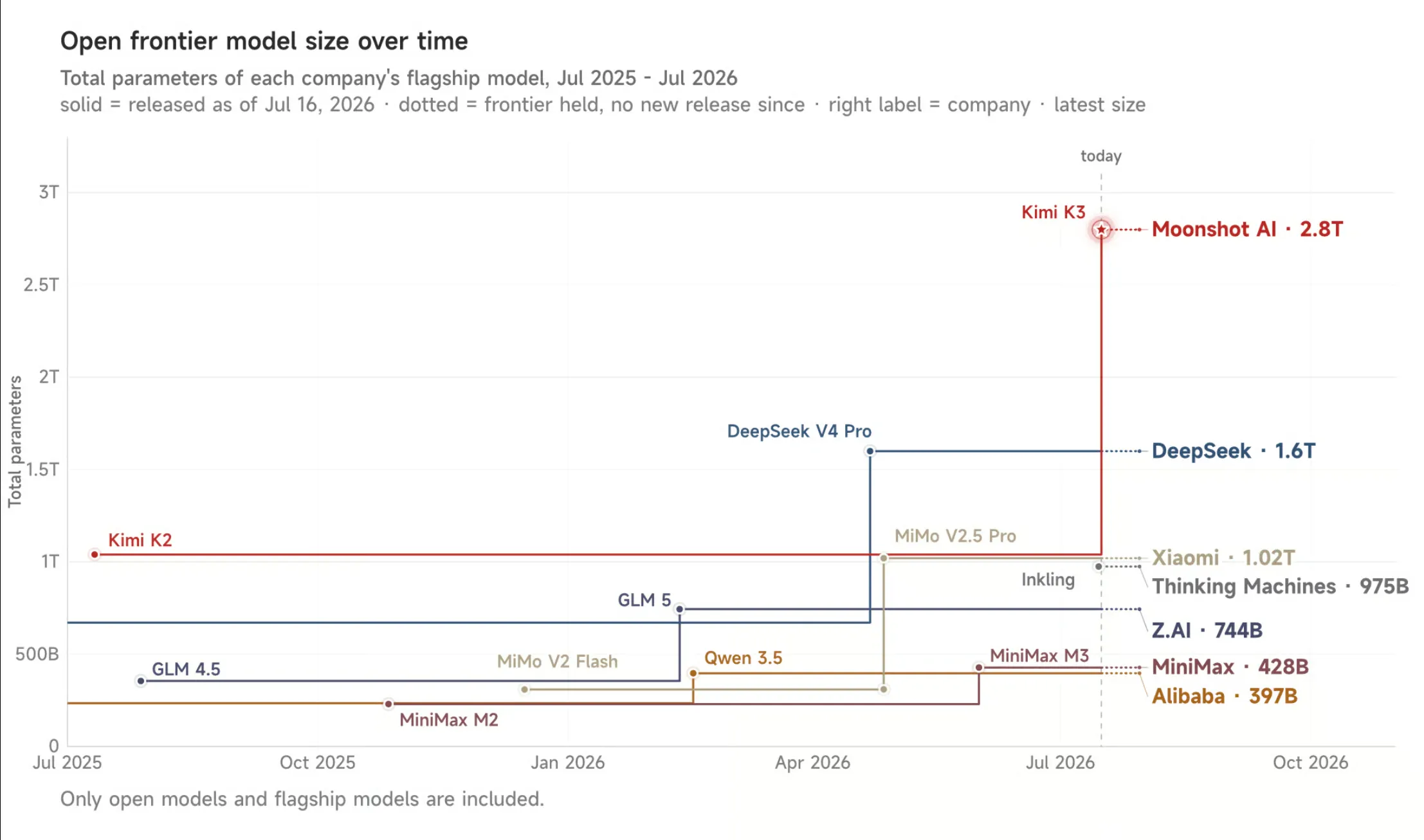
Kimi K3 , developed by Moonshot AI , is a recent open-source large language model with roughly 104 billion activated parameters and 2.8 trillion total parameters. This Mixture-of-Experts thinking model is natively trained in MXFP4, supports up to a 1M-token context window, and has shown competitive performance on benchmarks in knowledge tasks, mathematics, coding, and agentic tool use.
Last year I published a similar walkthrough for deploying Kimi K2 on Amazon EC2 , which ran on a single g6.16xlarge by offloading the MoE expert weights to CPU RAM. K3 is a different animal. It's nearly three times larger than K2, and its new attention architecture currently has no CPU inference path, so even the smallest 1-bit quantization must live entirely in GPU memory. The hardware floor jumps from one 24 GB GPU to eight 80 GB ones.
In the name of frugality I use the smallest instance that fits, a p4de.24xlarge (ideally on Spot). The steps are the same on larger instances like p6-b200.48xlarge, which also fit the higher-quality quantizations covered below.
Unsloth is an open-source framework for LLM fine-tuning and inference that enables running models with reduced memory requirements and faster speeds. It provides optimized kernels and techniques to make large models more accessible on smaller hardware. I previously wrote about Unsloth in Deploying quantized models on Amazon SageMaker AI with Unsloth ; this walkthrough follows that post's Pattern 1 (GGUF on Amazon EC2 with llama.cpp), applied to one of the largest open models you can currently run this way.
Quantization is a technique that reduces the precision of a model's weights (from higher-bit representations down to 8-bit, 4-bit, or even ~1-bit), significantly decreasing memory usage and increasing inference speed while attempting to maintain most of the model's performance. The dynamic 1-bit quantization I'm using here (
UD-IQ1_S , ~554 GB on disk) substantially reduces the model size from its ~1.56 TB lossless footprint, making it possible to fit entirely inside the 640 GB of GPU memory on a single p4de.24xlarge instance (with reduced accuracy).For more info on running Unsloth's quantized versions of Kimi K3, check out the Unsloth Kimi K3 documentation and the unsloth/Kimi-K3-GGUF repository.
Solution overview
The deployment is a single Amazon EC2 p4de.24xlarge instance. You stripe its local NVMe drives into a RAID0 array to stage the 554 GB model, build Unsloth's llama.cpp fork with CUDA support, download the quantized model from Hugging Face, and run llama-server as a systemd service. The server loads the model across all 8 GPUs and exposes an OpenAI-compatible chat completions API on port 8080, restricted to your IP by a security group rule. The walkthrough ends with test prompts that verify reasoning and code generation, followed by cleanup.
What the 1-bit quantization costs you
This guide trades model fidelity for accessibility, and it's worth understanding that trade before relying on the output. Unsloth benchmarks each quant against the truly lossless
UD-Q8_K_XL (lossless because K3's MoE weights are natively MXFP4, which Q8_K_XL preserves exactly):Quant | Size | Mean KLD | Perplexity | Top-1 agreement | Fits in |
|---|---|---|---|---|---|
UD-IQ1_S (used in this guide) | 594 GB | 0.565 | 2.58 | ~78.9% | p4de.24xlarge (640 GB HBM) |
UD-IQ1_M | 649 GB | 0.479 | 2.36 | ~81.2% | p6-b200.48xlarge |
UD-IQ2_XXS | 711 GB | 0.378 | 2.13 | ~84.1% | p6-b200.48xlarge |
UD-Q2_K_XL | 861 GB | 0.178 | 1.74 | ~90.4% | p6-b200.48xlarge |
UD-Q8_K_XL (lossless) | 1,560 GB | n/a | 1.458 | 100% | multi-node |
Benchmark data (KLD, perplexity, top-1 agreement) from Unsloth's Kimi K3 quantization analysis ; instance fit is my mapping.
To be clear: quantization is optional. If you have the hardware, you can run the model at full quality, either the lossless
UD-Q8_K_XL GGUF (1,560 GB, multi-node) or the original safetensors checkpoint on a serving stack like SGLang (a community deployment report runs it across two 8× H200 nodes). Quantization is a cost lever, and the curve between cost and quality is not linear in either direction.The first step down is cheap in quality terms: 1-bit cuts memory by 62% and still agrees with the full model on ~79% of tokens. Climbing back up is where costs stack. Getting from ~79% to ~90% agreement (
UD-Q2_K_XL ) moves you off the $24 to $41/hr p4de onto a ~$114/hr p6-b200, and closing the final 10% to lossless means multi-node infrastructure at higher cost and much more operational complexity. Pick the point on that curve that matches what you're actually testing.A few assumptions this guide makes, following Unsloth's guidance:
- The 1-bit model picks the same next token as the full model about 79% of the time. Divergent tokens are usually still coherent, so short factual and code tasks hold up well (verified below). Errors do compound over longer reasoning chains and larger code generations, though, so don't judge the full model by this copy.
- Unsloth's dynamic quantization is what makes 1-bit viable at all: sensitive layers such as attention and norms keep higher precision while the MoE expert weights take the aggressive bits, calibrated on a chat-aware dataset of over 1.5M tokens (see Unsloth's Dynamic 2.0 documentation ). For comparison, Unsloth reports a community (non-dynamic) 1-bit quant of K3 that is larger than this one measuring perplexity 54.6 against 2.58 here, 21× worse. These results do not generalize to other K3 GGUFs.
- Unsloth recommends
UD-IQ1_Sas the size/quality balance point and calls it "surprisingly usable." For better accuracy, consider the less aggressiveUD-Q2_K_XL(2-bit, ~90% top-1 agreement), which needs an instance with more GPU memory such as p6-b200.48xlarge (1,432 GB HBM3e). For production environments, I recommend running benchmarks yourself, with more storage, low or no quantization, and more powerful hardware.
- Unsloth's rule of thumb is RAM+VRAM ≈ the quant size. For K3 specifically it has to be VRAM; see the GPU requirement below.
This deployment approach provides a direct OpenAI-compatible API endpoint for interacting with the model without middleware layers, allowing you to test Kimi K3's capabilities on your own infrastructure before scaling to larger, production-grade configurations.
Disclaimer: This guide demonstrates a proof-of-concept deployment for testing purposes only, this is not recommended for production deployment. You should work with your security and legal teams to meet your organizational security, regulatory, and compliance requirements before any production use.
Prerequisites
- AWS account with permissions to create Amazon Elastic Compute Cloud (Amazon EC2) instances
- Intermediate knowledge of AWS services and Linux commands
- Sufficient Amazon EC2 vCPU quota for P-family instances (a p4de.24xlarge is 96 vCPUs against the "Running On-Demand P instances" quota)
- Note: These instructions were written for the "Deep Learning Base OSS Nvidia Driver GPU AMI (Amazon Linux 2023)" Amazon Machine Image (AMI) running on 8× NVIDIA A100 80GB (p4de.24xlarge).
Why a GPU instance is required: CPU-only inference of Kimi K3 is not currently viable with Unsloth's llama.cpp fork. The model's MLA "absorbed" attention path multiplies quantized weight tensors (attn_k_b/attn_v_b, q8_0) against permuted non-contiguous activations, an operation the CPU backend has no kernel for. It fails aGGML_ASSERTduring graph construction. The CUDA backend supports it. I verified this on an r7i.48xlarge (1.5 TB RAM) before switching to GPU. This also rules out the K2-style trick of offloading MoE experts to CPU RAM (-ot ".ffn_.*_exps.=CPU"): the entire model must be GPU-resident.
Walkthrough
Step 1: Launch an EC2 instance
For detailed steps, see the Launch your first Amazon EC2 instance tutorial . Launch an instance with the following details as a minimum:
- AMI: "Deep Learning Base OSS Nvidia Driver GPU AMI (Amazon Linux 2023)"
- Instance Type: p4de.24xlarge (8× A100 80GB = 640 GB HBM, 1,152 GB RAM, 8 TB local NVMe)
- Storage: 300 GB gp3 root volume (the model itself goes on the local NVMe instance store, see Step 4)
- Security group: Allow TCP (port 8080) from your IP (this is for the API access)
- Create or select an existing key pair
Estimated instance cost
Instance | GPU memory | Pricing (us-east-1, Linux) | Est. cost for this walkthrough (~2 hrs) |
|---|---|---|---|
p4de.24xlarge (On-Demand) | 640 GB (8× A100 80GB) | $40.97/hr (~$983/day) | ~$82 |
p4de.24xlarge (Spot) | 640 GB (8× A100 80GB) | ~$24/hr observed (varies) | ~$48 |
p6-b200.48xlarge (for UD-Q2_K_XL) | 1,432 GB (8× B200) | ~$113.93/hr | ~$228 |
On-demand rates are us-east-1 figures from the AWS Price List API as of July 2026 and vary by region; check Amazon EC2 pricing for current figures. Storage adds about $0.08/GB-month for the 300 GB gp3 root volume (roughly $0.07 for a 2-hour session); the NVMe instance store is included in the instance price. Spot pricing fluctuates and instances can be interrupted, so check current rates with the AWS Pricing Calculator . Terminate the instance as soon as you're done testing.
Step 2: Connect to the instance
Connect over SSH using your key pair, or use Session Manager , a capability of AWS Systems Manager , if you attached an instance profile with
AmazonSSMManagedInstanceCore (no inbound SSH required).Step 3: Install dependencies
Update system packages and install required packages. Note that
mdadm is not preinstalled on the Deep Learning AMI and is required for Step 4. The full curl package is deliberately absent from the list: it conflicts with the curl-minimal that ships on the current AMI, the curl binary is already present, and libcurl-devel is all the build needs.sudo dnf update -ysudo dnf install pciutils cmake libcurl-devel gcc-c++ make git mdadm python3-pip python3-devel -ysudo /usr/bin/python3 -m pip install "huggingface_hub[hf_transfer]" hf_xetStep 4: Set up model storage (RAID0 the local NVMe)
The 554 GB model download would overflow the root Amazon Elastic Block Store (Amazon EBS) volume. The p4de.24xlarge includes 8 TB of local NVMe instance store; stripe it into a single RAID0 array for fast staging:
DEVS=$(lsblk -dno NAME,MODEL | grep -i "Instance Storage" | awk '{print "/dev/"$1}')N=$(echo "$DEVS" | wc -l)sudo mdadm --create /dev/md0 --level=0 --raid-devices=$N $DEVS --forcesudo mkfs.xfs -f /dev/md0sudo mkdir -p /mnt/modelsudo mount /dev/md0 /mnt/modelsudo chown ec2-user:ec2-user /mnt/modeldf -h /mnt/model # should show ~6.9T availableThe
chown matters: the mount point comes up root-owned, and the Step 7 download runs as ec2-user and hits a permission error without it.Instance store is ephemeral: the model disappears when the instance stops or terminates. That's fine for a proof of concept, since re-downloading only takes 10 to 15 minutes.
Step 5: Set up environment variables
echo 'export HF_HUB_ENABLE_HF_TRANSFER=1' >> ~/.bashrcecho 'export PATH=/usr/local/cuda/bin:$PATH' >> ~/.bashrcecho 'export LD_LIBRARY_PATH=/usr/local/cuda/lib64:$LD_LIBRARY_PATH' >> ~/.bashrcecho 'export CUDA_HOME=/usr/local/cuda' >> ~/.bashrcsource ~/.bashrcStep 6: Clone and build llama.cpp
This walkthrough uses Unsloth's fork of llama.cpp which has been updated to run Kimi K3.
Critical: Kimi K3 support lives on thekimi-k3-unslothbranch, not on the fork's default branch. Building the default branch producesunknown model architecture: 'kimi-k3'at load time.
git clone --depth 1 --branch kimi-k3-unsloth https://github.com/unslothai/llama.cppcmake llama.cpp -B llama.cpp/build \  -DBUILD_SHARED_LIBS=OFF \  -DGGML_CUDA=ON \  -DLLAMA_CURL=ON \  -DCMAKE_CUDA_ARCHITECTURES="80;90;100" \  -DCMAKE_BUILD_TYPE=Release
# Build llama-server (and llama-completion for quick CLI tests)cmake --build llama.cpp/build --config Release -j --clean-first --target llama-server llama-completion
# Create bin directory and copy binariesmkdir -p ~/bincp llama.cpp/build/bin/llama-server ~/bin/cp llama.cpp/build/bin/llama-completion ~/bin/
Expect the build to take around 12 minutes on the 96 vCPUs of the p4de.24xlarge.
Step 7: Download the model
Download the UD-IQ1_S quantization (14 GGUF shards, ~554 GB) to the RAID array. With
hf_transfer /Xet over the 400 Gbps network of the p4de.24xlarge this took between 4 and 15 minutes across my test runs depending on region, sustaining 1 to 2.5 GB/s:python3 - <<'EOF'from huggingface_hub import snapshot_downloadsnapshot_download(repo_id="unsloth/Kimi-K3-GGUF", local_dir="/mnt/model", allow_patterns=["*UD-IQ1_S*"], max_workers=16)print("DOWNLOAD_COMPLETE")EOFStep 8: Create the server script
Create a server script that launches llama-server with the parameters I validated for Kimi K3 and API access through port 8080. Unsloth recommends
temperature 1.0 and top_p 0.95 for this model; --jinja is required so the chat template and thinking channel are handled correctly.cat > ~/start_kimi_server.sh << 'EOF'#!/bin/bashexport PATH=/usr/local/cuda/bin:$PATHexport LD_LIBRARY_PATH=/usr/local/cuda/lib64:$LD_LIBRARY_PATH~/bin/llama-server \ --model /mnt/model/UD-IQ1_S/Kimi-K3-UD-IQ1_S-00001-of-00014.gguf \ --n-gpu-layers 999 \ --ctx-size 8192 \ --fit off \ --temp 1.0 \ --top-p 0.95 \ --jinja \ --host 0.0.0.0 \ --port 8080 \ --no-webuiEOFchmod +x ~/start_kimi_server.shAll 8 GPUs are used automatically; at 8K context the model occupies about 580 GB of the 640 GB total HBM.
--fit off disables the auto-fit pass, which I found unreliable for this architecture.A note on access control: llama-server has no built-in authentication, and this script binds it to all interfaces (
--host 0.0.0.0 ). The security group rule from Step 1 is the only thing standing between this endpoint and the internet, so keep it scoped to your IP and do not open port 8080 to 0.0.0.0/0.Step 9: Create the systemd service
Create a systemd service configuration so the Kimi K3 server runs at system startup and restarts if it fails.
sudo tee /etc/systemd/system/kimi-server.service > /dev/null << EOF[Unit]Description=Kimi K3 LLM ServerAfter=network.target
[Service]Type=simpleUser=ec2-userWorkingDirectory=/home/ec2-userExecStart=/home/ec2-user/start_kimi_server.shRestart=on-failureRestartSec=5s
[Install]WantedBy=multi-user.targetEOF
Step 10: Enable and start the service
# Reload systemd to recognize the new servicesudo systemctl daemon-reload# Enable the service to start on bootsudo systemctl enable kimi-server# Start the servicesudo systemctl start kimi-serverNote: loading 554 GB of weights into GPU memory took about two and a half minutes in my testing. While the model loads,
/health returns 503 rather than refusing the connection, which makes it a handy readiness signal for scripts. You may also see a tokenizer warning at load time ( special_eos_id is not in special_eog_ids ); it's benign and can be ignored. You can check the status by running:sudo systemctl status kimi-servercurl -s http://127.0.0.1:8080/healthExample usage
After
/health returns 200, the server exposes an OpenAI-compatible chat completions API. A reasoning check:curl -s http://your-instance-ip:8080/v1/chat/completions \ -H "Content-Type: application/json" \ -d '{ "model": "kimi-k3", "messages": [{"role": "user", "content": "A farmer has 17 sheep. All but 9 run away. How many are left? Answer briefly and explain."}], "temperature": 1.0, "top_p": 0.95, "max_tokens": 400, "reasoning_effort": "low" }'Verified output:
"9 sheep are left. The phrase 'all but 9' means all except 9 ran away, so 9 remain."generation: 10.94 tok/s · prompt eval: 19.9 tok/s · 8× A100 80GB, ~580/640 GB HBM used
A second check asking for
fib(n) with memoization returned correct, runnable Python. One thing to watch: Kimi K3 is a thinking model. Its reasoning streams into a separate reasoning_content field on the response message and counts against max_tokens . If your answer comes back empty with finish_reason: length , raise max_tokens (1,500+ is a safe floor for code tasks).Usage instructions
API format
Send POST requests to the OpenAI-compatible endpoint. Keep in mind that Step 1 restricted the instance to your IP, so before you launch a terminal and send the curl, verify your IP is allowlisted.
curl -X POST http://your-instance-ip:8080/v1/chat/completions \ -H "Content-Type: application/json" \ -d '{ "model": "kimi-k3", "messages": [ {"role": "system", "content": "SYSTEM PROMPT HERE"}, {"role": "user", "content": "YOUR PROMPT HERE"} ], "temperature": 1.0, "top_p": 0.95, "max_tokens": 1500, "reasoning_effort": "low" }'Parameters
-
messages: Standard OpenAI-format chat messages; the server applies Kimi K3's chat template using--jinja
-
temperature: Controls randomness (1.0 is recommended for Kimi K3)
-
top_p: Nucleus sampling threshold (0.95 is recommended; 1.0 for agentic use)
-
max_tokens: Maximum tokens to generate. This includes the thinking block, so budget generously
-
reasoning_effort: Controls how long the model thinks before answering (low,high, ormax; K3 is thinking-only and instant mode is not supported)
Response format
The model's chain of thought arrives in
choices[0].message.reasoning_content ; the final answer is in choices[0].message.content . Because --jinja loads the template embedded in the GGUF, you do not need to hand-construct special tokens as with Kimi K2's /completion endpoint. For multi-turn conversations, pass back the full assistant message including reasoning_content , not content alone.Findings from testing
Observations from this deployment:
Finding | Detail |
|---|---|
Branch requirement | K3 support is on kimi-k3-unsloth , not the fork's default branch ( unknown model architecture: 'kimi-k3' otherwise). |
CPU-only is not viable | The MLA absorbed-attention path ( attn_k_b / attn_v_b mul_mat with permuted src) has no CPU kernel; the model must be fully GPU-resident. Partial offload re-triggers the same assert, so K2's CPU expert-offload trick does not apply. |
Throughput | 10.5 to 10.9 tok/s generation, ~20 tok/s prompt eval on 8× A100 at 8K context. ( Unsloth's docs quote ~20 tok/s on B200s, which have native MXFP4; A100s pay a dequant tax.) |
Download | 554 GB in 4 to 15 min (region-dependent) using huggingface_hub with hf_transfer /Xet onto RAID0 NVMe; don't download to the EBS root volume. |
Cost of this proof | Roughly $45 to $50 total (CPU exploration plus ~1.5 hr GPU Spot). Remember to terminate the instance when done. |
Cleaning up
To avoid ongoing charges, delete the resources you created when you're done testing:
- Terminate the instance. This also deletes the root Amazon EBS volume (it's created with delete-on-termination) and the NVMe instance store, including the downloaded model.
- Delete the security group and key pair you created in Step 1.
At $24 to $41 per hour, a forgotten p4de.24xlarge is an expensive surprise; verify the instance shows
terminated in the Amazon EC2 console before you close the tab.Conclusion
In this post, I showed how to deploy Kimi K3 on Amazon EC2 using Unsloth's dynamic 1-bit quantization: staging the 554 GB model on RAID0 instance storage, building the
kimi-k3-unsloth branch of llama.cpp with CUDA support, and serving an OpenAI-compatible API from a single p4de.24xlarge, with verified reasoning and code generation at around 11 tokens per second. The whole test cost me about $50.As next steps, consider the higher-fidelity
UD-Q2_K_XL quantization on a p6-b200.48xlarge, or explore the Unsloth Kimi K3 documentation for tuning options. For the K2-generation approach on smaller hardware, see my earlier post on deploying Kimi K2 on Amazon EC2 , and browse more builder content on the generative AI topic page .I'd love to hear what you build with it; leave a comment with your results or questions.
Special thanks to the team at Unsloth!
Any opinions in this article are those of the individual author and may not reflect the opinions of AWS.
Enjoyed reading this content? Let the author know!
Your likes, comments, shares, and saves help creators reach more builders.

Loading recommendations
Loading article