
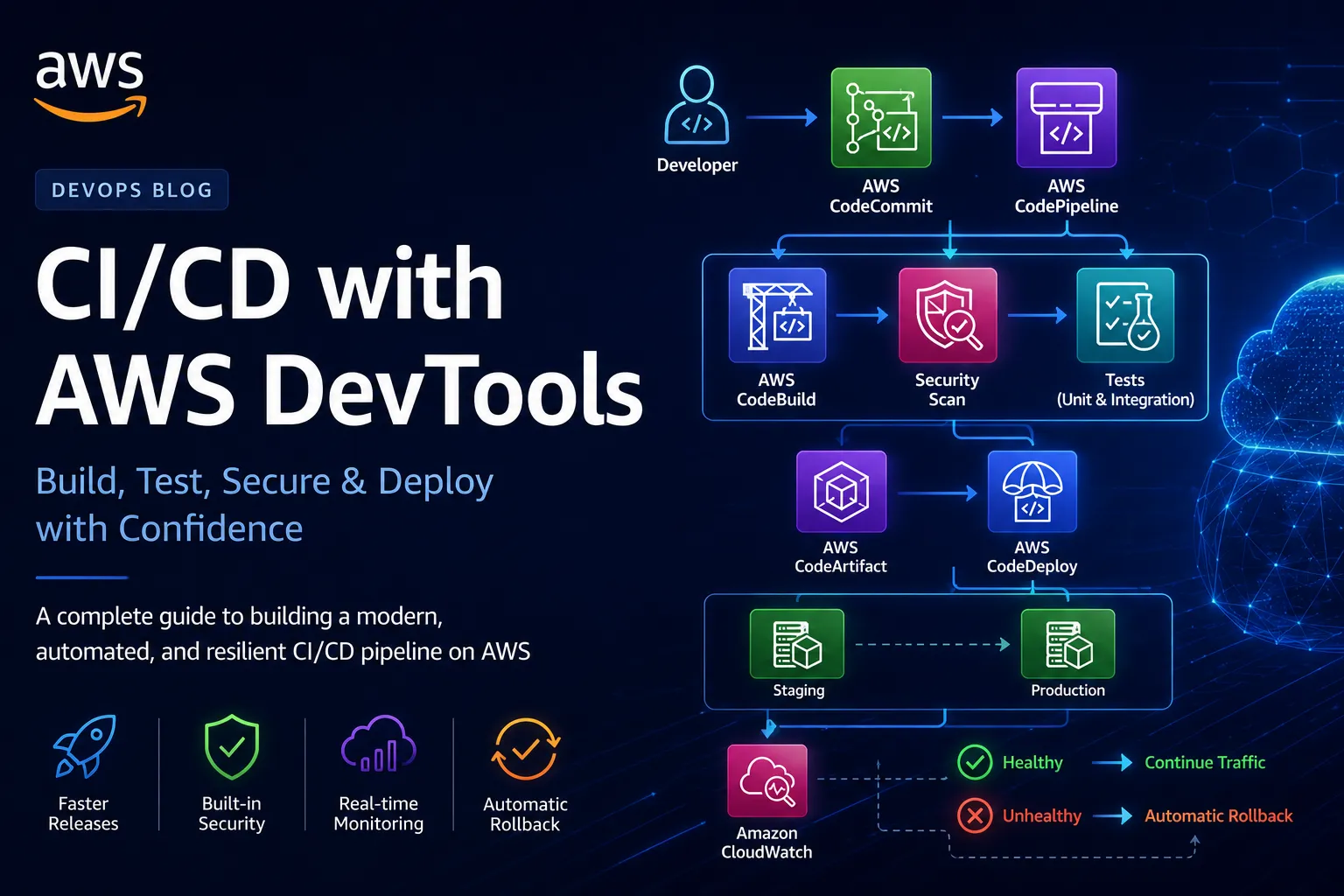
Stop Fighting Your CI/CD Pipeline: Build a Blazing-Fast Deployment Workflow with AWS DevTools
How to stop treating deployments as a stressful event and turn them into a predictable, automated workflow using AWS Developer Tools.

Introduction
If you've ever stared at a failed deployment wondering why it worked locally but broke in production, you already know the real problem. Writing code isn't what slows teams down; shipping it reliably is.
Most teams run into the same handful of failure modes:
- Manual deployment steps that cause production outages
- Long, uncached build times that kill developer momentum
- Inconsistent environments between local, staging, and production
- Rollbacks that turn into a second incident on top of the first
- Zero visibility into what a deployment is actually doing while it runs
The irony is that teams pour thousands of hours into optimizing application code while the pipeline that ships it stays untouched. AWS provides a full ecosystem of developer tools built to fix exactly this, and most teams only ever touch one or two of them.
This article walks through building a production-grade CI/CD workflow with AWS DevTools end-to-end, service by service, so you can see how each piece fits into the whole.
Why traditional deployments fail
Picture the manual version of this process:

Every arrow in that chain is a place a human can forget a step, skip a test, or push at the wrong time. It's slow, inconsistent, hard to audit, and gets riskier as the application grows, which is exactly backward, since growth is when you need releases to get safer, not scarier.
Enter AWS DevTools
AWS Developer Tools are a set of managed services that together cover the entire software delivery lifecycle:
Service | Purpose |
|---|---|
CodeCommit | Source control |
CodeBuild | Build and test |
CodeArtifact | Private package management |
CodeDeploy | Deployment automation |
CodePipeline | Workflow orchestration |
CloudWatch | Monitoring and alarms |
IAM | Security and access control |
Individually, each one solves a narrow problem. Wired together, they form an automated software factory that takes a commit and turns it into a verified production deployment with no manual steps in between.
Architecture overview

Step 1: Source control with CodeCommit
Everything starts with the repository. GitHub and GitLab are more common, but CodeCommit integrates directly with IAM, which removes an entire category of "where do our deploy credentials live" questions.
Bash
git initgit remote add origin https://git-codecommit.us-east-1.amazonaws.com/v1/repos/MyAppgit push origin main
Benefits worth calling out: encrypted repositories by default, IAM-based authentication instead of a separate credential system, fine-grained per-repo permissions, and native EventBridge integration so a push can trigger a pipeline with no webhook glue code in between.
Step 2: Automated builds with CodeBuild
CodeBuild spins up a fresh, isolated container for every single build. No dependency pollution, no "it built fine on the last run because of a leftover cache file," no "works on my machine."
YAML
version: 0.2phases:install:runtime-versions:python: 3.12pre_build:commands:- pip install -r requirements.txtbuild:commands:- pytest- docker build -t myapp .artifacts:files:- '**/*'
For a real service, say an ECS Fargate app with a Docker image, not a Lambda zip, you'll also want CodeBuild's local Docker layer cache enabled, or every build pays the full image-build cost from scratch even when only application code changed.
Step 3: Store dependencies with CodeArtifact
Pulling packages from the public internet on every single build is slow and adds unnecessary supply-chain risk. CodeArtifact gives you a private, versioned package repository sitting in front of npm, pip, Maven, or NuGet.
The payoff is threefold: faster builds because packages are served from inside AWS's network instead of the public internet, tighter control over exactly which package versions are allowed into a build, and a much smaller blast radius if a public package registry has an incident.
Step 4: Deploy automatically with CodeDeploy
There are two deployment strategies worth knowing, and they are not equivalent.
In-place deployment stops the old version, installs the new one, and starts it back up:
Plain text
Old Version│Stop Service│Install New Version│Start Service
Simple, but it means downtime on every release, not something you want for a service sitting behind a load balancer with live traffic.
Blue/green deployment stands up a full second environment, deploys the new version there, health-checks it, and only then shifts traffic over:

Zero downtime, and rollback is just shifting traffic back; no redeploy required. For an ECS Fargate service, CodeDeploy's ECS blue/green integration handles the parallel task set and target group swap for you.
YAML
version: 0.0os: linuxfiles:- source: /destination: /var/www/apphooks:BeforeInstall:- location: scripts/install.shAfterInstall:- location: scripts/start.shValidateService:- location: scripts/test.sh
Step 5: Orchestrate everything with CodePipeline
CodePipeline is the glue. It connects source, build, test, and deploy into one sequence where each stage only fires after the previous one succeeds:

Build faster with parallel execution
The naive version of a build stage runs every check in sequence:

None of those steps depend on each other, so run them in parallel instead:

On a pipeline that runs dozens of times a day, this alone can save the team several minutes per run, which adds up to hours per week.
Adding automated rollbacks
CloudWatch alarms wire directly into CodeDeploy's deployment lifecycle:

If latency spikes or error rates climb past a defined threshold right after a deployment, CodeDeploy reverts automatically no one has to be watching a dashboard at the exact moment it happens.
Security best practices
A pipeline that can deploy to production is also the highest-value target in your infrastructure, so it deserves the same scrutiny as production itself.
Do use IAM least-privilege roles scoped per pipeline stage, Secrets Manager or Parameter Store for anything sensitive, KMS encryption on artifacts at rest, signed build artifacts, and automated vulnerability scanning in the build stage.
Don't hardcode credentials into build specs or application code:
Python
# never do thisAWS_SECRET = "abcd1234"
Fetch them at runtime instead:
Python
import boto3client = boto3.client("secretsmanager")
Infrastructure as code
Keep the pipeline itself version-controlled, not clicked together in the console:
YAML
Resources:Pipeline:Type: AWS::CodePipeline::PipelineProperties:RoleArn: !GetAtt PipelineRole.ArnStages:- Name: Source- Name: Build- Name: Deploy
This is what makes a pipeline reproducible across environments and reviewable in a pull request like any other change.
Common pipeline bottlenecks
Problem | Solution |
|---|---|
Slow builds | Cache dependencies |
Long Docker builds | Multi-stage builds |
Repeated package downloads | CodeArtifact |
Failed deployments causing downtime | Blue/green deployment |
Secrets in code | Secrets Manager |
Manual approvals on every stage | Reserve approvals for production only |
Anatomy of the full pipeline

Key takeaways
Automate every repetitive step in the deployment path instead of relying on someone remembering to run it. Build the artifact once and deploy that same artifact to every environment; never rebuild per environment. Default to blue/green over in-place for anything with live traffic. Wire CloudWatch alarms directly into rollback instead of treating monitoring and deployment as separate concerns. Store packages in CodeArtifact instead of pulling from the public internet on every build. Manage the pipeline itself as infrastructure as code. Shift testing and security scanning left, into the build stage, instead of catching problems in staging. And treat automation as the thing that reduces deployment anxiety, not a nice-to-have on top of a process people already trust.
Final thoughts
A CI/CD pipeline shouldn't be a bottleneck; it should be an accelerator. AWS DevTools provides a fully managed ecosystem that lets teams focus on building features instead of wrestling with deployment scripts and release-day stress. Combine CodeCommit, CodeBuild, CodeArtifact, CodeDeploy, CodePipeline, and CloudWatch, and you get a deployment workflow that's fast, repeatable, secure, and resilient by default.
The biggest win isn't the minutes saved on any single deployment. It's the confidence to ship smaller changes more often, recover in seconds instead of scrambling when something breaks, and spend far more time delivering value than debugging the release process itself.
Enjoyed reading this content? Let the author know!
Your likes, comments, shares, and saves help creators reach more builders.

Loading recommendations
Loading article