
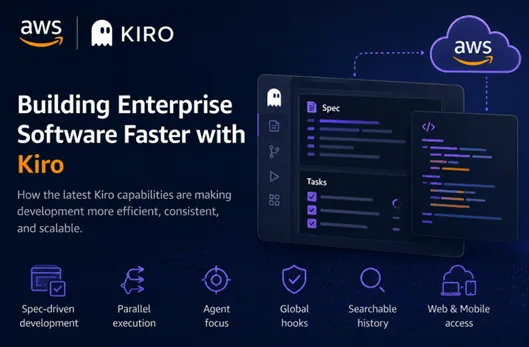
What's New in AWS Kiro? 8 Features That Improved My Enterprise Development Workflow
Discover the latest AWS Kiro features, from Parallel Task Execution and Quick Plan to AWS Transform and Searchable Session History. Learn how these updates enhance Spec-Driven Development for enterprise applications

Introduction
I have been using Kiro for several months, primarily on enterprise Java migration projects, AI-assisted development, and large codebases. Like many developers, I initially viewed it as another AI coding assistant—a tool that could generate code, explain APIs, and automate repetitive tasks.
But as my projects grew in complexity, I realised that code generation wasn't the real challenge.
The difficult part was managing context, coordinating multiple development tasks, maintaining consistency across teams, and ensuring AI could work reliably over long-running engineering efforts.
The latest Kiro updates address exactly these problems. Kiro is steadily evolving into an engineering platform designed for enterprise software development.
Here are the updates that have had the biggest impact on my workflow.
Parallel Task Execution
Parallel Task Execution Makes Large Implementations Practical
One frustration I often encountered was waiting for long-running specifications to complete.
A feature request would generate ten or twenty implementation tasks, but many of those tasks were completely independent.
Previously, they executed one after another.
Now Kiro automatically identifies independent work and executes it in parallel.
For enterprise projects this is a surprisingly significant improvement.
During migration work, it's common to have separate tasks for:
- backend services
- REST APIs
- unit tests
- documentation
- configuration updates
These no longer have to wait for each other.
Instead of simply producing code faster, Kiro finishes an entire implementation plan much sooner while keeping each task focused on its own context.
That reduces context pollution and improves overall code quality.
Quick Plan Fits Smaller Changes Better
I still think the full Spec workflow is one of Kiro's strongest features, especially when multiple developers are involved or when a feature requires design discussions.
But not every change is that size.
Sometimes I'm fixing a validation issue.
Sometimes it's a small API change.
Sometimes it's a bit of refactoring before moving on to the next task.
Quick Plan feels like a good middle ground.
It provides enough structure to think through the change without requiring the full requirements-design-task workflow every time.
I have found myself using it more often than I expected.
Requirement Analysis Before Implementation
One thing I learnt from working with AI-assisted development tools is that implementation quality usually reflects requirement quality.
If requirements are vague, incomplete or contradictory, the resulting implementation tends to be the same.
The newer requirement analysis helps identify those gaps earlier by highlighting ambiguous statements or missing acceptance criteria before implementation begins.
I like this because it shifts a little more attention to getting the problem statement right rather than immediately jumping into code.
Agent Focus Reduces Context Drift
One of the biggest challenges with AI coding assistants is maintaining focus during long conversations.
After enough prompts, every assistant starts carrying unnecessary context.
Agent Focus addresses this by allowing work to remain centred on a specific objective rather than one continuously expanding conversation.
I can see this becoming especially valuable for:
- Java migrations
- repository-wide refactoring
- large feature implementations
- multi-day engineering work
The agent spends less effort remembering unrelated discussions and more effort solving the current problem.
Global Hooks Reduce Repetition
Global Hooks probably won't be the feature that attracts the most attention, but it's one I have genuinely appreciated.
Before this update, repository-level automation often meant configuring similar hooks repeatedly across different projects.
Being able to define them once and reuse them everywhere is a small improvement that removes repetitive setup.
For enterprise teams managing many repositories, I can imagine this helping maintain more consistent development practices.
AWS Transform Integration
This was the update that caught my attention the most.
A significant part of my work involves application modernisation, whether that's upgrading Java versions, updating dependencies or preparing applications for cloud adoption.
Having AWS Transform available within Kiro feels like a natural extension of that workflow.
Rather than treating modernisation as a collection of disconnected activities, it becomes easier to keep planning, implementation and migration work in the same place.
I'm particularly interested in seeing how this evolves for larger migration programmes involving many applications.
Searchable Session History
This is one of those features that seems small until you need it.
When working on a large project, it's common to revisit an issue you solved a few days or even weeks earlier. I often remember discussing an architecture decision or debugging a particular problem, but not exactly when it happened.
Being able to search previous Kiro sessions makes it much easier to find those earlier discussions instead of trying to recreate the same investigation. For long-running projects, that can save both time and effort.
Kiro Beyond the Desktop
Kiro is no longer limited to the desktop IDE.
The addition of Kiro Web, with support for Spec-driven development and Git integration, makes it easier to review or continue work when I'm away from my primary development environment. The introduction of Kiro for iOS is another step in that direction, providing lightweight access to projects and ongoing workflows from a mobile device.
I still expect to do most of my development in the desktop IDE, but having access to Specs and project context from other devices makes the overall experience more flexible, especially for reviewing work or checking progress while away from the desk.
Enjoyed reading this content? Let the author know!
Your likes, comments, shares, and saves help creators reach more builders.

Loading recommendations
Loading article