
Beyond the IDE: Amazon Quick Desktop as the Planning Layer for AI-Assisted Development
Amazon Quick Desktop orchestrates your calendar, Slack, and coding agents via ACP, plus an honest look at where broad autonomy needs guardrails.

A few hours back, I wrote about designing a system for a world where you can't trust the humans in the loop: bounded autonomy, forced review gates, nothing allowed to act on its own past a certain point. It's the same question, just aimed inward this time: what does bounded autonomy look like when the "system" you're managing is your own workday, and the thing you're deciding whether to trust is an agent sitting on your own machine?
That's the question Amazon Quick's desktop app is actually answering. In the modern developer landscape, the hardest problem isn't writing code anymore; it's managing the context sprawl across Jira tickets, Slack threads, calendar invites, and local documentation before you can even start. Call it the "zero-context" problem: every task begins with you re-explaining who you are, what you're building, and why it matters, to whichever tool you've opened this time.
Tools like Kiro and Amazon Q Developer are masters of the codebase itself. Quick Desktop takes a different job: it orchestrates everything around the codebase — your calendar, your inbox, your coding agents so you stop being the one holding all the context in your head.
From chat assistant to work orchestrator
Most AI assistants stop at answering questions. Quick Desktop is built differently; it's an agentic teammate that runs persistently on macOS or Windows, connects to your local files and connected services, and takes on work you delegate rather than waiting for the next prompt. It's currently in preview for Plus and Enterprise accounts, with a 30-day trial for everyone else.
Two things make this more than a chat window with extra permissions:
- Autonomy you control. You can run Quick anywhere from step-by-step approval on every action to broad, goal-based execution, the same instinct as the append-only audit log I wrote about last time, just scoped to a person's workday instead of a border checkpoint: don't let the system act past the point you're willing to trust it unsupervised.
- Context that compounds. Quick builds an evolving understanding of your role, your projects, and how your team works, and it deepens the more you use it so you spend less time re-explaining yourself with every new request.
Why this isn't just another desktop chatbot
It's a fair question, and worth answering directly rather than assuming it away: why not just keep a browser tab open and paste context in every time?
A few things make Quick Desktop a different category of tool, not a prettier wrapper around the same one:
- Persistent context, not a fresh conversation. A chatbot forgets you the moment you close the tab. Quick's understanding of your role and projects carries across sessions, so you're not re-establishing who you are every morning.
- Orchestration, not just answers. A chatbot tells you what to do. Quick can plan the work, dispatch it to the right tool, and check the result the difference between a search engine and someone who actually picks up the task.
- ACP as a real execution channel. Most chat interfaces have no path to your terminal. Quick can hand a task to a coding agent and get a structured result back, not just a suggestion you have to copy-paste yourself.
- Connected apps, not copy-paste. Slack, calendar, Jira, and your local files are already wired in; you're not the integration layer manually shuttling context between tabs.
- A planning layer above your tools, not inside one of them. Quick doesn't compete with your IDE or your coding agent; it sits above both, which is exactly what lets it coordinate across them instead of just being one more place you have to check.
Orchestrating your coding agents via ACP
The most interesting feature for developers is that Quick doesn't try to be your coding agent; it manages the ones you already use. Through the Agent Client Protocol (ACP) , an open standard that does for AI agents roughly what the Language Server Protocol did for editors, Quick Desktop can register and dispatch tasks to tools like Kiro CLI or Claude Code , and get results back asynchronously without you leaving the conversation.
The division of labor is clean:
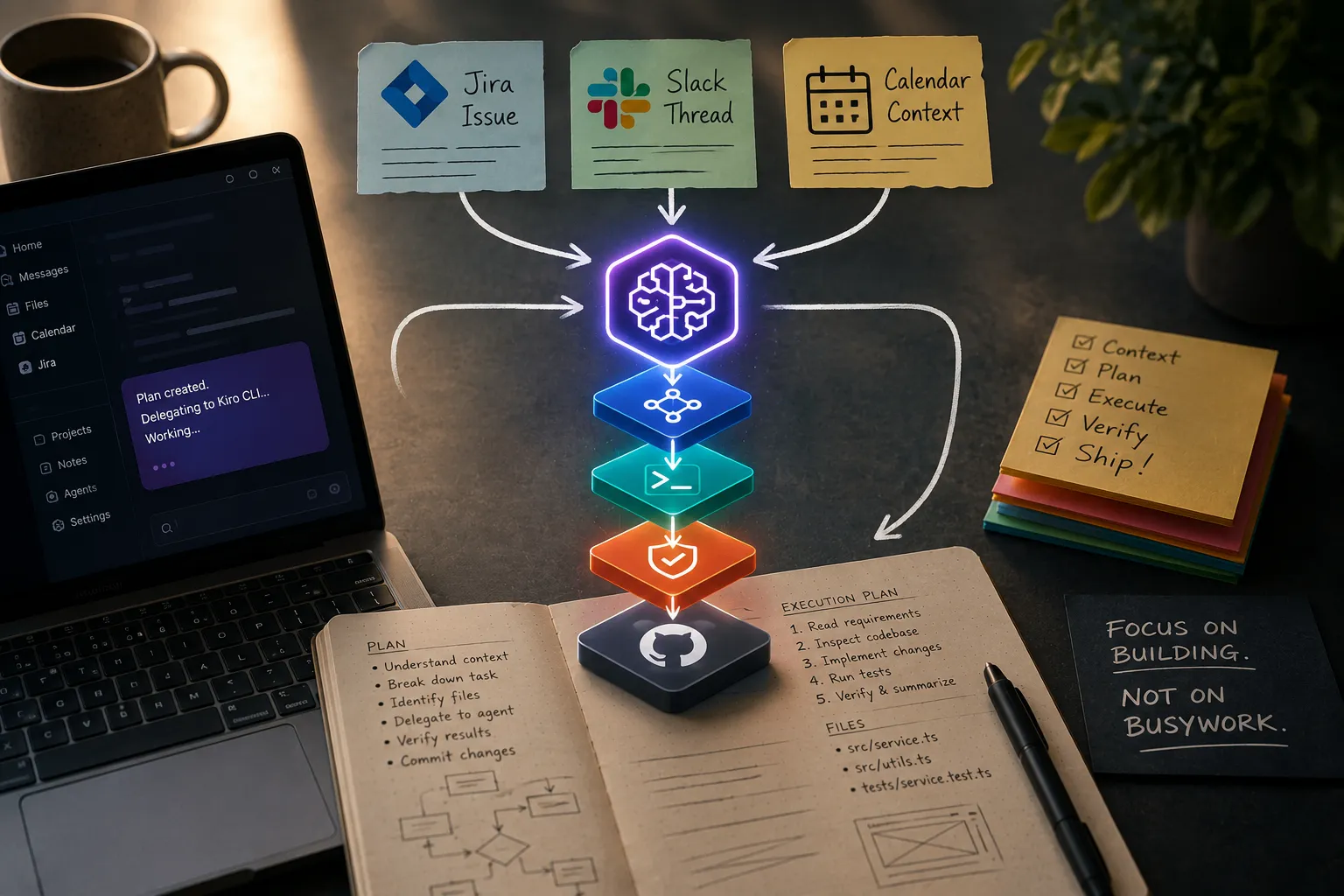
- Quick becomes the planning layer. It handles the high-level strategy, pulls in the surrounding context the Jira ticket, the Slack thread where the requirement actually got clarified, the calendar constraint and formulates a plan before anything gets dispatched.
- Kiro (or Claude Code) is the execution arm. It handles the specification-driven work: reading your steering files and conventions, generating the actual code, and reporting back over ACP once it's done.
- Quick closes the loop. Once the coding agent finishes, Quick re-reads the output against the original ask, which helps detect drift between the requested task and the agent's output before presenting the result as a real check, not just a status update.
Here's what that looks like end to end, from the context that kicks off the task to the commit that closes it:

Practically, this means you can ask Quick to pull a data point from a browser tab, hand a related fix to Kiro, and have the result dropped into a document all from one conversation, without the eight-tool, eight-login context switch that usually eats the first twenty minutes of any real task.
Here's the part worth being honest about, in the same spirit as the scoring layer I flagged in the last post: "broad, goal-based execution" is a real capability, not a marketing phrase, and that's exactly why the approval level you pick matters more than it sounds like it should. An orchestrator that can read your Slack, touch your calendar, and dispatch code changes is a wide blast radius if you leave it on the loosest setting out of convenience. The same rule that made the ATSIS audit log worth building applies here at a much smaller scale: the review gate is only doing its job if you actually leave it turned on for anything that writes or sends, not just for things that read.
Automating the boring stuff without overreaching
The value of an orchestrator that sits above your tools, not inside one of them, is that it can reclaim time from the work that was never really about coding in the first place. Quick splits this into two tiers depending on scale, and it's worth keeping them straight:
Quick Flows is the no-code layer for personal and team-scale routine tasks the kind you'd otherwise do by hand every week. Think: triaging meeting prep and flagging scheduling conflicts before you'd think to check, drafting recurring status reports, or answering "what changed in this legacy module and why" for a new hire without someone having to write a wiki page first.
Quick Automate is the heavier-duty layer for enterprise-scale, multi-system processes the kind of workload that needs control-flow logic, case management, and error handling, not just a natural-language prompt. Following up on stalled deals across a CRM, processing purchase orders, or validating vendor compliance across departments belong here, not in Flows. The scale and error-handling requirements are different enough that AWS built them as separate capabilities rather than one growing feature.
Why this reshapes how you think about project management
The interesting shift isn't that Quick can write a status report. It's that "memory" the thing that used to make you the bottleneck, because you were the only one who remembered why a decision got made three sprints ago stops being scarce. When an orchestrator maintains a continually updated picture of your projects, your conversations, and your team's conventions, the line between what you remember and what the system remembers starts to blur.
IDEs changed how we wrote software. Coding agents changed who writes the code. Orchestrators like Quick Desktop may end up changing who carries the context. That's a much bigger architectural shift than adding another chat window to your desktop.
Feature details reflect Amazon Quick's public documentation and AWS reporting as of mid-2026; Quick Desktop remains in preview and capabilities may change before general availability.
Enjoyed reading this content? Let the author know!
Your likes, comments, shares, and saves help creators reach more builders.

Loading recommendations
Loading article