
From Transactional Databases to Iceberg: Building a Multi-Source CDC Lakehouse on AWS
Land CDC data from Oracle, Aurora PostgreSQL, CockroachDB, and Kafka into Apache Iceberg in near real time. We compare two ingestion paths, Amazon Data Firehose and Debezium with Flink, write to both the Glue Data Catalog and S3 Tables, and query the same tables from Athena and Snowflake. An open-source Terraform repo deploys the whole stack.

Disclaimer: We are Amazon Web Services (AWS) employees. The views and opinions expressed in this post are our own and do not necessarily reflect the official policy or position of AWS or Amazon.
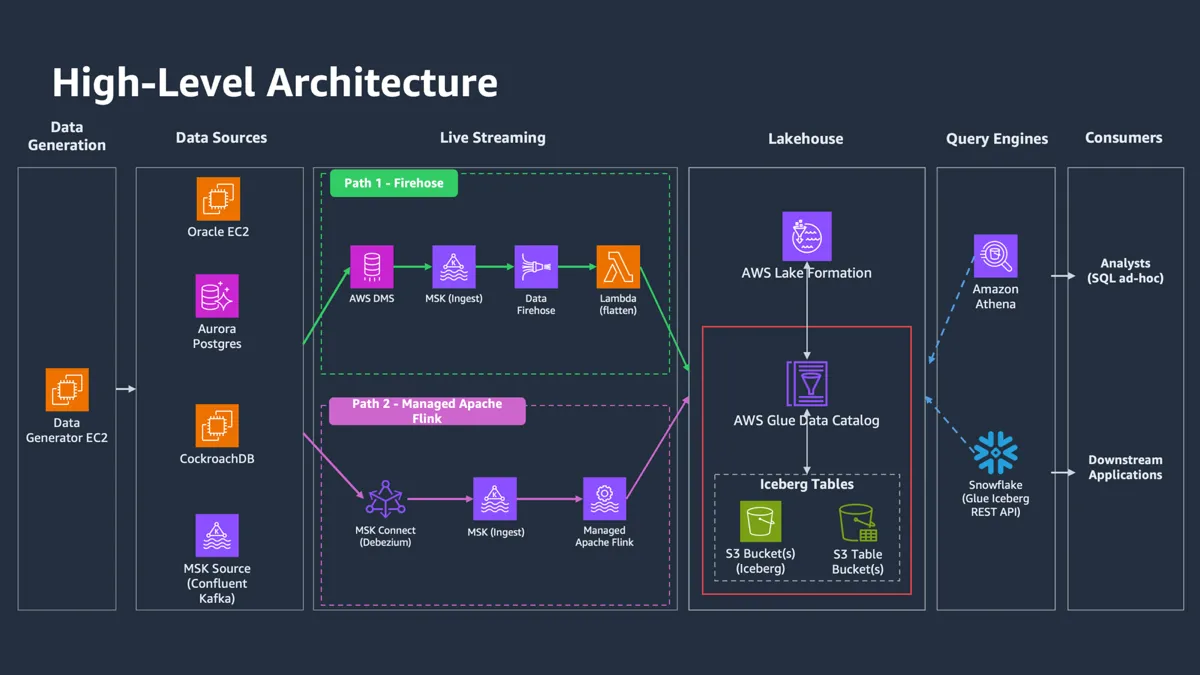
Everything in this post is deployable. The full architecture, both ingestion paths, all four sources, and both Iceberg catalogs, lives in an open-source Terraform repository: sample-multi-source-cdc-iceberg-lakehouse . Clone it, point it at your account, and you can follow along with real infrastructure.Note: the Oracle JDBC driver is not bundled. The repository is MIT-0 licensed and can't redistribute Oracle'sojdbc11driver, which Oracle licenses under its Free Use Terms and Conditions. If you want the Oracle CDC path, bring the driver yourself. Before deploying the datasources, edit the generator's pom.xml and change theojdbc11scope fromprovidedtocompile. The build pulls the driver from Maven Central and bundles it. Downloading it this way means you accept Oracle's terms. Aurora PostgreSQL, CockroachDB, and MSK work without this step.
Whether you're building a data layer to feed features to an ML team, giving an agentic application a better grip on your company's data, or getting your BI analysts a fresher view of the business, the same question keeps coming up: how do I take the data scattered across all my operational systems and make it usable, together, in near real time?
That data rarely lives in one place. It's in relational databases like Oracle and Aurora PostgreSQL, in distributed SQL stores like CockroachDB, in Kafka topics on-prem or in Confluent Cloud, and in a dozen other systems. The classic answer was a nightly batch job that dumps everything into Amazon S3 with AWS Glue as the Hive metastore. That's fine when "daily" is fresh enough. It stops being fine the moment someone wants to decide on data that's an hour old instead of a day old. And the old Hive-era headaches never really went away: rigid directory layouts, no time travel, queries that crawl as the data piles up.
The common escape hatch is to ship everything into a warehouse like Snowflake. Great query performance, and it takes the ingestion problem off your plate, but you pay for that storage twice and give up control over where and how your data lives.
This post takes a third route: land your operational data in Apache Iceberg , an open table format built for large analytic datasets, while keeping control of both the streaming pipeline and the storage. We'll build two ingestion paths against the same four sources, land the data in Iceberg on both AWS Glue Data Catalog and Amazon S3 Tables, and query it from Athena and Snowflake. Every claim in this post comes from running that stack.
Two paths to the same lakehouse
In this post we'll walk through two options for ingesting operational data into Iceberg. These are the two approaches we see customers adopt most often, and we'll call them Path 1 and Path 2 throughout. They differ in who runs the moving parts. Path 1 is almost entirely AWS-managed; Path 2 trades some operational work for control.
At the center of both paths sits Amazon Managed Streaming for Apache Kafka (Amazon MSK). It's the universal ingestion hub. It decouples capture from delivery, so how you read Oracle is independent of how you land Iceberg files, and it concentrates the hardest operational skill, running a stream, into one service both paths reuse. Every source publishes change events to Kafka topics on the same cluster, and every Iceberg writer reads from those topics. On top of MSK, the paths diverge in how they get data from Kafka into Iceberg.
Path 1 is Amazon Data Firehose with an AWS Lambda transformer. Firehose is AWS-managed, connects to MSK over AWS PrivateLink, supports Iceberg as a first-class destination, and lets a Lambda function reshape each record before it lands. It fits when you want the least to operate, your transformations are stateless, and Firehose's Iceberg write semantics work for you.
Path 2 is Debezium on Amazon MSK Connect for capture, paired with Apache Flink on Amazon Managed Service for Apache Flink for the sink. Debezium emits CDC events as JSON to MSK; a Flink job per source consumes them, parses the source-specific envelope in Java, and writes typed records to Iceberg with exactly-once semantics tied to Flink's checkpoints. It fits when CDC fidelity matters, when a source envelope needs custom handling, and when your team is comfortable with a small Java codebase.
The two sit at different points on the managed-versus-control spectrum, and the choice comes down to which end your team values more.
Both paths land data in two Iceberg targets in parallel. The primary is Iceberg on S3 registered in the AWS Glue Data Catalog, which gives the broadest engine support and full control over compaction and partition layout. The secondary is Amazon S3 Tables , managed Iceberg storage with automatic compaction, snapshot expiration, and unreferenced-file cleanup, served through its own Iceberg REST catalog. Both share the same schema per source, so an Athena query returns identical results regardless of which catalog it hits.
One setup note: the MSK cluster runs dual authentication. Path 1 (DMS, Firehose, the data generators) uses SASL/SCRAM; Path 2 (Debezium and Flink) uses IAM, the cleaner option for VPC-attached AWS compute. Both are enabled on the same cluster so the paths can share brokers and topics.
Change data capture: where the paths diverge
Downstream of MSK the two paths look nearly identical. At the source they diverge, because every database exposes its transaction log differently and no single tool speaks every dialect.
AWS DMS is the AWS-managed capture option. It reads Oracle through its Binary Reader (reading the redo logs directly) and Aurora PostgreSQL through logical replication slots (
pgoutput ), writing flat JSON to MSK over SASL/SCRAM. Its strength is operational simplicity. You get a managed replication instance with its own scaling and monitoring, and no connector plugins to manage. Its trade-off is fidelity. DMS flattens CDC semantics: before-images are dropped by default, multi-statement transactions aren't grouped, and a few source quirks leak through and get normalized downstream by Path 1's Lambda.Debezium is the Kafka-native option. It reads the same source mechanisms but emits richer events: a full envelope with the operation (insert, update, delete), source metadata, and the post-change row, as JSON on per-table topics. Its
ExtractNewRecordState transform flattens that envelope and promotes the operation to a top-level __op field so consumers can branch on it. Debezium runs as a source connector on MSK Connect with IAM auth. You get the operation code on every record and fine-grained control over what reaches MSK, at the cost of managing connector plugins, MSK Connect quotas, per-connector IAM roles, and source-specific knobs like the Oracle mining strategy and PostgreSQL replication-slot behavior.A rough rule: DMS is the right default when downstream workloads are row-state analytics and your team doesn't already run Kafka Connect. Debezium is the right default when the operation code matters per record, per-table routing simplifies consumers, or Kafka Connect is already part of your platform. Because MSK sits in the middle, you can start with one and migrate pieces to the other later.
CockroachDB is the exception, and it needs explaining before we look at either path in detail.
Why CockroachDB needs a different path
CockroachDB is a distributed SQL database. Data splits into ranges, each range replicates across nodes via Raft, and each node keeps its own local storage engine (Pebble). There's no single write-ahead log to tail; there are thousands of independent Raft logs across the cluster.
At the application layer it looks exactly like PostgreSQL: same JDBC driver, same wire protocol, same SQL. The natural assumption is that PostgreSQL CDC should work, but it doesn't. CDC operates at the replication layer, and CockroachDB's replication layer is Raft, not PostgreSQL logical decoding. There are no replication slots for DMS or Debezium to call. The wire-protocol compatibility goes no deeper than SQL.
Because external tools can't read its internal stream, CockroachDB builds CDC into the engine as changefeeds. Setup is two SQL statements ( setup-cockroachdb-changefeeds.sh runs them for you):
SQL
SET CLUSTER SETTING kv.rangefeed.enabled = true;CREATE CHANGEFEED FOR TABLE defaultdb.financial_transactionsINTO 'external://msk_financial'WITH format = json, updated, resolved = '30s', envelope = 'enriched', key_in_value;
One node acts as changefeed coordinator, but it's purely an administrator and processes no data. Each range has one replica watching for changes; when a row changes, that node encodes it and sends it straight to Kafka. The coordinator maintains a high-water mark and periodically writes a
resolved message to each partition, a consistency marker telling consumers everything before that timestamp has been emitted. The database itself is the CDC producer.We use the enriched envelope for its explicit
op field, plus key_in_value to embed the primary key, which is essential for deletes where the after field is null:JSON
// insert / update / delete{ "after": {"transaction_id": "TXN-001", "amount": 150.00}, "key": {"transaction_id": "TXN-001"}, "op": "c" }{ "after": {"transaction_id": "TXN-001", "amount": 200.00}, "key": {"transaction_id": "TXN-001"}, "op": "u" }{ "after": null, "key": {"transaction_id": "TXN-001"}, "op": "d" }
Both paths handle this envelope. On Path 1, the Lambda transformer reads
op , maps c / u to insert/upsert and d to delete, and drops resolved markers by their absent after . On Path 2, the Flink job filters resolved markers and tags each record as an insert, update, or delete (we'll see the mechanics in the Flink section). The CDC mechanism is completely different from the other sources; the lakehouse view is identical. CockroachDB rows land in the same tables as the Oracle and Aurora rows, indistinguishable once at rest.Path 1: Amazon Data Firehose
In Path 1 the CDC engine is AWS DMS with two tasks, reading from Oracle on Amazon EC2 and from Aurora PostgreSQL. DMS writes flat JSON to MSK; Firehose consumes those topics over PrivateLink; a Lambda transformer flattens and normalizes each record; and Firehose writes to Iceberg with configurable buffering. It's a short pipeline with almost nothing to operate, which is the point. The two pieces worth a closer look are the delivery stream itself and the Lambda in the middle.
Firehose as the Iceberg writer
Each Kafka topic gets its own Firehose delivery stream, declared entirely in Terraform ( msk-firehose-ingestion module ). The stream names the MSK cluster as its source, Iceberg as its destination, and the Glue table it writes to. The part that makes CDC work is
unique_keys . It tells Firehose which column identifies a row, so an update replaces the existing row instead of appending a duplicate:Terraform
resource "aws_kinesis_firehose_delivery_stream" "delivery_stream" {destination = "iceberg"msk_source_configuration {msk_cluster_arn = var.MSK_CLUSTER_ARNtopic_name = var.TOPIC_NAMEauthentication_configuration {connectivity = "PRIVATE" # PrivateLink into the VPCrole_arn = aws_iam_role.firehose_role.arn}}iceberg_configuration {catalog_arn = "arn:aws:glue:...:catalog"buffering_size = var.BUFFERING_SIZEbuffering_interval = var.BUFFERING_INTERVALdestination_table_configuration {database_name = var.GLUE_DATABASE_NAMEtable_name = var.GLUE_TABLE_NAMEunique_keys = ["transaction_id"] # upsert key}}}
There is no consumer application to run. Firehose polls the topic, batches records by the buffering settings, and commits them to the Iceberg table. Records that fail transformation land under an error prefix in S3 rather than blocking the stream.
The Lambda transformer
Firehose applies inserts, updates, and deletes to Iceberg based on an operation field the transformer attaches to each record. That contract is the whole job of transformer_function.py . One function handles all four sources, because by this point everything is JSON on MSK and only the envelope differs. For each record it:
- detects the envelope (DMS's
dataplusmetadata, CockroachDB'safterpluskey, or a plain Kafka message),
- extracts the row and lowercases Oracle's UPPERCASE column names,
- maps the source's operation code to
insert,update, ordeleteand returns it asotfMetadata, which tells Firehose how to apply the row,
- and drops CockroachDB's
resolvedtimestamp markers, which are consistency signals rather than data.
The delete case shows why the envelope detection matters. A CockroachDB delete arrives with
after set to null, so the row identity has to come from the key field instead:Python
operation_mapping = {"u": "update", "d": "delete"}op_code = record.get("op")operation = operation_mapping.get(op_code, "insert") if op_code else "insert"if operation == "delete":transaction_data = record.get("key") # 'after' is null on deleteselse:transaction_data = record.get("after")
That's everything Path 1 asks you to operate: a managed delivery stream per topic and one stateless Lambda. Nothing to patch, no offsets to manage, no cluster to size.
Path 2: Debezium and Apache Flink
Path 2 is the Kafka-native, open-source path. Debezium on MSK Connect captures CDC from Oracle and Aurora, CockroachDB publishes its own native changefeeds, the MSK source cluster carries direct Kafka events, and a fleet of Flink jobs reads each topic, parses the source-specific envelope in Java, and writes typed records into Iceberg on both catalogs. Once a row reaches MSK, the rest of the pipeline doesn't care which database it came from. Every source converges on the same record-shape contract, and only the upfront envelope translation is source-specific.
Capturing CDC with Debezium
Oracle's CDC story revolves around the redo logs (Oracle's write-ahead log) and LogMiner, a built-in utility that reads the redo log and exposes changes as queryable rows. The Debezium Oracle connector polls LogMiner, picks up changes since its last position, and publishes each as a Kafka message. For LogMiner to decode what changed rather than just that something did, the DBA enables archive log mode and supplemental logging. PostgreSQL is analogous, built on the write-ahead log and logical decoding through a replication slot and the
pgoutput plugin; on Aurora you enable it with rds.logical_replication=1 and grant the connector user the rds_replication role. The Debezium PostgreSQL connector has the full reference.The connectors are nearly identical to configure ( debezium-oracle/main.tf and debezium-aurora/main.tf in the repo). Here's the Oracle one; the PostgreSQL connector swaps the connector class, adds
plugin.name=pgoutput and a slot.name , and drops the database.pdb.name :properties
connector.class = io.debezium.connector.oracle.OracleConnectordatabase.hostname = oracle-host.example.comdatabase.dbname = ORCLCDBdatabase.pdb.name = ORCLPDB1topic.prefix = oracle-cdctable.include.list = <tables to include>log.mining.strategy = online_catalogsnapshot.mode = initialdecimal.handling.mode = precisevalue.converter = org.apache.kafka.connect.json.JsonConvertervalue.converter.schemas.enable = falsetransforms = unwraptransforms.unwrap.type = io.debezium.transforms.ExtractNewRecordStatetransforms.unwrap.add.fields = op,source.ts_mstransforms.unwrap.delete.tombstone.handling.mode = rewrite
That
ExtractNewRecordState transform is the one to know. By default Debezium produces a nested envelope consumers have to unpack; the transform replaces the body with just the post-change row and adds a top-level __op field ( c for insert, u for update, d for delete). By the time data reaches Flink, every source looks the same: JSON on MSK topics, IAM-authenticated, ready to consume.Flink as the sink
Flink on Amazon Managed Service for Apache Flink takes the runtime off your plate. There are no clusters to provision and no upgrades to schedule. It writes to Iceberg through the official
iceberg-flink-runtime connector, whose FlinkSink.forRowData(...) builder ties Iceberg's commit lifecycle to Flink's checkpoint barriers. When a checkpoint barrier flows through, the writer flushes its in-progress data files and the Iceberg committer atomically updates the catalog. If the job fails between checkpoints, Flink restores from the last successful one and abandons the in-flight files, giving exactly-once Iceberg writes.The reason to use Flink over a config-driven Kafka Connect sink is programmability. Each job is a few hundred lines of Java that does whatever a record needs: case-insensitive field lookup, base64 decimal decoding, resolved-marker filtering,
RowKind tagging. If you later need windowing, stream joins, or per-key state, the runtime already supports it. A job wires together a Kafka source, an envelope mapper, and two Iceberg sinks (full version in OracleCdcJob.java , with AuroraCdcJob , CockroachCdcJob , and MskAppendJob as the per-source variants):Java
public static void main(String[] args) throws Exception {StreamExecutionEnvironment env = StreamExecutionEnvironment.getExecutionEnvironment();env.enableCheckpointing(60_000); // commit cadence, tunable; see the latency sectionCatalogLoader glueLoader = CatalogLoader.custom("glue_catalog", Map.of(CatalogProperties.CATALOG_IMPL, "org.apache.iceberg.aws.glue.GlueCatalog",CatalogProperties.WAREHOUSE_LOCATION, "s3://your-warehouse/",CatalogProperties.FILE_IO_IMPL, "org.apache.iceberg.aws.s3.S3FileIO"),new Configuration(), "org.apache.iceberg.aws.glue.GlueCatalog");// S3 Tables loader is the same builder against the Iceberg REST catalog with SigV4 signingbuildPipeline(env, glueLoader, s3TablesLoader, "your-kafka-topic", "my_db.my_table", "primary_key");env.execute("MyCdcJob");}
buildPipeline creates a Kafka source with IAM auth, loads the Iceberg schema once at startup, attaches a source-specific mapper, and wires the RowData stream into both sinks in upsert mode keyed on the primary key:Java
DataStream<RowData> stream = env.fromSource(source, WatermarkStrategy.noWatermarks(), "kafka-" + kafkaTopic).map(new MyEnvelopeMapper(schema)).name("parse-" + kafkaTopic);FlinkSink.forRowData(stream).tableLoader(TableLoader.fromCatalog(glueLoader, tableId)).upsert(true).equalityFieldColumns(List.of(primaryKey)).append();// a second FlinkSink writes the same stream to the S3 Tables catalog
The mapper is the variable piece. It reads each message, determines the operation, and produces a typed
RowData aligned to the Iceberg schema:Java
public RowData map(String message) throws Exception {JsonNode node = JSON.readTree(message);String op = node.has("__op") ? node.get("__op").asText() : "c";RowKind rowKind = switch (op) {case "u" -> RowKind.UPDATE_AFTER;case "d" -> RowKind.DELETE;default -> RowKind.INSERT;};GenericRowData row = new GenericRowData(schema.columns().size());for (int i = 0; i < schema.columns().size(); i++) {Types.NestedField col = schema.columns().get(i);row.setField(i, convertJsonToIcebergType(node.get(col.name()), col.type()));}row.setRowKind(rowKind);return row;}
Each source needs a small variation. Oracle emits UPPERCASE column names, so the mapper does case-insensitive lookups, and its numeric columns arrive base64-encoded (Debezium's precise decimal mode), decoded with the column's declared scale. PostgreSQL is the same but lowercase. CockroachDB's enriched envelope needs resolved-marker filtering. Plain Kafka topics need almost nothing, since every record is already a flat insert.
The Iceberg sinks
Both catalogs are production-ready. The Glue Data Catalog is a managed metastore for Iceberg tables in an S3 bucket you own, where you handle compaction and snapshot maintenance yourself. Amazon S3 Tables is purpose-built storage that runs that maintenance for you, exposed through an Iceberg REST catalog endpoint the writer reaches with SigV4 signing. Either way the sink runs in upsert mode: for an insert or update it writes an equality-delete file marking any existing row with the same key, then the new row; for a delete it writes only the delete file. New rows become visible at the next successful Iceberg commit.
That last point, "the next successful commit," turns out to be the whole story on latency.
How the two paths compare
Running both paths against the same data on identical tables surfaces the difference that matters most in practice: how fresh the data is, and how much each path can take.
Latency is about when data becomes queryable
What counts is when a query can see the new row, not when the file lands in S3. That moment is the Iceberg commit, and both paths gate on it.
Firehose has a floor of about a minute (we measured 55 to 70 seconds), and the buffering setting doesn't lower it. Setting the buffer interval to zero drives the S3-write metric (
DeliveryToS3.DataFreshness ) to nearly zero, files hit S3 almost immediately, but the Iceberg metric ( DeliveryToIceberg.DataFreshness ) stays pinned around a minute. The two diverge because Firehose delivers to Iceberg in two stages: it writes Parquet to S3 (which the buffer controls), then a separate commit stage registers those files into the table on its own cadence. From the outside that commit cadence looks like a fixed ~60-second floor, and no delivery-stream setting moves it.Flink commits on its checkpoint interval, 60 seconds in our configuration, landing it in the same ballpark. The difference is that the checkpoint interval is a dial you control: shorten it and time-to-queryable drops, at the cost of more, smaller files to compact later. So by default both paths make data queryable in tens of seconds, and the real distinction is tunability. Firehose's latency floor is fixed; Flink's is a knob. Same managed-versus-control trade-off, expressed in seconds.
Throughput
Both paths absorb typical CDC volumes without losing a row. Firehose keeps up with sustained bursts; its consumer lag climbs under heavy load but drains back to zero.
For Flink, the number depends entirely on how you size the job, so it's worth being specific about what we ran. Each Flink app in this repository is configured at parallelism 4 with one vCPU per KPU, which works out to roughly 4 vCPU and 16 GB. At that sizing, a single job held a steady ~4,000 records per second and then flattened, with CPU pinned at 100%, busy time at 100%, and backpressure at zero. Fully busy and CPU-bound with nothing pushing back downstream means the job's own compute was the limit at this configuration, not the Iceberg sink or S3.
Because the limit here is compute and parallelism controls compute, raising parallelism scales throughput close to linearly, so this figure moves with the sizing you choose rather than being a fixed property of Flink. At the parallelism-4 configuration in the repo, roughly 3,000 records per second per source ran comfortably at around 75% CPU. (A single-partition topic also caps how many threads can read it, so at higher parallelism you would add partitions too.)
Querying the lakehouse
You adopt an open table format so any engine can read the same data without copying it. With data landed in Iceberg on Glue and S3 Tables, connecting engines is straightforward (S3 Tables documents its open-source engine integrations directly), with one cross-cutting caveat: Lake Formation credential vending only works with AWS-native engines, so Snowflake, Databricks, and Trino bypass it.
Amazon Athena
Athena has the simplest Iceberg experience. No JARs, no Spark session. If a table is registered in Glue with
table_type = 'Iceberg' , Athena queries it immediately . It supports full DML ( INSERT , UPDATE , DELETE , MERGE INTO on engine v3), all merge-on-read, writing position-delete files rather than rewriting data:SQL
MERGE INTO analytics_db.customer_orders tUSING staging_db.cdc_batch s ON t.order_id = s.order_idWHEN MATCHED AND s.op = 'D' THEN DELETEWHEN MATCHED THEN UPDATE SET t.order_total = s.order_totalWHEN NOT MATCHED THEN INSERT (order_id, order_total) VALUES (s.order_id, s.order_total);
Athena also does time travel by snapshot ID or timestamp, and table maintenance is built in (
OPTIMIZE for bin-pack compaction, VACUUM for snapshot expiry). For S3 Tables, use the federated child-catalog path , not just s3tablescatalog as the parent. A few limits are worth knowing: S3 Tables is Iceberg V2 only, table and column names must be lowercase, compaction is bin-pack only (use EMR for sort or z-order), and Athena can't CREATE / ALTER / DROP Lake Formation-governed Iceberg tables via DDL.Snowflake
Snowflake is where the interesting edge cases live. It offers two table types: Snowflake-managed Iceberg tables (Snowflake owns the lifecycle and writes standard Iceberg metadata to S3, readable by any engine, with full DML from Snowflake) and externally-managed tables (an external catalog like Glue or the S3 Tables REST endpoint owns the table, and Snowflake reads and, with caveats, writes through it). Historically externally-managed tables were read-only; Snowflake now supports externally-managed writes for Iceberg v2+ tables, with the constraints listed at the end of this section ( Manage Iceberg Tables ).
Three objects do the work: an External Volume for S3 access, a Catalog Integration for metadata, and an Iceberg Table binding. The official docs cover the syntax and IAM policies in detail; what follows is what those docs don't make obvious. For multi-table setups, catalog-linked databases are worth knowing about: Snowflake auto-discovers and mirrors every namespace and table from a REST catalog into a Snowflake database, which beats a
CREATE ICEBERG TABLE per table when the upstream catalog is dynamic.The Glue Data Catalog path alternates between AWS and Snowflake:
- AWS: create an S3 bucket, IAM policy, and IAM role with a placeholder trust policy. The Snowflake S3 storage integration guide has the exact IAM policy JSON, and the Snowsight wizard generates the same policy.
- Snowflake: create the external volume, then capture
STORAGE_AWS_IAM_USER_ARNandSTORAGE_AWS_EXTERNAL_IDfromDESC EXTERNAL VOLUME.
- AWS: replace the placeholder trust policy with those values, and verify with
SELECT SYSTEM$VERIFY_EXTERNAL_VOLUME('iceberg_vol');before moving on.
- Snowflake: create the Glue catalog integration , and capture the new
GLUE_AWS_IAM_USER_ARNandGLUE_AWS_EXTERNAL_ID, which differ from the external volume's pair.
- AWS: add the catalog integration's principal as a second statement in the trust policy, so the role trusts both Snowflake identities.
- Snowflake:
CREATE ICEBERG TABLEreferencing the volume and integration, then query.
What those docs don't tell you:
- The ordering wrinkle. The IAM role has to exist before you create the Snowflake objects (Snowflake needs the ARN), but the trust policy can't be finalized until after Snowflake generates its principal and external ID. So you bounce between the two consoles: AWS placeholder first, then Snowflake, then back to AWS with the real values, then Snowflake again. The Snowsight wizard surfaces this naturally; if you're scripting it, plan for the round trip.
- One role, multiple external IDs. Every Snowflake object that uses an IAM role gets its own external ID. Sharing one role between an external volume and a catalog integration (very common) means the trust policy needs both pairs, either as two
Allowstatements or one statement with ansts:ExternalIdarray.
-
SYSTEM$VERIFY_CATALOG_INTEGRATIONdoesn't work for Glue. It returnserror 004186: validation operation is not supported for this catalog type: GLUE. That's not a real failure; Snowflake just hasn't built a Glue validator. Go straight toCREATE ICEBERG TABLE, and if it succeeds the integration is fine.
-
CATALOG_TABLE_NAMEis case-sensitive and must match the Glue table name exactly.
Once registered,
AUTO_REFRESH keeps Snowflake in sync by polling the Glue catalog on the REFRESH_INTERVAL_SECONDS cadence (default 30s). When your CDC pipeline commits a new snapshot, the next poll picks it up. Iceberg's single metadata.json pointer means no SNS/SQS plumbing is needed.The S3 Tables path is harder, because the obvious approaches fail and the working one isn't in Snowflake's own docs. (The repo's snowflake-integration guide walks through the working setup.) Three approaches exist; only the third works:
- Direct S3 Tables REST endpoint (
https://s3tables.<region>.amazonaws.com/iceberg) with SigV4 fails withForbidden: Credential should be scoped to correct service: 's3tables'. Snowflake derives the signing service fromCATALOG_API_TYPE, and none of the allowed values sign ass3tables.
-
CATALOG_SOURCE = GLUEagainst the federated Glue catalog (<account>:s3tablescatalog/<bucket>) fails because Snowflake'sGLUE_CATALOG_IDaccepts only a 12-digit account ID and rejects the federated format ( Glue catalog integration docs ).
- Glue Iceberg REST endpoint (
https://glue.<region>.amazonaws.com/iceberg) withCATALOG_API_TYPE = AWS_GLUEand the federated catalog ID as the warehouse is the working path. Snowflake signs as serviceglue, the Glue endpoint accepts it, and Glue routes the request to S3 Tables internally. The AWS blog Connect Snowflake to S3 Tables using the SageMaker Lakehouse Iceberg REST endpoint is the canonical reference; follow it end to end.
That blog gets you most of the way. A few things to watch for on top of it:
- Lake Formation's account-level setting must be on:
AllowFullTableExternalDataAccess = trueviaPutDataLakeSettings. Without it, every query fails with auth errors that don't point at this setting.
-
lakeformation:GetDataAccessis a non-obvious required IAM permission on the Snowflake role; the Glue endpoint calls it to vend credentials.
- Lake Formation grants must be
ALL(SUPER in the console), not justSELECT, for external-engine vended credentials ( LF permissions reference ).
- No
EXTERNAL_VOLUMEon the table DDL. The S3 Tables path usesACCESS_DELEGATION_MODE = VENDED_CREDENTIALS, where Lake Formation vends scoped credentials per request. IncludingEXTERNAL_VOLUMEreturns "Cannot create an Iceberg table with an external volume and a catalog integration that supports credential vending."
-
glue:UpdateTableis the silent writer-killer. Every commit ends with a direct Glue call to update themetadata_locationpointer. Without it, the Parquet write succeeds but the commit fails, leaving orphan Parquet files on S3 with no manifest pointing at them.
- You'll need to be a Lake Formation data lake admin. In prototype accounts where infrastructure was deployed by a scoped role, that role is often the only admin. Add yourself before trying to grant LF permissions to the Snowflake role.
- Lake Formation hides Glue tables from non-admins. If
aws glue get-tablesreturns[]butaws glue create-tablereturnsAlreadyExistsException, Lake Formation is filtering the response. Becoming a data lake admin resolves it.
On governance, the two paths differ. On the Glue path Snowflake reads S3 directly with its own IAM role and never calls
GetTemporaryGlueTableCredentials , so column/row/cell-level LF policies aren't honored, and even table-level LF permissions are bypassed. On the S3 Tables + Glue Iceberg REST path, Lake Formation is in the picture for table-level vended credentials, but column/row/cell filters still aren't honored, since those only work for native AWS engines like Athena, EMR, and Redshift Spectrum. For fine-grained control inside Snowflake, use its own masking and row-access policies .Externally-managed writes come with a specific set of constraints:
- Iceberg v2+ only ( Iceberg spec v2 ).
- Position deletes only, no equality deletes.
- Cannot write
uuidorfixed(L).
- Autocommit only, no multi-statement transactions.
- Snowflake won't run snapshot expiry, orphan cleanup, or compaction, so schedule those from the writing engine ( Iceberg maintenance ) or rely on S3 Tables auto-maintenance.
-
DROP TABLEfails on S3 Tables (no PURGE flag); useaws s3tables delete-table.
- Catalog-linked databases don't allow nested-namespace writes.
A few smaller gotchas from our prototype builds are worth flagging too: dots in bucket names break SSL ( S3 bucket naming rules ); nanosecond timestamps get truncated to microseconds; merge-on-read delete-file performance degrades without scheduled compaction; and failed writes leave orphan Parquet files, so run
remove_orphan_files periodically.A note on maintenance
Every buffer flush and every checkpoint commit creates new data files, manifests, and snapshots. Without maintenance you accumulate thousands of small files, the metadata tree grows, and queries slow as engines spend more time on S3
LIST calls than on scanning. This is the small-file problem, and every streaming-to-Iceberg architecture has to solve it. It's the clearest place the two storage targets differ: on Glue-cataloged Iceberg you own maintenance (run bin-pack compaction with EMR Spark's rewrite_data_files , on a schedule or file-count threshold), while S3 Tables does it automatically (compaction toward 256 MB files, snapshot expiry after 24 hours, unreferenced-file cleanup after 3 days). If operational simplicity is the goal, that's the strongest argument for S3 Tables; if you need cross-region replication or the broadest engine support, Glue-cataloged Iceberg is the more mature choice.Wrapping up
The goal was to take operational data spread across Oracle, Aurora, CockroachDB, and Kafka and land it in Apache Iceberg in near real time, without giving up control of the pipeline or the storage. Two paths get you there: an AWS-managed one on Firehose, and a Kafka-native one on Debezium and Flink, both feeding the same tables and queryable from the same engines.
Which one you reach for depends on your team. If you want to write no code and operate almost nothing, Firehose is the answer, and you accept a fixed latency floor in return. If you want to shape every record in Java, dial latency down, and keep the door open to stateful processing later, Flink earns the codebase it costs you. Either way you get clean, queryable, exactly-once data in Iceberg that Athena, Snowflake, and any other Iceberg-aware engine can read without a copy.
The whole architecture, both paths and all four sources writing to both catalogs, is in sample-multi-source-cdc-iceberg-lakehouse and deploys end to end. Point it at your account, generate some data, and watch it flow.
Enjoyed reading this content? Let the author know!
Your likes, comments, shares, and saves help creators reach more builders.

Loading recommendations
Loading article