
Weekend Agent Challenge: Dev Community Pulse Agent
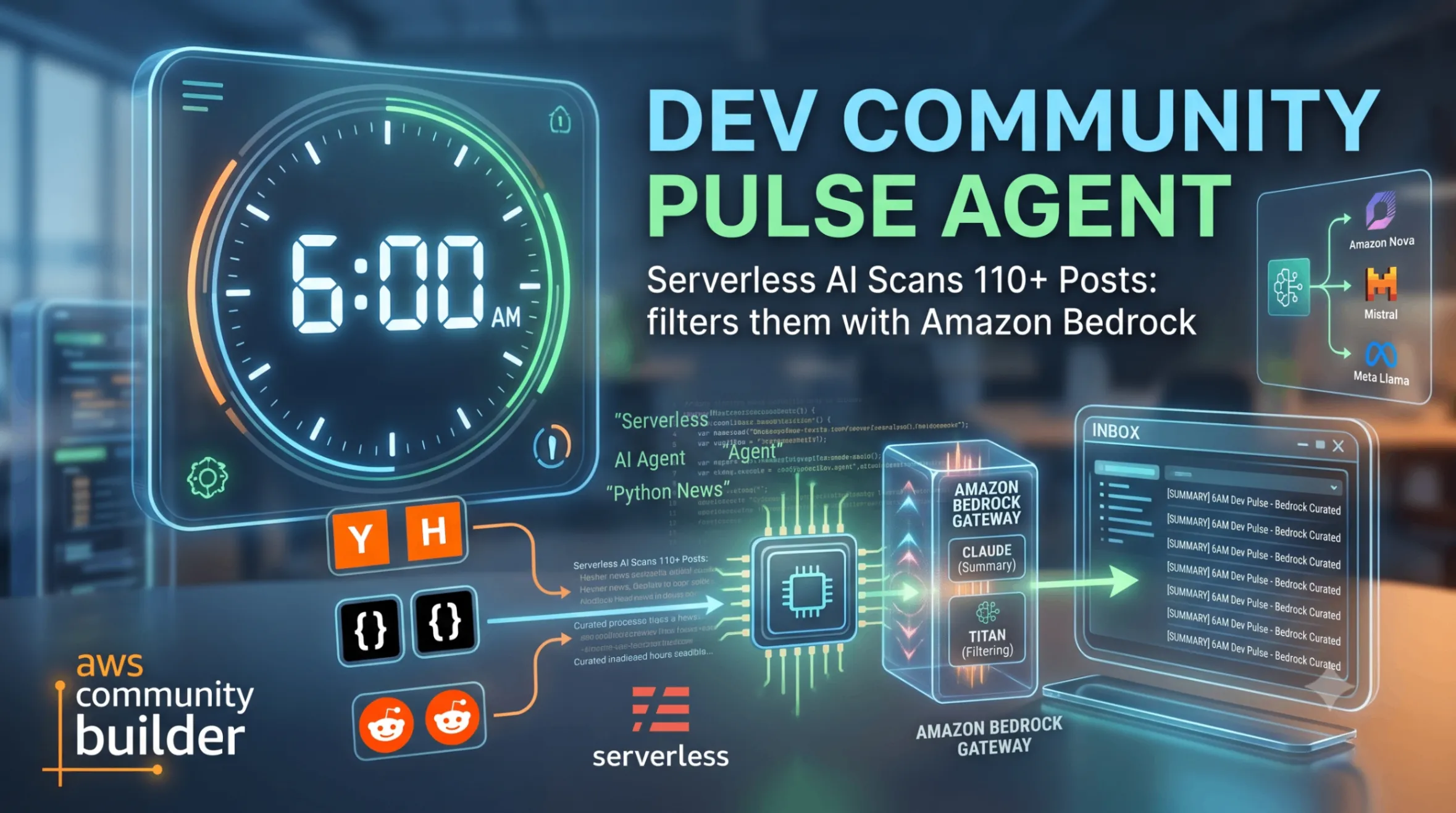
I built a serverless AI agent that wakes up at 6 AM, scans 110+ posts from Hacker News, Dev.to, and Reddit, filters them with Amazon Bedrock, and delivers a curated summary to my inbox — so I never have to manually scroll through developer news again.
The Problem That Ate My Mornings
Every single morning, my routine looked the same. Wake up, grab coffee, open six browser tabs — Hacker News , Dev.to , Reddit r/aws , Reddit r/programming — and spend 30 to 45 minutes scrolling through hundreds of posts trying to find the handful that actually mattered to my work. I work in solutions engineering, and staying current on serverless, agentic AI, LLMs, and AWS is not optional. It is part of the job.
But here is the thing I realized: most of those 45 minutes were wasted. Out of 110+ posts I scanned every morning, maybe 8 to 12 were actually relevant. The rest? Noise. Interesting noise sometimes, but noise nonetheless.
I kept thinking — what if something just read all of this for me while I slept, filtered out the junk, summarized what matters, and had a neat little report waiting in my inbox by the time I woke up?
When the AWS Builder Center Weekend Agent Challenge dropped, I knew exactly what I was going to build.
Vision & What the Agent Does
The Dev Community Pulse Agent is a personal AI-powered agent that runs completely on its own. No buttons to click. No dashboards to open. No manual triggers.
Here is what it does:
- Wakes up at 6:00 AM UTC every day via Amazon EventBridge Scheduler
- Fetches 110+ posts from four developer community sources (Hacker News top stories, Dev.to recent articles, Reddit r/aws hot posts, Reddit r/programming hot posts)
- Filters and summarizes only the posts that match my configured interests using Amazon Bedrock (Nova Micro model)
- Sends a curated HTML email digest to my inbox via Amazon SES , organized by source with clickable links and AI-generated 2-3 sentence summaries
The result? I went from spending 45 minutes every morning scrolling through noise to spending 3 minutes scanning a clean, summarized digest that is already sitting in my inbox when I wake up. And I did not have to do anything — the agent handled everything while I slept.
How I Built It
Starting Point: Keeping It Lean
I had one day. Not a weekend — one day. So I made a few non-negotiable decisions upfront:
- Single Lambda function — no microservices, no Step Functions, no over-engineering
- Python stdlib for HTTP —
urllib.requestinstead of installingrequests, because every dependency you add to Lambda is deployment seconds you lose - AWS SAM for deployment — one
sam build && sam deploy, and the entire stack exists - Static JSON config — no DynamoDB , no Parameter Store . A JSON file in the repo defines my interests and email settings. Simple.
Step 1: The Configuration (2 minutes)
I started with the simplest possible config file. Everything the agent needs to know about me lives in one JSON file:
1
2
3
4
5
{
  "interests": ["aws", "serverless", "python", "ai", "llm", "bedrock", "agentic ai", "automation"],
  "recipient_email": "your-email@example.com",
  "sender_email": "verified-sender@example.com"
}
The config loader validates this at runtime. If fields are missing, it fails fast with a clear error message. No guessing, no silent failures.
1
2
3
4
5
6
7
8
9
10
11
12
13
14
REQUIRED_FIELDS = ["interests", "recipient_email", "sender_email"]

def load_config(config_path: str = "interest_config.json") -> dict:
    with open(config_path, "r") as f:
        config = json.load(f)

    missing = [field for field in REQUIRED_FIELDS if field not in config]
    if missing:
        raise ConfigValidationError(f"Missing required fields: {missing}")

    if not isinstance(config["interests"], list) or len(config["interests"]) == 0:
        raise ConfigValidationError("interests must be a non-empty list")

    return config
JSON for interest topic, recipient, and sender email
Step 2: The Fetchers — Pulling From Four Sources
This is where the agent gathers its raw material. I built four independent fetchers, one for each source:
1
2
3
4
5
6
7
8
9
10
11
12
13
14
15
16
17
def fetch_all_sources() -> list[Post]:
    fetchers = [
        ("Hacker News", fetch_hackernews),
        ("Dev.to", fetch_devto),
        ("Reddit r/aws", fetch_reddit_aws),
        ("Reddit r/programming", fetch_reddit_programming),
    ]

    all_posts: list[Post] = []
    for source_name, fetcher in fetchers:
        try:
            posts = fetcher()
            all_posts.extend(posts)
        except Exception as e:
            logger.error(f"Failed to fetch from {source_name}: {e}")

    return all_posts
The key design decision here: graceful degradation. If Reddit is down, or Hacker News times out, or Dev.to returns a 500 — the agent does not crash. It logs the error and moves on with whatever sources did respond. I only skip the entire digest if ALL four sources fail, which in practice never happens.

CloudWatch Logs 403 and 429 Errors
The Dev.to 403 issue is that their server rejects requests from AWS IP ranges. For a production fix, I could add a proxy, use their official API with an API key, but for now I dropped it — Hacker News and Reddit r/aws are already providing good content for my interests.
Each fetcher normalizes the data into a simple
Post structure:1
2
3
4
class Post(TypedDict):
title: str
url: str
source: strFor Reddit specifically, I had to include a custom User-Agent header — Reddit's JSON API returns 429 (rate limit) errors if you hit it without identifying yourself:
1
2
3
4
5
6
def _fetch_reddit(subreddit: str) -> list[Post]:
    data = _http_get_json(
        f"https://www.reddit.com/r/{subreddit}/hot.json?limit=25",
        headers={"User-Agent": "DevCommunityPulseAgent/1.0"}
    )
    # ... parse children into Post objects
Step 3: The Brain — Amazon Bedrock Filtering and Summarization
This is where the magic happens. I have 110+ raw posts. Most of them are irrelevant to me. I need Bedrock to act as my personal content curator.
I chose Amazon Nova Micro (
amazon.nova-micro-v1:0) for a few reasons:- Fast inference (we are inside a 60-second Lambda timeout)
- Low cost (Free Tier compatible for this volume)
- Good enough at content classification and summarization for short-form content
The design batches posts by source and makes one Bedrock call per source. So instead of 110 API calls (one per post), I make exactly 4 calls. This keeps costs down and stays well within Lambda's time limit.
1
2
3
4
5
6
7
8
9
10
11
12
13
14
15
def filter_and_summarize(posts: list[dict], interests: list[str]) -> list[dict]:
    client = boto3.client("bedrock-runtime")

    posts_by_source = {}
    for post in posts:
        posts_by_source.setdefault(post["source"], []).append(post)

    relevant_posts = []
    for source, source_posts in posts_by_source.items():
        prompt = _build_prompt(source_posts, interests)
        response = _invoke_bedrock(client, prompt)
        filtered = _parse_response(response, source_posts)
        relevant_posts.extend(filtered)

    return relevant_posts
The prompt I send to Bedrock is straightforward — I give it the list of posts, my interests, and ask it to return a JSON array marking each post as relevant or not, with a 2-3 sentence summary for relevant ones:
1
2
3
4
5
6
7
8
9
10
11
12
13
14
15
16
17
18
def _build_prompt(posts: list[dict], interests: list[str]) -> str:
    posts_text = "\n".join(
        f"[{i}] {p['title']} - {p['url']}" for i, p in enumerate(posts)
    )
    interests_text = ", ".join(interests)

    return f"""You are a content curator. Given the following posts and user interests,
identify which posts are relevant and provide a 2-3 sentence summary for each relevant post.

User interests: {interests_text}

Posts:
{posts_text}

Respond in JSON format:
[{{"index": 0, "relevant": true, "summary": "..."}}]

Only include posts in the response. Mark irrelevant posts with "relevant": false."""
One gotcha I hit: Bedrock sometimes wraps its JSON response in markdown code blocks (triple backticks). The parser handles this gracefully:
1
2
3
4
text = response_text.strip()
if text.startswith("```"):
    text = text.split("\n", 1)[1].rsplit("```", 1)[0]
results = json.loads(text)
Step 4: The Email — Beautiful HTML Digest via SES
Once I have the filtered, summarized posts, the email composer groups them by source and builds a clean HTML email:
1
2
3
4
5
6
7
8
9
10
11
12
13
14
15
16
17
18
19
20
21
22
def compose_html(posts: list[dict]) -> str:
    posts_by_source: dict[str, list[dict]] = {}
    for post in posts:
        posts_by_source.setdefault(post["source"], []).append(post)

    sections = []
    for source, source_posts in posts_by_source.items():
        items_html = "".join(
            f'<li><strong><a href="{p["url"]}">{p["title"]}</a></strong>'
            f'<p>{p["summary"]}</p></li>'
            for p in source_posts
        )
        sections.append(f"<h2>{source}</h2><ul>{items_html}</ul>")

    return f"""<!DOCTYPE html>
<html>
<head><meta charset="UTF-8"></head>
<body>
<h1>Dev Community Pulse</h1>
{"".join(sections)}
</body>
</html>"""
I couldn't wait for the next day. I was super excited to see the results, so I invoked the Lambda through CloudShell.
1
2
3
4
5
6
FUNC_NAME=$(aws cloudformation describe-stack-resources
--stack-name dev-community-pulse-agent
--query "StackResources[?ResourceType=='AWS::Lambda::Function'].PhysicalResourceId"
--output text)

aws lambda invoke --function-name $FUNC_NAME --payload '{}' response.json && cat response.json
And wow... no errors! That means I should get an email, right?

Invoke Lambda through CloudShell
Initially, I thought there were no emails. But then I checked the spam folder — and there it was!

Dev Community Pulse Agent - Got Filtered Email by AI
The email subject includes the date automatically:
Dev Community Pulse - 2026-07-20SES sends it, and if delivery fails, it logs the error without crashing the Lambda . The agent's job is done — it will try again tomorrow.
Step 5: The Orchestrator — Lambda Handler
The handler ties everything together in a clean pipeline:
1
2
3
4
5
6
7
8
9
10
11
12
13
14
15
def lambda_handler(event, context):
    config = load_config()

    posts = fetch_all_sources()
    if not posts:
        logger.info("All sources failed or returned no posts, skipping digest")
        return {"statusCode": 200, "body": "No posts fetched"}

    relevant_posts = filter_and_summarize(posts, config["interests"])
    if not relevant_posts:
        logger.info("No relevant content found, skipping email")
        return {"statusCode": 200, "body": "No relevant posts"}

    send_digest_email(relevant_posts, config)
    return {"statusCode": 200, "body": f"Digest sent with {len(relevant_posts)} posts"}
Three possible outcomes, all handled:
- All sources fail → log and exit, no email sent
- Sources work, but nothing is relevant today → log and exit, no spam
- Relevant posts found → compose and send the digest
Step 6: Infrastructure — The SAM Template
The entire infrastructure is defined in one file. Deploy with
sam build && sam deploy --guided and everything exists:1
2
3
4
5
6
7
8
9
10
11
12
13
14
15
16
17
18
19
20
21
22
23
24
25
26
27
28
29
30
31
32
33
34
AWSTemplateFormatVersion: '2010-09-09'
Transform: AWS::Serverless-2016-10-31
Description: Dev Community Pulse Agent
Globals:
Function:
Timeout: 60
MemorySize: 256
Runtime: python3.13
Resources:
PulseAgentFunction:
Type: AWS::Serverless::Function
Properties:
Handler: src/pulse_agent/handler.lambda_handler
CodeUri: .
Architectures:
- x86_64
Policies:
- Statement:
- Effect: Allow
Action:
- bedrock:InvokeModel
Resource: "*"
- Effect: Allow
Action:
- ses:SendEmail
Resource: "*"
Events:
DailySchedule:
Type: ScheduleV2
Properties:
ScheduleExpression: cron(0 6 * * ? *)
State: ENABLEDThat is it. One Lambda, one schedule, two IAM permissions. Total AWS resource count: 3.
After successful
sam build && sam deploy, the CloudFormation output in CLI and resources in the console are as follows:
CloudFormation output cli

CloudFormation Resources after Successful Deployment
And the EventBridge scheduler rule on the AWS console for 6 AM daily.

EventBridge Scheduler rule in AWS Console showing the cron expression
AWS Services Used / Architecture Overview

Dev Community AI Pulse Agent - Daily Digest Email
| AWS Service | Role | Why I Chose It |
|---|---|---|
| AWS Lambda | Runs the agent pipeline | Pay-per-invocation, 1x daily = essentially free |
| Amazon EventBridge Scheduler | Triggers agent at 6 AM UTC daily | Fully managed cron, no EC2 instance running 24/7 |
| Amazon Bedrock (Nova Micro) | AI filtering and summarization | Fast, cheap, no model hosting required |
| Amazon SES | Email delivery | Reliable, pennies per email, integrates natively |
Why this architecture works for a weekend build:
- Zero servers to manage
- No database (stateless — every run is independent)
- Entire stack deploys in under 2 minutes with SAM
- All services fit comfortably within AWS Free Tier for this use case
Challenges I Ran Into (And How I Solved Them)
Challenge 1: Reddit Rate Limiting
My first test run returned 429 errors from Reddit. Turns out Reddit's public JSON API requires a User-Agent header that identifies your application. Without it, you get blocked immediately.
Fix: Added a custom User-Agent header to all Reddit requests:
1
headers={"User-Agent": "DevCommunityPulseAgent/1.0"}
Challenge 2: Bedrock Response Formatting
Bedrock's Nova model sometimes wraps JSON in markdown code blocks. My first parser assumed raw JSON and crashed.
Fix: Added code-block stripping logic before parsing:
1
2
if text.startswith("```"):
    text = text.split("\n", 1)[1].rsplit("```", 1)[0]
Challenge 3: Lambda Timeout with Sequential HN Fetches
Hacker News requires fetching story IDs first, then each story individually. 30 sequential HTTP calls were slow and dangerous for the 60-second timeout.
Fix: Limited to top 30 stories (not all 500) and set a 10-second timeout per HTTP call. In practice, the entire pipeline finishes in 20-35 seconds — well within limits.
Challenge 4: SES Sandbox Email Verification
New SES accounts are in sandbox mode — you can only send to verified email addresses. I nearly got stuck here during the build.
Fix: Verified both sender and recipient email addresses in the SES console before testing. For production use, you would request SES production access.
What I Learned
1. The "Always-On" Mindset Changes How You Build
Building something that runs without you forces a different kind of discipline. You cannot rely on "oh, I will just re-run it manually if it fails." Error handling, graceful degradation, and clear logging become first-class concerns, not afterthoughts.
2. Amazon Bedrock is Ridiculously Easy to Use
No model deployment, no endpoints to manage, no GPU instances to spin up. You call
invoke_model() with a prompt and get a response. The hardest part was designing the right prompt — the infrastructure was trivial.3. Batching is Critical for AI Costs
My first instinct was to send each post individually to Bedrock for evaluation. That would have been 110+ API calls per invocation. Batching by source (4 calls total) reduces cost by ~96% and keeps latency manageable.
4. SAM + EventBridge Scheduler is the Fastest Path to "Always-On"
From "I have code that works locally" to "it runs by itself in the cloud every morning" took exactly one
sam deploy command. The ScheduleV2 event type in SAM handles the EventBridge Scheduler creation, permissions, and Lambda wiring automatically.5. You Do Not Need a Database for Everything
This agent is completely stateless. Every invocation fetches fresh data, processes it, sends the email, and forgets everything. No DynamoDB, no S3, no state management. For a personal daily digest, this is perfect — yesterday's news is already in my inbox archive.
Project Structure
1
2
3
4
5
6
7
8
9
10
11
12
13
14
15
dev-community-pulse-agent/
├── template.yaml              # SAM template (entire infrastructure)
├── interest_config.json       # Your interests and email settings
├── requirements.txt           # Python dependencies (boto3)
├── src/
│   └── pulse_agent/
│       ├── __init__.py
│       ├── handler.py         # Lambda entry point (orchestrator)
│       ├── config.py          # Config loader & validator
│       ├── fetchers.py        # Content source fetchers (HN, Dev.to, Reddit)
│       ├── summarizer.py      # Bedrock AI filtering & summarization
│       └── email_composer.py  # HTML email composition & SES delivery
└── tests/
    ├── unit/                  # Unit tests with mocked AWS services
    └── property/              # Property-based tests (Hypothesis)
How to Deploy It Yourself
1
2
3
4
5
6
7
8
9
10
11
# 1. Clone the repo
git clone [YOUR_REPO_URL]
cd dev-community-pulse-agent

# 2. Edit interest_config.json with your interests and verified SES emails

# 3. Build and deploy
sam build
sam deploy --guided

# 4. Done. The agent runs tomorrow at 6 AM UTC automatically.
Prerequisites:
- AWS account with Bedrock model access enabled for Nova Micro
- SES email addresses verified (sender and recipient)
- AWS SAM CLI installed
- Python 3.13
Link to Repo
GitHub Repository: https://github.com/bdmostafa/dev-community-pulse-agent
Final Thought
The challenge prompt said it best: "The best productivity tool is the one you never even have to open."
That is exactly what this agent is. I built it on a Sunday, deployed it in under a few hours, and since then it has been doing the work I used to do manually every single morning. No dashboard to check. No button to click. Just a clean, summarized digest waiting in my inbox every day at 6 AM.
That is what "always-on" means. The agent works while I sleep.
Enjoyed reading this content? Let the author know!
Your likes, comments, shares, and saves help creators reach more builders.

Loading recommendations
Loading article