
Bye Bye Manually Hosting ArgoCD on EKS — Let's Try AWS's New Managed ArgoCD
EKS now has a managed ArgoCD capability built right into the console, so you can get GitOps running without installing or maintaining ArgoCD yourself. Here's how to set it up end to end using eksctl and IAM Identity Center.

If you've ever set up GitOps on Kubernetes, you know the drill. Install ArgoCD with Helm, apply a pile of manifests, keep an eye on the ArgoCD pods, figure out storage and HA, and then repeat all of that again every time there's an upgrade. It works, but it's one more thing to babysit.
AWS quietly changed that. EKS now has something called EKS Capabilities, and one of the first capabilities available is a fully managed ArgoCD. You don't install anything inside your cluster. You enable it, AWS runs and manages the actual ArgoCD control plane outside your cluster, and you just point it at your Git repo.
I wanted to try this myself instead of just reading about it, so in this article I'm going to walk through the entire thing end to end — creating the cluster, enabling the ArgoCD capability, wiring it up to IAM Identity Center for SSO, and deploying a sample app through it. Every command is here, and I'll be filling in the actual outputs as I run them.
My setup for this walkthrough (Windows, PowerShell as the terminal):
aws configure list-profilesterraform-dev
eksctl version0.224.0
kubectl versionClient Version: v1.33.0Kustomize Version: v5.6.0
$env:AWS_PROFILE="terraform-dev"
I already have IAM Identity Center enabled in my account, so I'll skip that setup and go straight to using it. I'm building everything in
us-east-1 .Let's go.
What we're building
- Create an EKS cluster with
eksctl
- Turn on the
API_AND_CONFIG_MAPauth mode (required for the capability)
- Create the IAM Capability Role that ArgoCD will run as
- Grab our Identity Center details for SSO + RBAC
- Create the ArgoCD capability using
eksctl
- Verify it's active and open the ArgoCD UI
- Register our own cluster as a deployment target
- Deploy a demo app (the classic ArgoCD guestbook) and watch GitOps do its thing
Step 1: Create the EKS cluster
Nothing fancy here — a small managed node group is plenty for this demo.
eksctl create cluster ` --name argocd-demo ` --region us-east-1 ` --version 1.33 ` --nodegroup-name standard-workers ` --node-type t3.medium ` --nodes 2 ` --nodes-min 1 ` --nodes-max 3 ` --managed
This takes somewhere around 15-20 minutes, so grab a coffee.
Output:
2026-07-18 16:50:54 [ℹ]  eksctl version 0.224.0
2026-07-18 16:50:54 [ℹ]  using region us-east-1
2026-07-18 16:51:06 [ℹ]  setting availability zones to [us-east-1f us-east-1a]
2026-07-18 16:51:06 [ℹ]  subnets for us-east-1f - public:192.168.0.0/19 private:192.168.64.0/19
2026-07-18 16:51:06 [ℹ]  subnets for us-east-1a - public:192.168.32.0/19 private:192.168.96.0/19
2026-07-18 16:51:06 [ℹ]  nodegroup "standard-workers" will use "" [AmazonLinux2023/1.33]
2026-07-18 16:51:06 [!]  Auto Mode will be enabled by default in an upcoming release of eksctl. This means managed node groups and managed networking add-ons will no longer be created by default. To maintain current behavior, explicitly set 'autoModeConfig.enabled: false' in your cluster configuration. Learn more: https://eksctl.io/usage/auto-mode/
2026-07-18 16:51:06 [ℹ]  using Kubernetes version 1.33
2026-07-18 16:51:06 [ℹ]  creating EKS cluster "argocd-demo" in "us-east-1" region with managed nodes
2026-07-18 16:51:06 [ℹ]  will create 2 separate CloudFormation stacks for cluster itself and the initial managed nodegroup
2026-07-18 16:51:06 [ℹ]  if you encounter any issues, check CloudFormation console or try 'eksctl utils describe-stacks --region=us-east-1 --cluster=argocd-demo'
2026-07-18 16:51:06 [ℹ]  Kubernetes API endpoint access will use default of {publicAccess=true, privateAccess=false} for cluster "argocd-demo" in "us-east-1"
2026-07-18 16:51:06 [ℹ]  CloudWatch logging will not be enabled for cluster "argocd-demo" in "us-east-1"
2026-07-18 16:51:06 [ℹ]  you can enable it with 'eksctl utils update-cluster-logging --enable-types={SPECIFY-YOUR-LOG-TYPES-HERE (e.g. all)} --region=us-east-1 --cluster=argocd-demo'
2026-07-18 16:51:06 [ℹ]  default addons metrics-server, vpc-cni, kube-proxy, coredns were not specified, will install them as EKS addons
2026-07-18 16:51:06 [ℹ]
2 sequential tasks: { create cluster control plane "argocd-demo",
    2 sequential sub-tasks: {
        2 sequential sub-tasks: {
            1 task: { create addons },
            wait for control plane to become ready,
        },
        create managed nodegroup "standard-workers",
    }
}
2026-07-18 16:51:06 [ℹ]  building cluster stack "eksctl-argocd-demo-cluster"
2026-07-18 16:51:13 [ℹ]  deploying stack "eksctl-argocd-demo-cluster"
2026-07-18 16:51:43 [ℹ]  waiting for CloudFormation stack "eksctl-argocd-demo-cluster"
2026-07-18 16:52:29 [ℹ]  waiting for CloudFormation stack "eksctl-argocd-demo-cluster"
2026-07-18 16:53:46 [ℹ]  waiting for CloudFormation stack "eksctl-argocd-demo-cluster"
2026-07-18 16:55:37 [ℹ]  waiting for CloudFormation stack "eksctl-argocd-demo-cluster"
2026-07-18 16:56:49 [ℹ]  waiting for CloudFormation stack "eksctl-argocd-demo-cluster"
2026-07-18 16:58:53 [!]  recommended policies were found for "vpc-cni" addon, but since OIDC is disabled on the cluster, eksctl cannot configure the requested permissions; the recommended way to provide IAM permissions for "vpc-cni" addon is via pod identity associations; after addon creation is completed, add all recommended policies to the config file, under `addon.PodIdentityAssociations`, and run `eksctl update addon`
2026-07-18 16:58:53 [ℹ]  creating addon: vpc-cni
2026-07-18 16:58:54 [ℹ]  successfully created addon: vpc-cni
2026-07-18 16:58:55 [ℹ]  creating addon: kube-proxy
2026-07-18 16:58:55 [ℹ]  successfully created addon: kube-proxy
2026-07-18 16:58:56 [ℹ]  creating addon: coredns
2026-07-18 16:58:57 [ℹ]  successfully created addon: coredns
2026-07-18 16:59:27 [!]  API server is unreachable
2026-07-18 17:00:14 [ℹ]  building managed nodegroup stack "eksctl-argocd-demo-nodegroup-standard-workers"
2026-07-18 17:00:53 [ℹ]  deploying stack "eksctl-argocd-demo-nodegroup-standard-workers"
2026-07-18 17:00:54 [ℹ]  waiting for CloudFormation stack "eksctl-argocd-demo-nodegroup-standard-workers"
2026-07-18 17:02:21 [ℹ]  waiting for CloudFormation stack "eksctl-argocd-demo-nodegroup-standard-workers"
2026-07-18 17:04:12 [ℹ]  waiting for CloudFormation stack "eksctl-argocd-demo-nodegroup-standard-workers"
2026-07-18 17:04:13 [ℹ]  waiting for the control plane to become ready
2026-07-18 17:04:14 [✔]  saved kubeconfig as "C:\\Users\\Krish\\.kube\\config"
2026-07-18 17:04:14 [ℹ]  no tasks
2026-07-18 17:04:14 [✔]  all EKS cluster resources for "argocd-demo" have been created
2026-07-18 17:04:36 [ℹ]  nodegroup "standard-workers" has 2 node(s)
2026-07-18 17:04:36 [ℹ]  node "ip-192-168-22-12.ec2.internal" is ready
2026-07-18 17:04:36 [ℹ]  node "ip-192-168-56-79.ec2.internal" is ready
2026-07-18 17:04:36 [ℹ]  waiting for at least 1 node(s) to become ready in "standard-workers"
2026-07-18 17:04:36 [ℹ]  nodegroup "standard-workers" has 2 node(s)
2026-07-18 17:04:36 [ℹ]  node "ip-192-168-22-12.ec2.internal" is ready
2026-07-18 17:04:36 [ℹ]  node "ip-192-168-56-79.ec2.internal" is ready
2026-07-18 17:04:36 [✔]  created 1 managed nodegroup(s) in cluster "argocd-demo"
2026-07-18 17:05:34 [ℹ]  creating addon: metrics-server
2026-07-18 17:05:34 [ℹ]  successfully created addon: metrics-server
2026-07-18 17:05:44 [ℹ]  kubectl command should work with "C:\\Users\\Krish\\.kube\\config", try 'kubectl get nodes'
2026-07-18 17:05:44 [✔]  EKS cluster "argocd-demo" in "us-east-1" region is ready
Once it's done, let's confirm
kubectl can talk to the cluster:kubectl get nodes
Output:
NAME                            STATUS   ROLES    AGE     VERSION
ip-192-168-22-12.ec2.internal   Ready    <none>   7m34s   v1.33.13-eks-8f14419
ip-192-168-56-79.ec2.internal   Ready    <none>   7m34s   v1.33.13-eks-8f14419
Step 2: Switch the cluster auth mode to API_AND_CONFIG_MAP
The ArgoCD capability relies on EKS Access Entries, which means the cluster needs to support the newer API-based authentication mode, not just the old
aws-auth ConfigMap. If your cluster was created recently with a newer eksctl , this might already be set — but let's check and set it explicitly anyway.aws eks update-cluster-config ` --name argocd-demo ` --region us-east-1 ` --access-config authenticationMode=API_AND_CONFIG_MAP ` --profile terraform-dev
Output:
by default auth mode will be API_AND_CONFIG_MAP. If not there then apply above commandThis is an async update, so let's poll until it's done:
aws eks describe-update ` --name argocd-demo ` --region us-east-1 ` --update-id <update-id-from-previous-output> ` --profile terraform-dev
Once that shows
Successful , double check the auth mode stuck:aws eks describe-cluster ` --name argocd-demo ` --region us-east-1 ` --query "cluster.accessConfig" ` --profile terraform-dev
Output:
{
    "authenticationMode": "API_AND_CONFIG_MAP"
}
You should see
"authenticationMode": "API_AND_CONFIG_MAP" in there.
Step 3: Create the IAM Capability Role
This is the IAM role that the managed ArgoCD service will assume to operate on your behalf. It's a dedicated trust relationship with the EKS capabilities service — not your everyday IAM role.
Create the trust policy:
@'
{
  "Version": "2012-10-17",
  "Statement": [
    {
      "Effect": "Allow",
      "Principal": {
        "Service": "capabilities.eks.amazonaws.com"
      },
      "Action": [
        "sts:AssumeRole",
        "sts:TagSession"
      ]
    }
  ]
}
'@ | Set-Content -Path .\argocd-trust-policy.json
Now create the role:
aws iam create-role ` --role-name ArgoCDCapabilityRole ` --assume-role-policy-document file://argocd-trust-policy.json ` --profile terraform-dev
Output:
{
    "Role": {
        "Path": "/",
        "RoleName": "ArgoCDCapabilityRole",
        "RoleId": "AROATNICEIHWAUO63EITM",
        "Arn": "arn:aws:iam::234617061868:role/ArgoCDCapabilityRole",
        "CreateDate": "2026-07-18T11:47:27+00:00",
        "AssumeRolePolicyDocument": {
            "Version": "2012-10-17",
            "Statement": [
                {
                    "Effect": "Allow",
                    "Principal": {
                        "Service": "capabilities.eks.amazonaws.com"
                    },
                    "Action": [
                        "sts:AssumeRole",
                        "sts:TagSession"
                    ]
                }
            ]
        }
    }
}
For this basic demo, we don't need to attach any extra policies to this role. If you later want ArgoCD to pull private repos via CodeConnections, or read secrets from Secrets Manager, you'd attach those permissions here.
Step 4: Grab your Identity Center details
Since IAM Identity Center is already enabled in my account, I just need its instance ARN and the user ID of whoever should get admin access in ArgoCD.
Get the Identity Center instance ARN and region:
aws sso-admin list-instances --query 'Instances[0].InstanceArn' --output text
Output:
arn:aws:sso:::instance/ssoins-72232c763e125f28Get the Identity Store ID (needed for the next command):
aws sso-admin list-instances --query 'Instances[0].IdentityStoreId' --output text
Output:
d-9066541af9Now look up the user ID for the person who should get
ADMIN access in ArgoCD (replace your-username with your actual Identity Center username):aws identitystore list-users ` --identity-store-id <identity-store-id-from-above> ` --query 'Users[?UserName==`your-username`].UserId' ` --output text
Output:
0478e498-40e1-70de-e66e-b49721e656b7If you does not have a username you can create by using below.
aws identitystore create-user `
  --identity-store-id d-9066541af9 `
  --user-name krishargocd_demo `
  --display-name "Krish ArgoCD Demo" `
  --name GivenName=Krish,FamilyName=ArgoCD `
  --emails Value=krishargocd_demo@gmail.com,Type=Work,Primary=true `
  --profile terraform-dev
Keep the instance ARN, the region your Identity Center instance lives in, and this user ID handy — they go into the config file in the next step.
Step 5: Create the ArgoCD capability with eksctl
This is the actual "enable managed ArgoCD" step, done declaratively through an
eksctl config file instead of clicking through the console.Create
argocd-capability.yaml :apiVersion: eksctl.io/v1alpha5kind: ClusterConfig
metadata: name: argocd-demo region: us-east-1
capabilities: - name: my-argocd type: ARGOCD roleArn: arn:aws:iam::<your-account-id>:role/ArgoCDCapabilityRole deletePropagationPolicy: RETAIN configuration: argocd: awsIdc: idcInstanceArn: <your-identity-center-instance-arn> idcRegion: us-east-1 rbacRoleMappings: - role: ADMIN identities: - id: <your-user-id-from-step-4> type: SSO_USER
A couple of notes on this file:
-
roleArnis the ArgoCDCapabilityRole we created in Step 3.
-
rbacRoleMappingsis how ArgoCD RBAC maps to your Identity Center users — you can add multiple users, or usetype: SSO_GROUPwith a group ID instead if you want to grant access to a whole team at once.
- Available roles are
ADMIN,EDITOR, andVIEWER.
Now apply it:
eksctl create capability -f argocd-capability.yaml --profile terraform-dev
Output:
2026-07-18 17:37:46 [ℹ]  creating capability my-argocd
2026-07-18 17:37:50 [ℹ]  deploying stack "eksctl-argocd-demo-capability-AVUKGWUORVEQMYLQVRTVYBGVYK5QQQSX"
2026-07-18 17:37:50 [ℹ]  waiting for CloudFormation stack "eksctl-argocd-demo-capability-AVUKGWUORVEQMYLQVRTVYBGVYK5QQQSX"
2026-07-18 17:38:22 [ℹ]  waiting for CloudFormation stack "eksctl-argocd-demo-capability-AVUKGWUORVEQMYLQVRTVYBGVYK5QQQSX"
2026-07-18 17:38:54 [ℹ]  waiting for CloudFormation stack "eksctl-argocd-demo-capability-AVUKGWUORVEQMYLQVRTVYBGVYK5QQQSX"
2026-07-18 17:40:54 [ℹ]  waiting for CloudFormation stack "eksctl-argocd-demo-capability-AVUKGWUORVEQMYLQVRTVYBGVYK5QQQSX"
2026-07-18 17:41:52 [ℹ]  waiting for CloudFormation stack "eksctl-argocd-demo-capability-AVUKGWUORVEQMYLQVRTVYBGVYK5QQQSX"
2026-07-18 17:42:45 [ℹ]  waiting for CloudFormation stack "eksctl-argocd-demo-capability-AVUKGWUORVEQMYLQVRTVYBGVYK5QQQSX"
2026-07-18 17:43:46 [ℹ]  waiting for CloudFormation stack "eksctl-argocd-demo-capability-AVUKGWUORVEQMYLQVRTVYBGVYK5QQQSX"
2026-07-18 17:45:36 [ℹ]  waiting for CloudFormation stack "eksctl-argocd-demo-capability-AVUKGWUORVEQMYLQVRTVYBGVYK5QQQSX"
This command returns almost immediately, but the capability itself takes a few minutes to actually spin up in the background.
Step 6: Verify the capability is active
Poll the capability status until it flips to
ACTIVE :eksctl get capability ` --region us-east-1 ` --cluster argocd-demo ` --name my-argocd
Output:
NAME            TYPE    STATUS  VERSION
my-argocd       ARGOCD  ACTIVE  3.3.10-eks-3
Once it's active, confirm ArgoCD's custom resources showed up in your cluster:
kubectl api-resources | Select-String "argoproj.io"
Output:
Krish ~ kubectl api-resources | Select-String "argoproj.io"
applications app,apps argoproj.io/v1alpha1 true Application
applicationsets appset,appsets argoproj.io/v1alpha1 true ApplicationSet
appprojects appproj,appprojs argoproj.io/v1alpha1 true AppProject
If you see those two resource types, ArgoCD is live and talking to your cluster.
Step 7: Open the ArgoCD UI and log in with SSO
This part's fully console-based:
- Open the Amazon EKS console
- Select the
argocd-democluster
- Go to the Capabilities tab
- Click Argo CD
- Click Open Argo CD UI
It'll bounce you through your IAM Identity Center login. Log in with the same user you mapped to
ADMIN in Step 5, and you should land straight in the ArgoCD dashboard — empty for now, but it's really there, hosted and managed by AWS, and you never ran a single helm install .
Step 8: Register your cluster as a deployment target
Here's a detail that trips people up: the managed ArgoCD capability does not automatically register the cluster it's running on as a deployment target. You have to register it yourself, even if you want ArgoCD to deploy back into the same cluster.
Create
local-cluster.yaml :apiVersion: v1kind: Secretmetadata: name: local-cluster namespace: argocd labels: argocd.argoproj.io/secret-type: clusterstringData: name: in-cluster server: arn:aws:eks:us-east-1:<your-account-id>:cluster/argocd-demo project: default
A couple of things worth calling out:
- Notice the
serverfield uses the EKS cluster ARN, not a Kubernetes API URL. The managed capability identifies clusters by ARN, and the usualhttps://kubernetes.default.svctrick from self-hosted ArgoCD does not work here.
- I'm naming it
in-clustersince that's the conventional name most ArgoCD examples (including the one we're about to deploy) expect.
Apply it:
kubectl apply -f local-cluster.yaml
Output:
secret/local-cluster createdVerify it registered:
kubectl get secrets -n argocd -l argocd.argoproj.io/secret-type=cluster
Output:
NAME            TYPE     DATA   AGE
local-cluster   Opaque   3      43s
One more thing — by default, the Access Entry that gets created for the Capability Role has zero Kubernetes RBAC permissions attached. For this demo, I keep it simple and grant cluster-admin access via the built-in access policy (not what you'd want in production):
aws eks associate-access-policy ` --region us-east-1 ` --cluster-name argocd-demo ` --principal-arn arn:aws:iam::<your-account-id>:role/ArgoCDCapabilityRole ` --policy-arn arn:aws:eks::aws:cluster-access-policy/AmazonEKSClusterAdminPolicy ` --access-scope type=cluster ` --profile terraform-dev
Output:
{
    "clusterName": "argocd-demo",
    "principalArn": "arn:aws:iam::234617061868:role/ArgoCDCapabilityRole",
    "associatedAccessPolicy": {
        "policyArn": "arn:aws:eks::aws:cluster-access-policy/AmazonEKSClusterAdminPolicy",
        "accessScope": {
            "type": "cluster",
            "namespaces": []
        },
        "associatedAt": "2026-07-18T18:03:29.385000+05:30",
        "modifiedAt": "2026-07-18T18:03:29.385000+05:30"
    }
}
Step 9: Deploy a demo app through GitOps
Time for the fun part. Let's deploy ArgoCD's own example guestbook app, pointed straight at the public
argoproj/argocd-example-apps repo.Create
guestbook-app.yaml :apiVersion: argoproj.io/v1alpha1kind: Applicationmetadata: name: guestbook namespace: argocdspec: project: default source: repoURL: https://github.com/argoproj/argocd-example-apps targetRevision: HEAD path: guestbook destination: name: in-cluster namespace: default syncPolicy: automated: selfHeal: true syncOptions: - CreateNamespace=true
Apply it:
kubectl apply -f guestbook-app.yaml
Output:
application.argoproj.io/guestbook createdCheck the Application's status:
kubectl get application guestbook -n argocd
Output:
NAME        SYNC STATUS   HEALTH STATUS
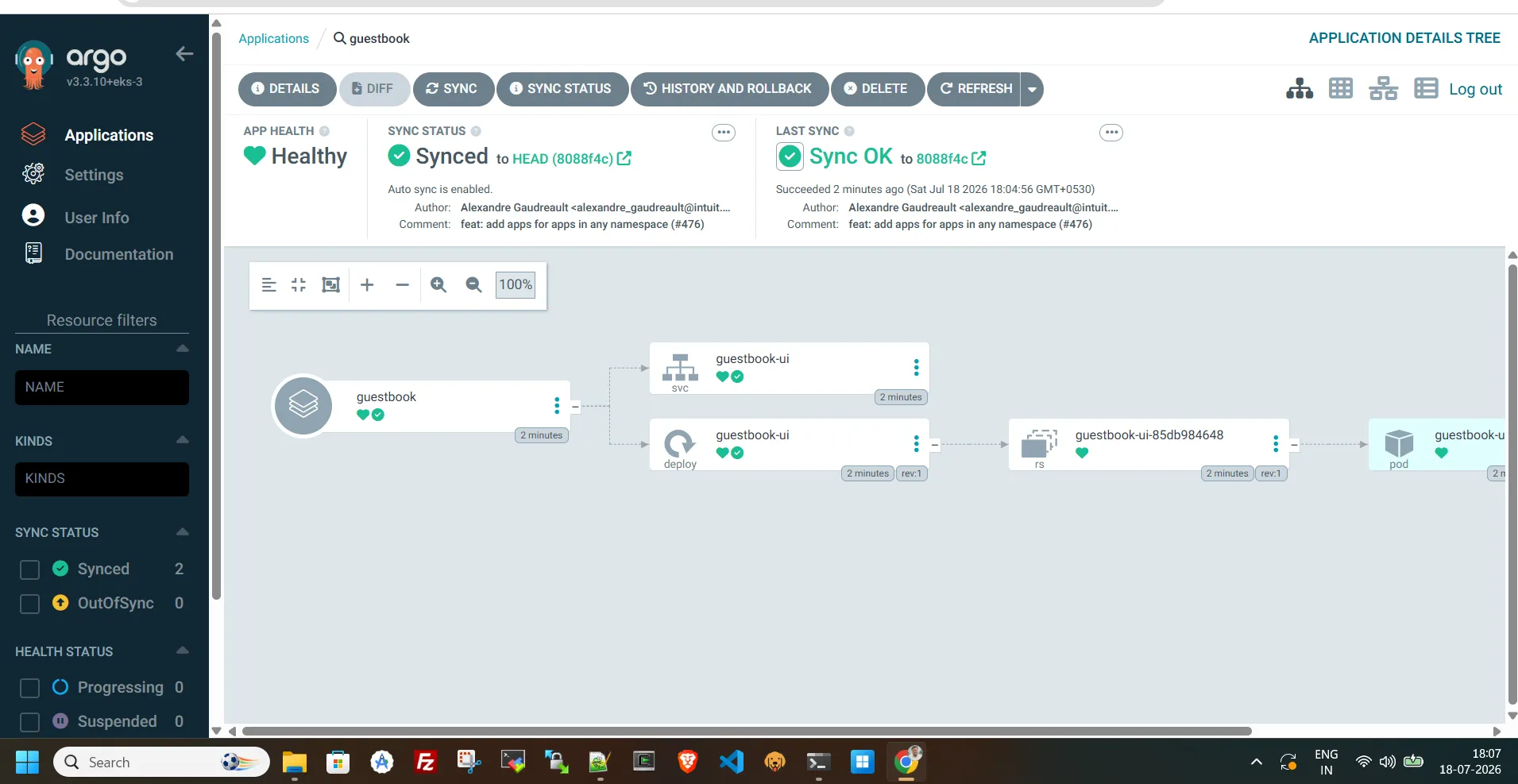
guestbook   Synced        Healthy
And because we turned on
automated sync, ArgoCD should pick up the manifests and deploy them on its own within a few seconds. Confirm the pods actually landed in your cluster:kubectl get pods -n default
Output:
NAME                            READY   STATUS    RESTARTS   AGE
guestbook-ui-85db984648-dwxvq   1/1     Running   0          63s
Pop back into the ArgoCD UI and you'll see the guestbook application with its full resource tree — Deployment, Service, ReplicaSet, Pods — all green and synced.
That's it. No Helm chart, no
kubectl apply on ArgoCD's own manifests, no managing pods or storage for ArgoCD itself. AWS is running the control plane, you're just describing what you want deployed.
What you get out of the box
- A fully managed ArgoCD dashboard, hosted and patched by AWS
- SSO login through IAM Identity Center — no separate ArgoCD admin password to manage
- A cluster that's GitOps-ready in minutes instead of an afternoon
What you're trading away
Nothing's free, and this is no exception:
- Less customization — things like custom Config Management Plugins, custom Lua health checks, the Notifications controller, ArgoCD Image Updater, and custom SSO providers aren't supported today.
- It runs outside your cluster — ArgoCD's control plane lives in an AWS-owned account, not inside your VPC. That's actually a nice thing for private clusters (no VPC peering needed), but it's a mental shift if you're used to
kubectl -n argocd get pods.
- The
argocdCLI needs a bit of getting used to — application names need the namespace prefix (argocd/guestbook), and cluster registration flows are slightly different from self-hosted setups.
- You still have to register clusters manually — including the one ArgoCD itself is "attached" to.
- It's an extra line item — this is a managed AWS service, so it comes with its own cost on top of your EKS cluster.
Final thoughts
If your team just wants GitOps working without owning the operational burden of ArgoCD itself — upgrades, HA, storage, patching — this managed capability removes a genuinely annoying chunk of platform work. If you're running a highly customized ArgoCD setup with plugins and custom health checks, you'll probably want to stick with self-hosting for now.
Either way, it's a solid sign of where AWS is taking EKS — less "here's Kubernetes, go build your platform," more "here are the platform pieces, already built." GitOps on EKS just got a lot less manual.
Enjoyed reading this content? Let the author know!
Your likes, comments, shares, and saves help creators reach more builders.

Loading recommendations
Loading article