
CI/CD Pipeline for Infrastructure as Code with Drift Detection on AWS
DevOps engineer and cloud architect specializing in AWS infrastructure automation, Kubernetes orchestration, and Infrastructure-as-Code with Terraform and CloudFormation. I build and document production-grade CI/CD pipelines, drift detection systems, and cost-optimized AWS architectures, and share hands-on tutorials, ebooks, and open-source tooling for the DevOps community.

Infrastructure drift silently breaks the promise of "infrastructure as code" — and a pipeline that only deploys but never detects drift is only half a solution. This guide walks through building a production-grade CI/CD pipeline for Terraform-based AWS infrastructure that automatically detects, alerts on, and remediates drift.
Why Drift Detection Matters
Configuration drift happens when the actual state of your AWS resources diverges from what's defined in your Terraform code — typically from console hotfixes, emergency changes, or another team's automation touching the same resources. IaC is meant to eliminate manual provisioning steps and keep infrastructure consistent, but it only delivers that benefit if drift is caught early. Left undetected, drift causes failed deployments, security gaps, and compliance violations that accumulate silently until an incident forces a reconciliation.
The goal of this pipeline is threefold: continuously validate that live AWS infrastructure matches the Terraform state, alert engineers the moment drift is found, and provide an automated (or semi-automated) path back to the declared state.
Architecture Overview
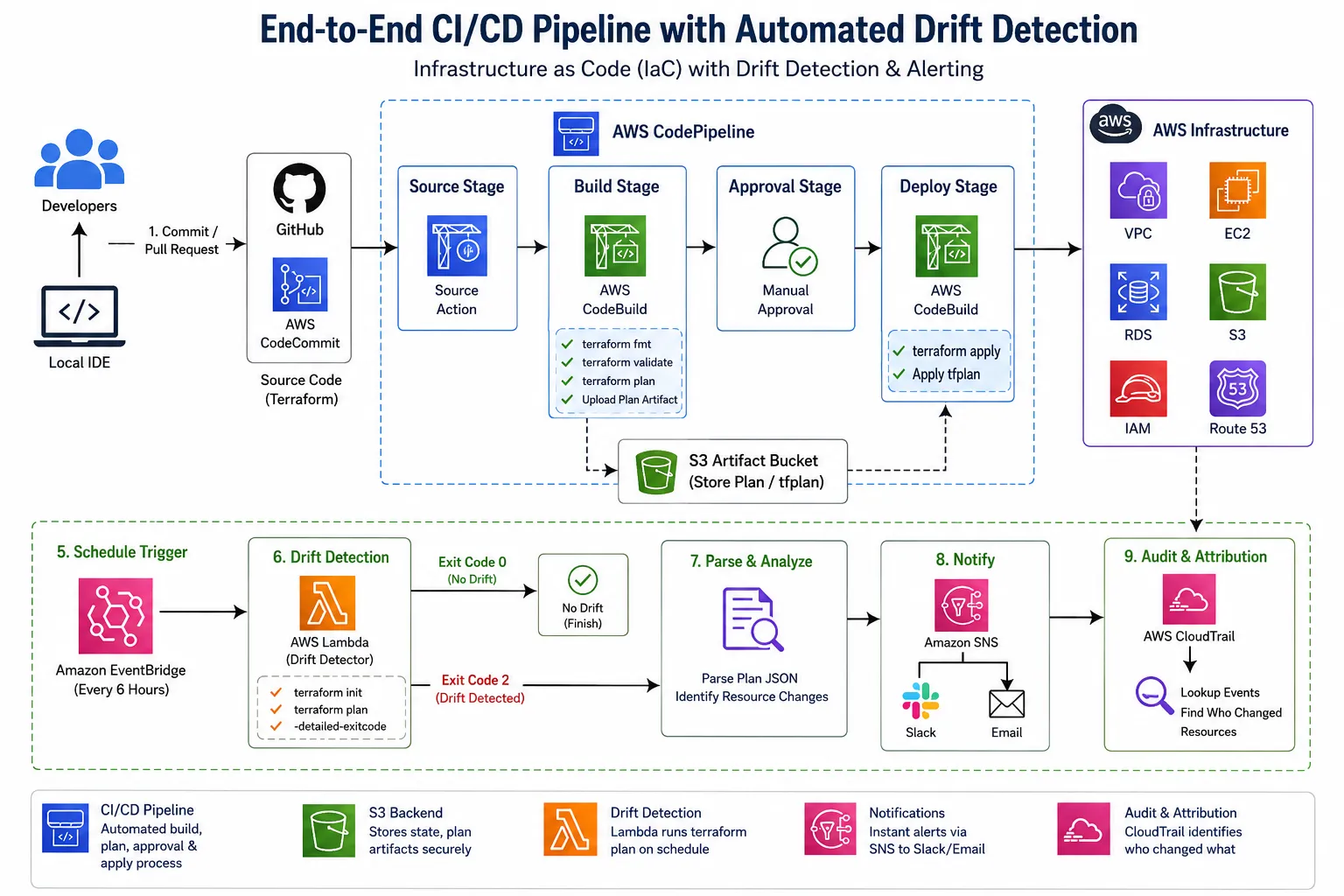
The pipeline combines standard AWS CI/CD services with a scheduled drift-detection job and a Python-based analysis layer:

- Source control: Git repository (GitHub or CodeCommit) holding Terraform modules
- CI stage: AWS CodeBuild running
terraform fmt,validate, andplanon every pull request
- CD stage: AWS CodePipeline orchestrating build → plan approval → apply
- Drift detection: A scheduled EventBridge rule triggering a Lambda function (or CodeBuild job) that runs
terraform plan -detailed-exitcodeand parses results
- Alerting: SNS notifications and a Python script that posts structured drift reports to Slack/email
- State backend: S3 with DynamoDB locking for Terraform state
- Audit trail: CloudTrail feeding drift correlation to identify who caused the drift
This mirrors AWS's recommended pattern of using CodeCommit, CodeBuild, CodePipeline, and CodeDeploy together, with CDK/CloudFormation or Terraform driving the actual provisioning.
Step 1: Structuring the Terraform Project

A clean module layout keeps drift detection scoped and manageable. Here's a typical structure for an AWS VPC + EC2 + RDS stack:
infra/
├── modules/
│   ├── vpc/
│   ├── ec2/
│   └── rds/
├── environments/
│   ├── dev/
│   │   ├── main.tf
│   │   ├── backend.tf
│   │   └── terraform.tfvars
│   └── prod/
│       ├── main.tf
│       ├── backend.tf
│       └── terraform.tfvars
└── scripts/
    └── drift_check.py
backend.tf (S3 remote state with locking):
terraform {
  backend "s3" {
    bucket         = "<your-org>-tfstate-prod"
    key            = "infra/prod/terraform.tfstate"
    region         = "ap-south-1"
    dynamodb_table = "terraform-locks"
    encrypt        = true
  }
}
modules/vpc/main.tf (core network resource, kept minimal for illustration):
resource "aws_vpc" "main" {
  cidr_block           = var.vpc_cidr
  enable_dns_support   = true
  enable_dns_hostnames = true

  tags = {
    Name        = "${var.env}-vpc"
    ManagedBy   = "terraform"
    Environment = var.env
  }
}

resource "aws_subnet" "public" {
  count                   = length(var.public_subnet_cidrs)
  vpc_id                  = aws_vpc.main.id
  cidr_block              = var.public_subnet_cidrs[count.index]
  map_public_ip_on_launch = true
  availability_zone       = var.azs[count.index]

  tags = {
    Name = "${var.env}-public-${count.index}"
  }
}
Tagging every resource with
ManagedBy = "terraform" is critical — it becomes the filter your drift-detection script uses to distinguish Terraform-managed resources from manually created ones.Step 2: The CI Stage — Validate Before Merge
Every pull request should trigger format checks, validation, and a plan preview. Using AWS CodeBuild with a
buildspec.yml :version: 0.2
phases:
install:
commands:
- curl -o terraform.zip https://releases.hashicorp.com/terraform/1.8.0/terraform_1.8.0_linux_amd64.zip
- unzip terraform.zip -d /usr/local/bin/
pre_build:
commands:
- cd infra/environments/$ENV
- terraform init -input=false
- terraform fmt -check -recursive
build:
commands:
- terraform validate
- terraform plan -out=tfplan -input=false
- terraform show -json tfplan > plan.json
post_build:
commands:
- aws s3 cp plan.json s3://<your-org>-tfplans/$ENV/$CODEBUILD_BUILD_ID.json
artifacts:
files:
- infra/environments/$ENV/tfplan
- infra/environments/$ENV/plan.jsonThis produces a JSON representation of the plan that later gets parsed programmatically — both for human-readable PR comments and for feeding into the drift-comparison logic.
Step 3: The CD Stage — CodePipeline with Manual Approval
CodePipeline stitches together source, build, manual approval, and apply stages. Below is the CLI-based setup using the AWS CLI (a common preference for engineers who script infra rather than click through the console):
aws codepipeline create-pipeline --cli-input-json file://pipeline-config.jsonpipeline-config.json (key stages only):
{
  "pipeline": {
    "name": "iac-drift-pipeline-prod",
    "roleArn": "arn:aws:iam::123456789012:role/CodePipelineServiceRole",
    "artifactStore": {
      "type": "S3",
      "location": "<your-org>-pipeline-artifacts"
    },
    "stages": [
      {
        "name": "Source",
        "actions": [{
          "name": "GitHubSource",
          "actionTypeId": {
            "category": "Source",
            "owner": "AWS",
            "provider": "CodeStarSourceConnection",
            "version": "1"
          },
          "configuration": {
            "ConnectionArn": "arn:aws:codestar-connections:ap-south-1:123456789012:connection/xxxx",
            "FullRepositoryId": "<your-org>/aws-iac-infra",
            "BranchName": "main"
          },
          "outputArtifacts": [{ "name": "SourceOutput" }]
        }]
      },
      {
        "name": "Plan",
        "actions": [{
          "name": "TerraformPlan",
          "actionTypeId": {
            "category": "Build",
            "owner": "AWS",
            "provider": "CodeBuild",
            "version": "1"
          },
          "configuration": { "ProjectName": "terraform-plan-prod" },
          "inputArtifacts": [{ "name": "SourceOutput" }],
          "outputArtifacts": [{ "name": "PlanOutput" }]
        }]
      },
      {
        "name": "Approval",
        "actions": [{
          "name": "ManualApproval",
          "actionTypeId": {
            "category": "Approval",
            "owner": "AWS",
            "provider": "Manual",
            "version": "1"
          },
          "configuration": {
            "NotificationArn": "arn:aws:sns:ap-south-1:123456789012:pipeline-approvals",
            "CustomData": "Review Terraform plan before applying to prod"
          }
        }]
      },
      {
        "name": "Apply",
        "actions": [{
          "name": "TerraformApply",
          "actionTypeId": {
            "category": "Build",
            "owner": "AWS",
            "provider": "CodeBuild",
            "version": "1"
          },
          "configuration": { "ProjectName": "terraform-apply-prod" },
          "inputArtifacts": [{ "name": "PlanOutput" }]
        }]
      }
    ]
  }
}
The apply-stage
buildspec.yml simply runs terraform apply tfplan -input=false using the exact plan artifact validated in the previous stage — ensuring what was reviewed is exactly what gets applied, with no drift introduced between plan and apply.Step 4: Automated Drift Detection
This is the core of the system. AWS CodePipeline handles deployment, but detecting drift after deployment requires a separate, scheduled process. There are two established approaches: continuous scheduled
terraform plan runs, and CloudTrail-based real-time detection.
Scheduled Terraform Plan via Lambda + EventBridge
An EventBridge rule triggers a Lambda function every few hours that runs
terraform plan -detailed-exitcode against each environment. Exit code 2 means drift was detected; 0 means no changes; 1 means an error.drift_lambda_handler.py:
import subprocess
import json
import boto3
import os

sns = boto3.client("sns")
SNS_TOPIC = os.environ["DRIFT_TOPIC_ARN"]

def run_terraform_plan(env_dir):
    subprocess.run(["terraform", "init", "-input=false"], cwd=env_dir, check=True)
    result = subprocess.run(
        ["terraform", "plan", "-detailed-exitcode", "-out=driftplan", "-input=false"],
        cwd=env_dir
    )
    return result.returncode

def parse_plan_summary(env_dir):
    with open(f"{env_dir}/driftplan.json", "w") as out:
        subprocess.run(
            ["terraform", "show", "-json", "driftplan"],
            cwd=env_dir,
            stdout=out
        )
    with open(f"{env_dir}/driftplan.json") as f:
        plan = json.load(f)

    changes = []
    for rc in plan.get("resource_changes", []):
        if rc["change"]["actions"] != ["no-op"]:
            changes.append({
                "resource": rc["address"],
                "actions": rc["change"]["actions"]
            })
    return changes

def handler(event, context):
    env_dir = event.get("env_dir", "/tmp/infra/environments/prod")
    exit_code = run_terraform_plan(env_dir)

    if exit_code == 2:
        drifted_resources = parse_plan_summary(env_dir)
        message = {
            "environment": event.get("env_name", "prod"),
            "drift_detected": True,
            "drifted_resources": drifted_resources
        }
        sns.publish(
            TopicArn=SNS_TOPIC,
            Subject="⚠️ Infrastructure Drift Detected",
            Message=json.dumps(message, indent=2)
        )
        return {"status": "drift_found", "count": len(drifted_resources)}

    return {"status": "in_sync"}
Deploy this with the CLI:
aws lambda create-function \
  --function-name terraform-drift-detector \
  --runtime python3.12 \
  --handler drift_lambda_handler.handler \
  --timeout 300 \
  --memory-size 512 \
  --role arn:aws:iam::123456789012:role/DriftDetectorLambdaRole \
  --environment "Variables={DRIFT_TOPIC_ARN=arn:aws:sns:ap-south-1:123456789012:drift-alerts}" \
  --zip-file fileb://drift_lambda.zip

aws events put-rule \
  --name drift-check-schedule \
  --schedule-expression "rate(6 hours)"

aws events put-targets \
  --rule drift-check-schedule \
  --targets '[{"Id":"1","Arn":"arn:aws:lambda:ap-south-1:123456789012:function:terraform-drift-detector"}]'

aws lambda add-permission \
  --function-name terraform-drift-detector \
  --statement-id eventbridge-invoke \
  --action lambda:InvokeFunction \
  --principal events.amazonaws.com \
  --source-arn arn:aws:events:ap-south-1:123456789012:rule/drift-check-schedule
CloudTrail-Based Real-Time Drift Correlation

Scheduled plans catch drift eventually, but CloudTrail lets you attribute drift to the exact API call and user that caused it, closing the gap between "something changed" and "who changed it". A Python script can query CloudTrail for mutating API calls (e.g.,
ModifyInstanceAttribute , AuthorizeSecurityGroupIngress ) outside the pipeline's execution role:import boto3
from datetime import datetime, timedelta
cloudtrail = boto3.client("cloudtrail")
PIPELINE_ROLE_ARN = "arn:aws:iam::123456789012:role/CodePipelineServiceRole"
MUTATING_EVENTS = [
"ModifyInstanceAttribute", "AuthorizeSecurityGroupIngress",
"RevokeSecurityGroupIngress", "ModifyDBInstance",
"PutBucketPolicy", "UpdateFunctionConfiguration"
]
def find_out_of_band_changes(hours_back=6):
end_time = datetime.utcnow()
start_time = end_time - timedelta(hours=hours_back)
suspicious = []
for event_name in MUTATING_EVENTS:
paginator = cloudtrail.get_paginator("lookup_events")
for page in paginator.paginate(
LookupAttributes=[{"AttributeKey": "EventName", "AttributeValue": event_name}],
StartTime=start_time,
EndTime=end_time
):
for event in page["Events"]:
username = event.get("Username", "unknown")
resources = event.get("Resources", [])
if not any(PIPELINE_ROLE_ARN in str(r) for r in resources) and "CodePipeline" not in username:
suspicious.append({
"event": event_name,
"user": username,
"time": event["EventTime"].isoformat(),
"resources": [r.get("ResourceName") for r in event.get("Resources", [])]
})
return suspicious
if __name__ == "__main__":
changes = find_out_of_band_changes()
for c in changes:
print(f"[POSSIBLE DRIFT SOURCE] {c['event']} by {c['user']} at {c['time']} on {c['resources']}")Running this alongside the scheduled Terraform plan gives you both what drifted and who caused it — critical for security review and compliance audits.
Step 5: Alerting and Reporting

Raw JSON plan output isn't actionable for a team standup. A formatting layer converts drift findings into a Slack-friendly summary:
import json
import requests
import os

SLACK_WEBHOOK = os.environ["SLACK_WEBHOOK_URL"]

def format_drift_report(drift_data):
    if not drift_data.get("drift_detected"):
        return None

    lines = [f"*⚠️ Drift Detected in `{drift_data['environment']}`*"]
    for res in drift_data["drifted_resources"]:
        actions = ", ".join(res["actions"])
        lines.append(f"• `{res['resource']}` — action: `{actions}`")
    return "\n".join(lines)

def send_slack_alert(drift_data):
    report = format_drift_report(drift_data)
    if report:
        requests.post(SLACK_WEBHOOK, json={"text": report})

def main():
    with open("driftplan.json") as f:
        raw_plan = json.load(f)

    drifted = [
        {"address": rc["address"], "actions": rc["change"]["actions"]}
        for rc in raw_plan.get("resource_changes", [])
        if rc["change"]["actions"] != ["no-op"]
    ]

    drift_data = {
        "environment": "prod",
        "drift_detected": len(drifted) > 0,
        "drifted_resources": [{"resource": d["address"], "actions": d["actions"]} for d in drifted]
    }
    send_slack_alert(drift_data)

if __name__ == "__main__":
    main()
Step 6: Remediation Strategies
Once drift is detected, teams typically choose between three remediation paths:
- Auto-reconcile: Automatically run
terraform applyto force resources back to the declared state — suitable for low-risk, non-production environments.
- Import and re-baseline: If the manual change was intentional and valid, update the Terraform code to match reality and re-apply, treating the drift as a legitimate code change.
- Self-healing via GitOps controllers: Tools like Argo CD or Flux continuously reconcile actual state against the desired state, automatically reverting unauthorized changes without waiting for a scheduled job.
For production AWS environments, a hybrid approach works best: auto-remediate for tagged "safe" resources (like security group rules), and require manual approval through the same CodePipeline approval stage for anything touching IAM, networking, or data stores.
def decide_remediation(resource_address, risk_tags):
    HIGH_RISK_PREFIXES = ("aws_iam_", "aws_vpc_", "aws_rds_", "aws_kms_")
    if resource_address.startswith(HIGH_RISK_PREFIXES):
        return "manual_approval_required"
    return "auto_remediate"
This function feeds into the pipeline logic — routing high-risk drift into the same manual-approval CodePipeline stage used for planned changes, while auto-applying low-risk fixes via a scheduled CodeBuild job.
Step 7: Complementary Tools
Beyond native
terraform plan diffing, dedicated drift tools add coverage:Tool | Best For | Notes |
|---|---|---|
Driftctl | Multi-cloud drift scanning outside Terraform state | Detects unmanaged resources too |
AWS Config | Continuous compliance rules and configuration history | Native AWS service, integrates with Config Rules |
env0 / Firefly | Managed drift detection with dashboards | SaaS platforms with built-in remediation workflows |
Argo CD / Flux | GitOps self-healing for Kubernetes-adjacent infra | Continuous reconciliation on a configurable interval |
AWS Config complements Terraform-based drift detection well since it captures configuration history natively and can trigger remediation Lambda functions through Config Rules, independent of your CI/CD tooling.
Putting It All Together
The full lifecycle looks like this: a developer opens a PR, CodeBuild runs
plan and posts the diff as a PR comment, a reviewer approves, CodePipeline runs apply with the exact reviewed plan, and from that point on, a scheduled Lambda checks for drift every six hours. When drift appears, CloudTrail correlation identifies the responsible actor, a Python script formats a Slack alert, and either auto-remediation or a manual-approval CodePipeline run brings infrastructure back in line with Git.
This closed loop — code review, controlled apply, continuous drift scanning, and root-cause attribution — turns Terraform from a one-time provisioning tool into a continuously enforced source of truth for your AWS environment. For teams running multiple AWS accounts or EKS-adjacent infrastructure, the same pattern extends naturally: swap the Lambda-based scheduler for a CronJob inside EKS, and use the same Python drift-comparison logic against
kubectl diff or Kustomize-rendered manifests for Kubernetes drift detection alongside your Terraform-managed AWS resources.Enjoyed reading this content? Let the author know!
Your likes, comments, shares, and saves help creators reach more builders.

Loading recommendations
Loading article