

Solving the Challenges of Impossible Location Detection with AWS Lambda Web Functions—and Assessing Its Effectiveness Against Modern Attacks
Build a serverless gatekeeper that detects stolen session cookies and blocks attack-tool fingerprints without modifying your application. Explore a CloudFront and DynamoDB implementation, with latency measurements and tests against sqlmap using a spoofed User-Agent.

In my previous two articles, I introduced approaches to detecting and blocking session hijacking—the abuse of stolen session cookies—using Amazon CloudFront.
- CloudFront Functions + KVS : Fast validation at the edge. However, this requires application changes and comes with KVS limitations: a 5 MB capacity limit, no TTL support, and eventual consistency.
- Lambda@Edge : No application changes required. However, because this approach uses signed cookies, individual sessions cannot be revoked.
At the end of the CloudFront Functions article, I wrote:
Ultimately, KVS is the only option for keeping validation entirely at the edge with CloudFront Functions. The trade-off is accepting its scaling limits.
With the newly introduced AWS Lambda Web Functions , we can place a reverse proxy—which I'll call the gatekeeper—at the CloudFront origin. This lets us use DynamoDB without modifying the application, resolving most of the challenges in the previous approaches.
This article covers the design and implementation of the Web Functions version, along with results from testing it on AWS. It also explores a capability made possible by using DynamoDB: blocking attack tools with JA4 / JA4H fingerprints, including sqlmap with a spoofed User-Agent.
What Are Lambda Web Functions?
Lambda Web Functions are a new way to run applications on Lambda. Unlike traditional Lambda functions, they let you run a regular HTTP server directly.
- Deploy Node.js servers built with Express, Hono, or similar frameworks that listen on a port, without an adapter.
- Process multiple requests concurrently in a single execution environment: 64 by default, with a maximum of 128.
- Pay for CPU only while it is actively being used. CPU time spent waiting for I/O, such as a DynamoDB response, is not billed. Memory is billed for as long as the execution environment exists.
- Use a Web Function as a CloudFront origin and reject requests from outside CloudFront through OAC (Origin Access Control). That's a welcome feature!
That last point is the key to this approach. Web Functions run in a Region rather than at the edge, so they are not a replacement for CloudFront Functions. What they do offer is a serverless HTTP server in front of your origin that only CloudFront can invoke and that can freely access DynamoDB. That is pretty much a dream setup! I've long said that Edge Security solves everything. Perhaps this approach deserves the name Gatekeeper Security.
What Does This Solve?
| Previous challenge | Affected approach | Web Functions approach |
|---|---|---|
| Cannot revoke individual sessions because they use signed cookies | Lambda@Edge | Delete the DynamoDB record to revoke the session immediately |
| HMAC secret management and cookie encryption | Lambda@Edge | Unnecessary: location information stays on the server |
| Deployment to us-east-1 is required | Lambda@Edge | Deploy to the Tokyo Region |
| Application changes are required to write to KVS at login | CF Functions + KVS | Unnecessary: the gatekeeper detects successful logins and writes the record |
| 5 MB capacity limit, enough for only tens of thousands of sessions | CF Functions + KVS | Effectively unlimited capacity with DynamoDB! |
| No TTL support; periodic cleanup is required | CF Functions + KVS | Automatic deletion with DynamoDB TTL |
| PutKey rate limits and retries for ETag conflicts | CF Functions + KVS | A straightforward PutItem |
| Eventual consistency can cause false blocks immediately after login | CF Functions + KVS | Strongly consistent reads |
| Pitfalls involving SigV4A and regional STS endpoints | CF Functions + KVS | Standard SigV4 |
| CloudFront Functions cannot call DynamoDB | CF Functions + KVS | The gatekeeper can call it directly |
It also enables some new capabilities:
- Revoke a session as soon as a mismatch is detected, immediately disabling a potentially stolen session.
- Store JA4 / JA4H blocklists in DynamoDB and check every request to block attack tools.
- Use OAC to establish infrastructure-level assurance of the authenticity of the
CloudFront-Viewer-Countryheader received by the gatekeeper.
Pretty great, right?
Architecture
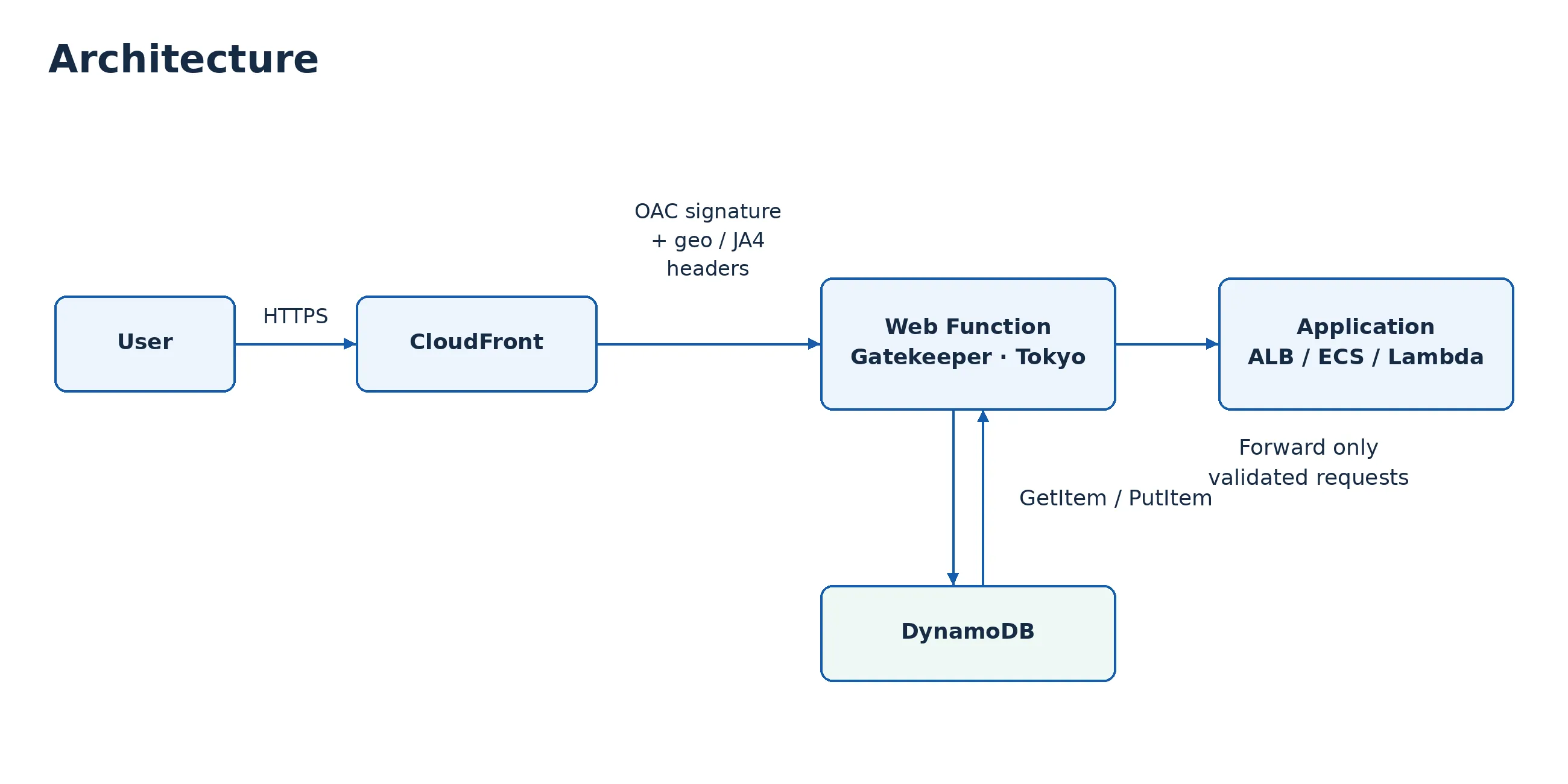
As mentioned above, the Web Function acts as a reverse proxy—the gatekeeper. The application does not need to know that the gatekeeper exists. Making the application aware of it can open up additional defensive possibilities, but I'll leave that for another article. You can introduce this architecture simply by replacing the application with the gatekeeper as the CloudFront origin.
At Login
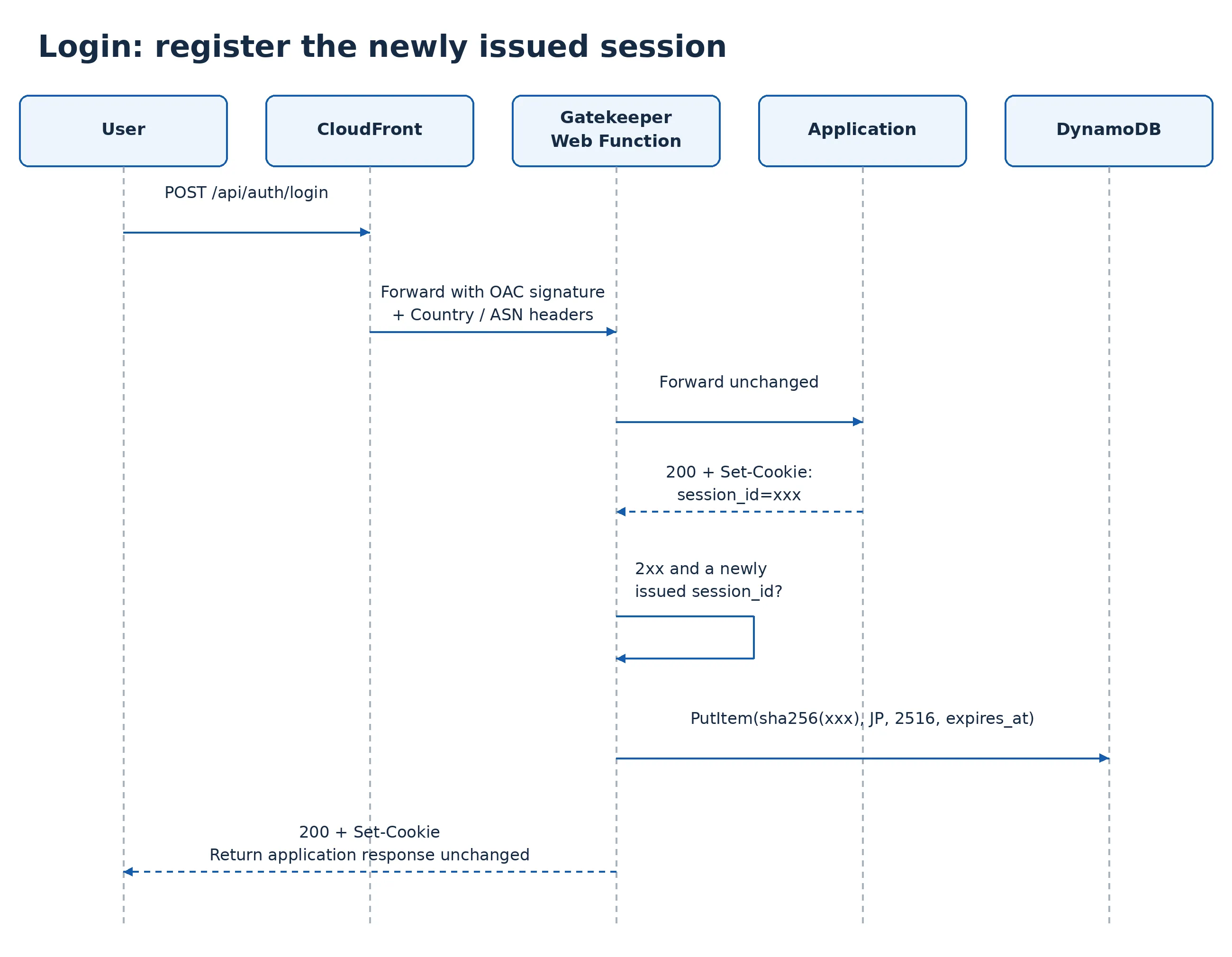
Following the same idea as the origin-response Lambda in the Lambda@Edge version, the gatekeeper inspects the login API response to determine whether login succeeded. Unlike the KVS approach, there is no need to add SDK calls to the application.
When Accessing a Protected Page
Implementation Details
The gatekeeper is a simple proxy written with the Node.js 24
http module. It is approximately 700 lines long, including JA4H calculation and DynamoDB access, and its only dependency is the AWS SDK DynamoDB client. For Web Functions, it listens on the address specified by AWS_LAMBDA_HTTP_ENDPOINT.1
2
const [host, port] = (process.env.AWS_LAMBDA_HTTP_ENDPOINT || 'localhost:3000').split(':');
server.listen(Number(port), host);Detecting Successful Login: Was a New Session Cookie Issued in the Response?
The gatekeeper registers a session only for requests to the configured login API paths (
login_paths), and only when both conditions are met: the status code is 2xx, and the response issues a session cookie through Set-Cookie. A Set-Cookie header returned by any other path does not trigger registration.1
2
3
4
5
6
7
8
9
10
11
12
13
14
async function registerLogin(upRes, geo) {
if (!config.successStatuses.includes(upRes.statusCode)) return true;
// Register only a session ID issued in the response, not one from the request cookie.
const sessionId = sessionIdFromSetCookie(upRes.headers['set-cookie'], config.sessionCookie);
if (!sessionId) return true;
await store.put(sessionKey(sessionId), {
country: geo.country,
asn: geo.asn,
expiresAt: Math.floor(Date.now() / 1000) + config.sessionTtlSeconds,
});
return true;
}Do not use the request cookie for registration. Some applications return HTTP 200 even when login fails. In such an application, an attacker could send a stolen session cookie, deliberately fail a login attempt, and cause the attacker's country to be registered for that session. Issuing a new session ID after successful authentication is also a basic defense against session fixation.
If the DynamoDB write fails, the gatekeeper discards the application's successful response and returns 503. Otherwise, it would hand the client an unregistered session cookie. All subsequent requests would then be blocked as unregistered, potentially trapping the user in a re-login loop.
Strongly Consistent Reads and TTL
1
2
3
4
5
await ddb.send(new GetItemCommand({
  TableName: tableName,
  Key: { session_hash: { S: key } },
  ConsistentRead: true, // Ensure the record can be read even immediately after login.
}));
In the KVS version, navigating to a protected page immediately after login could occasionally result in a false block because the write had not finished propagating. DynamoDB eliminates that concern. This is another major benefit.
Expired sessions are automatically deleted through DynamoDB TTL (
expires_at). However, TTL deletion is not immediate, so the gatekeeper also checks expiration itself.Revoke the Session as Soon as a Mismatch Is Detected
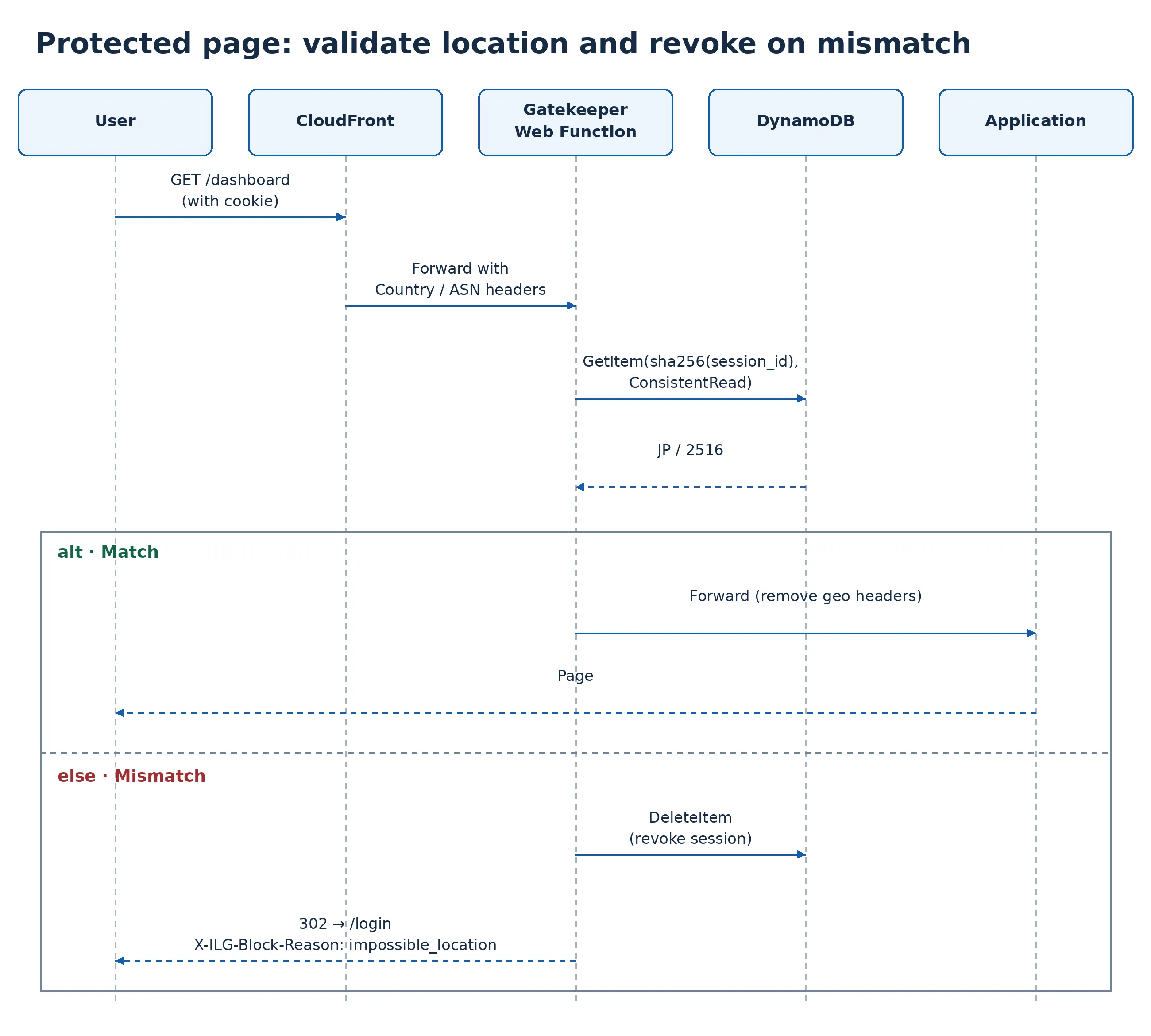
When the gatekeeper detects a country—or ASN—mismatch, it does more than return a 302 redirect to the login page. It also deletes the session registration from DynamoDB.
1
2
Attacker in the US uses a stolen cookie → Blocked with impossible_location; registration deleted
Legitimate user in Japan uses the same cookie → no_registration; must log in again
This forces the legitimate user to log in again as well. That is a deliberate security trade-off: a potentially stolen session should no longer remain usable. The signed-cookie approach in the Lambda@Edge version could not do this.
ASN checks can, however, produce false positives. A legitimate user's ASN may change when switching between mobile data and Wi-Fi, using a VPN, or tethering.
Failure Behavior
| Operation | Behavior on failure |
|---|---|
| Session registration at login (PutItem) | Discard the application's successful response and return 503 without delivering the cookie |
| Session validation (GetItem) | Block the request and redirect to login with store_error |
| Blocklist lookup (BatchGetItem) | My preference would be to allow requests by default and make this configurable. Treat a response containing unprocessed keys (UnprocessedKeys) as a lookup failure as well |
Testing It in Practice
Using Web Functions as a reverse proxy introduces an extra component into the request path. Latency is an obvious concern, especially because the gatekeeper also queries DynamoDB. I tested the implementation on AWS and measured that overhead. I also implemented JA4H calculation to explore its usefulness against modern attacks.
The deployment was in the Tokyo Region, and measurements were taken from a device in Japan. Any application could have been placed behind the gatekeeper; for convenience, I used a Lambda Function URL.
Functional Verification
| Test | Result |
|---|---|
| Access the Web Function endpoint directly without a signature | 403 |
| Access the application directly without the shared secret | 403 |
| Access a protected page without logging in | 302 (no_session) |
| Log in with POST, then access a protected page | 200 |
| Tamper with the session ID | 302 (no_registration) |
| Reuse an old cookie after logout | 302 (no_registration) |
| Use a cookie issued during login in Japan from another country | 302 (impossible_location) |
| Subsequently use the same cookie from Japan | 302 (no_registration: already revoked) |
:::message
When using a Lambda Function URL through OAC, clients must send the request-body hash in the
:::
When using a Lambda Function URL through OAC, clients must send the request-body hash in the
x-amz-content-sha256 header for POST and PUT requests. Web Functions did not require this: an ordinary POST using fetch worked as-is.:::
Latency
I compared "CloudFront → Application" and "CloudFront → Gatekeeper → Application" using the same cache settings, forwarding settings, and application, alternating between the two paths for 100 measurements each. p50 is the median, representing typical latency. p90 and p99 represent slower cases—roughly one in ten and one in a hundred requests, respectively. Here, "server wait" means TTFB (the time from sending a request to receiving the first response byte) minus connection-establishment time (DNS, TCP, and TLS), representing the wait for server-side processing.
| Server wait | p50 | p90 | p99 |
|---|---|---|---|
| CloudFront → Application (without gatekeeper) | 51.9ms | 69.5ms | 96.0ms |
| CloudFront → Gatekeeper → Application | 64.4ms | 70.2ms | 116.9ms |
| Inside gatekeeper: blocklist lookup (BatchGetItem) | 4.4ms | 4.8ms | 7.2ms |
| Inside gatekeeper: session validation (GetItem, strongly consistent) | 3.5ms | 4.0ms | 5.3ms |
The gatekeeper added approximately 12ms at p50, or about 9ms when measured as TTFB. Of that overhead, approximately 4.5ms was processing inside the gatekeeper, almost entirely DynamoDB queries. The blocklist lookup and session validation run concurrently. The remaining approximately 8ms came from the additional hop between CloudFront and the Web Function. Strongly consistent DynamoDB reads took 3–4ms, comparable to the few-millisecond edge lookups I cited as a reason for choosing KVS in the CloudFront Functions article. That looks entirely acceptable for this use case.
There are, however, two caveats:
- Cold starts: When there is no traffic, Web Functions scale execution environments down to zero, with no setting to configure a minimum. The first request after an idle period took approximately 1.3–1.5 seconds while the execution environment started.
- Sudden load after an idle period: I ran three consecutive tests of 10 concurrent requests × 200 iterations.
| Server wait (concurrency 10) | First run (after idle) | Second run | Third run |
|---|---|---|---|
| CloudFront → Application (without gatekeeper), p50 / p99 | 51.5 / 96.9ms | 49.6 / 80.6ms | 49.7 / 79.7ms |
| CloudFront → Gatekeeper → Application, p50 / p99 | 66.9 / 335.1ms | 63.2 / 117.0ms | 63.0 / 126.0ms |
| Inside gatekeeper: DynamoDB queries, p99 | Approx. 67ms | Approx. 7ms | Approx. 6ms |
The first run began with a cold start. Additional execution environments and newly established connections to DynamoDB and the application affected tail latency at p99. Once warm, in the second and third runs, the gatekeeper's p50 overhead settled at approximately 13ms, while DynamoDB query latency remained below 10ms at p99. At p99, however, the gap compared with the path without the gatekeeper was still around 40ms.
What DynamoDB Enables: Blocking Attack Tools with JA4 / JA4H
One thing that was difficult within KVS's 5 MB limit was maintaining fingerprint or IP-address blocklists. With DynamoDB, you can maintain these lists without worrying about that entry-count limitation and look them up on every request.
- JA4: A fingerprint derived from the TLS ClientHello. CloudFront provides it through the
CloudFront-Viewer-JA4-Fingerprintheader. - JA4H: A fingerprint derived from the HTTP request's header structure, including the method, version, header names and order, and cookie names. CloudFront does not calculate it, so the gatekeeper does.
:::message
You may not need Impossible Location detection at all. In that case, you can implement only the JA4 / JA4H blocklist functionality in the gatekeeper.
:::
You may not need Impossible Location detection at all. In that case, you can implement only the JA4 / JA4H blocklist functionality in the gatekeeper.
:::
Calculating JA4H with CloudFront-Viewer-Header-Order
The headers received by the gatekeeper have already been modified by CloudFront, which adds and removes headers. Calculating directly from those headers would therefore not produce the intended JA4H. Instead, the gatekeeper uses
CloudFront-Viewer-Header-Order, which contains the order of the header names sent by the viewer, together with CloudFront-Viewer-Http-Version.1
2
3
4
5
6
7
8
9
10
11
// JA4H = a_b_c_d
// a: method (2) + HTTP version (2) + cookie flag + referer flag + header count (2) + language (4)
// b: first 12 hex characters of SHA-256 of header names (in transmission order, excluding Cookie / Referer)
// c, d: first 12 hex characters of SHA-256 of cookie names / cookie name=value pairs
// Note: calculation of version ("1.1" → "11", "2.0" → "20"), cookieFlag / refererFlag,
// and lang (the first four characters of Accept-Language) is omitted.
const names = headerOrder.split(':').filter(Boolean);
const hashed = names.filter((n) => !/^cookie/i.test(n) && n.toLowerCase() !== 'referer');
const a = method.toLowerCase().slice(0, 2) + version + cookieFlag + refererFlag
+ String(Math.min(hashed.length, 99)).padStart(2, '0') + lang;
const b = sha256(hashed.join(',')).slice(0, 12);Because c and d vary between sessions based on cookies, the blocklist matches on a and b.
The gatekeeper retrieves the JA4 and JA4H entries together using
BatchGetItem, in parallel with session validation.Pay Attention to CloudFront Forwarding Settings
The managed origin request policy
AllViewerExceptHostHeader includes neither JA4 nor CloudFront-Viewer-Header-Order. To forward these headers, create a custom policy that forwards only explicitly listed headers.1
2
3
4
5
6
7
8
9
10
11
12
13
14
15
16
17
18
19
20
21
22
resource "aws_cloudfront_origin_request_policy" "guard" {
name = "ilg-guard"
cookies_config { cookie_behavior = "all" }
query_strings_config { query_string_behavior = "all" }
headers_config {
header_behavior = "whitelist"
headers {
items = [
"CloudFront-Viewer-Country",
"CloudFront-Viewer-ASN",
"CloudFront-Viewer-JA4-Fingerprint",
"CloudFront-Viewer-Header-Order",
"CloudFront-Viewer-Http-Version",
"Accept-Language", # Language field for JA4H
# Application-required headers; adjust for your application.
"Accept", "Content-Type", "Referer", "User-Agent",
]
}
}
}The four application headers shown here are just examples. Applications that inspect
Origin for CSRF protection or CORS, or authenticate through Authorization, need those headers included as well.Forwarding
Host causes the Web Function to return 404, because Lambda uses Host to identify the endpoint. Do not include Host in the allowlist. When forwarding a request to the application, the gatekeeper replaces Host with the application's own hostname. As a result, the application cannot see the hostname the user originally accessed, such as www.example.com. If your application constructs absolute redirect URLs or OAuth callback URLs from the hostname, configure the custom header X-Forwarded-Host: www.example.com in CloudFront's origin settings and have the application use it. The gatekeeper forwards this header unchanged.Blocking sqlmap Even with a Spoofed User-Agent
Setting Impossible Location detection aside for a moment, I ran sqlmap—a tool frequently used in recent attacks—against the demo environment. I then collected the observed fingerprints from the gatekeeper's logs and tested blocking them.
| Client | JA4 | JA4H(a_b) |
|---|---|---|
| sqlmap 1.10.10 (Python 3.13) | t13d861100_5177063c590b_… | ge11nn060000_a0ed1446aa58 (identical across all requests) |
| curl 8.7.1 (macOS) | t13d4907h2_0d8feac7bc37_… | Four variants, depending on request structure |
| curl 8.21.0 (CloudShell) | t13d3514h2_bfa337485184_… | Identical to macOS curl when the request structure matches |
Even for curl, JA4 differs between macOS and CloudShell because their TLS implementations differ. JA4H, however, matches when the HTTP request structure is the same. This illustrates the different roles of JA4 and JA4H.
I added sqlmap's JA4H to the blocklist and ran it again with
--random-agent, spoofing a Firefox User-Agent.1
2
[WARNING] HTTP error codes detected during run:
403 (Forbidden) - 90 timesThe gatekeeper logs showed that all 90 requests were blocked:
1
2
3
4
5
6
7
{
  "event": "blocked",
  "reason": "blocked_ja4h",
  "fingerprint": "ja4h:ge11nn060000_a0ed1446aa58",
  "label": "sqlmap",
  "userAgent": "Mozilla/5.0 (X11; Linux x86_64; rv:138.0) Gecko/20100101 Firefox/138.0"
}
Even though the User-Agent no longer identified sqlmap, its header structure still allowed it to be identified. Not a single test payload passed through the gatekeeper.
:::message
JA4H's a component includes the request method and the presence or absence of Cookie and Referer headers. The same client can therefore produce different values depending on the request structure. For example, curl GET requests may begin with
:::
JA4H's a component includes the request method and the presence or absence of Cookie and Referer headers. The same client can therefore produce different values depending on the request structure. For example, curl GET requests may begin with
ge20nn… without a cookie and ge20cn… with one. Use fingerprints observed in actual traffic when populating the blocklist. JA4 is better suited to consistently blocking a client across these variations, but take care not to block legitimate traffic.:::
:::message alert
JA4H is also easy to evade. In this test,
:::
JA4H is also easy to evade. In this test,
--random-agent changed only the User-Agent value, so the requests were still blocked. Changing the header structure itself, for example with --headers, also changes JA4H. A rule may also block legitimate Python clients, such as monitoring tools or integration jobs, that use the same header structure. Treat JA4 / JA4H as signals among others, rather than relying on them alone.:::
Latency with the Blocklist Enabled
| Allowed requests, p50 | Blocked requests (403), p50 | |
|---|---|---|
| TTFB through CloudFront | 119.2ms | 98.9ms |
| Inside gatekeeper: JA4H calculation | 0.1ms | 0.1ms |
| Inside gatekeeper: blocklist lookup (BatchGetItem) | 3.2ms | 2.6ms |
| Inside gatekeeper: total | 19.5ms | 2.7ms |
Because blocklist lookup runs concurrently with session validation, enabling the blocklist added only about 1ms of processing inside the gatekeeper. Blocked requests never reach the application, allowing the gatekeeper to return a 403 in under 3ms.
Remaining Limitations
So far, I've focused on the benefits, but the Web Functions approach still has some limitations.
Protected Paths Cannot Be Cached (CachingDisabled)
The gatekeeper is an origin. If CloudFront serves a cache hit, the request never reaches it, bypassing validation. As with the Lambda@Edge version, protected paths must therefore use CachingDisabled. Pages served after login are often personalized for each user, so this is usually acceptable. Still, this is an area where the CloudFront Functions approach has an advantage.
It Runs in a Region
For this test, I deployed only to the Tokyo Region. For a service with users around the world, the round trip to the gatekeeper will matter. Web Functions offer a
MultiRegion endpoint for deployments across multiple Regions. That setup would also require DynamoDB Global Tables, which I did not test here.One Additional Hop
Because the gatekeeper forwards requests to the application, it adds one network hop. In these measurements, the total p50 overhead was approximately 12ms, with around 8ms attributable to that additional hop. If the application is in a distant Region, that round-trip time will also contribute to latency.
Cold Starts
As discussed earlier, execution environments scale down to zero after a period without traffic. The next request must wait for an environment to start—approximately 1.3–1.5 seconds in this test. A sudden burst of traffic after an idle period also increases tail latency until the environments warm up. There is no setting to configure a minimum number of execution environments.
Session Expiration Is Fixed
The gatekeeper's session registration expires at the time determined at login by
session_ttl_seconds. It does not support sliding expiration, where each request extends the session's lifetime. As a result, the gatekeeper's registration can expire while the application still considers the session valid. Set session_ttl_seconds to match the application's maximum session lifetime, or absolute timeout.Origin Request Policy Header Limit (When Using JA4H)
The custom origin request policy forwards explicitly listed headers, with a limit of 10 headers. The gatekeeper uses six of those slots, leaving only four for application headers. If your application needs additional headers, such as
Authorization, you will need to request a quota increase. If you are not using JA4H, you can keep using AllViewerExceptHostHeader.Proxy Limitations
Web Functions do not support WebSocket . Request headers are limited to 128 KiB in total, and communication to the Web Function uses HTTP/1.1. Clients can still use HTTP/2 or HTTP/3 when communicating with CloudFront. Response streaming is supported. See HTTP requests and responses for details.
No Terraform Support (At the Time of Writing)
At the time of writing, the Terraform AWS Provider does not support either the Web Function resource itself or the
lambda OAC type. I use Terraform for DynamoDB, IAM, and CloudFront, and the AWS CLI (aws lambda-web deploy) for the Web Function and OAC.Blocking Direct Access to the Origin
As in the previous two articles, a fundamental requirement is that the application must be reachable only through the gatekeeper and CloudFront. If direct access remains possible, an attacker can bypass the defense simply by sending a stolen cookie directly to the application.
In the Web Functions version, there are two entry points to secure.
| Entry point | How to restrict access |
|---|---|
| Gatekeeper's Web Function endpoint | Use |
OAC + IamAuth | |
and an aws:SourceArn condition in the resource policy to restrict invocation to your own distribution | |
| Application | Validate a shared-secret header added by the gatekeeper, using the application itself, ALB listener rules, or AWS WAF |
Store the shared secret in a service such as Secrets Manager, and have the gatekeeper retrieve it at startup. For simplicity, this demo uses an environment variable. To rotate the secret without downtime, first configure the application to accept both the old and new values, then switch the gatekeeper to the new value.
The gatekeeper does not have a fixed outbound IP address, so you cannot restrict application access by its source IP address. If you need private connectivity to an application inside a VPC, you can also use a Web Functions egress network connector to route the gatekeeper's traffic through the VPC.
Architecture Comparison
| Aspect | Lambda@Edge + Cookie | CF Functions + KVS | Web Functions + DynamoDB |
|---|---|---|---|
| Application changes | Not required | KVS writes required | Not required |
| Validation location | Origin Request (edge) | Viewer Request (edge) | Origin (Region) |
| Caching protected paths | CachingDisabled required | Supported | CachingDisabled required |
| Scaling | No limit | 5 MB / tens of thousands of sessions | No limit |
| TTL / cleanup | Cookie expiration | Manual cleanup | DynamoDB TTL |
| Reads immediately after writes | — | Eventually consistent | Strongly consistent reads |
| Individual session revocation | Not supported | At logout | At logout and on mismatch detection |
| JA4 / JA4H blocklist | — | Capacity-constrained | Unlimited with DynamoDB |
| Deployment location | us-east-1 required | No restriction | A Region of your choice |
| IaC | Terraform | Terraform | Terraform + AWS CLI (at the time of writing) |
| Measured overhead | — | — | Approx. 12ms at p50 (server wait) |
Final Thoughts
What do you think? This approach resolves most of the Impossible Location detection challenges I discussed in my earlier articles. It also opens up possibilities for addressing modern attacks.
The measures presented here are only a small part of what is possible. Personally, I see limitless potential.
The gatekeeper can use application context, and the application can receive context from the gatekeeper. That exchange makes it possible to address threats that are difficult to handle with a WAF alone, including fraudulent logins and purchases.
Thanks for reading!
Enjoyed reading this content? Let the author know!
Your likes, comments, shares, and saves help creators reach more builders.

Loading recommendations
Loading article