
Building a Data Analyst Agent in Amazon Bedrock AgentCore
Build a Data Analyst Agent on Amazon Bedrock AgentCore that answers natural-language questions over hundreds of structured datasets. This post covers three design decisions—a coding agent that keeps DataFrames in memory instead of serialising into the LLM context, agentic search on S3 Vectors that recovers from vocabulary-mismatch failures, and self-explanatory Parquet data via dictionary encoding—plus a full CDK deployment walkthrough, multi-model benchmarking, and interactive Plotly charts.
Series: Strands Agents CodeAct (3 articles)
- 2Building a Data Analyst Agent in Amazon Bedrock AgentCore This article

Imagine the following scenario, a question lands on your desk: “ Is there a relationship between healthcare spending per capita and avoidable mortality?”. The data exists somewhere across your organisation's data lake, but finding the right tables takes a domain expert, and writing the Structured Query Language (SQL) takes a data engineer. By the time you've pieced the answer together, the organisation has already moved on to the next question.
The same friction shows up across roles. Policy analysts, programme managers, communications teams, researchers, statisticians, and economists all need to interrogate structured data, and all of them stall at the gap between a question in plain English and a query against the right table. The data exists, but the people who can write the SQL are a bottleneck.
In this post, we walk through a Data Analyst Agent built on Amazon Bedrock AgentCore that closes that gap. You will see how a coding agent, agentic search on Amazon S3 Vectors, and self-explanatory Parquet data combine to make hundreds of datasets queryable in plain English, and reproducible from a published AWS Solution Guidance.
Solution Overview
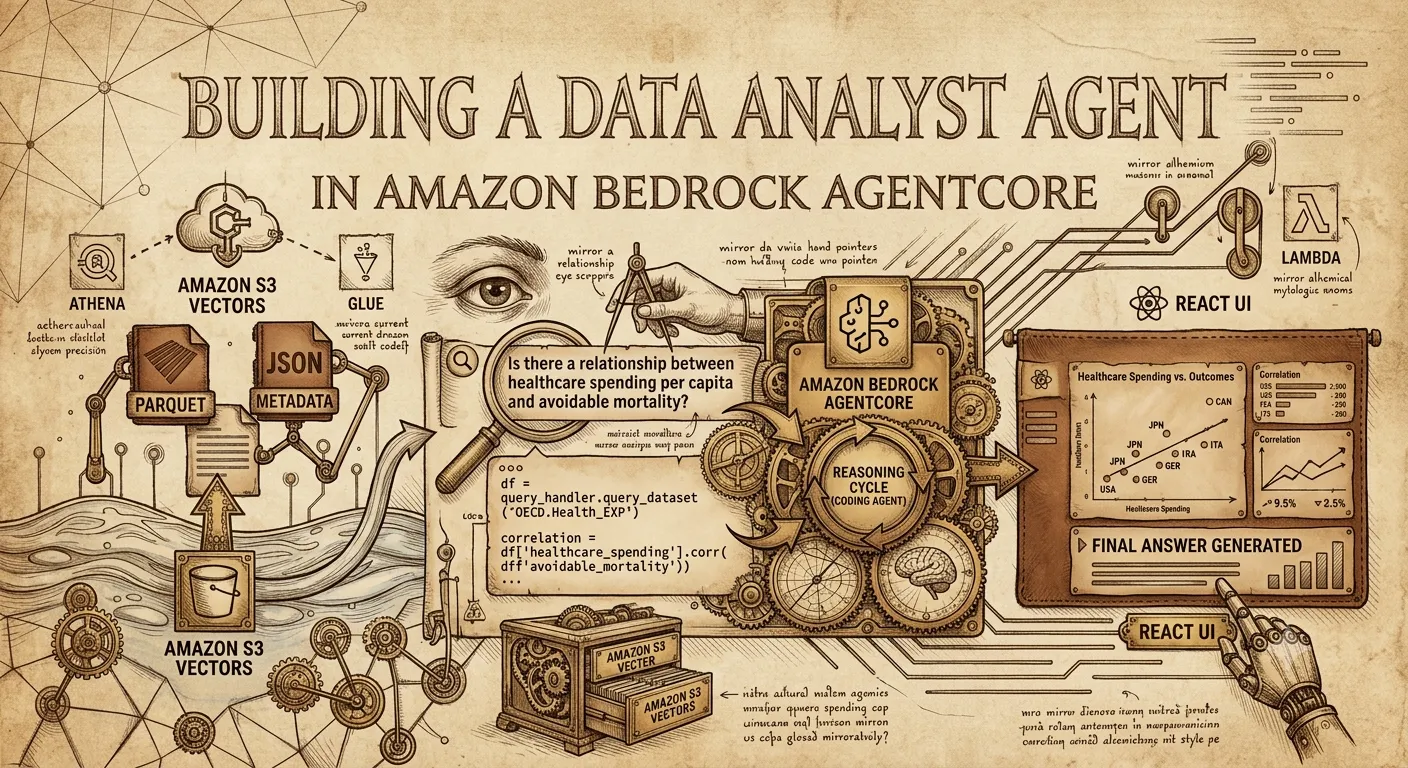
The Data Analyst Agent is a Python application built on the Strands Agents software development kit (SDK), packaged as a container, and deployed to Amazon Bedrock AgentCore. It answers natural-language questions over a corpus of structured datasets through two flows: an ingestion flow that registers datasets for query and discovery, and a query flow that runs whenever a user asks a question.

Figure 1 — Ingestion path (top): Parquet + JSON metadata are uploaded to Amazon S3, two ingestion Lambdas register an Amazon Athena external table and write an embedding to the S3 Vectors index. Query path (bottom): the React UI calls the agent on Amazon Bedrock AgentCore, which iteratively searches S3 Vectors and queries Athena before returning an answer.
Ingestion flow. For each dataset, an admin uploads two files to the ingestion bucket: a Parquet file with the rows, and a JSON metadata file describing the dataset. The Amazon S3 events trigger two AWS Lambda functions: one that registers the Parquet file as an external table in the AWS Glue Data Catalog (queryable through Athena), and one that embeds the metadata's
indexing-description field into an S3 Vectors index. From that point on, the dataset is both queryable and discoverable by the agent.Query flow. A user signs in to the React web app (served behind Amazon CloudFront with AWS WAF and authenticated by Amazon Cognito) and asks a question in plain English. The web app invokes the agent on Amazon Bedrock AgentCore. The agent searches the relevant datasets from the S3 Vectors index, then reasons through the question by writing and executing Python code. It calls Athena to fetch data, joins datasets in pandas, generates static or interactive charts (the agent can produce Plotly visualisations with zoom, pan, and hover tooltips rendered directly in the browser), and streams the final answer back to the UI.
The same architecture can scale from a single dataset to a corpus of thousands. The reference deployment loads 1,775 datasets from the Organisation for Economic Cooperation and Development (OECD) and the UK Office for National Statistics (ONS) to demonstrate the solution at scale.
Three design decisions that make this work
Three architectural choices distinguish this solution from a generic Retrieval-Augmented Generation (RAG) over-tables pattern. Each is a direct response to a failure mode we hit when prototyping this solution.
1. Coding agent over tool-calling agent
The conventional agent pattern is tool calling : the large language model (LLM) emits structured calls to a fixed set of functions, and each result is JSON-encoded back into the prompt. This does not survive contact with real datasets. A single Athena query can return thousands of rows, and serialising that into the context window burns most of the available tokens before reasoning starts. And what looks like a single data analysis action from the user's perspective (query a first dataset, query a second dataset, join, correlate, plot) becomes a sequence of separate tool calls, with each intermediate result serialised back into the prompt before the next step can begin.
Our agent is a coding agent built on the open-source strands-code-agent library. Instead of invoking structured tools by name, the agent writes Python code in a sandboxed read-eval-print loop (REPL) where domain capabilities (database queries, APIs, etc.) are exposed as importable library functions. A 10,000-row pandas DataFrame stays as a native Python object in memory; only what the agent explicitly prints re-enters the LLM context. Joining two datasets and computing a correlation is a single code block, not a chain of serialised tool calls.
In empirical evaluations on the Data Agent Benchmark, using the same foundation model, datasets, and queries, the code-generation paradigm achieves +7% higher accuracy while consuming 78% fewer input tokens, completing tasks 56% faster, and requiring 35% fewer reasoning cycles compared to an equivalent tool-calling agent built on the same Strands Agents SDK.
2. Agentic search over naïve RAG
The obvious way to discover datasets is naïve RAG : embed the user's question, retrieve the top-K closest dataset descriptions, and include them into the prompt. One retrieval, one shot. This breaks in two ways at scale.
Multi-topic questions. "Is there a relationship between healthcare spending per capita and avoidable mortality?" has two topics whose descriptions sit in different regions of the embedding space. A single embedding lands close to one topic but not the other, so the top-K silently misses half the data the agent needs.
Vocabulary mismatch. A user asks "how many people are out of work?" ; the relevant dataset is described as labour market statistics . The vector distance is small but not small enough to make the top-K cut.
We expose dataset discovery as a tool the agent can call any number of times , not as a one-shot retrieval. The agent receives the top-3 datasets up front, but if those are insufficient it calls search_datasets again with a reformulated query (i.e. "healthcare expenditure per capita" , "unemployment rate") and recovers the missing datasets.
3. Self-explanatory data via Parquet dictionary encoding
Many institutional datasets store dimension values as internal codes — the OECD, for example, uses PT_P5L for "Percentage of investment" . A human analyst with domain expertise might recognise these. An LLM does not, and when the agent loads a DataFrame full of cryptic codes it either asks for a lookup table (slow) or guesses (wrong).
We replace codes with human-readable labels at ingestion time. The agent, and any human auditing the output, can understand the data without a lookup table. The obvious objection is data bloat. Replacing a 6-character code with a 40-character string across millions of rows would, in CSV, add tens of megabytes per dataset. But we use Parquet , which uses dictionary encoding — each unique string is stored exactly once in a per-column dictionary and rows store small integer indices. Whether the dictionary entry reads PT_P5L or Percentage of investment, every row is the same tiny index. With column compression on top, the on-disk size barely moves.
Self-explanatory data is essentially free in Parquet, and expensive in CSV. The choice of file format directly affects the quality of AI-generated analysis.
Prerequisites
Before deploying, make sure you have:
- An AWS account with access to a Region where Amazon Bedrock AgentCore, S3 Vectors, and the chosen foundation models are available. The reference deployment is tested in us-east-1.
- AWS CLI v2 configured with credentials for a deployment role that can create S3 buckets, Glue databases and tables, Athena workgroups, S3 Vectors buckets and indexes, AWS Identity and Access Management (IAM), Amazon Elastic Container Registry (Amazon ECR) repositories, and AgentCore resources.
- Docker installed and running (used by the AWS CodeBuild project that packages the agent container).
- Python 3.10+ and pip.
- AWS Cloud Development Kit (CDK) v2: npm install -g aws-cdk, then cdk bootstrap if this is the first CDK deployment in your account/Region.
Indicative cost for the reference deployment in us-east-1 is around US$95 per month for 1,000 queries , dominated by Amazon Bedrock model invocations ($70 with Claude Haiku 4.5) and Bedrock AgentCore Runtime ($14). Use the AWS Pricing Calculator for production estimates.
Deploy the solution
The full source for the steps below is in the Solution Guidance repository . The steps are designed to be copy-paste runnable.
Step 1 — Deploy the Infrastructure
Clone the repository and deploy the CDK app:
1
2
3
4
5
6
git clone https://github.com/aws-solutions-library-samples/guidance-for-agentic-
data-analyst-using-amazon-bedrock-agentcore-on-aws.git
cd guidance-for-agentic-data-analyst-using-amazon-bedrock-agentcore-on-aws
pip install -r requirements.txt
cd infrastructure
cdk deploy --all
This creates four AWS CloudFormation stacks:
- DataStack — the ingestion S3 bucket, ingestion Lambdas, the Athena datasets database, and the S3 Vectors bucket and index.
- AgentCoreStack — an ECR repository, a CodeBuild project that builds and pushes the agent container, the Amazon Bedrock AgentCore runtime resource, and the IAM execution role with permissions for Amazon Bedrock, S3 Vectors, Athena, and the datasets bucket.
- WebAppStack — Amazon Cognito user pool, S3 bucket for the React build, and a CloudFront distribution.
- WafStack — AWS WAF web ACL attached to CloudFront, deployed in us-east-1.
To grant access to the demo web app, create a user in the Cognito user pool: in the AWS Management Console, open Cognito → select the DataAnalystWebAppUserPool* pool → User management → Users → Create user with a username and a temporary password.
Step 2 — Add a Dataset
Example Public Datasets : To load all 1,775 OECD and ONS datasets at once, the repository ships ready-to-use scripts under
agent/aws_data_analyst/datasets :1
2
3
4
5
6
7
8
9
10
11
cd agent
# Download 337 ONS Datasets
python aws_data_analyst/datasets/ons/download_datasets.py
python aws_data_analyst/datasets/ons/preprocess_datasets.py
# Download 1,438 OECD Datasets
python aws_data_analyst/datasets/oecd/oecd_data.py
# Upload all Datasets
python aws_data_analyst/datasets/upload_datasets_to_s3.pyYour Own Datasets : Adding a dataset requires two files: a Parquet file with the rows, and a JSON metadata file describing the dataset, for example:
1
2
3
4
5
6
{
  "namespace": "oecd",
  "id": "dsd_sha_df_sha",
  "indexing-description": "OECD Dataset - Health expenditure and financing\nA System of Health Accounts 2011 provides an updated and systematic description of the financial flows related to the consumption of healthcare goods and services. [...]",
  "usage-description": "OECD Dataset - Health expenditure and financing\nA System of Health Accounts 2011 provides an updated and systematic description of the financial flows related to the consumption of healthcare goods and services. [...].\nDimensions:\n\t- ASSET_TYPE: Asset type. Possible values: \"Infrastructure\", \"Intellectual property products\", [...]"
}
The
indexing-description is embedded into the S3 Vectors index (so the agent can discover the dataset) and the usage-description is injected into the prompt when the dataset is retrieved.Upload both files to the ingestion bucket created by DataStack:
1
2
3
4
aws s3 cp dsd_sha_df_sha/data.parquet \
  s3://datasets-<account-id>/datasets/oecd/health-expenditure/
aws s3 cp dsd_sha_df_sha/dataset.json \
  s3://datasets-<account-id>/metadata/oecd/health-expenditure/
Two Lambda functions trigger automatically. One registers an external table
dataset_oecd_health_expenditure in the Glue Data Catalog. The other embeds the indexing-description and adds a vector into the S3 Vectors index.If your raw data uses internal codes, expand them to readable labels before you write the Parquet file. The pattern is:
1
2
3
4
5
6
7
8
9
10
11
12
13
14
15
16
import pandas as pd
import pyarrow as pa
import pyarrow.parquet as pq

# Codelist supplied by the source (e.g., OECD codelist API)
DIMENSION_LABELS = {
    "PT_P5L":  "Percentage of investment",
    "PT_P51G": "Percentage of gross fixed capital formation",
    # ...
}

# DataFrame with code-valued columns
df = load_raw_data()
df["column-name"] = df["column-name"].map(DIMENSION_LABELS).fillna(df["column-name"])

pq.write_table(pa.Table.from_pandas(df), "demo.parquet", compression="snappy")
Parquet's dictionary encoding stores each unique label exactly once, so expanding a six-character code to a forty-character label across millions of rows costs almost nothing on disk — typically within a few percent of the original file size.
Step 3 — Test it end to end
Open the CloudFront URL shown in the WebAppStack outputs, sign in with the Cognito user you created, and ask a question. For example: “ Is there a relationship between healthcare spending per capita and avoidable mortality? “
Watch the agent trace in the UI. The first dataset retrieval based on the user query typically returns one dataset about avoidable mortality. The agent recognises that the information about health expenditure is missing, so it issues a second dataset search with a reformulated query " healthcare spending per capita expenditure ", and recovers the right dataset. It then runs two Athena queries through the Python REPL, and it calculates the correlation between these two quantities.
If the agent cannot find a suitable dataset, it returns "supported_by_data": false and explains why in the answer text.

Figure 2 — The agent retrieves two OECD datasets (healthcare expenditure and life expectancy), joins them by country and year, and produces an interactive chart showing the relationship between spending and outcomes across G7 countries over two decades.
Optional: Inspect the Coding Agent
The agent is defined in
agent/aws_data_analyst/data_analyst_agent.py and built on the strands-code-agent library (pip install strands-code-agent). This library provides a CodeAgent class that extends the Strands Agent class, replacing the tool-calling paradigm with code generation as the agent's primary action interface. You configure the Python environment with a set of Toolkits . A Toolkit specifies:- A list of libraries that will be added to the allow-list of libraries that can be imported in the sandboxed execution environment
- initialization_code — Python code snippets to run when initialising the execution environment
- usage_instructions — extra guidance about how to write the code
- domain_specific_code — callable symbols to be fully imported and documented in the agent's context
When you pass functions or classes via
domain_specific_code, the CodeAgent automatically extracts their signature and docstring, documents them in the system prompt, and imports them into the interpreter — the agent sees a fully documented API without any manual prompt engineering.The Data Analyst Agent uses the following toolkit:
1
2
3
4
5
6
7
8
9
10
11
QUERY_HANDLER_TOOLKIT = Toolkit(
    libraries=['aws_data_analyst.cloud_datasets', 'scipy'],
    initialization_code="""
from aws_data_analyst.cloud_datasets import CloudQueryHandler
query_handler = CloudQueryHandler()
""",
    usage_instructions="""
To load a dataset by Dataset-ID into a pandas dataframe, use:
df = query_handler.query_dataset('Dataset-ID', {'dimension-name': 'value'})
""",
)
The agent never calls a run_query tool . It writes Python like
df = query_handler.query_dataset('OECD.HEALTH_EXP', {'COUNTRY': 'GBR'}) and the DataFrame stays in the interpreter memory for the following actions.Optional: Inspect the Search-Datasets tool
Dataset discovery is exposed as a tool the agent can call repeatedly during reasoning. The definition in
agent/aws_data_analyst/dataset_search_tool.py uses a DatasetSearch class that returns a Strands @tool -decorated function:1
2
3
4
5
6
7
8
9
10
11
class DatasetSearch:
def __init__(self, datasets_db, datasets_loader):
...
def get_tool(self):
def search_datasets(query):
"""Discover datasets relevant to a given query."""
datasets = self.datasets_db.search_entries(query, topK=3)
...
return search_datasetsUnderneath,
search_entries embeds the query with the configured Amazon Bedrock embedding model and runs an s3vectors.query_vectors call against the index. The system prompt explicitly tells the agent it can call this tool whenever the initially retrieved datasets are insufficient — this is how agentic search is realised in practice.Optional: Benchmark across models
The repository includes a benchmarking framework under
agent/aws_data_analyst/evaluation/ with 82 real-world test queries and an LLM-as-a-judge evaluator that scores each answer for factual correctness. Run:1
python aws_data_analyst/evaluation/benchmark_agent.pyThe script invokes the deployed agent in parallel across all configured models and reports median latency, mean cost per query, and mean accuracy. Use it to compare foundation models on your own dataset corpus before committing to a default model.
Clean up
To avoid ongoing charges, tear the solution down once you are finished.
Empty the S3 buckets (ingestion bucket and Athena query-results bucket) before cdk destroy --all, otherwise CloudFormation will fail to delete the stacks because the buckets are not empty.
1
aws s3 rm s3://datasets-<account-id> --recursive
Destroy the CloudFormation stacks. a single CDK command does the bulk of the work:
1
2
cd infrastructure
cdk destroy --all
Conclusion
The question on your desk no longer has to wait for a domain expert and a SQL writer. A Strands coding agent on Amazon Bedrock AgentCore, with agentic search on S3 Vectors and self-explanatory Parquet data underneath, lets anyone in the organisation interrogate hundreds of datasets in plain English — and the same architecture scales from one dataset to thousands.
Each of the three design decisions in this post addresses a concrete failure mode we encountered during prototyping — and all three are reusable patterns you can apply to your own domain.
To try it yourself:
- Deploy the Guidance for Building a Data Analyst Agent using Amazon Bedrock AgentCore and load your own datasets using the two-file Parquet + JSON contract.
- Build your own coding agent: install the strands-code-agent library (
pip install strands-code-agent) and define Toolkits that expose your domain capabilities as importable Python functions. - Extend the agent: read the Strands Agents SDK documentation , and the Amazon Bedrock AgentCore documentation .
Series: Strands Agents CodeAct (3 articles)
- 2Building a Data Analyst Agent in Amazon Bedrock AgentCore This article
Enjoyed reading this content? Let the author know!
Your likes, comments, shares, and saves help creators reach more builders.

Loading recommendations
Loading article