
Building CloudOps Insight: A Full-Stack Cloud Cost & Infrastructure Monitoring Dashboard
How a 4-hour MVP event for cloud infrastructure monitoring got built with Kiro AI IDE — including the real bug behind an "invisible charts" styling disaster, and why skipping a backend was the right call under time pressure.


Here's a tight, punchy version:
I Built a Cloud Cost Dashboard in One Day Using Kiro — Here's What I Learned
The Problem
Cloud bills grow quietly. Idle EC2s, oversized RDS instances, orphaned S3 buckets — by the time finance flags it, you're already overspent. I wanted a dashboard that watches infrastructure health, tracks spend, and surfaces what to fix. I also wanted to build it fast using Kiro, AWS's new agentic IDE.
The Problem
Cloud bills grow quietly. Idle EC2s, oversized RDS instances, orphaned S3 buckets — by the time finance flags it, you're already overspent. I wanted a dashboard that watches infrastructure health, tracks spend, and surfaces what to fix. I also wanted to build it fast using Kiro, AWS's new agentic IDE.
What I Built
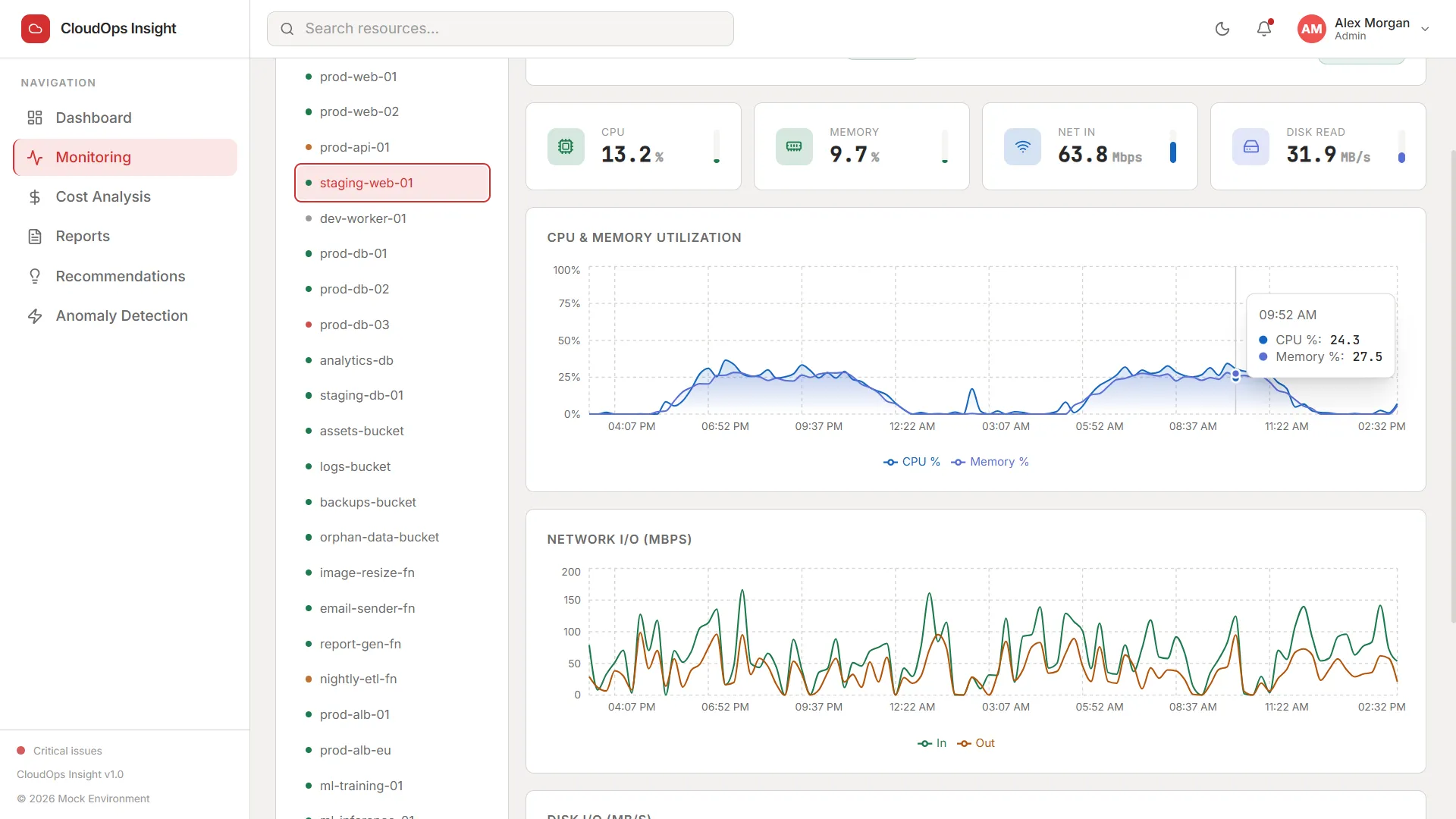
CloudOps Insight — a full-stack monitoring and cost optimization dashboard with:
CloudOps Insight — a full-stack monitoring and cost optimization dashboard with:
Resource dashboard — 30 resources across EC2, RDS, S3, Lambda, Load Balancer with live status, cost/month, and a detail drawer
Real-time monitoring — CPU, memory, network, disk charts with a live 5-second tick
Cost analysis — monthly trend, service/region breakdowns, budget burn-down, forecast projection
Optimization recommendations — rule engine that flags idle instances, oversized tiers, orphan storage, and estimates savings per finding
AI anomaly detection — 2σ trailing moving average over daily spend per resource; anomalies auto-generate recommendation cards
Reports — five pre-built reports with real CSV export (Blob API, no server needed)
Auth — JWT login, role-based UI (admin vs viewer), bcrypt passwords
Tech Stack
Frontend: React 18 + TypeScript, Vite, Tailwind CSS v4, React Router v6, Recharts, lucide-react
Real-time monitoring — CPU, memory, network, disk charts with a live 5-second tick
Cost analysis — monthly trend, service/region breakdowns, budget burn-down, forecast projection
Optimization recommendations — rule engine that flags idle instances, oversized tiers, orphan storage, and estimates savings per finding
AI anomaly detection — 2σ trailing moving average over daily spend per resource; anomalies auto-generate recommendation cards
Reports — five pre-built reports with real CSV export (Blob API, no server needed)
Auth — JWT login, role-based UI (admin vs viewer), bcrypt passwords
Tech Stack
Frontend: React 18 + TypeScript, Vite, Tailwind CSS v4, React Router v6, Recharts, lucide-react
Backend: Node.js, Express 4, SQLite (sqlite3), JWT, bcryptjs
Design: Dual light/dark theme via CSS custom properties — no hardcoded hex in any component. IBM Plex Mono for all numeric values (tabular-nums matters in cost tables).
SQLite was a deliberate choice. Zero setup, clone-and-run in under 3 minutes. The schema maps cleanly to RDS PostgreSQL when you're ready to go real.
How Kiro Actually Helped
Three things stood out:
Three things stood out:
- Spec mode is real. I wrote the requirements once. Kiro broke them into tasks and executed them in order — scaffolding, data layer, all seven page modules, the Express backend, the test suite. Not boilerplate. Actual business logic.
- It catches things you forget. better-sqlite3 needs a C++ toolchain and would fail on a plain Windows install. Kiro switched to sqlite3 with async wrappers unprompted. That's 20 minutes of debugging I didn't do.
- Steering files = persistent project memory. I added token rules, API conventions, and TypeScript interface standards to .kiro/steering/. Every file generated after that followed them automatically. Consistency without code review overhead.
The Anomaly Detection
The signature feature and the one worth explaining. For each resource, daily cost data goes into a rolling 14-day window. Compute mean and standard deviation. If today's spend is more than 2σ from the mean — flag it.
The signature feature and the one worth explaining. For each resource, daily cost data goes into a rolling 14-day window. Compute mean and standard deviation. If today's spend is more than 2σ from the mean — flag it.
It runs entirely in TypeScript in the browser. No ML service, no SageMaker endpoint. Statistically meaningful, zero additional cost, and the same algorithm runs server-side to pre-seed the database. When a high-severity anomaly persists, it auto-creates a recommendation card with a plain-language explanation.
One Thing I'd Do Differently
The mock data layer (src/lib/api.ts) already has the right function signatures — fetchResources(), fetchMetrics(), fetchAnomalies(). Connecting them to real AWS APIs (EC2, CloudWatch, Cost Explorer) is the obvious next step. The UI doesn't change at all. Only the data source does.
The mock data layer (src/lib/api.ts) already has the right function signatures — fetchResources(), fetchMetrics(), fetchAnomalies(). Connecting them to real AWS APIs (EC2, CloudWatch, Cost Explorer) is the obvious next step. The UI doesn't change at all. Only the data source does.
Full source on GitHub.
Enjoyed reading this content? Let the author know!
Your likes, comments, shares, and saves help creators reach more builders.

Loading recommendations
Loading article