
AI-DLC: What Comes After Vibe Coding
AI-DLC is AWS's open-source methodology for structured AI development. Works with Kiro, Claude Code, Cursor, and more. Full walkthrough with real deployment in this article

Kiro, Claude Code, and Cursor are genuinely good tools. They generate real code fast, handle boilerplate, and let engineers focus on higher-level decisions. The productivity gains at the individual level are real.
And yet teams often find that faster code generation doesn’t automatically translate into faster delivery. The reason is usually upstream: requirements that were assumed rather than validated, architectural decisions that were deferred or never made, ambiguity that only surfaced after the implementation was already underway.
The coding step got faster but the process around it didn’t change.
Think of it like a good rotary hammer drill. In a skilled tradesman’s hands - right bit, right speed, right anchor depth - it’s precise and fast. Hand the same drill to someone who hasn’t done this before, and you get cracked tiles and holes in the wrong place. The drill did exactly what it should. The outcome is still a mess. The problem wasn’t the tool, it was the knowledge of how and where to use it.
AI-DLC (AI-Driven Development Life Cycle) is AWS’s answer to this problem. It’s an open-source methodology that restructures the collaboration between humans and AI across the full development cycle, starting from the most important part - requirements.
TL;DR: If vibe coding is about speed, AI-DLC is about control. AI proposes the plan, asks the right questions, then builds - only after you’ve approved the steps. Not for everything, but for the work that matters.
The Core Idea
The expensive part of software development was never writing code. It was figuring out what code to write - and making sure everyone agreed before someone spent days building the wrong thing.
AI tools got fast at the writing part. AI-DLC addresses the figuring-out part.
Instead of a developer writing a requirements doc and asking AI to implement it, AI-DLC inverts this: AI analyzes the problem, drafts the plan, asks the clarifying questions - and waits. Humans review, decide, approve. Then AI builds.
This reversal is deliberate and is the central principle of the methodology: AI initiates the conversation, not the developer. The initiation flips - AI drives the workflow forward - humans approve and decide.
Think of it like a good consultant: they don’t start executing immediately. They come back with a structured set of questions, a proposed approach, and a clear plan - and nothing moves forward until you’ve signed off. AI-DLC formalizes that working model into a repeatable workflow.

The Three Phases
AI-DLC organizes work into three phases that intentionally build context for each other. It also uses its own vocabulary for work items: an Intent is the high-level goal (“build an incident responder”), a Unit is a self-contained deliverable decomposed from that Intent (analogous to an epic or subdomain in DDD), and a Bolt is the smallest iteration - hours or days, not two-week sprints.
Inception answers “what are we building and why?” - AI analyzes your problem statement, generates structured clarifying questions, and produces validated requirements only after you’ve answered them. The team’s job isn’t to write requirements but to review and refine what AI proposes. This happens through what the methodology calls Mob Elaboration: Product Owner, developers, and AI all participate together in breaking down the Intent into Units - collaborative, not siloed.
Construction answers “how do we build it?” - Using everything captured in Inception as context, AI creates a numbered code-generation plan with checkboxes before writing a single line. You review the plan, then approve execution step by step. AI applies Domain-Driven Design principles during this phase - defining aggregates, domain events, and bounded contexts before generating code. This keeps the output aligned with business logic, not merely technically correct.
Operations closes the loop on deployment and monitoring - and it goes further than most people expect. AI actively analyzes telemetry (metrics, logs, traces) to detect anomalies and predict SLA violations before they page anyone. When an incident occurs, AI cross-references predefined runbooks to propose specific remediation actions: resource scaling, fault isolation, performance tuning. Developers validate and approve; nothing executes without sign-off. The incident responder we’re building in this walkthrough is exactly this Operations phase in practice - AI-driven analysis of telemetry, structured diagnosis, actionable output.

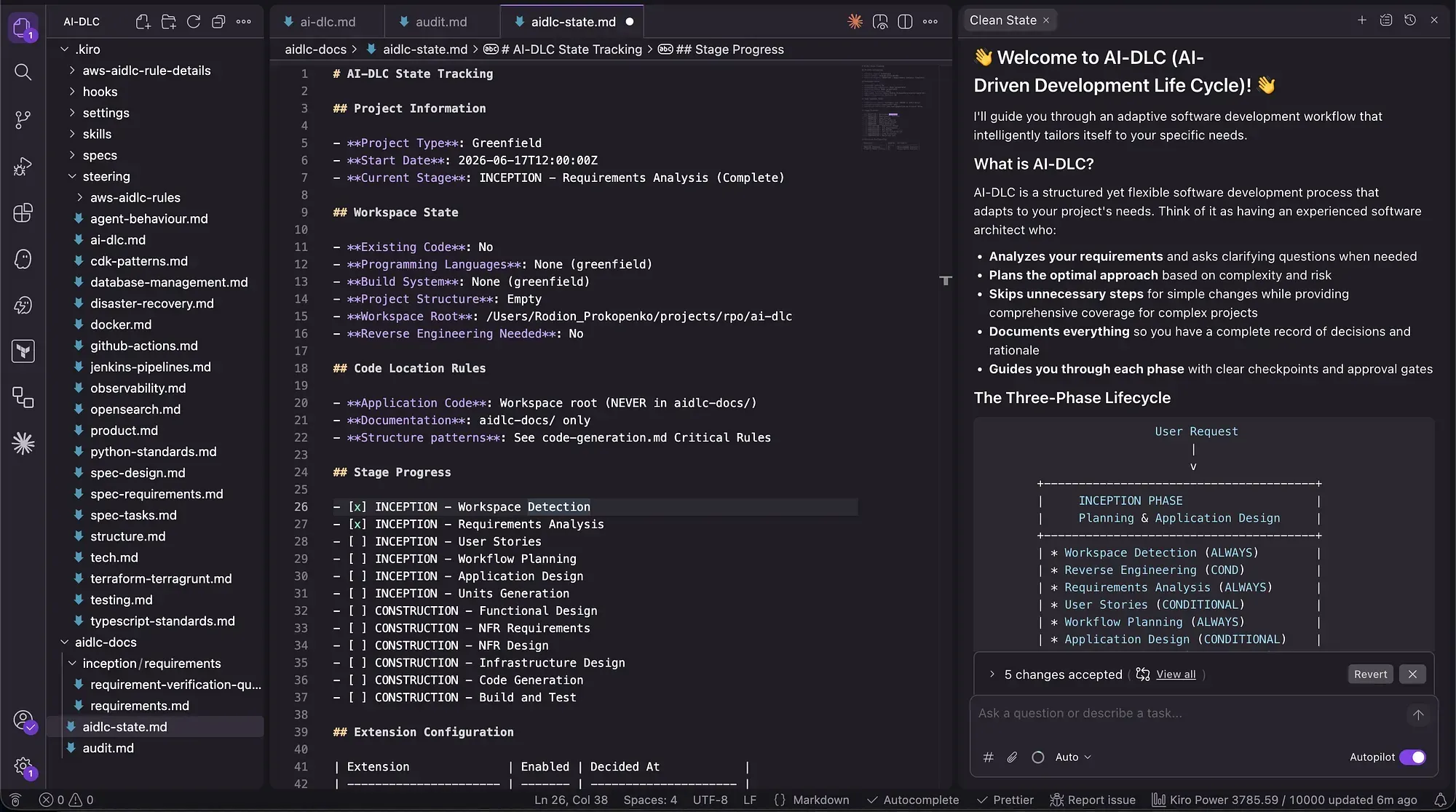
Each phase stores its artifacts -
choice is versioned, diffable, and part of the project history. A new team member can read
requirements.md, execution-plan.md, audit.md- directly in the repo. This is more useful than it sounds. The files live in git, so every requirement decision and architecturalchoice is versioned, diffable, and part of the project history. A new team member can read
audit.md and understand what was built and why each decision was made. A future iteration picks up the full context - without re-briefing, and without knowledge lost. And because the artifacts are plain markdown in the repo, any AI tool can read them: switch from Kiro to Claude Code mid-project and the context travels with you.How the Workflow Activates: The “Using AI-DLC” Trigger
One thing that makes AI-DLC practical rather than intrusive: it doesn’t activate automatically.
The steering rules sit in your project but stay dormant by default. Normal usage is completely unaffected - chat, specs, generate code, ask questions, all exactly as before.
The workflow only activates when you explicitly start a message with “Using AI-DLC, …”
1
Using AI-DLC, let's build a notification system for failed pipeline alerts
vs.
1
Add a retry mechanism to this Lambda function
The first triggers the full Inception → Construction flow. The second is just a regular change request.
You decide when the structure is worth the investment, on a task-by-task basis.
Hands-On: Building an AI-Powered Incident Responder
Every on-call engineer knows the drill: a CloudWatch alarm fires at 2am, you open the console, dig through log groups, try to correlate what happened, and 20 minutes later you have a hypothesis. Half the time it’s something that a bit of context would have made obvious immediately.
The goal: automate that first 20 minutes. When an alarm fires, a Lambda function pulls the relevant logs automatically, sends them to Bedrock for analysis, and posts a structured diagnosis with a suggested fix directly to Slack - before anyone has to open a laptop.
Architecture

This is a real AWS project with real infrastructure decisions - exactly the kind of work where AI-DLC’s requirement questions matter. Here’s the full run.
Setup
AI-DLC works as a set of rules that sit inside your project directory. The general pattern is the same across all tools - download the rules, copy them into the right folder for your IDE, and the workflow activates on the next session.
Tool Rules location:
Kiro
Claude Code
Cursor
GitHub Copilot
Amazon Q Developer
Cline
Kiro
.kiro/steering/Claude Code
CLAUDE.md in project rootCursor
.cursor/rules/GitHub Copilot
.github/copilot-instructions.mdAmazon Q Developer
.amazonq/rules/Cline
.clinerules/Full setup instructions with exact commands for each tool (macOS, Linux, Windows) are in the official repo README . It’s a 5-minute setup.
Triggering the Workflow
Start with the “Using AI-DLC” prefix - without it, your tool behaves exactly as normal:
1
2
3
4
5
6
Using AI-DLC, build an AI-powered incident responder: when a CloudWatch
alarm fires, pull the relevant logs, analyze them with Bedrock, and post
a diagnosis with a suggested fix to our Slack ops channel. Also include
a demo Lambda that simulates realistic service failures (RDS timeouts,
circuit breaker, cascading errors) so the system can be tested end-to-end
without a real incident.
AI-DLC confirms it’s active and creates
aidlc-docs/ folder at the project root - containing aidlc-state.md(session continuity) and audit.md(decision log) - then moves straight to Requirements Analysis.
Requirements Analysis
This is where the value of AI-DLC becomes immediately visible. The generated
requirement-verification-questions.md asks questions that genuinely change the architecture depending on how you answer them:- Language and IaC tooling? TypeScript or Python? CDK (Cloud Development Kit), SAM, or Terraform?
- Which alarms to monitor? All alarms in ALARM state, specific namespace (e.g. AWS/Lambda), or a predefined list?
- How to detect the relevant log group? Auto-derive from alarm dimensions, or a predefined namespace→log group mapping?
- How much log history? Last 5 minutes, 15 minutes, or 1 hour?
- Bedrock model? Claude Haiku (faster, cheaper) or Claude Sonnet (higher quality)?
- Concurrency? Process one alarm at a time, or handle concurrent triggers?
- Error handling? Fail fast, or best-effort with partial results?
- Scope? Single AWS account or cross-account via Organizations?
- Opt-in extensions? Security baseline scanning? Property-based testing?

Fill in the answers, type “Done” - AI-DLC validates them for conflicts, then generates
requirements.md.
Notice what didn’t happen: nobody assumed the alert format, log groups to monitor, error handling, single-account. These are exactly the decisions that cause a rewrite two weeks in if they’re left unasked.
Two questions cover opt-in extensions: security baseline scanning and property-based testing. Both were skipped for this PoC - but they’re there when the project warrants it.
Workflow Planning (Adaptive Skipping)
With requirements confirmed, AI-DLC proposes which stages to run. For this project - a backend-only Lambda with real AWS integrations - it keeps four stages: Application Design, Infrastructure Design, Code Generation, Build & Test. It skips five: User Stories, Units Generation, Functional Design, NFR Requirements, and NFR Design. Each skip is explicit and reasoned in the execution plan.


Type “Continue” to approve.
Application Design
Before infrastructure, AI-DLC asks design-level questions specific to how the code should be structured: single-file Lambda vs. layered architecture, whether to store the Bedrock prompt inline or in SSM Parameter Store, how to handle partial failures (fail fast vs. best effort), and which resource types to support for log group discovery.
These feel like implementation details - but they’re the decisions that are painful to change once code generation starts.
application-design-plan.md locks them in with your answers.For this demo we’ll keep it simple: single-file Lambda, inline prompt, sequential orchestration.

Infrastructure Design
Because this project has real AWS infrastructure - Lambda, SNS, Secrets Manager, IAM - AI-DLC runs an Infrastructure Design stage before touching code. It produces
infrastructure-design.md with:- Resources: CloudWatch Alarm → SNS Topic → Lambda → [CloudWatch Logs + Bedrock + Secrets Manager] → Slack
- IAM permissions breakdown: Least privilege - CloudWatch Logs query, Bedrock invoke, Secrets Manager read
- CDK stack structure: one stack, resources grouped by function
- Naming convention: `ai-ops-{env}-{resource}` (e.g. `ai-ops-prod-incident-responder`)
- Key decisions captured: why Secrets Manager over environment variable for the Slack webhook (rotation support, audit trail)
- Bedrock model: Claude Haiku via cross-region inference profile - on-demand, no provisioned throughput needed

Code Generation Planning
Before writing a line, AI-DLC produces a
code-generation-plan.md checklist:- CDK stack skeleton - full stack: SNS topic, Lambda, Secrets Manager, IAM role, demo service
- Lambda handler - complete pipeline: parse alarm → resolve log group → fetch logs → invoke Bedrock → post to Slack
- Demo service - a “broken” Lambda that simulates RDS connection pool failures for demo purposes
- Unit tests

Review this before approving. Adding “alert deduplication via DynamoDB” or replacing SNS with EventBridge is straightforward here. Doing it after code generation is a refactor.
Code Generation
AI-DLC works through the plan item by item, checking off each as it completes and pausing for review at logical boundaries. The Lambda handler, Bedrock prompt, and CDK stack are written as separate passes.

Build & Test
This is where the rubber meets the road. The plan looked clean on paper - now CDK has to agree.
AI-DLC generates deployment instructions for the CDK stack, a test event payload that simulates a CloudWatch alarm state change, and a verification checklist: Lambda deploys without errors, SNS topic triggers the correct Lambda, a test invocation returns a Slack message with the expected format.
The CDK stack also deploys a second Lambda - `ai-ops-prod-demo-payment-service` - that simulates a broken microservice. It throws realistic RDS connection errors and registers them as Lambda Errors in CloudWatch. This is what we’ll use to trigger the alarm.
1
2
3
4
5
6
7
8
9
10
11
12
13
14
# Verify: TypeScript compiles clean
npx tsc --noEmit

# Verify: run tests
npx jest

# Bootstrap CDK (first time only)
npx cdk bootstrap aws://{ACCOUNT_ID}/eu-central-1

# Deploy
npx cdk deploy

# Populate the Slack webhook
aws secretsmanager put-secret-value --secret-id ai-ops-prod-slack-webhook --secret-string "https://hooks.slack.com/services/..."
The Result
Remember the 20 minutes of console archaeology at 2am? This is what replaces it.
A working incident responder: CloudWatch alarm fires → Lambda pulls logs → Bedrock analyzes → Slack gets a formatted message with the diagnosis and a suggested fix. Deployed via CDK.
The entire path from “Using AI-DLC, build…” to deployed stack, with every architectural decision documented.

Let’s test it out!
Step 1: Create CloudWatch Alarm pointing at the service’s Error metric, with the SNS topic as its action.
We deployed a “broken” Payment Service alongside the incident responder. This Lambda simulates a real-world failure scenario - on every invocation it logs RDS connection timeouts, retry exhaustion, circuit breaker activation, and cascading order failures, then throws an exception (registering as a Lambda Error metric).
1
2
3
4
5
6
7
8
9
10
11
12
13
aws cloudwatch put-metric-alarm \
  --alarm-name "HighErrorRate-PaymentService" \
  --namespace AWS/Lambda \
  --metric-name Errors \
  --dimensions Name=FunctionName,Value=ai-ops-prod-demo-payment-service \
  --statistic Sum \
  --period 60 \
  --threshold 1 \
  --comparison-operator GreaterThanThreshold \
  --evaluation-periods 1 \
  --alarm-actions "arn:aws:sns:eu-central-1:<ACCOUNT>:ai-ops-prod-alarm-topic" \
  --treat-missing-data notBreaching \
  --region eu-central-1
Step 2: Generate Error Logs
Invoke the broken Payment Service a few times to produce logs:
Invoke the broken Payment Service a few times to produce logs:
1
2
3
4
5
6
7
for i in {1..5}; do
 aws lambda invoke \
 --function-name ai-ops-prod-demo-payment-service \
 --region eu-central-1 \
 /tmp/demo-response.json 2>/dev/null
 sleep 1
done
Within ~60 seconds, CloudWatch evaluated the metric, detected the threshold breach (5 errors > 1), transitioned the alarm to ALARM state, and published a notification to the SNS topic.
SNS invoked our incident responder Lambda, which:
- Pulled the last 15 minutes of error logs from
/aws/lambda/ai-ops-prod-demo-payment-service - Sent them to Bedrock Claude Haiku model for analysis
- Posted the AI-generated diagnosis to Slack
Step 3: Check Slack
Here’s what actually landed in my Slack when the demo alarm fired:

This shows the complete automated chain - no manual invocation of the incident responder at all. The alarm fires, and the diagnosis appears in Slack automatically.
Honest Assessment
What actually surprised me:
The requirement-verification questions. Before running this, the expectation was that they’d be generic - the usual “tell me more about your users” type prompts. They weren’t. They were specific to the exact problem described: which services, which regions, live vs mock data, authentication scope. Questions a good tech lead would ask in a kickoff meeting.
That’s the highest-value output of the entire workflow - the questions. They surface assumptions you didn’t know you were making, before code gets written. In a team setting, catching one bad assumption at this stage is worth hours of rework later.
The audit trail is the second surprise.
audit.md captures every question asked and every answer given. It sounds like documentation overhead. It turns out to be the answer to "why did we build it this way" - the question that normally goes completely unanswered until someone inherits the codebase six months later.Where it can go wrong:
The human-in-the-loop model only works if the human is actually engaged. The workflow creates checkpoints - it can’t make you think carefully at each one. Rubber-stamping every question without reading them is just adding ceremony to vibe coding. The tool won’t save you from that.
Worth mentioning that this methodology - like many others - isn’t meant for everything. Quick bug fixes, one-liners, hotfixes where the scope is already crystal clear: for those, just use your AI tool normally. The workflow is designed for work that’s complex enough to warrant upfront planning and produce a decision history - it’s not meant to add ceremony where none is needed.
Spec-Driven Development: Kiro Spec Mode vs. AI-DLC
Before AI-DLC, I was already using Kiro’s Spec mode - and it works well.
Spec mode is built into Kiro, fast to activate, and great for
self-contained component work. AI-DLC feels like the next layer up:
tool-agnostic, explicit about team collaboration, and it stores every
artifact in the repo so the full decision history travels with the code.
If your team uses different IDEs, or you want requirements and audit
trails that live outside any single tool’s state - AI-DLC is the better
fit. For solo work or focused Kiro sessions, Spec mode is still the
faster path.
Spec mode is built into Kiro, fast to activate, and great for
self-contained component work. AI-DLC feels like the next layer up:
tool-agnostic, explicit about team collaboration, and it stores every
artifact in the repo so the full decision history travels with the code.
If your team uses different IDEs, or you want requirements and audit
trails that live outside any single tool’s state - AI-DLC is the better
fit. For solo work or focused Kiro sessions, Spec mode is still the
faster path.
Resources
- AI-DLC White Paper - full methodology by Raja SP, Principal SA at AWS
- awslabs/aidlc-workflows - open-source steering rules for Kiro, Claude Code, Cursor, Cline, Q Developer, GitHub Copilot
- AI-DLC Hands-On Workshop - official 4-hour AWS workshop covering the full methodology end-to-end
- AWS DevOps Blog: AI-DLC Introduction - by Raja SP
- AWS DevOps Blog: Open-Sourcing AI-DLC Workflows
- AWS DevOps Blog: Building with AI-DLC using Amazon Q Developer
- Kiro Steering Docs
- AWS Knowledge: AI Driven Development Lifecycle Foundations - free badge on AWS Skill Builder
Final Thought
Most conversations about AI in software development are about tools. Which model, which IDE, which context window. AI-DLC is about something different: the contract between humans and AI during development. Who proposes, who decides, who validates, and when.
Changing that contract - even with the same tools you already use - tends to matter more than switching tools.
The “Using AI-DLC” prefix is a small thing. What it represents is a deliberate choice - knowing which tasks are worth the full workflow, and having a way to invoke it immediately when they are.
That judgment is what separates the good tool in a tradesman’s hands from the same tool in anyone else’s.
Enjoyed reading this content? Let the author know!
Your likes, comments, shares, and saves help creators reach more builders.

Loading recommendations
Loading article