
Deploy Amazon SageMaker HyperPod EKS in a fully private VPC for regulated industries
A practical guide to deploying Amazon SageMaker HyperPod EKS inside a fully private, internet-isolated VPC. This post covers the reference architecture, required VPC endpoints, container-image mirroring to ECR, and Terraform configuration. It's aimed at ML infrastructure teams in regulated industries (financial services, healthcare, life sciences) that must meet HIPAA, GDPR, and GxP requirements.
by Mark Vinciguerra, Daniel Schoonover, and Tomonori Shimomura
Introduction
ML infrastructure teams in regulated industries - financial services, healthcare, life sciences, and public sector - must operate within security postures that forbid public internet access, restrict container images to approved internal registries, and require corporate certificate authorities on every workload. This means extra attention to VPC endpoints, image mirroring, and security group configuration. Deploying a purpose-built training cluster under those constraints is harder than it sounds. The failure modes are often silent: a missing VPC endpoint, a Helm chart that still references a public registry, or a security group that blocks the traffic that cluster add-ons need.
Pharmaceutical and biotech organizations feel this tension acutely. Their ML workloads (protein structure models, genomics language models, molecular-property estimators) train on datasets that may contain or derive from protected health information, patient genomic sequences, or proprietary clinical-trial data. Three overlapping regulatory frameworks shape how they must architect infrastructure.
- HIPAA requires encryption, minimum-necessary access controls, and audit logs proving who accessed what. A cluster with uncontrolled internet egress cannot demonstrate these safeguards. Data could leave the compliance boundary without detection.
- GDPR imposes purpose limitation and data minimization on EU patient data, requiring that personal data only reach authorized processors under valid agreements. Uncontrolled network paths and container images from external registries outside contractual controls create compliance liability.
- GxP (GMP, GCP, GLP) goes further than data protection. It mandates quality-system controls over any computerized system that could affect product quality or patient safety. Training environments must be reproducible and change-controlled. This means immutable images from a validated internal registry, deterministic network configurations, and audit trails satisfying ALCOA+ data-integrity principles.
A cluster that can reach the public internet introduces uncontrolled variability, such as a changed base image or an updated dependency, that violates the change-control discipline GxP demands. Together, these frameworks create a dual mandate: protect patient data (HIPAA, GDPR) and maintain quality controls over systems that produce therapies and diagnostics (GxP). A private, internet-isolated cluster contributes to satisfying both.
In this post, we show you how to deploy Amazon SageMaker HyperPod on Amazon Elastic Kubernetes Service (Amazon EKS) inside a fully private virtual private cloud (VPC). The VPC has no internet access. We cover the reference architecture, the VPC endpoints you need, the container images you must mirror to Amazon Elastic Container Registry (Amazon ECR), the Terraform configuration that ties it all together, and the operational considerations that come up after the first cluster is running.
The pattern reflects lessons learned across repeated enterprise deployments in financial services and pharmaceutical research. It maps directly onto the closed-network Terraform modules in the AWS Labs awsome-distributed-ai repository.
This post is written for ML infrastructure engineers and cloud architects who are comfortable with Kubernetes, Terraform, and AWS networking primitives. If you are brand-new to SageMaker HyperPod EKS, the official HyperPod Documentation and the AI on SageMaker HyperPod Guide are the right place to start. We build on top of that foundation here.
Solution overview
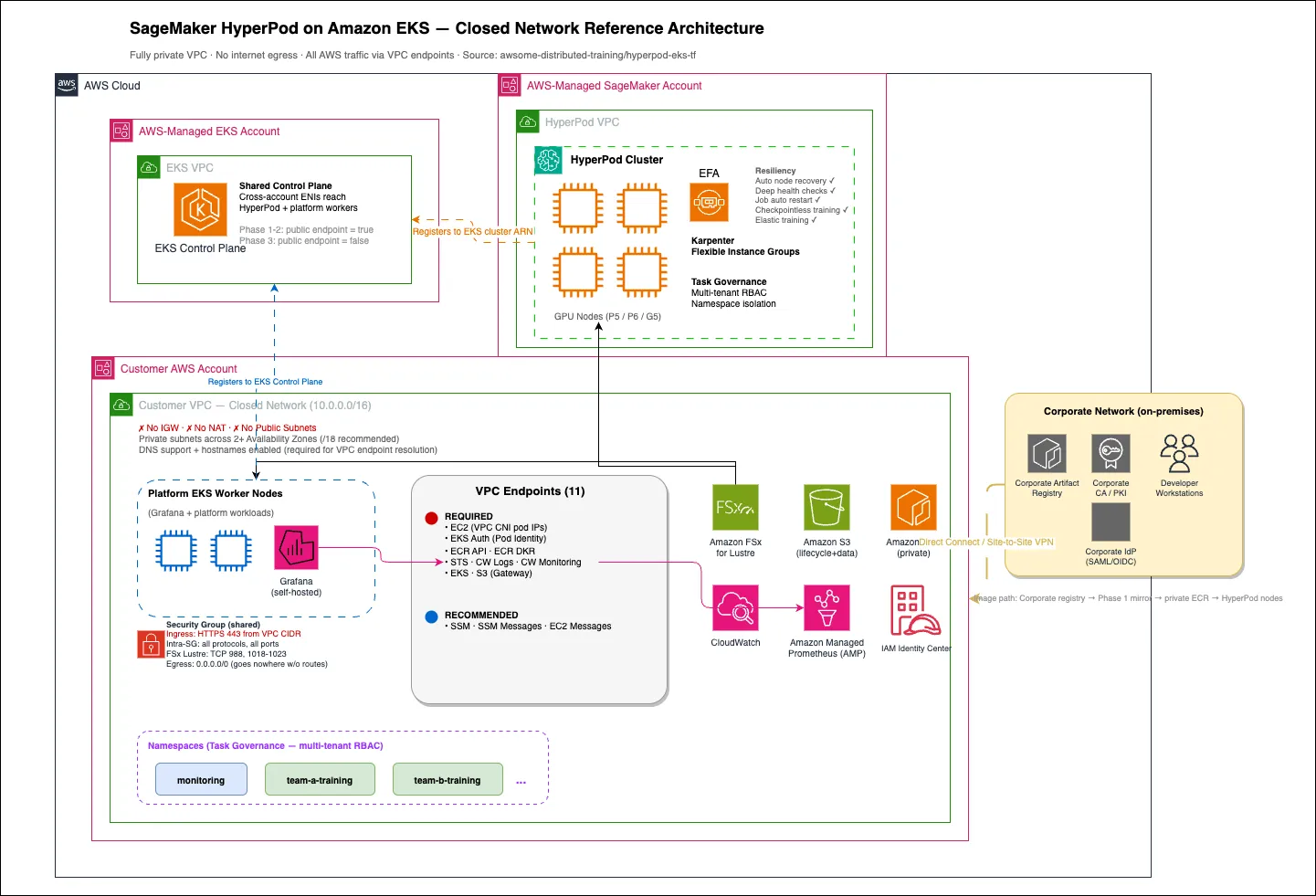
SageMaker HyperPod delivers persistent, resilient GPU clusters for distributed training. When you attach a HyperPod cluster to an Amazon EKS control plane, you keep the Kubernetes experience your teams already know. At the same time, you gain deep health checks, automatic node replacement, job auto-resume, and cluster-wide resiliency features. In a closed-network deployment, three VPCs work together:
- An AWS-managed Amazon EKS VPC hosts the Kubernetes control plane (API server, etcd, scheduler). This VPC is owned and operated by the service; you never see it in your account. Amazon EKS exposes the control plane to your VPC through cross-account elastic network interfaces.
- An AWS-managed SageMaker HyperPod VPC hosts the cluster agent and runs the HyperPod control plane. The GPU instances in your cluster are created in this service account and attached to your VPC through cross-account elastic network interfaces.
- Your VPC, the only VPC you manage, hosts the private subnets that accept those cross-account interfaces, along with your VPC endpoints, Amazon FSx for Lustre filesystems, observability stack, any existing Amazon EKS worker nodes, and Amazon S3 buckets for lifecycle scripts and training data.
Note: your training data never transits the EKS control plane VPC (that's only Kubernetes API traffic - pod scheduling, health status, kubectl commands). And the HyperPod control plane VPC handles only cluster orchestration (agent heartbeats, node health, lifecycle management) - not your training data.
The defining characteristic of a closed-network deployment is that your VPC has no internet gateway, no NAT gateway, and no public subnets. A HyperPod node makes many calls to AWS services: pulling an image from Amazon ECR, assuming an IAM role, writing logs to Amazon CloudWatch, and attaching an elastic network interface to itself. Every one of those calls traverses an AWS PrivateLink interface endpoint or the Amazon S3 gateway endpoint. Nothing leaves the VPC. Figure 1 shows the full architecture.

Figure 1. Reference architecture for SageMaker HyperPod on Amazon EKS in a closed-network environment.
You deploy this architecture in three phases, each of which we cover in detail below. Phase 1 happens on a build host that has internet access: you mirror the container images that HyperPod needs into your private Amazon ECR and commit the rewritten Helm values. Phase 2 happens against your empty private VPC: a single Terraform apply creates the VPC, endpoints, the Amazon EKS cluster, the Helm release, and the HyperPod compute. Phase 3 is a one-time hardening step: you verify end-to-end connectivity, run a smoke-test pod, and then disable public access to the Amazon EKS API, completing the air-gap.
Prerequisites
Before you start, verify you have the following:
- An AWS account with appropriate IAM permissions to create VPCs, subnets, VPC endpoints, Amazon EKS clusters, IAM roles, and SageMaker HyperPod clusters.
- Network connectivity from your corporate network to the target AWS Region. In regulated environments this is typically an AWS Direct Connect circuit, AWS Site-to-Site VPN, or AWS Client VPN, something your organization uses to reach private AWS resources.
- An Amazon ECR registry in the same AWS account and Region where you will deploy the cluster.
- A build host with internet access. This is the only machine that reaches the public registries where the source container images live. It does not need to be in the target AWS account. A developer laptop, a CI runner, or a bastion in a non-production AWS account all work.
- Terraform 1.5 or later, AWS CLI version 2.17 or later, Helm 3.12 or later, and kubectl 1.30 or later.
- The closed-network Terraform configuration from AWS Lab, awsome-distributed-ai/1.architectures/7.sagemaker-hyperpod-eks/terraform-modules/hyperpod-eks-tf .-
Sufficient GPU capacity for your instance groups. For large < 6 month reservations, use Amazon SageMaker Flexible Training Plans and pass the training plan ARN to the HyperPod cluster at creation time.
Note: If your organization requires outbound traffic to use a private artifact repository (for example, an on-premises JFrog Artifactory or Sonatype Nexus), treat that repository as an additional step in Phase 1: mirror the public images to your artifact repository first, then into Amazon ECR. The remainder of the deployment is unchanged.
Architectural building blocks
VPC design
The foundation of a closed-network deployment is a VPC with no path to the public internet. In Terraform, the reference configuration wires this up with a single flag,
closed_network = true, that cascades across the VPC, subnet, security group, and VPC endpoint modules. With closed_network set to true, the VPC module skips creation of the internet gateway, NAT gateway, elastic IP, public subnets, and public route tables. The VPC itself is still created with DNS support and DNS hostnames enabled, which is non-negotiable. If DNS support is disabled, the private DNS records that interface VPC endpoints publish will not resolve, and every AWS call inside the cluster will fail.1
2
3
4
5
resource "aws_vpc" "main" {
cidr_block = var.vpc_cidr # for example, 10.0.0.0/16
enable_dns_support = true
enable_dns_hostnames = true
}Your private subnets span at least two Availability Zones. We recommend large blocks, /18 or larger per subnet, because HyperPod GPU instances consume many IP addresses (a single ml.p5.48xlarge uses up to 81 IPs across primary and secondary ENIs, and pod IPs come from the same subnet through the Amazon VPC CNI plugin). The Amazon EKS control plane also needs a pair of small /28 subnets for its cross-account ENIs. Route tables on the private subnets have no default route. Traffic leaves the VPC only through a VPC endpoint or fails to leave at all, which is exactly the behavior you want.
Security groups
You use a single security group for both cluster nodes and VPC endpoints. Three ingress rules matter:
- HTTPS (TCP 443) from the VPC CIDR block. This is how pods and nodes reach the VPC endpoint ENIs. Without this rule, the EKS Pod Identity Agent times out after about five minutes and every addon deployment hangs.
- All protocols from the security group to itself (intra-SG). This covers node-to-node traffic, including NCCL and EFA.
- Amazon FSx for Lustre client ports: TCP 988 and TCP 1018–1023. Add these if you are mounting a Lustre filesystem from your pods or nodes.
Egress can be left as the default 0.0.0.0/0. Because the VPC has no default route, traffic still has no destination other than the endpoints.
VPC endpoints
VPC endpoints are what replace the public internet in a closed-network deployment, and getting the set right is the difference between a cluster that comes up cleanly and one that hangs in ways that are hard to diagnose. It helps to think about them as a dependency chain rather than a flat list. Before a single pod can run, the Amazon VPC CNI plugin has to assign it an IP address, and it does that by calling EC2 APIs over the EC2 interface endpoint. Once a pod is scheduled, the EKS Pod Identity Agent authenticates it to IAM through the eks-auth endpoint, and that identity is exchanged for credentials over the STS endpoint. Only then can the node pull its container images, which requires both ECR endpoints: ecr.api to authenticate to the registry and ecr.dkr to pull the image layers themselves. The Amazon S3 gateway endpoint backs the image layer store as well as your lifecycle scripts and training data. If any link in that chain is missing, the symptom usually shows up several steps later as a stuck pod or a timed-out add-on, which is why it pays to provision the whole chain up front.
The remaining endpoints support operations rather than core scheduling. The logs and monitoring endpoints carry CloudWatch telemetry out of the cluster, and the eks endpoint is what lets kubectl reach the API server from inside the VPC after you harden the cluster in Phase 3. The three Systems Manager endpoints (ssm, ssmmessages, and ec2messages) are recommended rather than strictly required: they enable Session Manager access to nodes, which is the most practical way to get an interactive shell without a VPN. In a complete deployment, twelve endpoints replace the internet. One is the Amazon S3 gateway endpoint, which is free, and the other eleven are interface endpoints. Every interface endpoint is deployed in every private subnet with private DNS enabled, so AWS service hostnames resolve to the endpoint ENI inside your VPC. Figure 2 shows the full endpoint inventory with criticality color-coding.

Figure 2. VPC endpoint topology. Critical endpoints are required for the cluster to function at all; the Amazon S3 gateway endpoint is free.
The full inventory is as follows.
| # | Service endpoint | Type | Criticality | Why it is needed |
|---|---|---|---|---|
| 1 | com.amazonaws. REGION.s3 | Gateway | Required | Lifecycle scripts, dataset and checkpoint storage, log archives |
| 2 | com.amazonaws. REGION.ec2 | Interface | Critical | Amazon VPC CNI plugin calls EC2 APIs to assign pod IPs |
| 3 | com.amazonaws. REGION.eks-auth | Interface | Critical | EKS Pod Identity Agent authenticates pods to IAM |
| 4 | com.amazonaws. REGION.ecr.api | Interface | Required | ECR authentication, GetAuthorizationToken |
| 5 | com.amazonaws. REGION.ecr.dkr | Interface | Required | Container image layer pulls from private ECR |
| 6 | com.amazonaws. REGION.sts | Interface | Required | IAM role assumption, IRSA token exchange |
| 7 | com.amazonaws. REGION.logs | Interface | Required | CloudWatch Logs ingestion |
| 8 | com.amazonaws. REGION.monitoring | Interface | Required | CloudWatch Metrics PutMetricData |
| 9 | com.amazonaws. REGION.eks | Interface | Required | kubectl API access from inside the VPC after hardening |
| 10 | com.amazonaws. REGION.ssm | Interface | Recommended | Systems Manager parameters, Session Manager initialization |
| 11 | com.amazonaws. REGION.ssmmessages | Interface | Recommended | Session Manager control channel for interactive access |
| 12 | com.amazonaws. REGION.ec2messages | Interface | Recommended | SSM agent heartbeat |
Important: Interface VPC endpoints bill at roughly $0.01 per hour per Availability Zone per endpoint, plus data-processing charges. Ten interface endpoints across four Availability Zones adds up to about $290 per month in endpoint-hours alone, before any data. Budget for this and for the per-GB data-processing fees that apply to each endpoint.
Private Amazon ECR image strategy
HyperPod on Amazon EKS relies on a small set of Kubernetes add-ons from the sagemaker-hyperpod-cli repository (device plugins, training operators, and the Health Monitoring Agent) that ship as container images. In a closed network your nodes cannot reach the public registries those images live in (NVIDIA NGC, Docker Hub, Quay). You mirror the images your cluster will need into your private Amazon ECR once, and then reference the ECR copies in your Helm values. Three images require mirroring. Two more are already hosted in AWS-managed Amazon ECR repositories and can be pulled directly over the ECR endpoints without any copy step.sitories and can be pulled directly over the ECR endpoints without any copy step.
| # | Image | Source | Action |
|---|---|---|---|
| 1 | NVIDIA Kubernetes device plugin | nvcr.io/nvidia/k8s-device-plugin | Mirror to your ECR |
| 2 | MPI operator | mpioperator/mpi-operator | Mirror to your ECR |
| 3 | Kubeflow training operator | kubeflow/training-operator | Mirror to your ECR |
| 4 | AWS EFA Kubernetes device plugin | 602401143452.dkr.ecr. REGION.amazonaws.com /eks/aws-efa-k8s-device-plugin | Use AWS-managed ECR (no copy) |
| 5 | SageMaker HyperPod Health Monitoring Agent | <regional-account>.dkr.ecr. REGION.amazonaws.com /hyperpod-health-monitoring-agent | Use AWS-managed ECR (no copy) |
The AWS EFA device plugin lives in a single AWS-owned account (602401143452) major regions . The HyperPod Health Monitoring Agent is hosted in a different AWS-owned account per region. For example, it lives in 905418368575 in us-west-2 and 767398015722 in us-east-1. The reference Terraform configuration maps the full set of supported Regions, so you do not need to track these values by hand.
Phase 0: Connect to AWS Account and Clone the Repository
Before beginning the deployment process, ensure you have access to the target AWS account and have the necessary permissions to create and manage resources. Start by configuring your AWS CLI credentials to authenticate against the account where you intend to deploy the SageMaker HyperPod cluster on EKS.
Configure AWS CLI credentials:
1
2
3
4
aws configure

# Or if using SSO:
aws sso login –-profile \<your profile\>
Verify your identity and account access:
1
aws sts get-caller-identity
Clone the awsome-distributed-ai repository:
1
2
git clone https://github.com/aws-samples/awsome-distributed-training.git
cd awsome-distributed-ai/1.architectures/7.sagemaker-hyperpod-eks/terraform
Note: Ensure that you have the following prerequisites installed on your local machine before proceeding to the next phase: AWS CLI v2, Terraform (>= 1.5), kubectl, and git. All subsequent phases in this guide assume you are operating from within the terraform directory of the cloned repository.
Phase 1: Mirror container images to private Amazon ECR
The first phase is the only one that requires internet access, and it only runs when the set of images changes, typically once per HyperPod release. The reference repository ships three tools in its tools directory that automate the work.
Declare the images
The file tools/ecr-images.conf is a simple REPO_NAME=SOURCE_IMAGE manifest. The three images in the default manifest match the HyperPod Helm chart as it ships today:
1
2
3
4
# tools/ecr-images.conf
nvidia-k8s-device-plugin=nvcr.io/nvidia/k8s-device-plugin:v0.16.1
mpi-operator=mpioperator/mpi-operator:0.5
kubeflow-training-operator=kubeflow/training-operator:v1-855e096
Mirror the images
Run the copy script from any host with internet access, Docker, and AWS credentials for the target account:
1
2
3
export AWS_REGION=us-east-1
export ACCOUNT_ID=111122223333
./tools/copy-images-to-ecr.sh $AWS_REGION $ACCOUNT_ID
The script does three things for each image in the manifest: it pulls the image with
--platform linux/amd64 (important if your build host runs on Apple silicon which is ARM architecture), creates the target Amazon ECR repository if it does not exist, and pushes the image with both the version tag and the latest tag. Retry logic with exponential backoff handles transient failures. If your corporate firewall forces image pulls through a proxy or through an on-premises artifact registry, adjust the script to pull from there instead; the push step is unchanged.Tip: For environments that require every container to trust a corporate certificate authority, add a build step that bakes the corporate CA bundle into each image before pushing it to Amazon ECR. Set NODE_EXTRA_CA_CERTS, REQUESTS_CA_BUNDLE, and SSL_CERT_FILE to the bundle path, and update ca-certificates inside the image so OpenSSL-based tooling also trusts it. Doing this once here saves you from debugging TLS failures inside the cluster later.
Rewrite the Helm values and commit
The second tool,
tools/update-values-with-ecr.py, reads ecr-images.conf and rewrites the HyperPod Helm chart values.yaml so every image reference points at your private Amazon ECR. It also handles the two AWS-managed images, substituting the correct regional account ID for the HyperPod Health Monitoring Agent, for example. The tool creates a backup of the files it modifies so changes are reversible.1
2
3
4
5
6
python3 tools/update-values-with-ecr.py
git add helm_chart/
git commit -m "Rewrite HyperPod Helm values for private ECR in us-east-1"
# Save the commit hash — Terraform needs it in Phase 2.
git rev-parse HEADThe commit hash you just captured is the value you will pass to Terraform as helm_repo_revision. Terraform will check out that exact revision of the chart when it installs the Helm release in Phase 2, guaranteeing that the image references in your values.yaml are the ones the cluster actually uses.
Phase 2: Deploy the cluster with Terraform
Phase 2 is a single terraform apply that creates every resource the cluster needs, in the correct dependency order. Figure 3 shows the end-to-end flow; the remainder of this section walks through the key configuration.

Figure 3. Three-phase deployment flow. Phase 2 is a single terraform apply that builds the VPC, endpoints, Amazon EKS cluster, Helm release, and HyperPod compute in order.
Point Terraform at the closed-network variables file
The reference repository ships a ready-to-edit closed-network.tfvars. A minimal version looks like this:
1
2
3
4
5
6
7
8
9
10
11
12
13
14
15
16
17
18
19
20
21
22
23
24
25
26
27
28
29
30
31
# closed-network.tfvars
region          = "us-east-1"
availability_zones = ["us-east-1a", "us-east-1b"]
vpc_cidr        = "10.0.0.0/16"
closed_network  = true

# Amazon EKS API is public during Phase 2 so Terraform can install add-ons.
eks_endpoint_public_access = true
eks_cluster_name = "hyperpod-closed-eks"

# Helm chart revision captured at the end of Phase 1.
helm_repo_url      = "https://github.com/your-org/your-helm-fork.git"
helm_repo_revision = "a0e0b9907b1b0af1fe675f7aceb8b645d6f1ae70"

# HyperPod cluster configuration.
hyperpod_cluster_name          = "hyperpod-closed-prod"
auto_node_recovery             = true
continuous_provisioning_mode   = true
karpenter_autoscaling          = true

# One instance group to start — add more later.
instance_groups = [
  {
    instance_group_name = "gpu-training"
    instance_type       = "ml.p5.48xlarge"
    instance_count      = 2
    availability_zone   = "us-east-1a"
    ebs_volume_size_gb  = 500
    threads_per_core    = 1
  }
]
Apply the configuration
1
2
3
terraform init
terraform plan  -var-file=closed-network.tfvars -out tfplan
terraform apply tfplan
Behind that single apply, Terraform creates resources in the order shown in Figure 3: the VPC, private subnets, the shared security group, the Amazon EKS cluster, the lifecycle-scripts Amazon S3 bucket, the eleven VPC endpoints, the SageMaker execution IAM role, the Helm release pulled from your private ECR, the HyperPod compute, the Amazon FSx for Lustre CSI driver, and the observability stack. Steps that depend on Kubernetes resources (Helm release, CSI driver, observability) automatically wait for the Amazon EKS cluster and its nodes to become ready.
A note on the awscc provider
The reference configuration uses both the standard hashicorp/aws provider and the AWS Cloud Control provider, hashicorp/awscc. The HyperPod cluster resource itself (awscc_sagemaker_cluster) currently ships in the awscc provider, which is an official joint project of AWS and HashiCorp. It is published in Terraform Registry's Official tier alongside hashicorp/aws and is generated from the same AWS Cloud Control API that CloudFormation uses. In practice you declare both providers in your configuration and use the hashicorp/aws resources for everything except the HyperPod cluster:
1
2
3
4
5
6
7
8
9
10
11
12
terraform {
  required_providers {
    aws = {
      source  = "hashicorp/aws"
      version = "~\> 5.80"
    }
    awscc = {
      source  = "hashicorp/awscc"
      version = "~\> 1.15"
    }
  }
}
Note: Because awscc uses AWS Cloud Control under the hood, it also works with OpenTofu. If your organization standardizes on OpenTofu as a drop-in for Terraform, the same configuration applies without modification. Replace terraform with tofu in the commands above.
Phase 3: Verify, then harden the cluster
With a running cluster in hand, the final phase has three steps: verify that all eleven endpoints actually work from inside the cluster, run a smoke-test pod that exercises the cluster end to end, and disable public access to the Amazon EKS API server.
Verify connectivity
The reference repository includes tools/verify-aws-connectivity.py, a short Python script that probes each endpoint from inside a cluster node in two layers: a raw TCP/443 socket connection to the endpoint DNS name, and a boto3 API call against the service. The second layer catches situations where the endpoint exists but IAM policy or endpoint policy is blocking the call.
1
2
# From a cluster node or a pod with access to the cluster network:
python3 tools/verify-aws-connectivity.py
Expected output is a checklist of OKs for each service in your endpoint inventory.
Run a smoke-test pod
The smoke test validates the four systems that commonly fail in a closed network (image pull, DNS resolution, IAM via IRSA, and GPU device visibility) in a single pod.
1
2
3
4
5
6
7
8
9
10
11
12
13
14
15
16
17
18
19
20
21
apiVersion: v1
kind: Pod
metadata:
  name: closed-network-smoke-test
  namespace: default
spec:
  restartPolicy: Never
  containers:
  - name: smoke
    image: 111122223333.dkr.ecr.us-east-1.amazonaws.com/cuda-validation:12.4.1
    command: ["/bin/bash", "-lc"]
    args:
    - |
      echo "[dns]"    ; getent hosts s3.us-east-1.amazonaws.com
      echo "[sts]"    ; aws sts get-caller-identity
      echo "[ecr]"    ; aws ecr describe-repositories --max-items 1
      echo "[gpu]"    ; nvidia-smi --query-gpu=name,driver_version --format=csv
      echo "[cw]"     ; aws cloudwatch list-metrics --max-items 1
    resources:
      limits:
        nvidia.com/gpu: 1
1
2
kubectl apply -f smoke-test.yaml
kubectl logs closed-network-smoke-testDisable public access to the Amazon EKS API
When verification succeeds, flip the Terraform flag and re-apply. From this point forward, the Kubernetes API is reachable only from inside your VPC. That means access comes from SageMaker Studio in VPC-only mode, from a bastion inside the VPC reached through Session Manager, from an existing Amazon EKS worker node, or from developer workstations connected by AWS Direct Connect or AWS Site-to-Site VPN.
Why this step matters. While the public endpoint is protected by IAM and RBAC, disabling it adds a network-layer control: even with compromised credentials, the API is unreachable from outside your VPC. Many compliance frameworks (SOC 2, FedRAMP) require network segmentation independent of identity controls. For a cluster already operating without an IGW or NAT, leaving the management plane publicly accessible is the last gap in the air-gap.
When to do it. Disable public access only after confirming a private access path (Direct Connect, VPN, or Session Manager via SSM endpoints). As an interim measure, restrict public access to specific CIDR blocks until the private path is verified.
1
2
# closed-network.tfvars
eks_endpoint_public_access = false
1
terraform apply -var-file=closed-network.tfvarsImportant: Before you disable public access, confirm that at least one mechanism for reaching the API inside the VPC is already in place and tested. We have seen teams lock themselves out of newly hardened clusters because the Direct Connect route they planned to use was still pending approval.
Operational considerations
Observability in a closed network
The observability stack installed in Phase 2 includes Amazon Managed Service for Prometheus (AMP), Amazon Managed Grafana (AMG), and Amazon CloudWatch. AMP and AMG both support AWS PrivateLink, so all metrics ingestion and Grafana traffic stays inside your VPC.
For Grafana authentication, connect AMG to your corporate identity provider through AWS IAM Identity Center. The IAM Identity Center SAML flow runs over private AWS endpoints once you are on Direct Connect or VPN. If you have an existing self-hosted Grafana on your EKS nodes, both patterns coexist without trouble.
Task Governance for multi-tenant clusters
Closed-network clusters often serve multiple internal teams from a single pool of GPUs. HyperPod Task Governance provides Kubernetes-native multi-tenant resource management: role-based access control, fair share, queueing, and quota enforcement through Kueue. A simple pattern is one Kubernetes namespace per team, with a ClusterQueue per namespace backed by the team's share of the GPU pool. Task Governance enforces the quotas transparently while the teams continue to submit normal Kubernetes jobs.
Karpenter and Flexible Instance Groups
HyperPod on Amazon EKS now supports Flexible Instance Groups, which let a single instance group hold more than one instance type. With Karpenter enabled in your tfvars, the cluster autoscales across the instance types you list, in priority order, and across the Availability Zones you specify. This is especially valuable in regulated environments where GPU capacity is tight: you can express a preference for P5 but fall back to P4d or G6 rather than leaving training queues stalled. The full feature set is covered in the Flexible Instance Groups launch post.
Storage for training data and checkpoints
Amazon FSx for Lustre is the typical choice for training data and checkpoints in a closed-network cluster because it delivers the throughput large model training needs and it mounts over the same security group and subnets the cluster uses. Mount the Lustre filesystem in the HyperPod instance groups directly. The FSx CSI driver the Helm release installs handles persistent volume claims from Kubernetes. For low-volume shared state, for example home directories for notebooks, Amazon EFS is a reasonable complement.
Developer experience
The reason many regulated customers want a cluster at all is that their data scientists can train models. Three access patterns work well in a closed network, and you can mix them depending on how your teams already work.
The first pattern is an Amazon SageMaker Studio domain in VPC-only mode. Studio compute is AWS-managed, but the ENIs that back Studio notebooks are injected into your private subnets. With a lifecycle configuration that preinstalls kubectl and helm, a data scientist can open JupyterLab and submit jobs to the HyperPod cluster without ever leaving the corporate network. The second pattern uses on-premises developer workstations connected through Direct Connect or Site-to-Site VPN. The workstation runs the IDE, while kubectl and the HyperPod CLI run either locally or in a remote session. This suits teams that already standardize on a VDI. The third pattern is a dedicated jump host inside the VPC, reached through Session Manager over the SSM endpoints. It is a good escape hatch for infrastructure teams who need shell access without adding a VPN.
Whichever pattern you choose, share a common filesystem across both the Studio or workstation environment and the HyperPod nodes. Use FSx for Lustre for high-performance training data and Amazon EFS for notebooks and source code. That way, code written in an IDE can run on the cluster without a separate sync step.
Troubleshooting common issues
Pods stuck in ContainerCreating
Nine times out of ten this is a missing com.amazonaws.REGION.ec2 endpoint. The Amazon VPC CNI plugin calls EC2 APIs to attach secondary ENIs and allocate pod IPs; without the endpoint the calls fail silently and pods never get an IP. Check the ipamd logs on the node (/var/log/aws-routed-eni/ipamd.log) for RequestError or UnauthorizedOperation entries, and confirm the endpoint exists and has the cluster security group attached.
EKS Pod Identity Agent times out on install
If you are reusing pre-existing VPC endpoints and attaching a new security group to your nodes, verify the new security group is also attached to those endpoints. Otherwise, the node-side HTTPS traffic reaches the endpoint ENI and gets dropped, and the Pod Identity Agent hangs for five minutes before failing. The fix is one command per endpoint:
1
2
3
aws ec2 modify-vpc-endpoint \
  --vpc-endpoint-id vpce-0123456789abcdef0 \
  --add-security-group-ids sg-0a1b2c3d4e5f6789a
ImagePullBackOff on addon pods
Re-run the Phase 1
update-values-with-ecr.py tool and diff the result against your committed values.yaml. A frequent culprit is a HyperPod release that adds a new image to the Helm chart. The tool picks it up, but only if you re-run it. Other common causes are a missing ECR repository in the target Region, an IAM policy on the node role that forbids ecr:BatchGetImage, or an endpoint policy on the ecr.dkr endpoint that restricts repository access.TLS failures inside containers
If your organization issues its own corporate certificate authority, workloads that do not trust that CA fail TLS handshakes to any HTTPS endpoint that is served by a proxy using a corporate certificate. Bake the corporate CA bundle into every container image (set NODE_EXTRA_CA_CERTS, REQUESTS_CA_BUNDLE, and SSL_CERT_FILE to its path, and run update-ca-certificates during image build). Do this once in your base image and inherit it everywhere.
DNS resolves to a public IP instead of the endpoint
This means private DNS is not enabled on the endpoint or DNS support is disabled on the VPC. Confirm
private_dns_enabled = true on the endpoint and enable_dns_support = true on the VPC, and check that your on-premises DNS forwarder (if any) resolves AWS service hostnames through the VPC's .2 resolver, not through the public internet.Clean up
To remove the cluster, run terraform destroy against the same variables file. If you used the reference closed-network Terraform stack, the order of deletion is handled for you. Separately, delete the Amazon ECR repositories you mirrored if you no longer need them.
1
2
3
4
5
6
terraform destroy -var-file=closed-network.tfvars

# Delete mirrored repositories
for repo in nvidia-k8s-device-plugin mpi-operator kubeflow-training-operator; do
  aws ecr delete-repository --repository-name "$repo" --force --region us-east-1
done
Conclusion
Running SageMaker HyperPod EKS in a closed network is a tractable problem once you treat it as one: a VPC without internet egress, eleven VPC endpoints in the right configuration, the right three container images mirrored to your private Amazon ECR, and a single Terraform apply tying it together. The pattern we walked through in this post (three VPCs, three phases, no surprises) is the same pattern we use with regulated-industry customers across financial services and pharmaceutical research. It maps directly onto the closed-network Terraform modules AWS publishes in the awsome-distributed-ai repository.
To get started, clone awsome-distributed-ai, open
1.architectures/7.sagemaker-hyperpod-eks/terraform-modules/hyperpod-eks-tf, and work through Phase 1 on a build host with internet access. Then run terraform apply against your private VPC. After the verification smoke test succeeds, flip the API endpoint private and you have an air-gapped GPU cluster ready for training. For deeper reading, the SageMaker HyperPod Developer Guide covers cluster management, custom AMIs, and the HyperPod CLI and SDK that sit on top of this architecture.About the authors
Mark Vinciguerra is a Specialist Solutions Architect at Amazon Web Services (AWS) based in New York, focused on AI/ML infrastructure. He helps customers from startups to enterprises run distributed training and inference workloads on Kubernetes and Slurm clusters using services like SageMaker HyperPod and EKS. Prior to AWS, he attended Boston University with a degree in Computer Engineering. You can connect with him on LinkedIn .
Daniel Schoonover drives scalable GenAI solutions for Healthcare and Life Sciences, bringing 20+ years of scientific and technical AI and computing expertise throughout the HCLS value chain. He holds 2 MSc’s in Electrical & Computer Engineering, and Cognitive Neuroscience.
Tomonori Shimomura is a Principal Solutions Architect on the Amazon SageMaker AI team, where he provides in-depth technical consultation to SageMaker AI customers and suggests product improvements to the product team. Before joining Amazon, he worked on the design and development of embedded software for video game consoles, and now he leverages his in-depth skills in Cloud side technology. In his free time, he enjoys playing video games, reading books, and writing software.
# amazon-sagemaker-hyperpod# amazon-sagemaker# amazon-eks# security-best-practices# advanced-networking
Any opinions in this article are those of the individual author and may not reflect the opinions of AWS.Enjoyed reading this content? Let the author know!
Your likes, comments, shares, and saves help creators reach more builders.

Loading recommendations
Loading article