
Mapping a Codebase for AI: Refactoring, Duplicate Detection, and Architecture Review with codeknit
codeknit is an experiment in giving AI coding assistants the structure of a codebase instead of raw source. it parses 12 languages into a compact, LLM-readable map of symbols and relationships, then adds graph analysis to surface architectural signals like cycles and god classes, plus structural fingerprinting to find duplicate code. The result: assistants spend their context reasoning about your change, not rediscovering where things are.


Large Language Models (LLMs) are useful for day-to-day coding, but they still struggle with large codebases. The problem is not just context size. Even when you can paste a lot of code into a model, raw source is noisy: implementation details, comments, tests, generated files, formatting differences, and local naming choices all compete with the structural information you usually need for a refactor, architecture review or plan a feature.
codeknit is an experiment in making that structural information easier to use. It parses source code and emits a compact map of the codebase: symbols, files, types, functions, methods, and relationships such as containment, calls, inheritance, imports, and references. The output is designed to be read by an AI coding assistant, but it is also readable enough for humans to inspect.
The goal is to give an AI Assistant the shape of the system before asking it to change the system.
Why structure matters
When you ask an AI assistant to refactor a project, the assistant needs answers to questions like:
- Where are the public entry points?
- Which functions call this one?
- Which types are duplicated across packages?
- Which modules form a cycle?
- Which files contain the important symbols for this task?
- Which tests and generated files should be ignored?
Raw source code contains these answers, but they are scattered across many files. A model has to reconstruct the graph in its limited context window while also reasoning about the change you asked it to make. That is expensive and error-prone.
codeknit shifts some of that work out of the prompt. It turns a repository into a compact structural representation first, then the assistant can reason over that representation.
What codeknit extracts
codeknit currently supports 12 programming languages through tree-sitter parsing libraries: C, C++, C#, Go, Java, JavaScript, PHP, Python, Ruby, Rust, Scala and TypeScript. It's a CLI written in go to provide fast parsing and execution directly in your agentic loop.
For each supported language, codeknit extracts symbols such as packages, classes, structs, interfaces, functions, methods, fields, variables, constants, and type parameters. It also records relationships between those symbols.
A small example of the default .skt output looks like this:
1
2
3
4
5
6
7
8
9
10
[symbols]
## src/main.go
S1 module/package L1-L1 main
S2 type/struct L5-L8 Server {exported}
S3 callable/function L10-L12 NewServer(addr: string) -> *S2 {exported}
S4 callable/method L14-L19 Start() {receiver=*Server}

[edges]
S2 --contains--> S4
S3 --returns--> S2
The representation intentionally avoids most implementation detail. It keeps the parts that help answer structural questions: what exists, where it lives, and how it relates to the rest of the codebase.
Output modes for different workflows
The main command is:
1
codeknit parse ./myproject
By default, this writes chunked .skt files to ./skeleton. This is useful for medium and large projects because an assistant can read only the chunks it needs.
There are three output modes:
- directory-flat: writes chunked output files such as map_001.skt
- directory-tree: mirrors the source tree with one output file per source file
- inline: writes the full result to stdout (useful for single files to small directory analysis)
For tool integrations, codeknit can also emit JSON:
1
codeknit parse ./src --output-mode inline --format json --edges
That makes it possible to build editor integrations, CI checks, custom scripts, or other downstream analysis tools without parsing .skt.

codeknit's interactive terminal UI
Graph analysis
Parsing gives you the structural map. Graph analysis uses that map to identify architectural signals.
1
codeknit graph analyze ./myproject
The analysis report is also emitted in an LLM-readable format. It includes signals such as:
- cyclic dependencies
- hub symbols with high fan-in or fan-out
- dead-code candidates
- god classes or functions
- deep inheritance chains
- package coupling
- transitive fan-in, which approximates blast radius
- change propagation
- layer violations
- weakly connected components
This is useful when you want an assistant to review architecture before touching code. Instead of asking "what is wrong with this repo?" against raw source, you can give it a report that already contains structural findings.
You can also render the structural graph as an interactive HTML visualization:
1
codeknit graph show ./myproject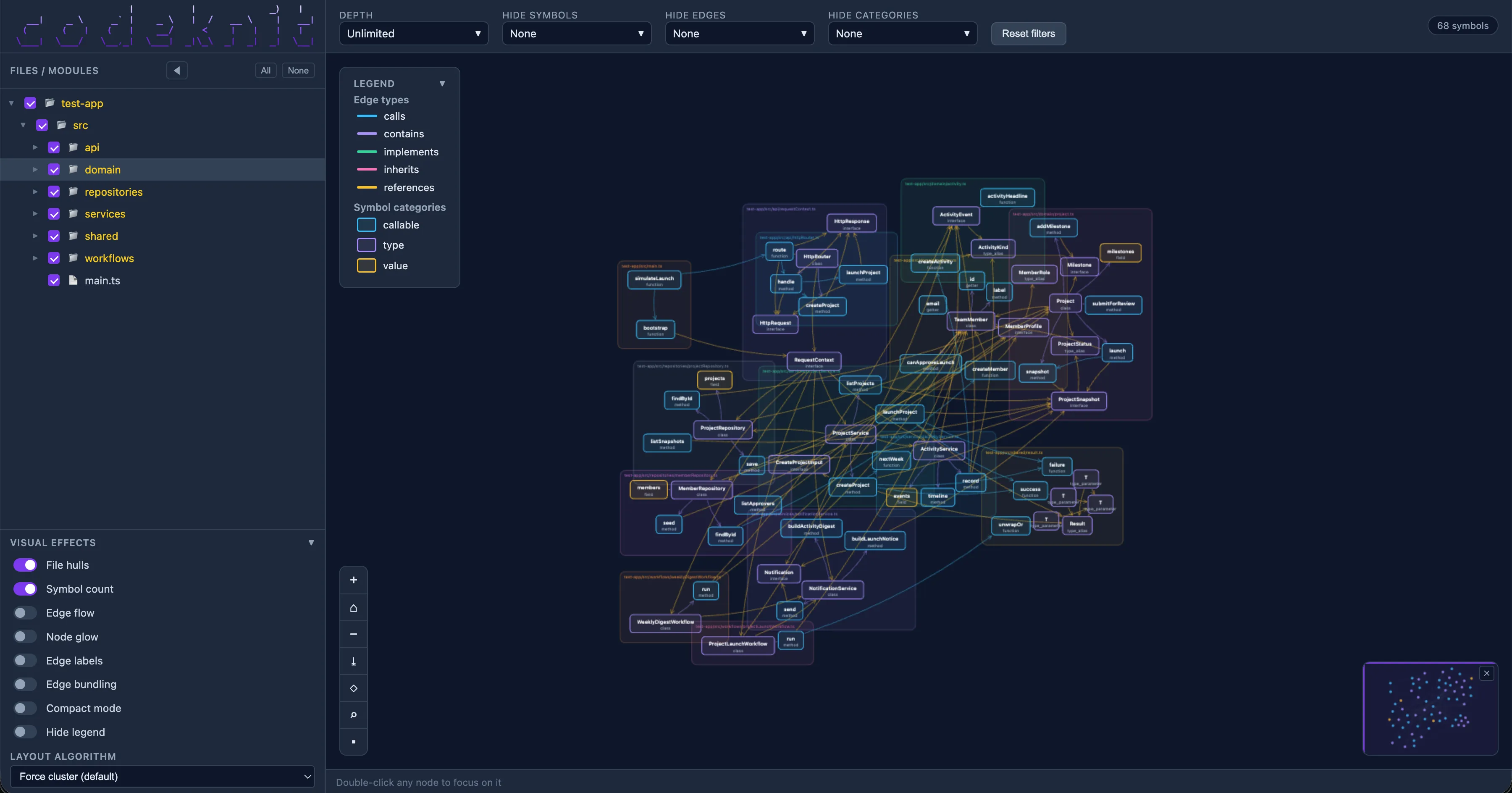
graph show output: an interactive view of symbols and their relationships, useful for spotting hubs, cycles, and clusters at a glance
The graph view is generated as a static, self-contained HTML file that can run locally in a browser. It gives you an interactive way to explore the structure of a codebase, with multiple visualization modes for moving between the full symbol graph, file-oriented views, and grouped relationships.

graph show output: focus mode on one specific symbol
You can pan and zoom through the graph, inspect individual symbols (e.g. right click on one), and focus on the path around a specific symbol to understand what depends on it, what it calls, and how it connects to the rest of the system.
Duplicate detection
codeknit also includes a fingerprinting command:
1
codeknit fingerprint ./myproject
This looks for duplicate and near-duplicate code using structural fingerprints. The fingerprinting process normalizes away names and literals, then compares the shape of functions, methods, variables, and types.
That means it can catch cases where code has been copied and lightly edited: renamed variables, changed strings, or equivalent control flow across different files. It can also compare code across languages when the structural shape is similar enough. If you pass the rerank flag (
--rerank), codeknit can additionally use local embeddings as a semantic signal, helping surface code that is conceptually similar even when the syntax differs more substantially. A high similarity score means “review these together”, it does not automatically mean they should be merged.Using codeknit with AI assistants
codeknit ships with assistant skills that explain how an AI coding assistant should use the tool. The skills cover:
- how to run codeknit parse
- when to use each output mode
- how to read .skt
- when to run graph analysis
- how to use fingerprint results during refactoring
They can be installed without cloning the repository:
1
curl -fsSL https://raw.githubusercontent.com/awslabs/codeknit/main/scripts/install-skills.sh | bash
Or for one assistant:
1
2
3
curl -fsSL https://raw.githubusercontent.com/awslabs/codeknit/main/scripts/install-skills.sh | bash -s -- --assistant kiro
curl -fsSL https://raw.githubusercontent.com/awslabs/codeknit/main/scripts/install-skills.sh | bash -s -- --assistant claude
curl -fsSL https://raw.githubusercontent.com/awslabs/codeknit/main/scripts/install-skills.sh | bash -s -- --assistant codex
Once installed, the assistant has a reusable workflow for structural analysis instead of needing the user to explain the tool every time.
What codeknit is not
codeknit is not a compiler, linter, type checker, or full semantic analyzer. It does not try to preserve every detail of every language. It is also not meant to replace reading source code.
It is a structural preprocessor for AI-assisted software work.
That design choice keeps the output compact. For many refactoring and review tasks, the assistant does not need every line of every function. It needs to know the system's shape, the important symbols, and the relationships between them.
Conclusion
AI assistants are most useful when they understand the structure of the code they are changing. Raw source code is often the least efficient way to provide that understanding.
codeknit turns source code into a compact structural map, adds graph analysis and duplicate detection, and packages the workflow as reusable assistant skills. It is a small tool with a narrow purpose: help humans and AI assistants reason about codebases before changing them.
For large refactors, architecture reviews, and codebase exploration, that structural step can make the difference between a generic answer and a useful plan.
Try it out
codeknit is open source under Apache 2.0 and available on GitHub at github.com/awslabs/codeknit .
The repository has installation instructions, the full command reference, and the assistant skills described above. Full documentation available here: awslabs.github.io/codeknit/
Enjoyed reading this content? Let the author know!
Your likes, comments, shares, and saves help creators reach more builders.

Loading recommendations
Loading article