
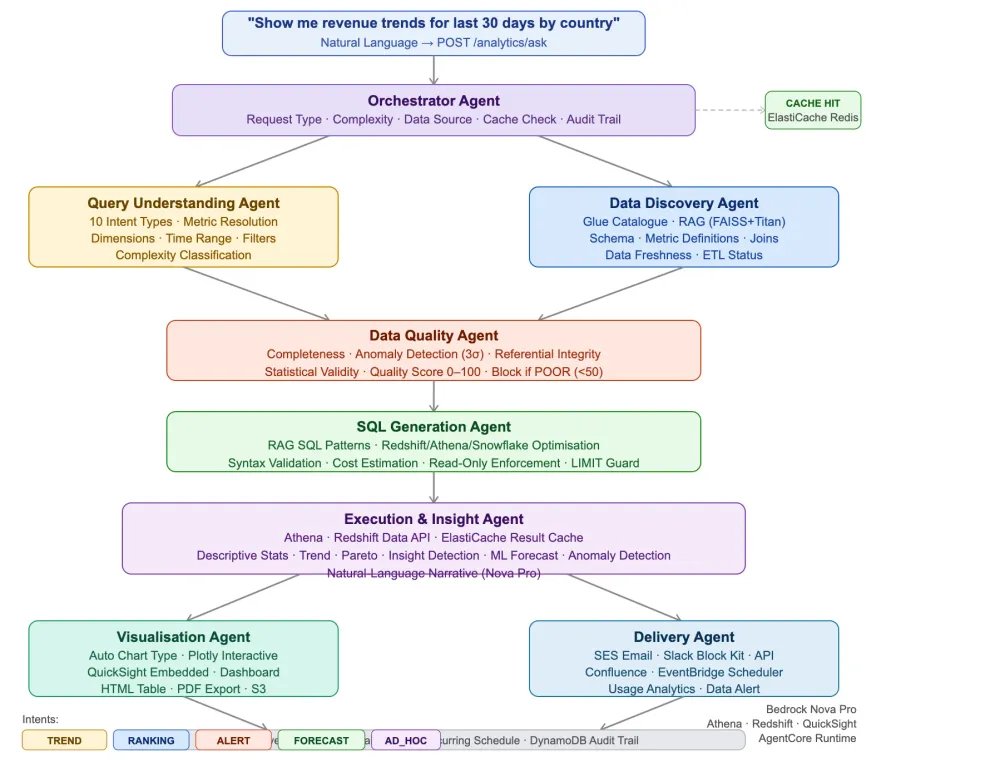
Building a Multi-Agent AI Data Analytics Assistant on AWS with Strands Agents SDK and Amazon Bedrock
Business users shouldn't need to know SQL to get answers from their data. Yet today, most analytics workflows still require an analyst to interpret the question, find the right table, write the query, validate the data, create the chart, and send the report — a process that takes hours for what should be a 30-second conversation.


Building a Multi-Agent AI Data Analytics Assistant on AWS with Strands Agents SDK and Amazon Bedrock
GitHub: https://github.com/its-me-sweta/Data_Analyst_Assistant.git
Introduction
Business users shouldn't need to know SQL to get answers from their data. Yet today, most analytics workflows still require an analyst to interpret the question, find the right table, write the query, validate the data, create the chart, and send the report — a process that takes hours for what should be a 30-second conversation.
In this post I'll walk through a production-ready, seven-agent AI pipeline that automates the full analytics lifecycle — from a natural-language question to an interactive dashboard, Slack message, and scheduled recurring report — using:
- Strands Agents SDK with
@tooldecorators - Amazon Bedrock Nova Pro for natural-language understanding, SQL generation, and narrative generation
- AWS Glue Data Catalogue for semantic data discovery (FAISS + Titan Embed v2)
- Amazon Athena + Redshift Data API for query execution
- Amazon QuickSight for embedded dashboard delivery
- Amazon Forecast + SageMaker for ML-powered forecasting
- ElastiCache (Redis) for result caching
- Amazon EventBridge Scheduler for recurring report automation
- Amazon SES + SNS for multi-channel delivery
- AgentCore Runtime for serverless deployment
Architecture Overview
1
2
3
4
5
6
7
8
9
10
11
12
13
14
15
16
17
18
19
20
21
22
23
24
25
26
27
28
29
30
31
32
33
34
35
36
37
38
39
40
41
42
43
44
                   ┌─────────────────────────────────────────────┐
                   │        FastAPI / REST Layer                   │
                   │   POST /analytics/ask                         │
                   │   "Show me revenue trends for last 30 days"   │
                   └──────────────────┬──────────────────────────┘
                                      │
                   ┌──────────────────▼──────────────────────────┐
                   │          Orchestrator Agent                   │
                   │  Request Type · Complexity · Data Source      │
                   └──────┬────────────────────────────────┬─────┘
                           │                                │
         ┌─────────────────▼──────┐         ┌──────────────▼──────────────┐
         │  Query Understanding    │         │   Data Discovery Agent       │
         │  Agent                 │         │   Glue Catalogue · RAG        │
         │  Intent · Metrics       │         │   Schema · Freshness · Joins  │
         │  Dimensions · Filters   │         │   Metric Definitions          │
         └─────────────────┬──────┘         └──────────────┬──────────────┘
                           └──────────┬──────────────────────┘
                                      │
                   ┌──────────────────▼──────────────────────────┐
                   │           Data Quality Agent                  │
                   │  Completeness · Anomaly Detection             │
                   │  Referential Integrity · Statistical Validity │
                   └──────────────────┬──────────────────────────┘
                                      │
                   ┌──────────────────▼──────────────────────────┐
                   │          SQL Generation Agent                 │
                   │  RAG SQL Patterns · Optimisation              │
                   │  Syntax Validation · Cost Estimation          │
                   └──────────────────┬──────────────────────────┘
                                      │
                   ┌──────────────────▼──────────────────────────┐
                   │       Execution & Insight Agent               │
                   │  Athena / Redshift · ElastiCache              │
                   │  Statistics · Insight Detection               │
                   │  ML Forecast · Anomaly Detection · Narrative  │
                   └──────────┬────────────────────────────┬─────┘
                               │                            │
              ┌────────────────▼──────┐     ┌──────────────▼──────────────┐
              │  Visualisation Agent   │     │   Delivery Agent             │
              │  Chart Type Selection  │     │   SES · Slack · Confluence   │
              │  Plotly · QuickSight   │     │   EventBridge Scheduler      │
              │  Dashboard · PDF       │     │   API · Usage Analytics      │
              └────────────────────────┘     └──────────────────────────────┘
Stage 1 — Query Understanding Agent
The first agent transforms a natural-language question into a structured analytics intent using keyword matching, entity extraction, and NLP heuristics.
Intent Classification (10 types):
1
2
3
4
5
6
7
8
intent_signals = {
    "TREND_ANALYSIS":  ["over time", "trend", "history", "change", "growth"],
    "RANKING":         ["top", "bottom", "best", "worst", "highest"],
    "ROOT_CAUSE":      ["why", "reason", "cause", "explain", "what happened"],
    "FORECAST":        ["predict", "forecast", "next", "will be", "expected"],
    "ANOMALY_DETECTION": ["anomaly", "unusual", "outlier", "alert", "flag"],
    ...
}
Metric Resolution — Maps plain-English metric names to registered SQL definitions:
1
2
3
4
5
METRIC_DEFINITIONS = {
    "revenue":         "SUM(order_amount) FILTER (WHERE status = 'completed')",
    "conversion_rate": "ROUND(COUNT(DISTINCT CASE WHEN status='completed' THEN order_id END) * 100.0 / NULLIF(COUNT(DISTINCT session_id),0), 2)",
    "arpu":            "ROUND(SUM(order_amount) / NULLIF(COUNT(DISTINCT user_id),0), 2)",
}
Time Range Extraction — supports relative expressions:
- "last 30 days", "this quarter", "YTD", "vs same period last year"
Stage 2 — Data Discovery Agent
The Data Discovery Agent searches the AWS Glue Data Catalogue to find the right tables for the intent:
1
2
3
4
5
def search_data_catalogue(metrics, dimensions) -> dict:
r = glue.search_tables(SearchText=" ".join(metric_names), MaxResults=5)
# Augmented with FAISS semantic search over table descriptions
# Returns ranked candidate tables with relevance scoresMetric-to-Table mapping ensures business metrics always reference the correct source of truth:
1
2
3
4
5
6
TABLE_MAP = {
    "orders":   "analytics.fact_orders",
    "users":    "analytics.dim_users",
    "events":   "analytics.fact_events",
    "revenue":  "analytics.fact_orders",  # revenue lives in orders table
}
Data Freshness Check — verifies ETL latency before committing to a query:
1
2
lag_hours = (datetime.utcnow() - last_updated).seconds // 3600
etl_status = "CURRENT" if lag_hours < 24 else "STALE"
Stage 3 — Data Quality Agent
Before executing any query, the Quality Agent validates the data across four dimensions:
Completeness Check — Are all expected dates present?
Anomaly Detection (3-sigma rule):
1
2
3
z_score = abs(val - mean) / stddev
if z_score > 2.5:
    anomalies.append({"severity": "HIGH" if z_score > 3 else "MEDIUM", ...})
Quality Score (0–100):
| Score | Label | Action |
|---|---|---|
| 90–100 | HIGH | Proceed with confidence |
| 70–89 | MEDIUM | Proceed with caveats |
| 50–69 | LOW | Add prominent warnings |
| 0–49 | POOR | Block analysis, alert data engineering |
Stage 4 — SQL Generation Agent
The SQL Generation Agent uses RAG over a pre-approved SQL pattern library (FAISS-indexed) and fills templates with the structured intent:
Trend Analysis Template (Redshift):
1
2
3
4
5
6
7
8
9
10
11
12
-- Metric trend over time with period-over-period comparison
SELECT
    DATE_TRUNC('{granularity}', event_date) AS period,
    {metric_sql} AS metric_value,
    LAG({metric_sql}) OVER (ORDER BY DATE_TRUNC('{granularity}', event_date)) AS prior_period_value,
    ROUND(({metric_sql} - LAG({metric_sql}) OVER (...)) * 100.0
        / NULLIF(LAG({metric_sql}) OVER (...),0), 2) AS pct_change
FROM {table}
WHERE event_date BETWEEN '{start_date}' AND '{end_date}'
    {filters}
GROUP BY 1
ORDER BY 1
Optimisations applied automatically:
- Athena: adds partition filter on
event_date, removesSELECT * - Redshift: uses
APPROXIMATE COUNT DISTINCTfor large cardinality (> 10GB scan) - Always: adds
LIMIT, timeout hints, and read-only enforcement
Cost estimation before execution:
1
2
3
cost_usd = scan_gb / 1024 * 5   # Athena: $5/TB
if cost_usd > 10.0:
    return {"cost_acceptable": False, ...}  # Block expensive queries
Stage 5 — Execution & Insight Agent
Executes against the target engine and automatically detects insights:
Insight detection — Pareto analysis:
1
2
3
4
5
if pct > 30:
    insights.append({
        "type": "PARETO",
        "insight": f"'{top_segment}' accounts for {pct:.1f}% of total {primary_metric}"
    })
Period-over-period change:
1
2
3
pop_change = (last_value - first_value) / first_value * 100
direction = "increased" if pop_change > 0 else "decreased"
# → "Revenue increased 23.4% over the last 30 days"
ElastiCache result caching:
- Cache key: SHA256 of (SQL + time_range + filters)
- TTL: 1 hour for real-time, 24 hours for historical reports
- Cache hit returns results instantly without re-executing the query
ML Forecasting (FORECAST intent): Amazon Forecast endpoint via SageMaker with linear extrapolation fallback.
Stage 6 — Visualisation Agent
Selects the optimal chart type automatically:
| Intent Type | Chart |
|---|---|
| TREND_ANALYSIS | Line chart with period-over-period |
| RANKING | Horizontal bar (sorted descending) |
| COHORT_ANALYSIS | Heatmap (cohort × months) |
| FORECAST | Line + shaded confidence interval |
| ANOMALY_DETECTION | Line + red dot markers at anomaly points |
Generates: Plotly JSON spec (interactive web), QuickSight embedded URL, HTML data table, PDF export.
Stage 7 — Delivery Agent
Multi-channel delivery with recurring scheduling:
1
2
3
4
5
6
7
8
def schedule_recurring_report(request_id, frequency, delivery_channel) -> dict:
schedule_expr = {
"daily": "cron(0 8 * * ? *)", # Every day at 08:00
"weekly": "cron(0 8 ? * MON *)", # Every Monday at 08:00
"monthly": "cron(0 8 1 * ? *)", # 1st of every month
}
scheduler.create_schedule(Name=f"analytics-{request_id}-{frequency}", ...)Try It Yourself
1
2
3
4
5
6
7
8
9
10
11
12
13
14
15
git clone https://github.com/its-me-sweta/Data_Analyst_Assistant.git
cd data-analytics-assistant
pip install -r requirements.txt
uvicorn main:app --reload

# Ask a natural-language analytics question
curl -X POST http://localhost:8000/analytics/ask \
  -H "Content-Type: application/json" \
  -d '{
    "user_id": "U001",
    "user_email": "sweta@company.com",
    "request_text": "Show me revenue trends for the last 30 days by country, compare vs prior period",
    "delivery_channel": "slack",
    "slack_channel": "#analytics-alerts"
  }'
Built with Strands Agents SDK · Amazon Bedrock Nova Pro · AgentCore Runtime
Enjoyed reading this content? Let the author know!
Your likes, comments, shares, and saves help creators reach more builders.

Loading recommendations
Loading article