
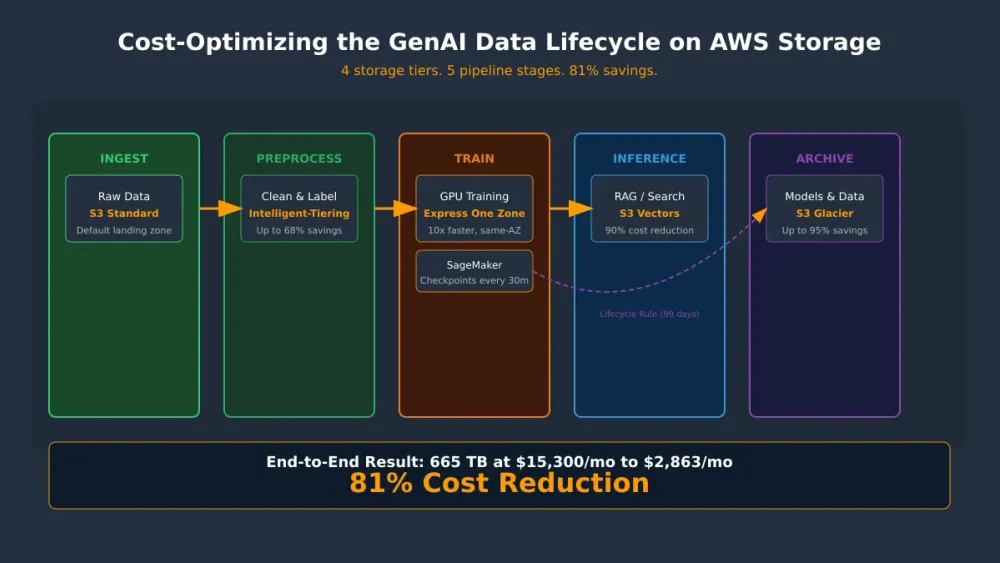
Cost-Optimizing the GenAI Data Lifecycle on AWS Storage
I mapped four S3 storage classes to the five stages of a GenAI pipeline and got storage costs down from $15K/mo to under $2K.


Cost-Optimizing the GenAI Data Lifecycle on AWS Storage
How to match the right S3 storage class to each stage of your AI/ML pipeline. Save up to 81% on overall storage costs without sacrificing performance.
Introduction
If you're running GenAI workloads, you already know the data piles up fast at every stage: raw training corpora, preprocessed datasets, model checkpoints, vector embeddings, and archived artifacts. Storing it is easy. Storing it cheaply while keeping training fast is the hard part.
Most organizations default to S3 Standard for everything. This is like heating every room in a house to the same temperature regardless of whether anyone's home. The result: wasted spend on cold data and under-optimized performance on hot data.
Is This Post for You?
If you answer "yes" to two or more of these, keep reading:
- Are you storing more than 5 TB of AI/ML data in S3 Standard with no lifecycle policies set up?
- Do you have training checkpoints or old datasets sitting untouched in S3 Standard for 30+ days?
- Are you paying for a provisioned vector database that sits mostly idle between inference bursts?
- Are checkpoint writes or data loading a bottleneck in your training loop?
- Is nobody on your team actively managing which storage class your ML artifacts end up in?
I'm going to walk through a pattern that maps four AWS storage tiers to the natural stages of the GenAI data lifecycle:
| Pipeline Stage | Storage Tier | Why |
|---|---|---|
| Active training & checkpoints | S3 Express One Zone | Single-digit ms latency, same-AZ as GPU compute |
| Datasets with variable access | S3 Intelligent-Tiering | Automatic cost optimization, no retrieval charges |
| Vector embeddings for RAG | S3 Vectors | Built specifically for this, sub-second query, no infra to manage |
| Completed runs & compliance | S3 Glacier | Up to 95% savings for rarely-accessed archival |
The GenAI Data Lifecycle
Before diving into storage classes, here's the data flow:
1
2
3
4
5
6
+----------------+    +----------------+    +----------------+    +----------------+    +----------------+
|    Ingest      |--->|  Preprocess    |--->|    Train       |--->|  Inference     |--->|   Archive      |
|   Raw data     |    |  Clean/Label   |    |  GPU epochs    |    |  RAG/APIs      |    |    Retain      |
+----------------+    +----------------+    +----------------+    +----------------+    +----------------+
  S3 Standard          Intelligent-           S3 Express           S3 Standard           S3 Glacier
  or Int-Tiering       Tiering (FA)           One Zone             + S3 Vectors          (Instant/Deep)
Each stage looks different in terms of how often you touch the data, how fast you need it, and how much of it there is.
Stage 1: S3 Express One Zone for Active Training & Checkpoints
During distributed training, GPUs are the most expensive resource, often $30-40+/hour per accelerator. Every millisecond spent waiting on data I/O is a millisecond of wasted GPU compute. For a 100B-parameter model on 4,000 accelerators, inefficient checkpointing can waste thousands of GPU-hours daily.
S3 Express One Zone delivers:
- Single-digit millisecond first-byte latency
- Up to 10x faster access than S3 Standard
- Up to 80% lower request costs than S3 Standard
The key thing: co-locate the directory bucket in the same Availability Zone as your training compute. This eliminates cross-AZ data transfer costs and maximizes throughput.
Multi-Level Checkpointing
For large-scale training, implement a tiered checkpoint strategy:
| Frequency | Destination | Purpose |
|---|---|---|
| Every 5 minutes | Local NVMe / in-memory | Fastest recovery from transient failures |
| Every 30 minutes | S3 Express One Zone | Durable, single-digit ms writes |
| Every few hours | S3 Standard or Intelligent-Tiering | Cross-AZ durable for catastrophic failure |
This keeps your GPUs busy instead of idle-waiting on storage.
SageMaker Integration
SageMaker Model Training natively supports S3 Express One Zone for training data, checkpoints, and model outputs. Point your
CheckpointS3Uri to a directory bucket and SageMaker handles the sync.For PyTorch users, the Amazon S3 Connector for PyTorch provides native primitives with automatic performance optimizations for high-throughput data loading directly from S3 Express.
When to Skip Express One Zone
- Small fine-tuning jobs (<1 GB data), the latency difference is negligible
- Offline preprocessing, not latency-sensitive
- Data not accessed in tight performance loops, the savings compound only at scale
Stage 2: S3 Intelligent-Tiering as the Default for Datasets
AI/ML datasets have unpredictable access patterns. A dataset might be heavily used during one training run, then untouched for months until the next retraining cycle. Managing lifecycle transitions by hand is a pain and things get missed.
S3 Intelligent-Tiering automatically moves objects between access tiers based on observed patterns, with no retrieval charges when objects move between tiers:
| Tier | Trigger | Savings vs. Frequent Access |
|---|---|---|
| Frequent Access | Default (new objects) | - |
| Infrequent Access | 30 days without access | Up to 40% |
| Archive Instant Access | 90 days without access | Up to 68% |
| Archive Access (opt-in) | 90 days without access | Up to 71% |
| Deep Archive Access (opt-in) | 180 days without access | Up to 95% |
When an object is accessed, it's automatically promoted back to Frequent Access. No restore process, no delays.
Why This Matters for GenAI
Take a typical embedding dataset:
- Week 1-2: Actively generated and queried during RAG system development, sits in Frequent Access
- Month 2-3: System in production, embeddings rarely recomputed, auto-moves to Infrequent Access (40% savings)
- Month 4+: Major model update triggers re-embedding, automatically promoted back to Frequent Access on access
The savings just happen without you managing lifecycle policies yourself.
Constraints to Know
- Objects 128 KB and above are eligible for auto-tiering. Smaller objects stay at Frequent Access rates but don't incur monitoring fees either, so no penalty for having them there
- A small per-object monitoring charge applies to tiering-eligible objects (~$0.0025 per 1,000 objects/month)
- No minimum storage duration (unlike S3 Standard-IA's 30-day minimum)
Best Practice
Use S3 Lifecycle policies to automatically transition newly ingested raw data from S3 Standard to Intelligent-Tiering after your initial preprocessing window completes. Pair with S3 Storage Lens for visibility into which buckets and prefixes would benefit most.
Stage 3: S3 Vectors for Embeddings
RAG (Retrieval-Augmented Generation) and semantic search require vector embeddings. Traditionally, you'd provision a dedicated vector database (OpenSearch, pgvector, Pinecone) at real infrastructure cost, even when you're barely querying them.
Amazon S3 Vectors is the first cloud object storage with native vector support, designed for storing and querying embeddings without managing database infrastructure:
- Sub-second query latency for similarity search
- Strongly consistent writes, data is immediately queryable
- Automatic index optimization as data scales. No manual tuning needed
- Metadata filtering with key-value pairs for filtered similarity search
- Scale to 2 billion vectors per index, 10,000 indexes per vector bucket
S3 Vectors vs. a Vector Database
| Criteria | S3 Vectors | Dedicated Vector DB |
|---|---|---|
| Query volume | Infrequent to moderate | High QPS (hundreds/second) |
| Scale | Billions of vectors | Varies by engine |
| Infrastructure | Zero, serverless | Provision & manage |
| Cost model | Pay-per-query + storage | Instance hours + storage |
| Latency | Sub-second (100ms+ at frequency) | Low single-digit ms |
S3 Vectors works well when you have large embedding collections with infrequent query patterns. This is actually typical of many RAG applications where the knowledge base is huge but query rate is moderate.
Use a dedicated vector DB when your inference workload needs consistently sub-10ms latency at hundreds of requests per second.
Native Integrations
- Amazon Bedrock Knowledge Bases - select S3 Vectors as your vector store for RAG
- Amazon OpenSearch Service - use S3 Vectors for cost-optimized storage with OpenSearch for high-QPS query execution
- Aurora PostgreSQL - query S3 Vectors via SQL for analytics workloads
Cost Impact
As of June 2026, S3 Vectors reduced query charges by up to 80% for indexes with over 10 million vectors. For a typical RAG application with 100M embeddings and moderate query volume, this can reduce vector storage + retrieval costs by about 90% compared to a provisioned vector database.
Stage 4: S3 Glacier for Archival That Enables Future Innovation
After a training run finishes, you're left with a bunch of stuff you don't need right now but can't delete: old datasets, model versions you might roll back to, and checkpoints you could reuse for fine-tuning later.
Keeping this data in S3 Standard costs $0.023/GB-month. At petabyte scale, that's over $23,000/month for data you might touch once a year.
Three Glacier tiers match the spectrum of "cold but might need it" to "archive and forget":
| Class | Retrieval | Min Duration | Best For |
|---|---|---|---|
| Glacier Instant Retrieval | Milliseconds | 90 days | Archived checkpoints you might reuse for fine-tuning |
| Glacier Flexible Retrieval | Minutes to hours | 90 days | Completed run outputs, older model artifacts |
| Glacier Deep Archive | 12 hours | 180 days | Compliance archival, historical training corpora |
Why Glacier Instant Retrieval is the ML Default
For AI/ML workloads, Glacier Instant Retrieval is the go-to for archived model checkpoints and training datasets. It delivers millisecond retrieval (same as S3 Standard-IA) at significantly lower storage cost.
Real-world example: Snap saved tens of millions of dollars using Glacier Instant Retrieval for 1.5 trillion archived media objects. The same pattern applies directly to ML artifact archival at scale.
Lifecycle Automation
Automate transitions with S3 Lifecycle rules:
1
2
3
4
5
6
7
8
9
10
11
12
13
14
15
16
17
18
19
20
21
22
23
24
25
26
{
  "Rules": [
    {
      "ID": "Archive completed checkpoints",
      "Filter": { "Prefix": "checkpoints/completed/" },
      "Status": "Enabled",
      "Transitions": [
        {
          "Days": 90,
          "StorageClass": "GLACIER_IR"
        }
      ]
    },
    {
      "ID": "Deep archive superseded models",
      "Filter": { "Prefix": "models/superseded/" },
      "Status": "Enabled",
      "Transitions": [
        {
          "Days": 180,
          "StorageClass": "DEEP_ARCHIVE"
        }
      ]
    }
  ]
}
Archival Accelerates Innovation
A common mistake is treating archival as purely a cost exercise. An effective archive strategy actually accelerates new model development because you can rapidly restore prior checkpoints for fine-tuning rather than retraining from scratch. The cost savings enable you to keep more data rather than deleting it, and that data becomes an asset for future model iterations.
Putting It All Together: End-to-End Cost Model
Here's what a typical GenAI pipeline looks like with optimized storage class selection vs. defaulting to S3 Standard:
| Data Type | Volume | S3 Standard Cost/Mo | Optimized Cost/Mo | Savings |
|---|---|---|---|---|
| Active training data | 10 TB | $235 | ~$1,126 (Express One Zone*) | Storage is higher, but see footnote |
| Preprocessed datasets | 50 TB | $1,150 | $690 (Int-Tiering IA after 30d) | 40% |
| Vector embeddings | 5 TB | $115 | $12 (S3 Vectors)† | ~90% |
| Archived checkpoints | 100 TB | $2,300 | $460 (Glacier Instant) | 80% |
| Historical corpora | 500 TB | $11,500 | $575 (Deep Archive) | 95% |
| Total | 665 TB | $15,300/mo | $2,863/mo | ~81% |
*Express One Zone storage is $0.11/GB-month vs. $0.023 for Standard (about 5x more). But request costs are 80% lower, GET costs are 85% lower, and co-locating with compute eliminates cross-AZ transfer fees. The real savings show up on your compute bill: fewer idle GPU-hours during data loading and checkpointing. For a 4,000-GPU training cluster, even a 5% improvement in GPU utilization saves far more than the ~$900/mo storage premium. (Pricing as of April 2025 reduction.)
†S3 Vectors pricing includes query charges; actual cost depends on query volume.
> Storage optimization for GenAI isn't just about reducing storage bills. It's about reducing total pipeline cost by matching storage performance to compute requirements. The storage premium you pay on Express One Zone comes back many times over in GPU efficiency.
Common Mistakes (and How to Avoid Them)
Here are the pitfalls I see teams hit most often when optimizing GenAI storage:
Mistake 1: Putting short-lived checkpoints in Glacier
You archive training checkpoints to Glacier Instant Retrieval immediately after a run completes, but then delete them two weeks later when you realize the experiment was a dead end.
Glacier Instant Retrieval has a 90-day minimum storage duration. Delete before 90 days and you're billed a pro-rated early-deletion fee for the remaining days. For Glacier Deep Archive, it's 180 days.
Fix: Keep experiment checkpoints in S3 Standard or Intelligent-Tiering until you're confident the run was successful. Only transition to Glacier after the minimum duration would naturally elapse, or better, use a Lifecycle rule with a 90-day transition delay so the math always works.
Mistake 2: S3 Express One Zone in a different AZ than compute
You create a directory bucket in
us-east-1a but your training instances launch in us-east-1b.You lose the single-digit millisecond latency advantage (cross-AZ adds 1-2ms per request) and you pay cross-AZ data transfer charges (~$0.01/GB each direction). For a 10 TB training dataset loaded multiple times per epoch, that's hundreds of dollars in transfer fees alone, negating the storage savings.
What to do instead: Pin your training compute to the same AZ as your directory bucket. In SageMaker, use subnet configuration to constrain the training job. For EC2/EKS, use placement groups or AZ-specific subnets.
Mistake 3: Using S3 Vectors for high-QPS inference
You adopt S3 Vectors for your RAG knowledge base, then scale to production with 500+ queries/second hitting the vector index.
S3 Vectors is optimized for infrequent to moderate query patterns, sub-second latency, not sub-10ms. At high QPS, per-query charges add up quickly and latency may not meet SLA requirements for real-time chat applications.
The workaround: Use S3 Vectors as the storage layer and export to Amazon OpenSearch Serverless for the query layer when QPS exceeds ~100 requests/second. S3 Vectors supports snapshot export to OpenSearch for exactly this pattern. You get cost-optimized storage plus high-performance retrieval.
Mistake 4: Ignoring the 128 KB threshold for Intelligent-Tiering
You store millions of individual embedding vectors (each ~1-4 KB) as separate objects in an Intelligent-Tiering bucket, expecting automatic cost savings.
Objects smaller than 128 KB are not eligible for auto-tiering and won't move to cheaper tiers. They stay at Frequent Access rates permanently. The good news is you don't pay monitoring fees on them (AWS removed that charge for small objects in 2021), so there's no direct penalty. But you're also getting zero benefit from Intelligent-Tiering compared to just using S3 Standard. It's a wash, not a win.
Better approach: For small objects like individual embeddings:
- Batch them into larger files (e.g., Parquet files grouping embeddings by category)
- Use S3 Vectors instead, it's built specifically for this exact use case, no size threshold
- Reserve Intelligent-Tiering for larger objects: datasets, model artifacts, preprocessed files
Mistake 5: "Archive everything, delete nothing"
You never delete anything because Glacier Deep Archive is "basically free" ($0.00099/GB-month). Over 3 years, you accumulate 5 PB of undocumented training data with no metadata about what runs produced it.
Storage is cheap, but the operational cost is not. When you need to find a specific checkpoint for fine-tuning, you can't locate it. Retrieval from Deep Archive takes 12 hours, and you often restore the wrong objects first. Meanwhile, compliance audits require you to demonstrate you know what you're retaining and why.
Here's what to do instead:
- Tag objects with structured metadata at archive time (run ID, model version, dataset version, date, outcome)
- Set expiration rules for failed experiments (e.g., auto-delete after 1 year)
- Maintain a lightweight catalog (even a DynamoDB table or S3 Inventory report) mapping archived objects to their provenance
- Only Deep Archive data you have a documented retention reason for
Getting Started: Three Actions This Week
- Enable S3 Intelligent-Tiering on your training dataset buckets. Zero risk, no retrieval charges, automatic promotion on access. Savings start compounding after 30 days.
- Evaluate S3 Vectors for your RAG embedding store. If you're running a self-managed vector DB with <100 QPS, S3 Vectors likely reduces cost by 90%+ with acceptable latency.
- Add Lifecycle rules to transition completed training checkpoints to Glacier Instant Retrieval after 90 days. Your archived checkpoints remain instantly accessible for fine-tuning but cost 80% less.
Conclusion
The GenAI data lifecycle has distinct stages, each with its own speed and access needs. By mapping AWS storage classes to these natural stages: Express One Zone for hot training, Intelligent-Tiering for variable access, S3 Vectors for embeddings, and Glacier for archival, you can reduce storage costs by 40-95% on cold and warm data while actually improving performance where it matters most (active training and inference).
And these transitions can be fully automated with S3 Lifecycle policies and Intelligent-Tiering's built-in monitoring. Set it up once, and the cost optimization compounds as your data grows.
Further Reading
- S3 Express One Zone storage class
- S3 Intelligent-Tiering documentation
- Working with S3 Vectors
- Architecting scalable checkpoint storage for large-scale ML training
- How Tavily reduced AI search caching costs by 95% with S3 Express One Zone
- Amazon S3 Vectors reduces query charges by up to 80%
- Snap case study - Glacier Instant Retrieval at scale
Enjoyed reading this content? Let the author know!
Your likes, comments, shares, and saves help creators reach more builders.

Loading recommendations
Loading article