
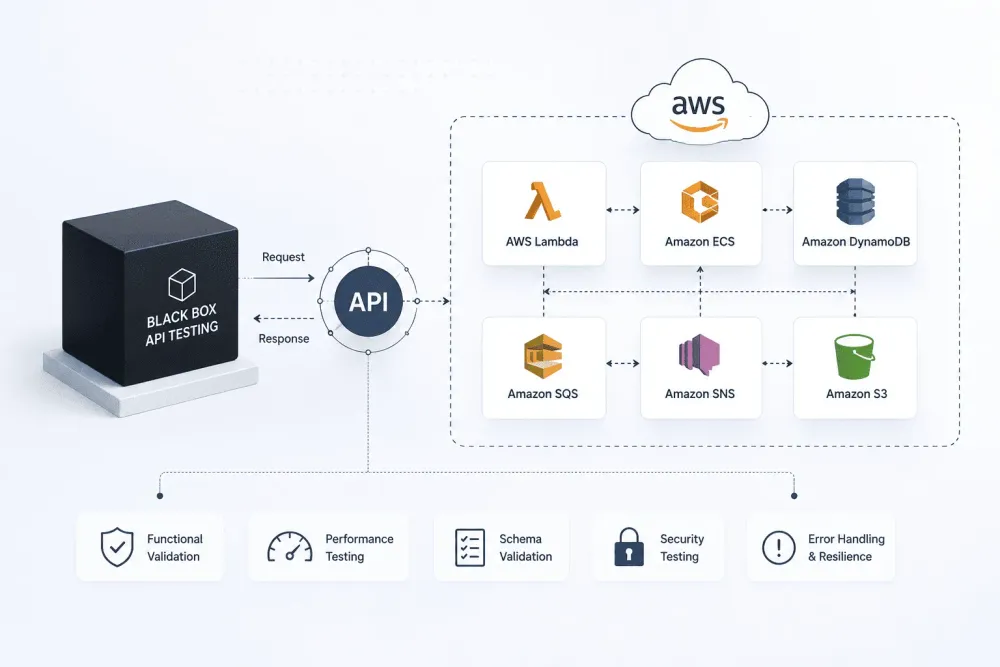
Black Box API Testing for AWS Microservices: How to Test What You Can't See Inside
Black box testing for AWS microservices means testing API contracts, not internals. Learn how to design, run, and automate tests at the service boundary.

Black box testing is one of the most practical approaches for validating microservices on AWS, and also one of the most underused. Most teams write unit tests that look inside a service and integration tests that wire multiple services together. But testing at the API boundary, purely from inputs and outputs, without touching internal code? That gets skipped.
Splitting a monolith into services on ECS, Lambda, or EKS creates a new failure pattern most teams aren't prepared for. Each service now depends on other services through APIs. When that API contract breaks or returns something unexpected, the failure shows up downstream — in a completely different service, sometimes hours later. Tracing it back takes time. Fixing it takes longer.
Black box testing at the API layer is how you catch this before it reaches production. You don't need to know what the payment service does internally. POST a valid payload to
/charge, get a 200 back with the right shape. POST something invalid, get a 400. That's the test. That's the contract.Why Microservices Make Black Box Testing Harder
In a monolith, you can call any function directly in tests. You can inspect internal state. You know exactly what the code does because it's all in one place.
With microservices, you often don't own the service you're testing against. Or you do own it, but another team consumes it. Either way, you're testing a contract, not an implementation. The service is genuinely a black box from your perspective as a consumer.
This creates a few real problems:
The dependency problem. Your service under test calls three other services. In a test environment, those three services may not be available, may return stale data, or may be unreliable. Your black box tests start failing for reasons that have nothing to do with the service you're actually testing.
The environment drift problem. The test environment doesn't behave the same as production. Request volumes differ, data shapes differ, edge cases from real users never appear in synthetic test data. So your black box tests pass in staging and something still breaks in production.
The coverage gap. Teams write happy path tests and call it done. The unhappy paths- malformed payloads, missing headers, out-of-range values, race conditions from concurrent requests, are the ones that cause actual incidents. And they're harder to write synthetic tests for because you don't always know what "real bad input" looks like until it shows up in production.
AWS architectures add extra layers to all three. A service sitting behind API Gateway may behave differently depending on authorizer configuration, throttling limits, or request transformation templates. Lambda cold starts can cause timeout behaviors that never show up in local testing. ECS tasks with health check grace periods can accept traffic before they're actually ready. All of these are things your black box tests can surface if they're designed to.
What Black Box API Testing Actually Looks Like
The setup is simpler than most teams assume. You need three things: a running instance of the service (or a stable test environment), a set of test cases that describe inputs and expected outputs, and a way to run those test cases and report results.
For AWS microservices, a "running instance" usually means one of three setups:
A dedicated test environment on AWS. Same architecture as production- API Gateway, Lambda or ECS, databases. The most reliable option. Also the most expensive to maintain if you have many services.
A local stack using tools like LocalStack. Simulates AWS services on your machine. Good for development speed. Less reliable for testing behaviors that depend on actual AWS service behavior - IAM evaluation, specific service quotas, exact throttling behavior.
Mocked dependencies with a real service. The service under test runs for real. Its downstream dependencies are mocked- returning predictable responses so the service itself can be tested in isolation. This is the most common pattern for unit-level black box testing of individual services.
The test cases themselves follow a consistent structure regardless of which setup you use. For each endpoint, you define:
- The request: method, path, headers, body, query parameters
- The expected response: status code, response body shape, specific field values where relevant
- Edge cases: what happens with missing required fields, oversized payloads, invalid types, duplicate requests
Here's a concrete example. Say you have a user registration service behind API Gateway. Your black box tests for the
POST /users endpoint would cover:- Valid payload returns 201 with a user ID in the response body
- Missing
emailfield returns 400 with a meaningful error message - Duplicate email returns 409
- Email field with invalid format returns 400
- Payload exceeds API Gateway's 10MB limit returns 413
- Request without the required Authorization header returns 401
None of these tests look inside the Lambda function handling the request. They only observe what comes back at the API layer. That's exactly what you want - because that's what your consumers see.
Handling Dependencies Without Breaking Test Isolation
The hardest part of black box testing microservices is managing what happens when the service under test calls other services. If you let it call real downstream services, your tests become slow, flaky, and dependent on services you don't control. If you mock everything, you risk tests that pass in isolation but fail in production because the mock doesn't match how the real dependency actually behaves.
There are three approaches that work well in AWS environments.
Contract-based mocking. Before you mock a dependency, you capture what it actually returns under various conditions. You use that captured data as the basis for your mock. This way the mock reflects real behavior rather than what you assume the dependency does. It's more setup work upfront but your tests are significantly more reliable.
Service virtualization through a proxy. Tools like WireMock or Hoverfly can sit in front of your downstream services and record real interactions during a capture phase. You then replay those recorded interactions during testing. This is particularly useful when you have a third-party API you can't control - record a session of real calls, then test against the replay.
Traffic-based test generation. Instead of writing test cases manually, you generate them from real production traffic. Tools that instrument your API layer, capture the actual requests and responses flowing through it, and turn those into test cases give you a fundamentally different kind of coverage. Your tests reflect what real users and real services actually send - not what you imagine they'll send. Keploy does this specifically for API testing: it captures real traffic and auto-generates test cases from it, so your black box tests start from observed reality rather than assumptions.
The third approach is the most powerful for catching the edge cases that synthetic tests miss. Production traffic has a habit of containing inputs that no developer would think to write a test for.
Testing API Gateway Behaviors Specifically
If your services sit behind API Gateway - and most AWS microservice architectures use it, there are behaviors at the gateway layer that are worth testing explicitly, separately from the service itself.
Request validation. API Gateway can validate request bodies against a JSON schema before the request reaches your Lambda or ECS service. If you've configured this, test that it actually rejects invalid payloads. It's more common than you'd think to configure schema validation incorrectly and not discover it until a malformed request hits production.
Authorizer behavior. Custom Lambda authorizers and Cognito authorizers can fail in specific ways - expired tokens, missing scopes, malformed JWT structures. These are worth explicit test cases because the failure mode is a security gap, not just a functional bug.
Throttling and rate limiting. API Gateway enforces usage plan limits and stage-level throttling. If your consumers are calling your API at high volume, test what happens when they hit the throttle limit. The 429 response and the Retry-After header need to behave predictably or your consumers' retry logic will break.
Stage variables and environment configuration. If your API Gateway uses stage variables to configure backend endpoints or feature flags, changes to those variables during deployment can have unexpected effects. Black box tests that run against each stage after deployment catch configuration drift before it affects real traffic.
Running Black Box Tests in CI/CD
Black box API tests should run on every deployment, not just manually or on a scheduled cadence. On AWS, this means integrating them into your deployment pipeline.
The typical pattern for CodePipeline or GitHub Actions deploying to AWS:
- Deploy the service to a test environment
- Wait for the service to become healthy (check endpoint returns 200)
- Run the black box test suite against the test environment URL
- If tests pass, promote to the next stage; if they fail, block the deployment and alert
A few things that make this more reliable in practice:
Use environment-specific base URLs. Don't hardcode the API Gateway endpoint in your tests. Pass it as an environment variable from the pipeline. This way the same test suite runs against test, staging, and production without modification.
Test idempotency matters. If your tests create resources (users, orders, records), they need to clean up after themselves or use unique identifiers that don't collide across runs. Tests that leave state behind cause the next run to fail with 409 Conflict errors on endpoints that should be returning 201.
Separate smoke tests from full suites. A small set of critical path tests (5-10 tests covering the most important endpoints) should run in under 30 seconds and gate every deployment. The full test suite can run in parallel or on a slower cadence. Blocking a deployment for 15 minutes while a 200-test suite runs creates pressure to skip the tests, which defeats the purpose.
Alert on failure with enough context. A failing test in CI should tell you exactly which endpoint failed, what the request was, what response was expected, and what actually came back. If the failure output is cryptic, engineers will start ignoring it.
A Note on Testing Across Service Boundaries
One thing that black box testing alone doesn't solve is verifying that two services agree on the same API contract. Service A tests its own endpoint behavior. Service B tests its own behavior. But if Service A changes its response shape in a way that breaks Service B's expectations, neither service's tests catch it, because each service only tests itself.
This is where contract testing comes in as a complement to black box testing. Tools like Pact let you define the contract between a consumer and a provider explicitly. The consumer specifies what it expects from the API. The provider verifies it can meet those expectations. Both sides run tests against the same contract definition.
In AWS environments, you can run Pact contract tests in the same CI pipeline that runs your black box tests. They're different tests answering different questions. Black box tests answer "does this service behave correctly for any input." Contract tests answer "does this service still meet what its consumers depend on."
Running both gives you meaningful coverage at the service level and at the integration level, without the cost and fragility of full end-to-end tests that spin up every service in the system.
Where to Start
If you're running microservices on AWS and your current test coverage is mostly unit tests and some end-to-end tests, adding black box API tests at the service boundary is the highest-ROI change you can make.
Start with your most critical service, the one that, if its API breaks, causes the most downstream pain. Map its endpoints. Write test cases for the happy path, then for the most common failure modes. Run them against a test environment. See what breaks.
The first round usually surfaces something. A response field that's inconsistently named. An error message that returns 500 instead of 400. A missing header that should be there. These are real bugs that were hiding in a service that all your other tests were calling "working."
From there, add the test suite to your deployment pipeline. Once it's blocking bad deployments automatically, you've changed the failure mode from "production incident" to "CI failure." That's exactly where you want it.
Enjoyed reading this content? Let the author know!
Your likes, comments, shares, and saves help creators reach more builders.

Loading recommendations
Loading article