
Give Every Knowledge Worker a Research Assistant That Never Sleeps: Claude Cowork on Amazon Bedrock
Claude Cowork is a desktop application that delegates research, document analysis, and report generation to Claude, running exclusively through Amazon Bedrock in your AWS account. Learn how it works, what it costs, and how to set it up for your team.

The Problem: AI Tools That Only Developers Can Use
Your engineering team has been using AI coding assistants for months. They ship faster, debug quicker, and automate repetitive tasks. Meanwhile, your marketing team still copies text between browser tabs. Your analysts still manually reformat data from one spreadsheet into another. Your support team still searches knowledge bases one article at a time.
The gap isn't about intelligence or willingness. It's about interface. Every AI tool available to non-developers today requires either: (a) crafting perfect prompts from scratch every time, (b) navigating a chat interface that forgets everything between sessions, or (c) trusting consumer-grade products with sensitive company data.
Claude Cowork is Anthropic's answer to this gap—a desktop application designed specifically for knowledge workers who need AI assistance but don't write code.
What Claude Cowork Actually Is
Claude Cowork is a native desktop application (macOS and Windows) that gives non-technical employees a persistent, context-aware AI assistant. It runs entirely through Amazon Bedrock in your AWS account, meaning your data never leaves your security perimeter.
Unlike a chat interface, Cowork maintains project context across sessions. You create a workspace for "Q3 Marketing Campaign" or "Annual Budget Review" and the assistant remembers every document, conversation, and decision made within that workspace.
Key Capabilities
Document Analysis at Scale: Drop a 200-page contract into a workspace. Ask questions about it next week without re-uploading. Cowork maintains a semantic index of every document in the workspace, so it can cross-reference your quarterly report against your strategic plan without you having to specify which files to look at.
Research Orchestration: Need competitive intelligence? Cowork can run multi-step research workflows: it reads your internal product briefs, searches the web for competitor announcements, cross-references with analyst reports you've uploaded, and produces a synthesis document with citations.
Report Generation: Give Cowork access to your data exports (CSV, Excel, JSON) and a template from a previous report. It generates new reports that match your organization's format, tone, and structure—without you explaining the format every time.
Meeting Preparation: Connect your calendar and document workspace. Before each meeting, Cowork pulls relevant documents, summarizes recent changes, identifies open questions from previous meetings, and prepares a brief you can review in two minutes.
The Architecture: Why Amazon Bedrock Matters Here
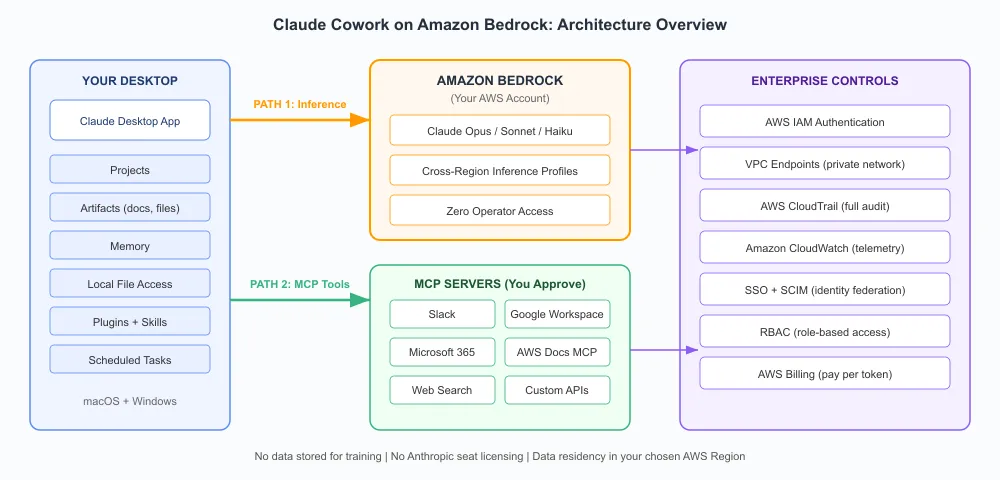
Claude Cowork runs on a three-tier architecture that keeps your data secure while delivering the responsiveness of a native application.
Local Desktop Layer: The Cowork application runs locally, providing instant UI response, offline document caching, and local workspace indexing. Documents are chunked and embedded locally before being sent to Bedrock for generation.
Amazon Bedrock API Layer: All LLM inference runs through your AWS account's Bedrock endpoint. This means you get IAM-based access control, VPC endpoints for private connectivity, AWS CloudTrail logging of every API call, and usage tracking through standard AWS billing.
MCP Integration Layer: Cowork connects to Model Context Protocol (MCP) servers for extended capabilities. Your IT team can deploy MCP servers that connect to internal databases, ticketing systems, or knowledge bases—giving Cowork access to live company data without exposing raw credentials to the application.
How a Typical Workflow Runs
Let's say your product manager asks Cowork to prepare a competitive analysis:
- Cowork reads the workspace context (previous analyses, product roadmap, positioning documents)
- It formulates a research plan using Claude Sonnet 4 on Bedrock for planning
- It connects to an internal MCP server to check current service capabilities. It connects to a web search MCP server for competitor context. In 8-12 minutes, the user receives a structured document with citations, comparison tables, and recommended positioning—all generated without writing a single prompt beyond the initial request.
What It Costs: Real NumbersWhat It Costs: Real Numbers
Cowork pricing has two components:
Cowork Application License: $30/user/month for the desktop application, workspace management, and local indexing features.
Amazon Bedrock Usage: Pay-as-you-go based on actual token consumption. For a typical knowledge worker doing 20-30 AI-assisted tasks per day:
- Light usage (document Q&A, summarization): ~$15-25/month in Bedrock costs
- Medium usage (research workflows, report generation): ~$40-70/month
- Heavy usage (continuous background analysis, multi-step workflows): ~$100-150/month
The Bedrock costs are predictable because Cowork intelligently routes tasks to appropriate models. Quick questions go to Haiku (cheap and fast). Complex analysis goes to Sonnet (balanced). Only multi-step reasoning tasks use Opus (expensive but thorough).
Cost Comparison
Compare this to alternatives:
- ChatGPT Enterprise: $60/user/month (but data leaves your network)
- Microsoft Copilot: $30/user/month (limited to Microsoft ecosystem)
- Custom-built solution: $200K-500K development cost plus ongoing maintenance
Cowork on Bedrock gives you enterprise-grade security, model flexibility, and usage-based pricing that scales with actual value delivered.
Setting It Up for Your Team
Prerequisites
- An AWS account with Amazon Bedrock access enabled
- Claude model access granted in your Bedrock console (Haiku, Sonnet, and optionally Opus)
- IAM roles configured for your users (Cowork provides CloudFormation templates)
- Network connectivity from user desktops to your Bedrock endpoint
Deployment Steps
Step 1: Infrastructure (30 minutes)
Deploy the Cowork CloudFormation stack in your AWS account. This creates:
- IAM roles with least-privilege Bedrock access
- (Optional) VPC endpoint for private connectivity
- CloudWatch dashboards for usage monitoring
- Budget alerts for cost management
Step 2: Application Distribution (varies)
Distribute the Cowork installer through your existing software deployment tool (SCCM, Jamf, Intune). The application requires:
- 4GB RAM minimum
- 2GB disk space for local workspace indexing
- Network access to your Bedrock endpoint
Step 3: User Configuration (5 minutes per user)
Each user connects their Cowork application to your AWS account using either:
- AWS SSO (recommended): Single sign-on through your identity provider
- IAM Identity Center: Federated access with temporary credentials
- Access keys: Direct IAM user credentials (not recommended for production)
Step 4: MCP Server Deployment (optional, 2-4 hours)
For extended capabilities, deploy MCP servers that connect Cowork to your internal systems:
- Confluence/SharePoint server for knowledge base access
- Jira/ServiceNow server for ticket context
- Database server for live metrics access
- Custom servers for proprietary systems
Who Should Use This
Claude Cowork on Bedrock is designed for organizations where:
- Knowledge workers spend 2+ hours daily on research, document review, or report creation
- Data sensitivity prevents using consumer AI tools
- The IT team wants centralized control over AI model access and spending
- You need audit trails for compliance (every Bedrock API call is logged in CloudTrail)
It is NOT designed for:
- Developers (use Claude Code instead)
- Casual or occasional AI users (the $30/month license needs consistent usage to justify)
- Organizations without AWS infrastructure (you need Bedrock access)
Getting Started Today
- Request Bedrock model access for Claude Haiku, Sonnet, and Opus in your AWS console
- Deploy the CloudFormation template from Anthropic's partner page on AWS
- Start with a pilot group of 5-10 knowledge workers in a single department
- Measure time savings over 30 days—most organizations see 3-5 hours saved per user per week
Claude Cowork turns Amazon Bedrock from a developer tool into an organizational capability. Every knowledge worker gets a research assistant that never sleeps, never forgets context, and never sends your data outside your AWS account.
Claude Cowork on Amazon Bedrock is available today in all AWS regions where Bedrock is offered. Visit the AWS Marketplace listing for pricing details and deployment guides.
Enjoyed reading this content? Let the author know!
Your likes, comments, shares, and saves help creators reach more builders.

Loading recommendations
Loading article