
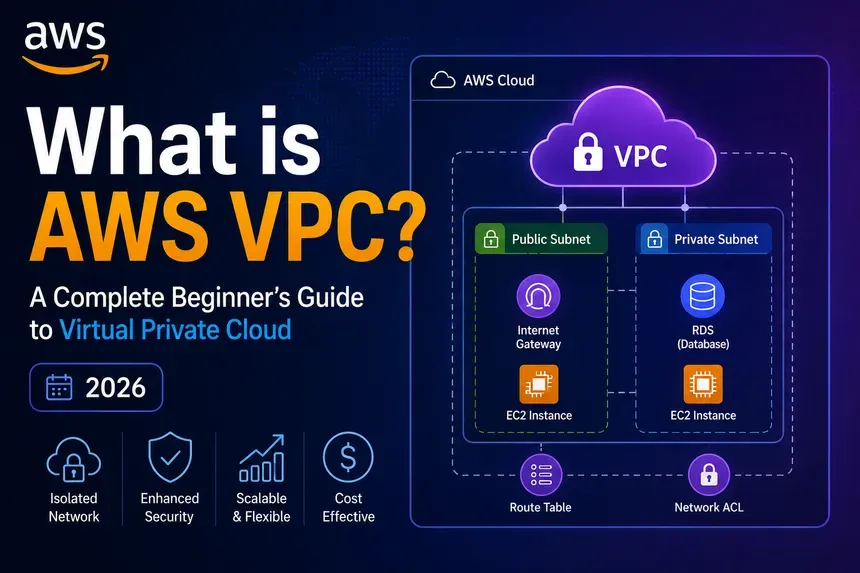
AWS VPC ZERO TO HERO
A complete guide to understanding AWS Virtual Private Cloud from core concepts to hands-on CLI usage

Table of Contents
- What is a VPC?
- Core Components
- Key Facts and Limits
- Subnets
- Route Tables
- Internet Gateway
- NAT Gateway
- Security Groups
- Network ACLs (NACLs)
- Stateless vs Stateful Firewalls
- Gateways
- Elastic IPs
- VPC Endpoints and PrivateLink
- VPC Flow Logs
- VPC Peering
- Shared VPCs
- AWS VPN
- Direct Connect
- Transit Gateway
- VPC Lattice
- AWS Network Firewall
- Bastion Hosts / Jump Boxes
- DHCP Options Sets
- IPv4 to IPv6 Migration
- Network Address Usage (NAU)
- Hands-On: CLI Walkthrough
1. What is a VPC?
An AWS Virtual Private Cloud (VPC) is a logically isolated section of the AWS cloud where you can launch AWS resources in a virtual network that you define.
Think of it as your own private data center inside AWS you control the IP ranges, subnets, routing, security, and connectivity.
VPCs are used for:
- Hosting compute resources like EC2, Lambda, ECS, and RDS
- Attaching Elastic Network Interfaces (ENIs) virtual network cards to those compute resources
- Controlling what traffic flows in, out, and between your services

2. Core Components
1) Internet Gateway (IGW) - Connects your VPC to the public internet (inbound + outbound)
2) Virtual Private Gateway - The AWS-side endpoint for a VPN connection to your on-premises network
3) Customer Gateway - The on-premises-side endpoint for a VPN connection
4) Route Tables - Decide where network traffic is directed
5) NAT Gateway - Lets private instances reach the internet outbound, without being reachable inbound
6) NACL - Stateless subnet-level firewall with allow and deny rules
7) Security Group - Stateful instance-level firewall with allow-only rules
8) Public Subnet - Subnet where instances can be assigned public IP addresses
9) Private Subnet - Subnet where instances cannot be assigned public IP addresses
10) VPC Endpoints -Privately connect to supported AWS services without going over the internet
3. Key Facts and Limits
Free services (no cost):
- VPCs, Subnets, Route Tables, Internet Gateways, NACLs, Security Groups, VPC Peering
Paid services:
- NAT Gateway, VPC Endpoints, VPN Gateway, Customer Gateway, Elastic IPs (when unassociated or when attached to a running instance), DNS hostnames
Default limits (per region, soft limits can be increased):
- VPCs: 5 (default), can be raised via support ticket
- Subnets per VPC: 200
- Every region comes with 1 default VPC #do not delete it
Reserved IPs in every subnet: AWS reserves the first 4 and last 1 IP addresses in every subnet CIDR block. For example, in
10.0.0.0/24:10.0.0.0= Network address10.0.0.1= VPC router10.0.0.2= DNS10.0.0.3= Reserved for future use10.0.0.255= Broadcast (not used in AWS, but reserved)
This means a
/24 gives you 251 usable IPs, not 256.4. Subnets
A subnet is a range of IP addresses within your VPC. Every resource you launch sits inside a subnet.
Subnet types:
- Public subnet = has a route to an Internet Gateway, instances can have public IPs
- Private subnet = no route to IGW, instances are not directly reachable from the internet
- Isolated subnet = no route to IGW and no route to a NAT Gateway; completely cut off from internet traffic in both directions (used for databases, internal-only workloads)
Rules:
- Each subnet belongs to exactly one Availability Zone
- Each subnet can only be associated with one route table at a time
- A subnet can only be associated with one NACL at a time
Default VPC subnets:
- Default VPC CIDR:
172.31.0.0/16(65,536 IPs) - Each default subnet uses a
/20block (4,096 IPs, 4,091 usable)
5. Route Tables
Route tables determine where network traffic from your subnet is directed.
- Every subnet must be associated with a route table (either explicitly or implicitly via the main route table)
- A subnet can only be associated with one route table at a time
- A route table can be associated with multiple subnets
How routing works:
- AWS uses longest prefix match — the most specific route wins
- Example: A route for
10.0.0.0/24beats a route for0.0.0.0/0for traffic going to10.0.0.5 - The
0.0.0.0/0route (default route) is where traffic goes when no more specific route matches typically pointing to an IGW (public) or NAT Gateway (private)
6. Internet Gateway
An IGW allows both inbound and outbound internet traffic to and from your VPC.
- One IGW per VPC
- Horizontally scaled and highly available by default no bandwidth limits, no single point of failure
- Must be attached to the VPC and referenced in a route table to be useful
For a subnet to be truly "public," three things must be true:
- An IGW is attached to the VPC
- The subnet's route table has a
0.0.0.0/0route pointing to the IGW - The instance in the subnet has a public IP (either auto-assigned or via Elastic IP)
7. NAT Gateway
NAT = Network Address Translation
A NAT Gateway allows instances in a private subnet to make outbound connections to the internet (or other AWS services), while preventing the internet from initiating inbound connections to those instances.
How it works: It translates the private IP of your instance to a public IP when traffic leaves, and maps the response back.
Key facts:
- Fully managed by AWS no patching or maintenance needed
- Lives in a public subnet, not a private one
- Requires an Elastic IP
- Redundant within a single AZ for high availability, deploy one NAT Gateway per AZ
- Supports NAT64: translates IPv6-to-IPv4, allowing IPv6-only instances to reach IPv4 services on the internet
NAT Gateway vs Bastion Host:
- NAT Gateway = outbound internet access for private instances
- Bastion = admin SSH access into private instances
- These are completely different use cases. NAT cannot be used as a bastion.
8. Security Groups
Security Groups act as a stateful virtual firewall at the instance level.
- Stateful: if you allow inbound traffic on port 80, the response traffic is automatically allowed outbound you don't need to explicitly configure it
- Only allow rules you cannot write deny rules in a Security Group
- A security group is not bound to a subnet one SG can protect instances across multiple subnets
- One instance can have multiple security groups applied
Key feature many people miss — SG-to-SG referencing:
Instead of specifying a CIDR range as the source, you can reference another security group. Example: Allow traffic on port 3306 from any instance that belongs to
sg-app-tier. This is cleaner and more dynamic than hardcoding IP ranges.bash
1
2
3
4
5
6
7
8
9
10
11
12
13
14
15
16
17
18
19
20
21
# Create a security group
aws ec2 create-security-group --group-name my-sg --vpc-id $VPC_ID

# Allow HTTP from anywhere
aws ec2 authorize-security-group-ingress \
  --group-id $SG_ID \
  --protocol tcp \
  --port 80 \
  --cidr 0.0.0.0/0

# Allow MySQL only from another security group (not a CIDR)
aws ec2 authorize-security-group-ingress \
  --group-id $DB_SG_ID \
  --protocol tcp \
  --port 3306 \
  --source-group $APP_SG_ID

# Attach to an EC2 instance
aws ec2 modify-instance-attribute \
  --instance-id $INSTANCE_ID \
  --groups $SG_ID
9. Network ACLs (NACLs)
NACLs act as a stateless virtual firewall at the subnet level.
- Stateless: outbound responses are NOT automatically allowed just because inbound was permitted you must create rules in both directions explicitly
- Supports both allow and deny rules
- Rules are evaluated in ascending order by rule number lowest number = highest priority
- First matching rule wins; processing stops after a match
- A subnet can only be associated with one NACL but one NACL can cover multiple subnets
- Every VPC gets a default NACL that allows all inbound and outbound traffic
When to use NACLs:
- Blocking a specific IP address or CIDR range (something Security Groups cannot do)
- Adding a blanket deny at the subnet boundary as a secondary layer of defense
bash
1
2
3
4
5
6
7
8
9
10
11
12
# Create a NACL
aws ec2 create-network-acl --vpc-id $VPC_ID

# Deny inbound traffic from a specific IP on all ports
aws ec2 create-network-acl-entry \
  --network-acl-id $NACL_ID \
  --ingress \
  --rule-number 100 \
  --protocol -1 \
  --port-range From=0,To=65535 \
  --cidr-block 176.5.108.3/32 \
  --rule-action deny
10. Stateless vs Stateful Firewall
| Security Group (Stateful) | NACL (Stateless) | |
|---|---|---|
| Level | Instance | Subnet |
| Direction awareness | Yes - tracks connection state | No - each packet is evaluated independently |
| Rules | Allow only | Allow and Deny |
| Response traffic | Automatically allowed | Must be explicitly allowed |
| Rule evaluation | All rules evaluated, most permissive wins | Rules evaluated in order, first match wins |

Real-world analogy:
- Security Group = a bouncer who remembers you walked in, so lets you out without checking ID again
- NACL = a security checkpoint that checks your ID going in and again going out every time
11. Gateways
| Gateway | Purpose |
|---|---|
| Internet Gateway | Inbound + outbound public internet access for VPC |
| Egress-Only Internet Gateway | Outbound-only internet access for IPv6 traffic (no inbound) |
| NAT Gateway | Outbound-only internet access for IPv4 private instances |
| Virtual Private Gateway | AWS-side endpoint for VPN connection to on-premises |
| Customer Gateway | On-premises-side endpoint for VPN connection |
| Carrier Gateway | Connects to AWS-partnered telecom networks (for 5G/mobile use cases) |
| Direct Connect Gateway | Endpoint for fiber optic connection at a colocation data center |
| Gateway Load Balancer | Layer 3 load balancer for scaling third-party network appliances (firewalls, IDS/IPS) |
| AWS Backup Gateway | Endpoint for AWS managed backups |
| IoT Device Gateway | Bidirectional endpoint for IoT data |
| AWS Transit Gateway | Hub-and-spoke model to connect multiple VPCs and on-premises networks at scale |
| AWS API Gateway | Abstracts and manages API endpoints to backend services |
| AWS Storage Gateway | Syncs, caches, or extends local storage to AWS cloud storage |
Why Egress-Only IGW exists instead of NAT for IPv6: IPv6 addresses are globally unique and publicly routable by design there's no need to NAT them like IPv4. But you still may want to block inbound connections from the internet to your IPv6 instances. The Egress-Only IGW does exactly that: allows outbound IPv6 traffic, blocks unsolicited inbound.
12. Elastic IPs
An Elastic IP is a static, persistent public IPv4 address you can allocate to your AWS account and associate with instances or other resources.
Why you need them:
- When an EC2 instance is stopped and restarted, its public IP changes. An Elastic IP stays the same.
- If an instance fails, you can remap the Elastic IP to a replacement instance in seconds.
Key facts:
- Region-specific cannot be moved across regions
- Drawn from Amazon's pool of IPv4 addresses
- Free when actively associated with a running instance
- Charged when allocated but not associated (to discourage hoarding)
- Also incurs the standard IPv4 address charge when in use (AWS started charging for all public IPv4 in 2024)
bash
1
2
3
4
5
6
7
# Allocate an Elastic IP
aws ec2 allocate-address

# Associate it with an instance
aws ec2 associate-address \
  --instance-id $INSTANCE_ID \
  --allocation-id $ALLOC_ID
13. VPC Endpoints and Private-Link
The Problem They Solve
By default, when your EC2 instance in a private subnet calls S3, that traffic travels through the public internet. VPC Endpoints keep that traffic inside the AWS network entirely.
1
2
Without endpoint: EC2 → NAT Gateway → Internet → S3
With endpoint:    EC2 → VPC Endpoint → S3 (never leaves AWS network)
Types of VPC Endpoints
1. Gateway Endpoints (free)
- Only for S3 and DynamoDB
- Added as an entry in your route table
- No ENI created
2. Interface Endpoints (paid)
- For most other AWS services (CloudFormation, CodeBuild, API Gateway, EC2 API, etc.)
- Creates an Elastic Network Interface (ENI) with a private IP in your subnet
- Powered by AWS PrivateLink
3. Gateway Load Balancer Endpoints
- Distributes traffic to a fleet of third-party network appliances (firewalls, IDS/IPS) via PrivateLink
AWS PrivateLink
PrivateLink is the underlying technology for Interface Endpoints. It also lets you:
- Expose your own service to other AWS accounts privately
- Connect to supported AWS Marketplace partner services
PrivateLink is one-directional (consumer → provider). It is not the same as VPC Peering, which is a bidirectional network-level connection.
14. VPC Flow Logs
VPC Flow Logs capture information about IP traffic flowing through your VPC.
- Can be enabled at the VPC level, subnet level, or ENI level
- Logs are published to CloudWatch Logs or S3
- Does NOT capture real-time packet content only metadata (source IP, destination IP, port, protocol, bytes, action: ACCEPT or REJECT)
- Useful for: security analysis, troubleshooting connectivity issues, compliance auditing
bash
1
2
3
4
5
6
7
aws ec2 create-flow-logs \
  --resource-ids $VPC_ID \
  --resource-type VPC \
  --traffic-type ALL \
  --log-destination-type cloud-watch-logs \
  --log-group-name my-vpc-flow-logs \
  --deliver-logs-permission-arn $IAM_ROLE_ARN
15. VPC Peering
VPC Peering creates a direct, private network connection between two VPCs using private IP addresses.
- Not a gateway, not a VPN traffic stays on the AWS backbone
- Can peer VPCs across the same or different AWS accounts
- Can peer VPCs across different regions (inter-region peering)
- Supports IPv4 and IPv6
- No single point of failure
- Not transitive: if VPC-A peers with VPC-B, and VPC-B peers with VPC-C, VPC-A cannot reach VPC-C through VPC-B. You need a direct peering or Transit Gateway.

Cost:
- Data transfer within the same AZ via peering is free
- Cross-AZ peering is chargeable
- Inter-region peering has separate (higher) data transfer costs
bash
1
2
3
4
5
6
7
8
9
10
11
12
13
14
15
16
17
18
19
# Create peering connection
aws ec2 create-vpc-peering-connection \
  --vpc-id $VPC_ID_1 \
  --peer-vpc-id $VPC_ID_2

# Accept the connection (from the other side)
aws ec2 accept-vpc-peering-connection \
  --vpc-peering-connection-id $PEER_ID

# Add routes on both sides
aws ec2 create-route \
  --route-table-id $RT_ID_1 \
  --destination-cidr-block 12.0.0.0/16 \
  --vpc-peering-connection-id $PEER_ID

aws ec2 create-route \
  --route-table-id $RT_ID_2 \
  --destination-cidr-block 10.0.0.0/16 \
  --vpc-peering-connection-id $PEER_ID
16. Shared VPCs
AWS Resource Access Manager (RAM) lets you share VPC subnets across AWS accounts.
Why use it:
- Reduces the number of VPCs you need to create and manage
- Separates billing and access control across accounts while sharing network infrastructure
How it works:
- The owner account creates and manages the VPC infrastructure (subnets, route tables, gateways)
- Participant accounts can launch resources into the shared subnets
- Participants cannot modify the shared subnet infrastructure only the owner can
Limitation: Participants see and use the subnets but have no control over the network layer.
17. AWS VPN
Two types:
1. Site-to-Site VPN
- Connects your on-premises network or branch office to your VPC
- Uses IPsec encryption over the public internet
- Requires a Virtual Private Gateway on the AWS side and a Customer Gateway on the on-premises side

2. Client VPN
- Connects individual users (laptops, desktops) to AWS or on-premises networks
- Used for remote workers needing secure access
IPsec is the protocol suite that handles authentication and encryption for VPN tunnels. It operates at the network layer and encrypts packet-by-packet.
18. AWS Direct Connect
Direct Connect is a dedicated private fiber connection from your on-premises location to AWS bypassing the public internet entirely.

Two bandwidth tiers:
- Lower: 50 Mbps – 500 Mbps (via hosted connection from a partner)
- Higher: 1 Gbps, 10 Gbps, 100 Gbps (via dedicated connection directly from AWS)
Why use it over VPN:
- Lower latency and more consistent throughput
- Reduces data transfer costs for large volumes
- Required for compliance scenarios that prohibit public internet traversal
Tradeoff: Much more expensive to set up than VPN, and takes weeks to provision.
19. Transit Gateway
A Transit Gateway is a regional network hub that connects multiple VPCs and on-premises networks through a single gateway.

Why it exists:
- Without it, connecting 10 VPCs requires 45 peering connections (n*(n-1)/2)
- With Transit Gateway, each VPC connects to the hub that's 10 connections total
Key facts:
- Supports up to 5,000 VPC attachments per gateway
- Supports VPN and Direct Connect attachments
- Supports cross-region peering between Transit Gateways
- Data transfer through Transit Gateway is chargeable
VPC Peering vs Transit Gateway:
- Peering is simpler and cheaper for 2–3 VPCs
- Transit Gateway is the right choice when you have many VPCs or need a hub-and-spoke architecture
20. VPC Lattice
Amazon VPC Lattice is a fully managed application networking service for connecting, securing, and monitoring services across VPCs and accounts.
- Works at Layer 7 (application level) unlike Transit Gateway which works at Layer 3 (network level)
- Handles service-to-service communication with built-in auth, observability, and traffic management
- Useful for microservices architectures spread across multiple VPCs or accounts
21. AWS Network Firewall
AWS Network Firewall is a managed, stateful network firewall and IDS/IPS service for your VPC.
- Filters both inbound and outbound traffic at the VPC perimeter
- Supports stateful packet inspection, domain name filtering, and custom Suricata-compatible rules
- Designed for deep traffic inspection beyond what NACLs and Security Groups can do
When to use it:
- You need to block traffic based on domain names (e.g., block all traffic except
*.amazonaws.com) - You need intrusion detection or prevention rules
- Compliance requirements demand a managed firewall
22. Bastion Hosts / Jump Boxes
A bastion host is a hardened EC2 instance in a public subnet that gives you SSH (Linux) or RDP (Windows) access to instances in private subnets.

- The private EC2 never needs a public IP
- The bastion is exposed to the internet but hardened: minimal software, strict security group rules (allow SSH only from your IP), MFA enabled
Common mistake: Thinking you can use a NAT Gateway as a bastion. You cannot. NAT Gateway is for outbound internet from private instances it has no SSH capability.
23. DHCP Options Sets
DHCP (Dynamic Host Configuration Protocol) is how instances in your VPC automatically get IP addresses and network configuration when they launch.
Every VPC has a DHCP Options Set that controls:
- Domain name servers (DNS) used by instances
- NTP servers
- NetBIOS settings
By default, AWS sets the DNS to
AmazonProvidedDNS. If you want instances to use your own DNS server (e.g., for hybrid environments), you create a custom DHCP Options Set and associate it with the VPC.24. IPv4 to IPv6 Migration
An IPv4-only VPC can be migrated to dual-stack mode (supports both IPv4 and IPv6 simultaneously).
Steps:
- Add a new IPv6 CIDR block to the VPC (AWS provides a /56 block)
- Create new IPv6 subnets (existing IPv4 subnets cannot be converted you associate a /64 IPv6 CIDR with them)
- Update route tables to route IPv6 traffic to the IGW (or Egress-Only IGW for outbound-only)
- Update Security Group rules to include IPv6 addresses
- Check that your EC2 instance types support IPv6 (most modern types do)
Why IPv6 doesn't need NAT: IPv6 addresses are globally unique and routable by design. Every IPv6 address is essentially a public address. If you want outbound-only access (like NAT behavior), you use the Egress-Only Internet Gateway instead.
25. Network Address Usage (NAU)
NAU is a metric AWS uses to track how much of your VPC's address space is being consumed by resources.
- Use NAU to plan VPC sizing before you run out of IP space
- Enable NAU monitoring on a VPC to push metrics to CloudWatch automatically
- Useful for large environments where tracking free IPs manually isn't practical
26. Hands-On: CLI Walkthroughs
Create a VPC
bash
1
2
3
4
5
6
7
8
9
10
11
12
13
14
15
16
17
18
19
20
21
22
23
24
25
26
27
28
29
30
31
32
33
34
35
36
37
38
39
40
41
42
43
44
45
46
47
48
49
50
51
52
53
54
55
56
57
# Create VPC
VPC_ID=$(aws ec2 create-vpc \
--cidr-block "172.1.0.0/16" \
--region us-east-1 \
--tag-specifications 'ResourceType=vpc,Tags=[{Key=Name,Value=my-vpc}]' \
--query Vpc.VpcId \
--output text)
echo "VPC_ID: $VPC_ID"
# Enable DNS hostnames
aws ec2 modify-vpc-attribute \
--vpc-id $VPC_ID \
--enable-dns-hostnames '{"Value":true}'
# Create Internet Gateway and attach
IGW_ID=$(aws ec2 create-internet-gateway \
--query InternetGateway.InternetGatewayId \
--output text)
aws ec2 attach-internet-gateway \
--internet-gateway-id $IGW_ID \
--vpc-id $VPC_ID
# Create a public subnet
SUBNET_ID=$(aws ec2 create-subnet \
--vpc-id $VPC_ID \
--cidr-block "172.1.0.0/20" \
--query Subnet.SubnetId \
--output text)
echo "SUBNET_ID: $SUBNET_ID"
# Auto-assign public IPs on launch
aws ec2 modify-subnet-attribute \
--subnet-id $SUBNET_ID \
--map-public-ip-on-launch
# Get the main route table for this VPC
RT_ID=$(aws ec2 describe-route-tables \
--filters "Name=vpc-id,Values=$VPC_ID" "Name=association.main,Values=true" \
--query "RouteTables[].RouteTableId[]" \
--output text)
echo "RT_ID: $RT_ID"
# Associate subnet with route table
ASSOC_ID=$(aws ec2 associate-route-table \
--route-table-id $RT_ID \
--subnet-id $SUBNET_ID \
--query AssociationId \
--output text)
echo "ASSOC_ID: $ASSOC_ID"
# Add route to internet gateway
aws ec2 create-route \
--route-table-id $RT_ID \
--destination-cidr-block 0.0.0.0/0 \
--gateway-id $IGW_IDDelete a VPC (in correct order)
Before deleting a VPC, you must delete its dependencies first:
bash
1
2
3
4
5
6
7
8
9
10
11
12
13
14
15
16
# 1. Disassociate subnet from route table
aws ec2 disassociate-route-table --association-id $ASSOC_ID
# 2. Delete subnet
aws ec2 delete-subnet --subnet-id $SUBNET_ID
# 3. Detach and delete internet gateway
aws ec2 detach-internet-gateway \
--internet-gateway-id $IGW_ID \
--vpc-id $VPC_ID
aws ec2 delete-internet-gateway --internet-gateway-id $IGW_ID
# 4. Delete VPC (security groups, NACLs, route tables are deleted automatically)
aws ec2 delete-vpc --vpc-id $VPC_IDNote: Custom Security Groups, NACLs, and route tables must be deleted before the VPC can be removed. Default ones (created automatically by AWS) are removed when the VPC is deleted.
Create an Egress-Only IGW (IPv6 outbound)
bash
1
2
3
4
5
6
7
8
9
10
11
12
13
14
15
16
17
18
19
20
21
22
23
24
25
26
27
28
29
30
31
32
33
# Create VPC with IPv6
VPC_ID=$(aws ec2 create-vpc \
  --cidr-block 10.0.0.0/16 \
  --amazon-provided-ipv6-cidr-block \
  --query Vpc.VpcId --output text)

# Create subnet with IPv6
SUBNET_ID=$(aws ec2 create-subnet \
  --vpc-id $VPC_ID \
  --ipv6-cidr-block <paste-ipv6-cidr-from-vpc> \
  --cidr-block 10.0.2.0/24 \
  --query Subnet.SubnetId --output text)

# Enable DNS64 (allows IPv6 instances to reach IPv4 services)
aws ec2 modify-subnet-attribute \
  --subnet-id $SUBNET_ID \
  --enable-dns64

# Create Egress-Only Internet Gateway
EG_ID=$(aws ec2 create-egress-only-internet-gateway \
  --vpc-id $VPC_ID \
  --query EgressOnlyInternetGateway.EgressOnlyInternetGatewayId \
  --output text)

# Create route table and route IPv6 traffic through it
ROUTE_ID=$(aws ec2 create-route-table \
  --vpc-id $VPC_ID \
  --query RouteTable.RouteTableId --output text)

aws ec2 create-route \
  --route-table-id $ROUTE_ID \
  --destination-ipv6-cidr-block ::/0 \
  --egress-only-internet-gateway-id $EG_ID
VPC Peering
bash
1
2
3
4
5
6
7
8
9
10
11
12
13
14
15
16
17
18
19
20
21
# Create peering connection
PEER_ID=$(aws ec2 create-vpc-peering-connection \
  --vpc-id $VPC_ID_1 \
  --peer-vpc-id $VPC_ID_2 \
  --query VpcPeeringConnection.VpcPeeringConnectionId \
  --output text)

# Accept connection
aws ec2 accept-vpc-peering-connection \
  --vpc-peering-connection-id $PEER_ID

# Add routes in both VPCs
aws ec2 create-route \
  --route-table-id $RT_ID_1 \
  --destination-cidr-block 12.0.0.0/16 \
  --vpc-peering-connection-id $PEER_ID

aws ec2 create-route \
  --route-table-id $RT_ID_2 \
  --destination-cidr-block 10.0.0.0/16 \
  --vpc-peering-connection-id $PEER_ID
Create a NACL Rule
bash
1
2
3
4
5
6
7
8
9
# Deny all traffic from a specific IP
aws ec2 create-network-acl-entry \
  --network-acl-id $NACL_ID \
  --ingress \
  --rule-number 100 \
  --protocol -1 \
  --port-range From=0,To=65535 \
  --cidr-block 176.5.108.3/32 \
  --rule-action deny
Create Default VPC (if deleted)
bash
1
aws ec2 create-default-vpc --region us-east-1Enjoyed reading this content? Let the author know!
Your likes, comments, shares, and saves help creators reach more builders.

Loading recommendations
Loading article