
Web Search in Claude Code on Amazon Bedrock
Claude Code on Bedrock has now a genuinely useful web search tool for anything time-sensitive - product launches, security advisories, API changes, competitive landscape.

If you've been using Claude Code with Amazon Bedrock, you've probably hit this wall:
"I don't have access to real-time information. My knowledge has a cutoff date."
That changed on June 17, 2026.
What's New
AWS announced general availability of Web Search on Amazon Bedrock AgentCore — a fully managed connector that grounds your agents in current, cited web knowledge.
A few things that set it apart:
- Amazon's own web index — the same infrastructure behind Alexa+, Amazon Quick, and Kiro. Not a proxy to Tavily or Brave.
- Zero data egress — queries never leave your secured AWS environment.
- Raw observations — returns URL + snippet + title + publish date. Your model does the synthesis, not a black box.
- No additional cost — you pay only for Gateway data transfer.
- Available today in us-east-1.
How It Connects
The standard MCP spec uses OAuth bearer tokens. But an AgentCore Gateway with IAM inbound auth expects SigV4-signed requests — standard MCP clients don't know how to do that.
mcp-proxy-for-aws is the official AWS bridge that handles this gap. It's a lightweight local stdio process that signs every MCP request with SigV4 using your normal AWS credential chain — AWS_PROFILE , environment variables, SSO, IAM role, whatever you already have configured.Plain text
Claude Code ──stdio──▶ mcp-proxy-for-aws ──SigV4 HTTPS──▶ AgentCore Gateway ──▶ Web Search(MCP client) (signs with IAM) (IAM inbound) (Amazon index)
One proxy. Your AWS credentials. That's it.
Setup
Step 1 — Create the Gateway
In the Amazon Bedrock AgentCore console (us-east-1) → Gateways → Create gateway:
Setting | Value |
|---|---|
Inbound identity | Use IAM permissions (SigV4) |
Target protocol | MCP target |
Target type | Connectors |
Pre-configured target | Web Search tool |
Outbound auth | IAM Role |


When the gateway is created, copy the gateway resource URL and append
/mcp to it.Step 2 — Register with Claude Code
Run this in your terminal.
Bash
claude mcp add --scope user agentcore-web-search -- \uvx mcp-proxy-for-aws@1.6.1 \https://YOUR-GATEWAY-ID.gateway.bedrock-agentcore.us-east-1.amazonaws.com/mcp \--service bedrock-agentcore \--region us-east-1
uvx fetches and runs the proxy on demand — make sure you have uvx installed on your machine. And add --profile YOUR_PROFILE if needed.The exact same config works in Kiro via
~/.kiro/settings/mcp.json :JSON
{"mcpServers": {"agentcore-web-search": {"command": "uvx","args": ["mcp-proxy-for-aws@1.6.1","https://YOUR-GATEWAY-ID.gateway.bedrock-agentcore.us-east-1.amazonaws.com/mcp","--service", "bedrock-agentcore","--region", "us-east-1"]}}}
Step 3 — Verify and ask
Plain text
> /mcp
You should see
agentcore-web-search ✔ connected with 1 tool listed:-
Then just ask naturally:
Plain text
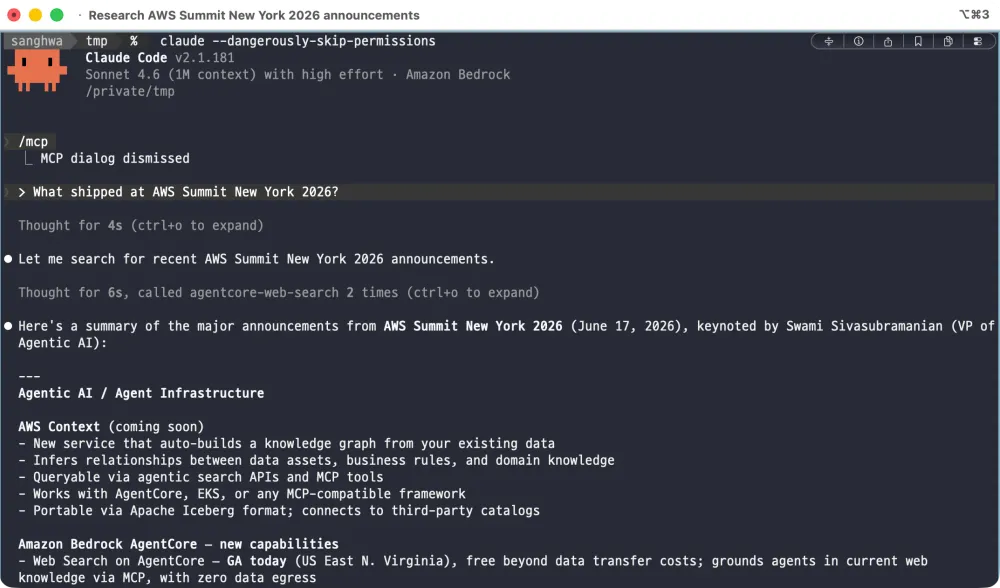
> What shipped at AWS Summit New York 2026?

The model calls the Web Search tool over MCP, gets back real ranked results, and grounds its answer in current web knowledge — all within your AWS environment.
What the Tool Actually Returns
This is important: Web Search returns raw observations, not a synthesized answer. Each result looks like this:
JSON
{"title": "Announcing Web Search on Amazon Bedrock AgentCore","url": "https://aws.amazon.com/blogs/aws/...","publishedDate": "17 JUN 2026","text": "...the general availability of Web Search on Amazon Bedrock AgentCore..."}
Up to 25 results per query (default 10, configurable via
maxResults ). Your model reasons over them. This is a deliberate design — you can inspect every source, apply your own filtering, and the model stays in control of synthesis.
IAM vs OAuth — which should you use?
AgentCore Gateway supports both. Here's the quick mental model:
| IAM (SigV4) | OAuth (JWT / Cognito) |
|---|---|---|
Best for | Developer laptop, CI/CD, internal tools | Multi-tenant SaaS, human-facing apps |
Setup | AWS creds already configured → done | Need IdP (Cognito, Okta, Entra…) |
Bridge | mcp-proxy-for-aws | mcp-remote |
If you're a developer who already has
aws configure set up, IAM is strictly simpler. No browser login, no token refresh, no secret rotation.
Verify Without Claude Code
You can test the gateway directly using Python +
mcp-proxy-for-aws as a library:Python
# uv run verify_gateway.py "your query here"import asynciofrom mcp import ClientSessionfrom mcp_proxy_for_aws.client import aws_iam_streamablehttp_clientENDPOINT = "https://YOUR-GATEWAY-ID.gateway.bedrock-agentcore.us-east-1.amazonaws.com/mcp"async def main():async with aws_iam_streamablehttp_client(endpoint=ENDPOINT, aws_region="us-east-1", aws_service="bedrock-agentcore") as (read, write, _):async with ClientSession(read, write) as session:await session.initialize()tools = await session.list_tools()print([t.name for t in tools.tools])asyncio.run(main())
Why This Matters
Claude Code on Bedrock has now a genuinely useful web search tool for anything time-sensitive — product launches, security advisories, API changes, competitive landscape. And because queries stay inside your AWS environment, it fits enterprise security requirements that ruled out Anthropic's native web search.
With Web Search on AgentCore, the model knows about it — from the live web, grounded in real sources, with zero data leaving your account.
Resources
Enjoyed reading this content? Let the author know!
Your likes, comments, shares, and saves help creators reach more builders.

Loading recommendations
Loading article