
Prevent Workflow Blind Spots When Tracing Step Functions and AgentCore Agents in Dynatrace
AWS Step Functions can now invoke an Amazon Bedrock AgentCore harness as a native workflow step, so agents run alongside Lambda, SNS, and human approvals while emitting OpenTelemetry straight to Dynatrace. This sample builds and observes an agentic incident-response workflow end to end — and shows the blind spot: Dynatrace traces the agents in depth but not the Step Functions workflow itself, so you bridge the two with logs and the execution graph.

Key takeaways* AWS Step Functions can now run an Amazon Bedrock AgentCore agent as a native workflow step (InvokeHarness): no Lambda glue, no custom orchestration.* The agents are fully observable over OpenTelemetry, but the workflow around them is the blind spot: Step Functions don't emit distributed traces, so no backend can render the end-to-end run as one trace today.
- The durable pattern is two planes: agent traces (OTLP-direct) for depth, workflow metrics + the Step Functions console for breadth, and the execution id in logs to correlate the two.
- Validated end to end on AWS; the real-world gotchas (exact model id, JSON parsing, IAM scoping, per-incident cost) are documented below.
You've put an AI agent in production. The first time it does something surprising at 2 a.m., the question isn't what did it answer rather what was the whole automation around it doing, and can you see it?
The Amazon Bedrock AgentCore managed harness lets you declare an agent (model, prompt, tools, memory) as configuration and let AgentCore run the Strands loop for you. Because the harness reads OpenTelemetry settings from environment variables, the agent emits traces over OTLP to your observability backend (Dynatrace in this post) without any orchestration code of your own. That handles how a single agent runs. It doesn't handle what runs around the agent, and that, as we'll see, is where the blind spot is.
Real agentic systems are rarely a single agent answering a single prompt. They're pipelines: an event arrives, an agent classifies it, you branch on the result, maybe a second agent does deeper work, a human approves something, and then a deterministic action executes. Until recently, you wired that orchestration yourself, usually a Lambda calling AgentCore, with your own state handling, retries, and branching logic around it.
That changed recently. AWS Step Functions added an optimized integration for the AgentCore harness . In Workflow Studio you search for AgentCore InvokeHarness, drag it onto the canvas, point it at a harness ARN, and the agent is now a first-class step in your state machine, right next to Lambda, ECS, SNS, DynamoDB, and human-approval gates.
This post builds a real workflow with two agent steps and a human approval gate, then gets honest about observability: the agent reasoning lands in Dynatrace in full, the workflow around it is the blind spot, and we show how to close the gap.
Where this sits. Observability for agentic AI is still an unconsolidated category. The OpenTelemetry GenAI semantic conventions are stabilizing; GenAI-native tools (Langfuse, Arize) focus on the model/prompt layer; and the general-purpose backends (Dynatrace, Datadog, New Relic, CloudWatch) are racing to trace both the agents and the workflows that orchestrate them. The pattern below is deliberately OpenTelemetry-first — Dynatrace is the backend here, but the approach, and the blind spot it exposes, are vendor-neutral.
The workflow we'll build
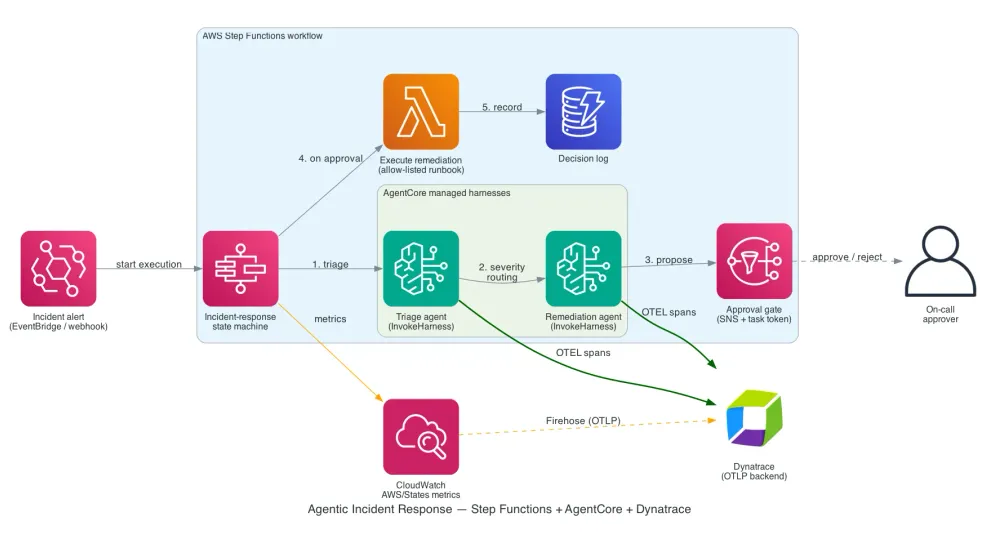
An alert (say, from a Dynatrace problem webhook) starts a Step Functions execution. One agent triages it, the workflow routes on severity, a second agent proposes a fix, a human approves, and only then does a deterministic step execute and record the decision.
Two agent steps, a severity branch, a human approval gate, and a deterministic executor. The full state machine, both harness configs, the Lambdas, and the IAM policy live in the companion sample . The rest of this post focuses on the few things that are specific to running agents inside a workflow, and on the observability story.
How the InvokeHarness integration works
Each agent step is a native Step Functions task pointed at the resource
arn:aws:states:::bedrockagentcore:invokeHarness. You give it a harness ARN and the user message; the model, system prompt, tools, and iteration limit can all be overridden per invocation, so one harness serves many behaviors. A few things are worth knowing before you build on it:- It's request/response only. A Step Functions task can normally integrate with a service in one of three ways, chosen by a suffix on the task's resource ARN: a plain call that returns right away, a "run a job" mode (
.sync) where the workflow waits for a long-running job to finish, or a "wait for callback" mode (.waitForTaskToken) where the workflow pauses until something external signals back with a token.InvokeHarnesssupports only the first. The step calls the harness, the harness runs its agent loop, and you get the answer back in that same call. (That is exactly why the human approval below has to be its own step, since there is no callback mode to pause on.) - The output is Converse-shaped and trimmed. You get the final assistant message (text only),
StopReason, tokenUsage, andLatencyMs. Tool calls and reasoning blocks are omitted from the workflow output, which is exactly what makes the observability story below matter. - There's a hard 15-minute cap per step, even if you set a higher timeout. Keep the harness timeout under it.
- Mind the hyphen. The Step Functions resource URI is
bedrockagentcore(no hyphen); the harness ARN isbedrock-agentcore(with one). They are not typos.
The workflow is written in JSONata, which keeps the glue between steps small. The pieces specific to orchestrating agents:
- Session continuity. Mint one
RuntimeSessionIdup front and reuse it on both agent steps, so the remediation agent keeps the triage agent's context. The workflow also captures the Step FunctionsexecutionId; that, not the session id, turns out to be the correlation key in Dynatrace later. - Branching on the agent's answer. The triage agent returns JSON; the workflow parses it and a
Choicesends SEV1/SEV2 to remediation and everything else to a log-only path. (One practical note: ask the model for raw JSON at temperature 0, and extract the JSON defensively, because models like to prepend a sentence. See "Validated end to end" below.) - Errors are first-class.
Retry/CatchhandleBedrockAgentCore.*throttling and failures declaratively, with no try/except plumbing in a Lambda.
Human approval, because request/response has no callback
A high-severity remediation shouldn't run without a human, but
InvokeHarness has no callback pattern. The fix is simple: make the approval gate its own step. An SNS publish with a task token pauses the workflow; a person approves (a small Lambda resumes it with the decision), and a Choice routes to execution or rejection. The agent steps stay clean request/response calls; the workflow provides the durability and the wait.Guardrails for agentic remediation
This workflow lets an LLM propose a remediation, but it deliberately never lets the model touch production directly. Two guardrails matter:
- A human gate on anything that acts. SEV1/SEV2 incidents route through the SNS + task-token approval before
ExecuteRemediationruns; low-severity incidents are only logged. No agent output reaches the executor without a person (or a policy) in the loop. - Never execute agent-proposed commands verbatim. In the live run the remediation agent happily emitted
kubectl rolloutcommands. The executor Lambda here is a stub; a production version should map the agent's intent onto a vetted, allow-listed runbook action, notevala model-authored string. Treat agent output as an untrusted suggestion, scope the executor's IAM to exactly what the runbook needs, and keep the blast radius small.
Least-privilege IAM
Step Functions generates a tidy execution-role policy from the workflow definition; scope it to the two specific harness ARNs (
bedrock-agentcore:InvokeHarness / InvokeAgentRuntime), the one remediation function, the approval topic, and the decisions table. If your harness uses Gateway, Browser, or Code Interpreter tools, those permissions live on the harness execution role, not the Step Functions role. The full policy is in the sample.But what about my observability?
This is the question that matters, and the answer has a subtlety worth getting right, because the obvious assumption ("Step Functions traces the whole thing, and my ISV tool ingests CloudWatch, so I'm covered") is half true and half misleading.
There are two telemetry planes, and they carry different things.
Plane 1: the agent (OTLP-direct to Dynatrace)
Your harness is configured to send OpenTelemetry straight to Dynatrace via environment variables on the harness config:
1
2
3
4
5
6
7
8
9
{
  "environmentVariables": {
    "DISABLE_ADOT_OBSERVABILITY": "true",
    "OTEL_EXPORTER_OTLP_ENDPOINT": "https://<env-id>.live.dynatrace.com/api/v2/otlp",
    "OTEL_EXPORTER_OTLP_PROTOCOL": "http/protobuf",
    "OTEL_SERVICE_NAME": "incident-triage-agent",
    "OTEL_INSTRUMENTATION_GENAI_CAPTURE_MESSAGE_CONTENT": "true"
  }
}
Here's the key insight: the harness emits its telemetry from inside the runtime, so it doesn't matter who invokes it. CLI, SDK, or a Step Functions
InvokeHarness task — the agent still emits the same GenAI spans (model calls, tool calls, reasoning, token usage) directly to Dynatrace. Moving the agent into a workflow changed the caller; it didn't touch the telemetry pipeline. Your existing Dynatrace dashboards, SLOs, and alerts on these services keep working.This plane is also where the agent's reasoning lives. Remember that the
InvokeHarness workflow output is trimmed to the final message; tool calls and reasoning are stripped from what flows to the next state. So if you want to see how the agent reached its answer, you don't get it from the Step Functions execution data. You get it from the OTLP spans in Dynatrace (and from the CloudWatch link beside the step). For most teams the OTLP spans are the richer, queryable record.Plane 2: the workflow
Step Functions itself doesn't speak OTLP. What it gives you:
AWS/StatesCloudWatch metrics: executions started/succeeded/failed/timed-out, execution duration. Route them into Dynatrace with a CloudWatch Metric Stream → Amazon Data Firehose → Dynatrace OTLP metrics endpoint. (The same Firehose pipeline can also carry AgentCore platform metrics; set it up once and add theAWS/Statesnamespace.)- Per-step token and latency, lifted from each
InvokeHarnessresponse (Usage.TotalTokens,Metrics.LatencyMs). The workflow assigns those to variables; recording them gives you a GenAI cost dashboard keyed by workflow and step, not just by service. - X-Ray execution traces: the state machine has tracing enabled, but those traces land in AWS X-Ray and the Step Functions console, not Dynatrace (Dynatrace doesn't ingest X-Ray; see "Joining the two planes" below).
So the honest version of "my ISV pulls CloudWatch anyway" is: yes for metrics, but the agent's reasoning and tool detail are trace/span data on plane 1, arriving via OTLP, not something you reconstruct from CloudWatch metrics. Both planes matter; they answer different questions.
Joining the two planes
Depth vs. breadth. To see one agent's full reasoning, open its trace in the Distributed Tracing app: the clickable waterfall of model calls, tool use, and loop cycles. What you won't get for free is a single trace covering the whole workflow, and the reason is upstream of any observability tool: Step Functions doesn't emit OpenTelemetry, the optimized
InvokeHarness integration doesn't propagate trace context into the harness, and the harness doesn't stamp the execution id onto its spans. So no OTLP backend can stitch the workflow and the agents into one trace today. The workflow graph lives in the Step Functions console, and Dynatrace (like any OTLP backend) sees the agents in depth.Closing the blind spot comes down to two levers: correlate via logs (below), and/or bridge the workflow's AWS X-Ray data into OTLP with an OpenTelemetry Collector so the execution shows up as spans alongside the agents. The Collector bridge is straightforward for app/Lambda X-Ray segments and more involved for Step Functions' own state-transition trace, so treat it as the path to evaluate rather than a turnkey switch (it's not wired into this sample). For most teams the log-based correlation is enough day one.
What does work is correlation through logs. With
OTEL_INSTRUMENTATION_GENAI_CAPTURE_MESSAGE_CONTENT=true, the harness emits the prompt and completion content as Dynatrace logs. The state machine embeds the Step Functions execution id in the triage prompt (and the triage agent echoes it into its output), so the execution id shows up in the gen_ai content logs of both agents. That's the join key. Pull all agent activity for one incident with:1
2
3
4
fetch logs, from:now()-1h
| filter contains(content, "<stepfunctions-execution-arn>")
| fields timestamp, service.name, content
| sort timestamp ascAnd confirm both agents emitted spans, with token spend per service:
1
2
3
fetch spans, from:now()-1h
| filter service.namespace == "incident-response"
| summarize spans = count(), outTokens = sum(gen_ai.usage.output_tokens), by:{service.name}
That's the full-stack picture for an agentic workflow: the deterministic path (Step Functions
AWS/States metrics in Dynatrace plus the workflow graph in the Step Functions console), the agent reasoning and cost (OTLP spans + gen_ai.usage.* in Distributed Tracing), and per-incident correlation (the execution id in the content logs). If you need a hard span-level join, you have to add it yourself: a custom-container harness that stamps the execution id onto a span/resource attribute, or an agent tool call you control. A pure managed harness won't do it for you.What you can answer that you couldn't before
With both planes in Dynatrace, you can answer questions that neither the Step Functions console nor agent-only tracing can on its own:
- "Where did this incident-response run spend its time?" The Step Functions console graph for the state path, agent
LatencyMsper step (in Dynatrace), and (if the agent used Gateway tools) the tool spans underneath. Model thinking vs. tool backend vs. waiting on a human approval, all visible across the two surfaces. - "What did this run cost?"
Usage.TotalTokensper agent step, summed per execution, charted over time. - "Why did the agent recommend that?" The gen_ai content logs for the run's execution id (the reasoning/tool detail is captured as logs, not in the trimmed workflow output), plus the OTLP spans on plane 1 for timing and tokens.
- "Are agent steps failing or throttling?"
BedrockAgentCore.ThrottlingExceptionretries show on the workflow plane; failure modes correlate with the agent spans.
Cost: you pay per agent step
Each agent step is real model inference. In the live runs, triage plus remediation ran ~13k+ tokens each on Claude Sonnet 4.6: fine for one incident, material at fleet scale. As a rough illustration, at Sonnet-class rates (on the order of a few dollars per million input tokens and ~5x that for output; always check current Amazon Bedrock pricing ), two ~13k-token calls land around $0.05–$0.20 per incident. That's trivial at hundreds of incidents a month and very much not trivial once an agent loops, fans out, or runs across a large fleet. Three levers keep it sane, all visible in telemetry you're already capturing (
Usage.TotalTokens per step):- Route to skip work. The
Choicealready sends SEV3/SEV4 straight to logging, with no remediation agent and no second model call. - Right-size the model per step. The per-invocation
Modeloverride lets triage run a smaller/cheaper model and reserves the larger model for remediation. - Watch it. Token spend per agent per execution is a first-class dashboard metric, so cost regressions surface like latency regressions.
Side-by-side: Lambda-wrapped agent vs. native InvokeHarness
| Aspect | Lambda calls AgentCore | Native InvokeHarness task |
|---|---|---|
| Orchestration | You write it in the Lambda | Declarative ASL states |
| Branching on agent output | Custom code | Choice + JSONata $parse |
| Retries/backoff | Your try/except | Retry/Catch on BedrockAgentCore.* |
| Session continuity | You thread it through | RuntimeSessionId on each step |
| Model/prompt overrides | Code + redeploy | Per-invocation on the step |
| Per-step cost/latency | You extract and log it | Usage + Metrics in the response |
| Human approval | You build it | Separate SNS + task-token step |
| IAM | Lambda role, broad | SF role scoped to harness ARNs |
| Agent observability | OTLP-direct to Dynatrace | OTLP-direct to Dynatrace (unchanged) |
| Workflow observability | Lambda traces + your logs | AWS/States metrics + Step Functions console graph |
The agent-observability row is the point: it doesn't change. You move orchestration from imperative Lambda code into a declarative workflow, and the OTLP pipeline the harness already uses keeps working.
Try it
The companion sample,
aws-samples/sample-stepfunctions-agentcore-dynatrace , has the full state machine, both harness configs, the infrastructure template, and a lifecycle script:1
2
3
4
5
6
7
8
9
10
11
12
13
14
git clone https://github.com/aws-samples/sample-stepfunctions-agentcore-dynatrace.git
cd sample-stepfunctions-agentcore-dynatrace
export AWS_REGION=us-east-1
export DT_ENDPOINT="https://<env-id>.live.dynatrace.com/api/v2/otlp"
./run.sh deploy-harness # deploy the two harness agents (AgentCore CLI)
export TRIAGE_HARNESS_ARN=...
export REMEDIATION_HARNESS_ARN=...
./run.sh deploy # deploy the workflow stack
./run.sh trigger # start an execution from events/incident-alert.json
./run.sh approve <token> approved
./run.sh observe # check execution status
./run.sh teardown # clean up the workflow stackThen open Dynatrace and run the DQL in
infra/observability.md to pull the agent spans for your run.Validated end to end
This sample was deployed and run end to end on AWS (us-east-1): both harnesses via the AgentCore CLI, the workflow stack via CloudFormation, and a full execution that flowed InitContext → TriageAgent → RouteOnSeverity → ProposeRemediation → RequestApproval → (approve) → ExecuteRemediation → RecordDecision and wrote the decision to DynamoDB. Both agents emitted spans to Dynatrace as
incident-triage-agent and incident-remediation-agent. A few things the live run taught us, all folded back into this sample:- Model ids are exact. The Sonnet 4.6 cross-region profile in us-east-1 is
us.anthropic.claude-sonnet-4-6(no date suffix). A wrong id fails at invoke time. - JSON parsing needs a guard. Even told to emit raw JSON, the model prepended a sentence and used the built-in
shelltool, so the final text waspreamble + {json}. The state machine extracts the JSON block with a regex before parsing it. - Correlation is logs-based, not span-attribute-based. There is no
session.id/execution-id span attribute on a managed harness; correlate through the gen_ai content logs as shown above. - SAM transform needs
CAPABILITY_AUTO_EXPANDonaws cloudformation deploy(already ininfra/deploy.sh).
Both the managed harness and the Step Functions
InvokeHarness integration are in public preview, so APIs may still change. Pin the preview CLI and integration versions you tested (recorded above) and re-validate at GA before depending on this in production. The one thing this stack does not create is the AWS/States → Firehose → Dynatrace metric path.What's next (and what's still missing)
Treat the blind spot as a moving target; expect it to narrow from several directions over the next few quarters:
- Native Step Functions tracing. There's an open request for Step Functions to emit distributed traces. If AWS ships that (or propagates trace context into
InvokeHarness), the workflow and its agents could finally stitch into one trace. - A turnkey X-Ray → OTLP bridge. Today the OpenTelemetry Collector path is DIY; expect it to get packaged (managed collectors, fleet tooling) so the workflow shows up as spans without hand-rolling a pipeline.
- Standardizing GenAI telemetry. As the OpenTelemetry GenAI semantic conventions firm up, agent spans (tokens, tools, reasoning) become portable across any backend, which is exactly why an OTLP-first approach ages well.
Until then, the two-plane pattern (agent traces for depth, workflow metrics + console for breadth, execution id in logs to correlate) is the durable way to keep agentic workflows observable. Build to it now and you inherit the improvements as they land.
Resources
- Companion sample on GitHub
- Invoke AgentCore harness with Step Functions
- InvokeHarness API reference
- Triage support tickets sample (AWS)
- Transforming data with JSONata in Step Functions
- AgentCore harness overview
The managed agent harness and the Step Functions AgentCore integration are in public preview. Features and APIs may change before general availability.
Enjoyed reading this content? Let the author know!
Your likes, comments, shares, and saves help creators reach more builders.

Loading recommendations
Loading article