
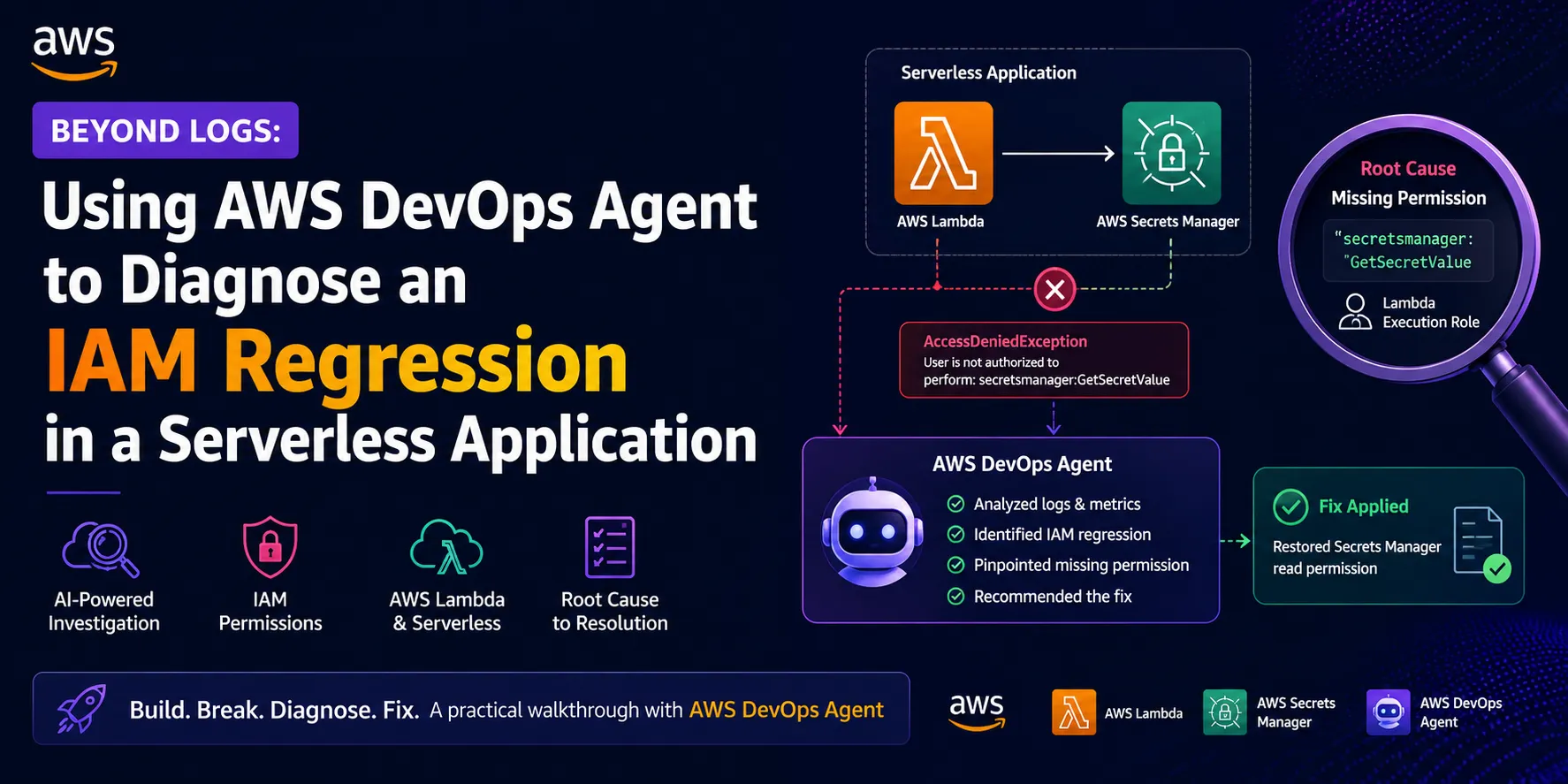
Beyond Logs: Using AWS DevOps Agent to Diagnose an IAM Regression in a Serverless Application
In this hands-on walkthrough, I'll demonstrate how I built a simple serverless application, intentionally introduced an IAM permission regression, and used AWS DevOps Agent to identify the root cause. You'll learn how infrastructure changes can impact application behavior, how to investigate permission-related failures, and how to restore a serverless application without modifying a single line of code.

🎉 Challenge 1: Meeting the AWS DevOps Agent
🎮 Introduction
As part of the AWS User Group Madurai Builders Skill Sprint, I started my journey with the first challenge: Meet Your AWS DevOps Agent.
🗨️ The objective was simple—set up the AWS DevOps Agent, interact with it through natural language, and understand how it provides operational insights into an AWS environment. Rather than navigating multiple AWS Console pages, the DevOps Agent allows us to ask questions in plain English and receive contextual answers about our infrastructure.
💡 Objective
The goal of this challenge was to:
- Verify that the AWS DevOps Agent was configured successfully.
- Connect the agent to my AWS account.
- Explore my AWS environment using conversational queries.
- Understand how the agent summarizes infrastructure health.
📝 Observations
- One of the most interesting aspects was how the DevOps Agent translated AWS infrastructure into easy-to-understand language.
- Instead of manually checking services such as CloudFormation, Lambda, or CloudWatch, the agent summarized the environment and highlighted the current health status.
This conversational approach can significantly reduce the time required for initial investigations, especially when working with larger cloud environments.
🚨 Why This Matters
Traditional cloud troubleshooting often requires jumping between multiple AWS services.
With the AWS DevOps Agent, engineers can:
- Quickly understand their AWS environment.
- Receive summarized health information.
- Ask follow-up questions naturally.
- Reduce the time spent navigating different AWS consoles.
For teams managing multiple AWS resources, this conversational interface has the potential to simplify day-to-day operational tasks.
🛳 Challenge 1: Meeting the AWS DevOps Agent
1️⃣ First question I asked DevOps Agent as part of this challenge?
What resources do I have in this account?

first question
2️⃣ Second question I asked DevOps Agent as part of this challenge?
Is anything unhealthy right now?

second question
3️⃣ Third question I asked DevOps Agent as part of this challenge?
Give me a health summary of my environment?

third question
4️⃣ Final question I asked DevOps Agent as part of this challenge?
Which AWS Region are these resources in?

final question
⭐ Key Takeaways
After completing this challenge, I learned that:
⚔️. Setting up the AWS DevOps Agent is straightforward.
⚔️ The agent can interpret AWS resources using natural language.
⚔️ It provides an easy-to-read health summary instead of raw infrastructure details.
⚔️ This lays the foundation for more advanced troubleshooting in the upcoming challenges.
🎉 Challenge 2: Investigating a Failing AWS Lambda with AWS DevOps Agent
❖ Introduction
📌 After getting familiar with the AWS DevOps Agent in Challenge 1, the next step was to use it for a real-world troubleshooting scenario.
📌 The challenge simulated a production incident where a newly deployed AWS Lambda function failed on every invocation. Instead of manually searching through CloudWatch logs and multiple AWS services, the objective was to investigate the issue using the AWS DevOps Agent, identify the root cause, apply the fix, and verify that the application had recovered.
🧐 Challenge Scenario
A Lambda function named challenge2-broken-fn had been deployed, but every invocation resulted in failure.
The task was to:
- Deploy the CloudFormation stack.
- Trigger the Lambda function several times.
- Allow the CloudWatch alarm to detect the failures.
- Ask the AWS DevOps Agent to investigate.
- Identify the root cause.
- Apply the recommended fix.
- Confirm that the Lambda function executed successfully.
🏗️ Deploying the Infrastructure
The CloudFormation template created the required resources, including:
- AWS Lambda function
- CloudWatch alarm
- IAM execution role
After the deployment completed successfully, I executed the Lambda function multiple times using the Test feature in the AWS Lambda console. As expected, each invocation failed, causing the associated CloudWatch alarm to transition into the ALARM state.

Cloud Formation Template
🕵🏻 Investigating with AWS DevOps Agent
Instead of manually opening CloudWatch Logs and tracing the failure, I asked the DevOps Agent:
The Lambda function challenge2-broken-fn is failing on every invocation. Investigate and tell me the root cause and how to fix it.
The DevOps Agent analyzed the available telemetry and provided a plain-English explanation of the issue. It summarized the failure, identified the likely root cause, and suggested the corrective action required to restore the function.
This conversational troubleshooting experience was significantly faster than manually navigating multiple AWS Console pages.

lambda function
👨🔧 Applying the Fix
Based on the DevOps Agent's findings, I updated the Lambda function code and deployed the changes.
After deployment:
- The Lambda function executed successfully.
- No new errors were generated.
- The CloudWatch alarm returned to the OK state.
- The DevOps Agent confirmed that the application was healthy.

fix applied
⭐ Key Takeaways
✦ Challenge 2 demonstrated how AWS DevOps Agent can simplify production troubleshooting by transforming logs and monitoring signals into actionable insights.
✦ While engineers still need to understand the underlying AWS services, the conversational investigation experience helps reduce the time required to identify and resolve infrastructure issues.
🎉 Challenge 3: Investigating a Failing AWS Lambda with AWS DevOps Agent
⛵ Introduction
᯽ Infrastructure incidents are inevitable in modern cloud environments. One of the most common production issues is an EC2 instance suddenly becoming unresponsive due to excessive CPU utilization.
᯽As part of the AWS User Group Madurai Builders Skill Sprint, Challenge 3 simulated this real-world scenario. A preconfigured Amazon EC2 instance was intentionally overloaded, and my task was to investigate the performance degradation using AWS DevOps Agent, identify the root cause, remediate the issue, and verify that the instance returned to a healthy state.
✿ Challenge Overview
The challenge simulated an EC2 instance named challenge3-stress experiencing severe performance degradation.
My objectives were to:
- Deploy the infrastructure using AWS CloudFormation.
- Observe the CloudWatch alarm transition into the ALARM state.
- Use AWS DevOps Agent to investigate the issue.
- Connect to the EC2 instance using AWS Systems Manager Session Manager.
- Apply the recommended remediation.
- Verify that CPU utilization returned to normal and the alarm recovered.
🌐 Deploying the Environment
★ Using the provided CloudFormation template, I provisioned the required infrastructure.
★ Within a few minutes, the EC2 instance began consuming excessive CPU resources. As expected, the CloudWatch alarm challenge3-high-cpu transitioned to the ALARM state, confirming that the simulated production issue had been triggered successfully.

challenge 3
🔎 Investigating with AWS DevOps Agent
➺ Instead of manually inspecting CloudWatch metrics and system logs first, I used the AWS DevOps Agent as my primary investigation tool.
I asked:
My EC2 instance challenge3-stress is slow and its alarm is firing. Investigate the cause and tell me how to fix it.
➺ The DevOps Agent analyzed the available operational telemetry and identified the resource responsible for the abnormal CPU utilization. It also explained the likely impact on the system and recommended corrective actions to restore normal performance.
➺ This conversational investigation significantly reduced the time required to understand what was happening inside the instance.

high usage
📍 Applying the Fix
Following the recommendations provided by the AWS DevOps Agent, I applied the necessary remediation to stop the excessive resource consumption.
After the corrective action:
- CPU utilization steadily decreased.
- The CloudWatch alarm returned to the OK state.
- The EC2 instance became responsive again.
- AWS DevOps Agent confirmed that the instance had recovered successfully.

fix applied

prevention
⭐ Key Takeaways
This challenge highlighted several capabilities of AWS DevOps Agent:
- Rapid identification of infrastructure issues.
- Correlation between CloudWatch alarms and system behavior.
- Plain-English explanations of operational problems.
- Actionable recommendations for remediation.
- Faster root-cause analysis compared to manual investigation alone.
Rather than replacing existing monitoring tools, the agent enhances operational workflows by helping engineers reach the root cause more quickly.
🎉 Challenge 4: Investigating a Lambda Failure Beyond the Code
★ Introduction
When an application suddenly starts failing after a deployment, the first instinct is usually to inspect the source code. However, in cloud-native environments, application behavior depends on much more than code alone. IAM permissions, resource configurations, environment variables, networking, and service integrations all play a critical role.
Challenge 4 of the AWS User Group Madurai Builders Skill Sprint demonstrates this perfectly. A Lambda function that appeared completely correct in the editor failed every time it was invoked. The challenge was to determine why the application failed when the code itself contained no obvious defects.
⌯⌲ Challenge Overview
The application consisted of:
- An AWS Lambda function (
challenge4-app-fn) - An Amazon DynamoDB table
- Amazon CloudWatch monitoring
- AWS DevOps Agent for investigation
Although the Lambda function had been deployed successfully, every execution failed after a recent deployment.
The objective was to:
- Deploy the infrastructure.
- Reproduce the failure.
- Investigate using AWS DevOps Agent.
- Identify the actual root cause.
- Apply the required configuration fix.
- Verify that the application recovered successfully.
✴ Reproducing the Issue
After deploying the CloudFormation stack, I invoked the Lambda function multiple times using the Test feature.
Each execution failed, and the CloudWatch alarm challenge4-app-fn-errors transitioned into the ALARM state.
Interestingly, reviewing the Lambda function source code revealed no obvious programming mistakes. The logic looked correct, making this an ideal scenario for investigating infrastructure and configuration rather than application code.
🤔 Investigating with AWS DevOps Agent
To begin the investigation, I asked the AWS DevOps Agent:
My application challenge4-app-fn started failing after a deployment, but the code looks correct. Investigate the root cause and tell me how to fix it.
The DevOps Agent analyzed the application's operational data, correlated the CloudWatch errors, and identified the underlying issue outside the application code.
This reinforced an important DevOps principle:
A successful deployment does not guarantee a healthy application. Infrastructure configuration is just as important as application logic.

root cause
🚀 Applying the Fix
Using the recommendations provided by AWS DevOps Agent, I corrected the affected configuration without modifying the Lambda source code.
After applying the required change:
- The Lambda function executed successfully.
- The expected data was retrieved from DynamoDB.
- The CloudWatch alarm returned to the OK state.
- AWS DevOps Agent confirmed that the application had recovered.

lambda function

devops agent
- Ask the agent how to prevent this class of problem from shipping in a future deploy.
🔗 Preventing This in the Future
Update your CloudFormation/SAM/CDK template to include the DynamoDB permissions in the role definition, so future deploys don't recreate the role without them.
⭐ Key Takeaways
This challenge highlighted several important operational lessons:
- Successful code does not guarantee a successful deployment.
- Infrastructure changes can introduce application failures.
- IAM permissions and service configurations should always be validated after deployments.
- AI-assisted investigations can dramatically reduce mean time to resolution (MTTR).
- CloudWatch telemetry combined with AWS DevOps Agent provides a powerful troubleshooting workflow.
🎉 Beyond Logs: Using AWS DevOps Agent to Diagnose an IAM Regression in a Serverless Application
✈️ Introduction
🎯Imagine deploying a new version of your serverless application. The deployment completes successfully, CloudFormation reports CREATE_COMPLETE, and your CI/CD pipeline finishes without any errors. Everything appears to be working perfectly. However, a few minutes later, users begin reporting that the application has stopped working. You open the Lambda function to investigate, but the code looks exactly the same. There are no syntax errors, no recent code changes, and nothing immediately stands out. So, what caused the application to fail?
🎯 This is exactly the type of real-world scenario I wanted to explore as part of the AWS User Group Madurai Builders Skill Sprint – Challenge 5. Rather than creating another simple demo, I decided to simulate a production-like incident where the application code remains unchanged, but a configuration change introduced during deployment causes the application to fail. In this blog, I'll walk through how I recreated the issue, used AWS DevOps Agent to investigate the root cause, and restored the application by fixing the underlying configuration rather than modifying the code.
💠 The Idea Behind This Experiment
𖦏 For this challenge, I wanted to recreate a problem that many cloud engineers encounter in real-world environments. Instead of introducing a bug in the application code, I wanted to demonstrate how a small infrastructure change could cause the entire application to fail.
𖦏 The idea was simple: build a serverless application where an AWS Lambda function reads a secret from AWS Secrets Manager. Initially, the application works as expected. Then, without modifying the code, I remove the IAM permission that allows the Lambda function to access the secret. From the application's perspective, nothing has changed, but every request now fails because the required permission is missing.
𖦏 This scenario highlights an important lesson: not every production issue is caused by bad code. Sometimes, a small change in permissions or configuration can have a significant impact on an application's behavior.
𖦏 The goal was to use AWS DevOps Agent to investigate the issue, identify the missing permission, and restore the application by fixing the infrastructure rather than the code.

SAM CLI
❀ Investigate with DevOps Agent
After deploying the application, I first verified that the Lambda function was working correctly by running a test from the AWS Lambda console. Once I confirmed that it could successfully retrieve the secret from AWS Secrets Manager, I intentionally introduced an IAM regression by removing the
secretsmanager:GetSecretValue permission from the Lambda execution role without making any changes to the application code. I then tested the function again, and as expected, the invocation failed with an AccessDeniedException, creating a realistic production scenario for AWS DevOps Agent to investigate and identify the root cause.My Lambda function started failing after deployment. The code hasn't changed. Please investigate the root cause and recommend a fix.

devops agent
✅️ Applying the Fix
After reviewing the findings from AWS DevOps Agent, it became clear that the application itself was not the problem. The investigation pointed to the Lambda execution role, which no longer had permission to access AWS Secrets Manager. To resolve the issue, I restored the missing
secretsmanager:GetSecretValue permission to the IAM role. Since the problem was related to infrastructure rather than application code, there was no need to modify the Lambda function or redeploy the application. Once the permission was restored, I tested the Lambda function again, and it executed successfully by retrieving the secret as expected. This confirmed that the root cause had been fixed and the application was back to a healthy state.
lambda

secret cli
⭐ Key Takeaways
🔔 This experiment reinforced an important lesson about troubleshooting cloud-native applications. A successful deployment does not always mean a healthy application, and not every failure is caused by a bug in the code. In this scenario, the Lambda function remained unchanged, but removing a single IAM permission prevented it from accessing AWS Secrets Manager and caused every request to fail. AWS DevOps Agent helped identify the root cause quickly by pointing to the missing permission, reducing the time spent searching through logs and configurations. It also reminded me that when investigating production issues, it's important to look beyond the application code and verify IAM permissions, resource configurations, and service integrations before assuming the problem lies in the implementation.
🦋 This hands-on exercise showed how a small IAM configuration change can have a significant impact on a serverless application, even when the application code is completely correct. By intentionally creating an IAM regression and using AWS DevOps Agent to investigate it, I gained a better understanding of how infrastructure changes can affect application behavior. I hope this walkthrough helps others learn how to troubleshoot similar issues and encourages them to think beyond application code when diagnosing production problems.
🎉GitHub Source Path - https://github.com/vjraghavanv/aws-devops-agent-iam-regression-demo
Thank you for taking the time to read my article :) If you found it helpful, feel free to like, share, and drop your thoughts in the comments
✨https://www.linkedin.com/in/vjraghavanv/
Enjoyed reading this content? Let the author know!
Your likes, comments, shares, and saves help creators reach more builders.

Loading recommendations
Loading article