
OpenCV 5: What the New DNN Engine Actually Unlocks
OpenCV 5 finally ships a graph-based DNN engine with over 80% ONNX coverage, native VLM support, and ARM-tuned acceleration. Here is what that means in practice, told through a real project where the old tooling forced us into workarounds we should not have needed.

If We Had OpenCV 5 Back Then, We Would Have Built It Completely Differently
At university, one of our final projects was to build a mobile app from scratch as a team of five. Market research, product definition, design, development. The whole thing. We had to pick the idea ourselves, which meant we also owned the consequences of picking the wrong one.
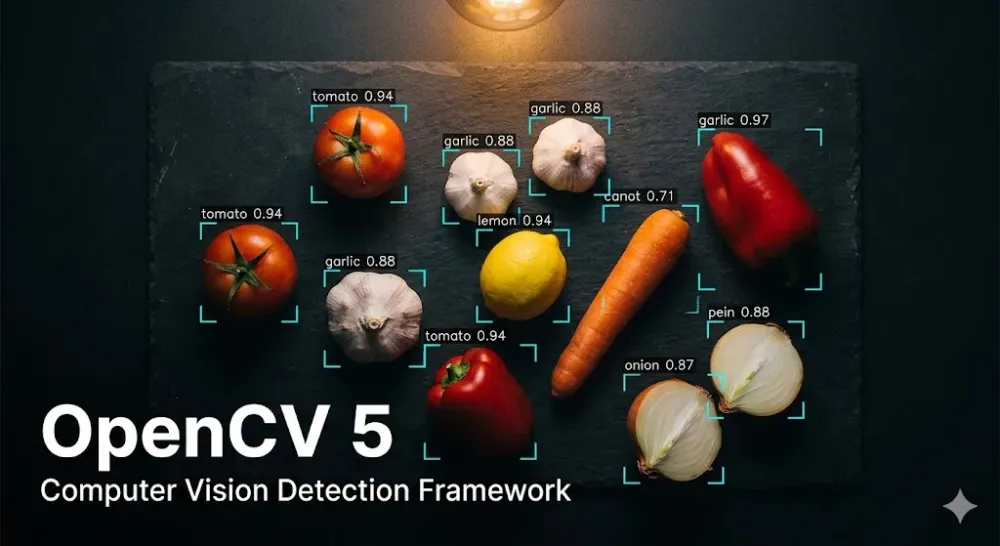
We landed on something we genuinely wanted to exist: photograph the ingredients you have at home and get meal suggestions based on what's actually in your kitchen. The product made sense. The technical challenge we underestimated was recognition: getting the app to reliably identify what was in the photo. This was late 2023, so the options on the table were realistic for that moment.
I was fullstack on the team, so I ended up deep in both the mobile side and the backend vision pipeline. And that pipeline is where things got complicated.
Here is what the stack looked like by the time we submitted.
Google Cloud Vision API handled object localization on the full image, returning bounding boxes with labels and confidence scores. OpenCV then cropped each detected region with a small border adjustment, and we sent each crop back to Vision API again for a second, more focused identification pass. A hardcoded set of about 20 valid ingredient names acted as the filter. Vision was returning things like "tableware" and "kitchenware" constantly, and we had no better way to gate the results. If the label matched the set and cleared a confidence threshold of 0.5, it counted as an ingredient. Otherwise it was dropped.
After that, a GPT call with function calling returned recipe suggestions as structured JSON. Another call fetched the full recipe. Another powered a chat interface where you could ask questions about whichever recipe you picked.
OpenCV's actual role in all of this:
cv2.imdecode to convert bytes to a numpy array, array slicing to crop the bounding box, cv2.imencode to convert back to bytes. That was it. We pulled in an entire computer vision library to do image cropping.1
2
3
4
5
6
7
# This was essentially all we used OpenCV for
nparr = np.frombuffer(inputImageBytes, np.uint8)
img = cv2.imdecode(nparr, cv2.IMREAD_COLOR)
# Crop to bounding box with border adjustment
trim = img[yInicial:yFinal, xInicial:xFinal, :]
is_success, trimBuffer = cv2.imencode(".jpg", trim)
The recognition never got to where we wanted it. Parsley and cilantro looked the same to Vision. Cherry tomatoes came back as "fruit." The hardcoded ingredient list was a band-aid over a gap we couldn't close with the tools available. We used three external APIs, two of them paid, to do what we thought OpenCV was going to handle. The result worked well enough to ship, but the architecture was a chain of external dependencies held together by confidence thresholds and a Python set literal.
What OpenCV 5 Actually Changes
The core problem with OpenCV 4.x DNN was structural, not a matter of missing operators. The engine represented a neural network as a flat list of layers walked sequentially. It had no graph representation, no shape propagation, and no concept of dynamic tensor dimensions. Any model that changed its input shape at runtime (virtually every modern transformer architecture) either failed to load or produced wrong output silently.
The new engine in OpenCV 5 is graph-based. It builds a typed operation graph at load time, runs shape inference across the entire graph, and applies optimization passes before a single inference happens: constant folding, operator fusion, dead node elimination, unified buffer allocation. ONNX operator coverage went from roughly 22% to over 80%. The models that were structurally incompatible with 4.x now load and run correctly.
In practice, this means YOLOv8, DINOv2, RF-DETR, and OWLv2 all work through the same interface:
1
2
3
4
5
6
7
8
import cv2

net = cv2.dnn.readNet("yolov8n.onnx")

img = cv2.imread("kitchen.jpg")
blob = cv2.dnn.blobFromImage(img, 1/255.0, (640, 640), swapRB=True)
net.setInput(blob)
detections = net.forward()
No separate runtime. No PyTorch wheel. No framework stitching.
The engine selection is explicit, and the fallback behavior is important:
1
2
3
4
5
6
7
8
# ENGINE_AUTO: new graph engine, falls back to classic on unsupported ops
net = cv2.dnn.readNet("model.onnx")

# ENGINE_CLASSIC: forces 4.x behavior, keeps CUDA and OpenVINO support
net = cv2.dnn.readNet("model.onnx", engine=cv2.dnn.ENGINE_CLASSIC)

# ENGINE_ORT: delegates to ONNX Runtime, useful for GPU providers
net = cv2.dnn.readNet("model.onnx", engine=cv2.dnn.ENGINE_ORT)
ENGINE_AUTO does not hard-fail on unsupported ops. It degrades to classic behavior. You find out what breaks in tests, not in production.On CPU, the benchmarks are real. On an Intel i9-14900KS, the new engine outperforms ONNX Runtime: XFeat +31%, YOLOv8n +11.5%, OWLv2 +36.6%. Operator fusion reduces kernel launch overhead. Constant folding eliminates computation that was redundant at inference time. Unified buffer allocation reduces peak memory pressure. These are not theoretical gains.
The Part That Would Have Replaced Our Entire GPT Layer
OpenCV 5 ships native support for vision-language models inside the DNN module. Qwen 2.5, Gemma 3, PaliGemma, the GPT-2 and GPT-4 family. It includes its own tokenizer and KV-cache implementation for autoregressive decoding. No PyTorch, no Transformers, no external runtime.
They load through the same
cv2.dnn.readNet() interface as a detection model:1
2
3
vlm = cv2.dnn.readNet("qwen2.5-1.5b.onnx")
# Same Net API, same blob preprocessing interface
# KV-cache and autoregressive decoding handled internally
The team validated output against ONNX Runtime and got token-for-token matching on the same prompts. That is the right correctness bar. Getting autoregressive decoding right means KV-cache management, attention masks, and sampling all have to be exactly right.
Think about what this means for the project we built. The detection model finds the ingredients. A small VLM reads the detected labels and generates meal suggestions. One library, one inference interface, zero external API calls for that step. No Google Cloud Vision bill. No OpenAI bill for the recipe layer. No translation API because the VLM handles Spanish natively.
The architecture we would write today:
1
2
3
4
5
6
7
8
9
10
# Step 1: detect ingredients
detector = cv2.dnn.readNet("yolov8n-food.onnx")
blob = cv2.dnn.blobFromImage(img, 1/255.0, (640, 640), swapRB=True)
detector.setInput(blob)
detections = detector.forward()

# Step 2: ask the VLM for recipes based on what was found
vlm = cv2.dnn.readNet("qwen2.5-1.5b.onnx")
prompt = f"Tengo estos ingredientes: {detected_labels}. Dame 3 recetas posibles."
# Feed prompt through blob interface, get structured response
One process. One dependency. No external services for the core inference loop.
Why This Matters for Real Deployments
The dependency story is where this gets interesting beyond university projects.
On AWS Lambda, container image size is a first-class cost driver. Cold start duration scales with image size, and every megabyte that isn't there doesn't slow down initialization. A Python function that previously needed OpenCV plus PyTorch or ONNX Runtime for inference carried gigabytes of weight it couldn't avoid. With OpenCV 5, for the broad class of models now covered by the DNN engine, that entire secondary dependency disappears.
For ARM-based deployments, OpenCV 5's hardware acceleration layer (Universal Intrinsics 2.0) includes tuned paths for Arm via KleidiCV, with reported 3-4x improvements on
warpAffine and warpPerspective. If you're running on AWS Graviton3, which makes sense on cost alone, those improvements are free throughput on preprocessing operations that run on every single frame.The VLM support opens a pattern that previously required either an external API call or a separate framework: a pipeline that does object detection and natural language generation in the same process, with the same library, without a network round trip. On edge deployments running AWS Greengrass, that matters both for latency and for offline operation. A Greengrass component that identifies defects and generates a natural-language description of each one before sending results to IoT Core needs no Bedrock call for that generation step.
For workloads where you need frontier model quality, high-volume APIs, or anything a small ONNX model won't match on accuracy, Amazon Bedrock is still the right answer. These are not competing options. The Bedrock use case is scale and model quality. The OpenCV 5 VLM use case is embedded pipelines where dependency weight, latency, and offline capability matter more than model scale.
What Actually Breaks When Upgrading
Three things, stated plainly.
The legacy C API is gone.
IplImage, CvMat, cvLoadImage(), the original C-style headers: all removed. Modern C++ and Python codebases are unaffected. The Python API is unchanged.C++17 is now required. For most projects this is a build configuration change, not a code change.
Some modules moved to
opencv-contrib. Worth checking your imports before upgrading a C++ project.For Python:
1
pip install "opencv-python>=5.0.0"
Run your tests. Fix what breaks there. The 3-to-4 migration was genuinely painful. This one is not.
What We Actually Learned From That Project
We thought OpenCV was the computer vision layer. It turned out to be a cropping utility that we wrapped in two paid APIs to do the actual work. That was not a failure of the library at the time, and it was not a bad call on our part. In late 2023, it was an accurate reflection of what the tooling could realistically support.
OpenCV 5 closes that gap. The DNN engine can now load and run the models the field actually uses. The VLM support means a pipeline can go from raw image to natural language output without leaving the library. The dependency chain that turned our university project into a three-API architecture could, today, be a single Python install.
That is not a minor release. That is the library finally becoming what it was supposed to be.
Enjoyed reading this content? Let the author know!
Your likes, comments, shares, and saves help creators reach more builders.

Loading recommendations
Loading article