
Identity Federation on AWS: Workload Identity with OIDC
This article is for builders who want to understand how workload identity federation works on AWS.


Before we dive into the topic, if your goal is getting your team logged into the AWS Console with corporate credentials, see the Identity Federation on AWS: Workforce SSO with IAM Identity Center article. Now, let's talk about workload identity on AWS.
The problem: static credentials for workloads
When your team is small, creating an IAM user for your CI/CD pipeline works fine. You generate an access key, paste it into GitHub Secrets or an environment variable, and your deployment runs. But it stops working fast.
Those keys never expire. They sit in config files, in pipeline settings, in container images. Someone leaves the team and nobody remembers which pipeline uses their key. A secret gets logged accidentally. A repo goes public and the key is exposed. There's no connection between "this pipeline should have access" and "this pipeline actually has access right now."
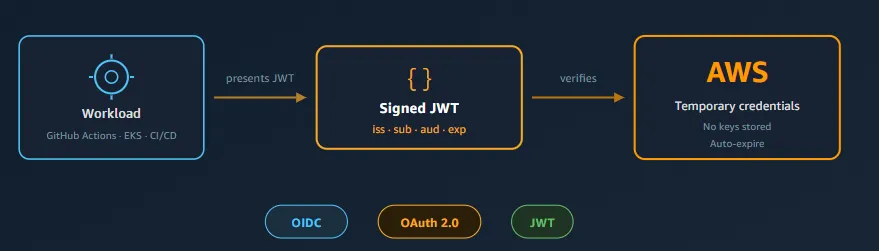
Workload identity federation solves this by letting your code prove who it is to AWS without storing any secrets. No access keys created, no secrets stored anywhere, no rotation to manage. The pipeline runs, gets temporary credentials for that specific run, and those credentials expire in minutes.
Here's what that looks like in practice:
1
2
3
4
5
6
7
8
9
10
11
  GitHub Actions workflow starts
  → GitHub issues a signed token saying "this is repo X, branch main, workflow deploy.yml"
  → Workflow presents that token to AWS
  → AWS verifies the signature, checks the claims match the role's policy
  → AWS issues temporary credentials (valid ~1 hour)
  → Workflow deploys using those credentials
  → Credentials expire automatically

  Access keys stored: ZERO
  Secrets to rotate: ZERO
  Credentials that outlive the pipeline run: ZERO
Same concept as workforce federation (trust an external system, get temporary credentials), but for machines instead of humans. Here's how it works.

The key terms (and how they relate)
These terms get mixed up constantly. Here's how they relate.
OAuth 2.0 (2012) is an authorization framework. It answers: "what is this application allowed to access?" It grants access tokens with specific permissions, but it does NOT prove who the caller is. Think of it like a hotel key card. The card opens your room, but it doesn't say your name.
OpenID Connect (OIDC) (2014) is an identity layer built on top of OAuth 2.0. It answers: "who is this?" It adds an ID token that proves identity. Think of it like a driver's license. It says who you are.
JSON Web Token (JWT) is the format these tokens use. It's a compact, signed piece of JSON with three parts: header (how it's signed), payload (the claims), and signature (proof it hasn't been tampered with). You can decode a JWT and read its contents, but you can't alter it without invalidating the signature.
The relationship:
1
2
3
4
5
6
  OAuth 2.0         = the framework (how tokens are requested and granted)
       │
       └── OIDC     = identity layer on top (adds "who is this?" via ID tokens)
              │
              └── JWT = the token format (how the data is structured and signed)
Why this matters on AWS: When a GitHub Action or an EKS pod needs AWS credentials, it presents a JWT (issued by GitHub or Kubernetes) to AWS. AWS verifies the signature, checks the claims, and issues temporary credentials in return. That's OIDC federation in one sentence.
In the workload context, the "who" isn't a person. It's a specific repo, branch, pod, or pipeline run. The JWT's claims identify the workload the same way a driver's license identifies a person.
A note on OIDC and human login
You might have heard OIDC is used for human login too. It is. When you run
aws sso login on the CLI or sign into a web app with "Sign in with Google," that's OIDC handling the browser-based flow (called the Authorization Code Flow). The identity provider authenticates the user, issues tokens, and the app exchanges them server-to-server.Desktop apps and Proof Key for Code Exchange (PKCE): Desktop tools (AWS CLI, IDEs) can't safely store a client secret, because anyone could decompile the app and extract it. They use PKCE (pronounced "pixie") to prove the same app that started the flow is the one finishing it, without needing a static secret.
But in the context of workload identity, the flow is simpler. There's no browser, no user interaction. The workload already has a JWT issued by its platform (GitHub, Kubernetes, GitLab), and it presents that token directly to AWS. No redirects, no code exchange. That's the path this article covers.
How OIDC federation works on AWS
The pattern is the same regardless of which workload you're connecting. Whether it's GitHub Actions, GitLab CI, Terraform Cloud, or an EKS pod, the flow is:
- An external system issues a JWT identifying the workload (GitHub issues a token for a workflow run, Kubernetes issues one for a pod)
- The workload presents that JWT to AWS via the
AssumeRoleWithWebIdentityAPI - AWS verifies the token by checking the signature against the issuer's public keys, then validating the claims match the IAM role's trust policy
- AWS issues temporary credentials (access key, secret key, session token) scoped to the IAM role's permissions
No secrets are exchanged. The trust is based on cryptographic verification: AWS trusts the issuer because you registered the issuer's public key URL (the OIDC discovery endpoint) ahead of time.
This is the same "notarized document" concept from SAML federation in the companion article. The difference: instead of XML assertions, it's JWTs. Instead of browser redirects, it's API calls. Instead of humans clicking "Login," it's code running automatically.
What you set up once
The one-time setup creates the trust relationship:
- Create an IAM OIDC Identity Provider in your AWS account. This tells AWS: "I trust tokens signed by this issuer."
- Create an IAM Role with a trust policy that says: "Allow
AssumeRoleWithWebIdentity, but only for tokens from this provider with specific claims."
After that, every workload run gets fresh credentials automatically. Nothing stored, nothing rotated manually.
Claims: how AWS knows what to trust
A JWT contains claims (key-value pairs describing the identity). When AWS receives a token, it checks the claims against the role's trust policy conditions. Common claims:
- iss (issuer): who signed this token (e.g.,
https://token.actions.githubusercontent.com) - sub (subject): what specific identity this represents (e.g.,
repo:myorg/myrepo:ref:refs/heads/main) - aud (audience): who this token is intended for (e.g.,
sts.amazonaws.com)
The trust policy conditions let you be as specific as you want: trust only this repo, only this branch, only this workflow file. A token from a different repo or branch won't match the conditions, and
AssumeRoleWithWebIdentity will be denied.AWS requires these claim conditions for shared providers like GitHub and GitLab. If you create a trust policy without them, the role creation will fail with an error. This is a safety mechanism: it prevents you from accidentally trusting every repo on GitHub.
Where OIDC federation shows up on AWS
GitHub Actions → AWS
This is the most common use case right now. GitHub's OIDC provider issues a unique JWT for every workflow run containing claims about the repo, branch, actor, and workflow. Your IAM role's trust policy checks those claims. If they match, temporary credentials are issued for that specific run.
The result: your deployment workflow gets AWS access without any stored secrets. When the workflow finishes, the credentials expire. If someone forks your repo, their workflow gets a different
sub claim and can't assume your role.EKS Pod Identity
When a pod running in Amazon Elastic Kubernetes Service (EKS) needs to call AWS APIs, it needs credentials. EKS Pod Identity solves this by associating an IAM role with a Kubernetes service account. When a pod with that service account starts, it automatically receives temporary AWS credentials scoped to the associated role.
There's an older mechanism called IAM Roles for Service Accounts (IRSA) that works similarly but requires you to manage OIDC providers and service account annotations yourself. EKS Pod Identity simplifies this: AWS handles the token exchange, you just create the association. For new projects, Pod Identity is the recommended path.
The concept is the same either way: the pod proves its identity via a signed token, AWS verifies it, temporary credentials are issued.
Amazon Cognito
Cognito also uses OIDC, but for a different audience: your application's end users (customers signing in with Google, Facebook, or a corporate identity provider), not your infrastructure. It's mentioned here for completeness because it shares the same underlying protocol, but it solves a different problem than the workload identity patterns above. If you're building customer-facing login, see the Cognito Developer Guide .
Other platforms that support OIDC federation with AWS
AWS recognizes OIDC tokens from many CI/CD and DevOps platforms. The setup pattern is always the same: register the provider's issuer URL, create a role with trust policy conditions, and the platform handles the rest.
- GitLab CI
- Terraform Cloud
- Buildkite
- Pulumi
- CircleCI
IAM Roles Anywhere (on-premises workloads)
Not all workloads run in cloud CI/CD systems or Kubernetes. If you have servers in a data center, applications in a private network, or IoT devices that need AWS access, they can't get OIDC tokens from GitHub or EKS. But they still shouldn't use static access keys.
IAM Roles Anywhere solves this using X.509 certificates instead of JWTs. You establish a trust anchor (a Certificate Authority that AWS trusts), and any workload with a certificate signed by that CA can exchange it for temporary AWS credentials.
The pattern is similar to OIDC federation: present a signed proof of identity, AWS verifies it against a pre-registered trust, temporary credentials are issued. The difference is the format (certificates instead of JWTs) and the use case (on-premises workloads that don't have an OIDC issuer available).
When to use this: Hybrid environments where on-premises servers, edge devices, or non-cloud workloads need AWS access without VPN tunnels or stored access keys.
What about workloads already running on AWS?
If your code runs on EC2, Lambda, ECS, or other AWS compute services, it already gets temporary credentials natively. EC2 instances have instance profiles. Lambda functions have execution roles. ECS tasks have task roles. These credentials are issued automatically by AWS infrastructure with no federation needed.
The problem this article solves is different: getting credentials to workloads running outside AWS infrastructure (CI/CD pipelines, on-prem servers, external Kubernetes clusters) or workloads on EKS that need fine-grained per-pod access rather than node-level access.
How this compares to workforce federation (SAML)
If you've read the companion article, here's how the two approaches relate:
| Workforce SSO | Workload identity | |
|---|---|---|
| Who | Humans (your team) | Machines (your code) |
| Protocol | SAML 2.0 (XML) | OIDC (JWT) |
| AWS service | IAM Identity Center | IAM OIDC Providers |
| How trust is established | Metadata + certificate exchange | OIDC discovery endpoint registration |
| How identity is proven | Signed XML assertion | Signed JWT |
| How credentials are issued | Identity Center SSO portal / CLI | AssumeRoleWithWebIdentity API |
| Credential lifetime | Hours (configurable) | Minutes to hours (configurable) |
| What you eliminate | IAM users + passwords | IAM users + access keys |
Same pattern: trust an external system, verify a signed token, issue temporary credentials. Different mechanics for different actors.
Glossary
| Term | Definition |
|---|---|
| OAuth 2.0 | Authorization framework (2012). Grants access tokens. Does not prove identity. |
| OIDC | OpenID Connect. Identity layer on top of OAuth 2.0 (2014). Proves who the caller is. |
| JWT | JSON Web Token. Compact, signed JSON payload used as the token format. |
| Claims | Key-value pairs inside a JWT (e.g., sub, aud, iss) that describe the identity. |
| PKCE | Proof Key for Code Exchange. Extension for OAuth flows in apps that can't store secrets. |
| IAM OIDC Provider | An AWS resource that tells IAM to trust tokens from a specific issuer URL. |
| AssumeRoleWithWebIdentity | The STS API call that exchanges a JWT for temporary AWS credentials. |
| Trust Policy | The part of an IAM role that defines who (or what) can assume it. |
| IRSA | IAM Roles for Service Accounts. The original EKS mechanism for pod-level AWS access (2019). |
| EKS Pod Identity | Newer, simplified mechanism for granting EKS pods AWS credentials (2023). |
| IAM Roles Anywhere | Certificate-based workload identity for on-premises servers and non-cloud workloads. |
Try it yourself
Decode a JWT (2 minutes): Go to jwt.io , paste any JWT token, and read the claims. Understanding what's inside a token makes the whole system click.
GitHub Actions OIDC (15 minutes): Follow GitHub's guide to set up keyless AWS access for a workflow. Configuring OIDC in AWS
EKS Pod Identity (30 minutes if you have a cluster): Install the Pod Identity Agent add-on and create an association. Install the Pod Identity Agent add-on and create an association. EKS clusters incur charges; only do this if you already have one running. EKS Pod Identity docs
Cleanup
If you created resources while testing, remove them to keep your account clean:
- Delete the IAM OIDC provider if you created one for testing
- Delete the IAM role you created
- Remove any pod identity associations from your EKS cluster
- Revert workflow file changes if you don't want OIDC federation running in your repo yet
IAM OIDC providers and roles have no ongoing charges, but removing unused resources is good security hygiene.
Further reading
- https://builder.aws.com/content/3F0DzoOH7GDjdn1oEeCvaFKFQfS/identity-federation-on-aws-workforce-sso-with-iam-identity-center
- IAM OIDC identity providers
- GitHub Actions OIDC for AWS
- EKS Pod Identity
- IAM Roles for Service Accounts (IRSA)
- IAM Roles Anywhere
- Amazon Cognito Developer Guide
- Identity-provider controls for shared OIDC providers
Krishna Kadiyala is a Solutions Architect at AWS.
Any opinions in this article are those of the individual author and may not reflect the opinions of AWS.
Enjoyed reading this content? Let the author know!
Your likes, comments, shares, and saves help creators reach more builders.

Loading recommendations
Loading article