
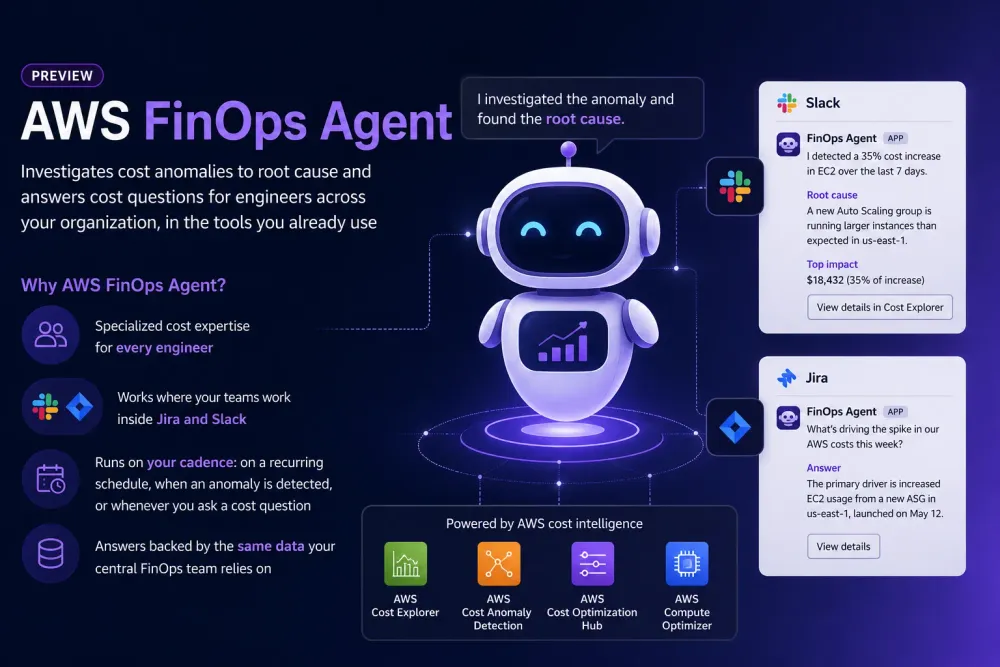
AWS FinOps agent
Investigates cost anomalies to root cause and answers cost questions for engineers across your organization, in the tools you already use

9 of June 2026: Amazon Web Services (AWS) has announced the preview release of AWS FinOps Agent, a new AI-powered solution designed to help FinOps practitioners and engineering teams gain better visibility into cloud spending and automate cost management workflows.
The new agent enables users to ask questions about AWS costs, generate cost and usage reports, identify optimization opportunities, and investigate unexpected spending patterns. By leveraging data from AWS Cost Optimization Hub and AWS Compute Optimizer, AWS FinOps Agent can provide recommendations for rightsizing resources, removing idle infrastructure, and maximizing savings through Savings Plans.
One of the most notable capabilities of the service is its ability to automatically investigate cost anomalies. When unusual spending is detected, the agent can analyze potential root causes, generate findings, and notify engineering teams through Slack or create Jira tickets for further action, reducing the need for manual triage.
Currently available in preview, AWS FinOps Agent is offered at no additional cost and supports cost and usage data across AWS Regions, with the exception of AWS GovCloud (US) and AWS China Regions.
Let's test it out!

Let it create a role automatically:

The role is primarily read-only across billing, optimization, monitoring, logging, and infrastructure services, allowing the agent to analyze costs, identify savings opportunities, and investigate anomalies. The only write permissions are limited to managing its own EventBridge scheduling rules, which are used to automate recurring FinOps workflows. It cannot modify, create, or delete AWS infrastructure resources such as EC2 instances, RDS databases, Lambda functions, or networking components.

This role does not grant access to AWS resources directly (such as EC2, RDS, Lambda, or billing data). Instead, it grants permission to operate and manage the AWS FinOps Agent service, including conversations, investigations, reports, artifacts, and automations created within the service. Think of it as the user/operator access policy for interacting with FinOps Agent, while the previous policy was the data access policy that allows the agent to gather cost and optimization information from AWS.
Here we can enable 3rd party integrations, we will back to this part later:

Review and create:

Currently is has this interface:

Asking it about ec2 saving opportunities:


Okay, to get this result - the agent checked Cost Optimization Hub. (COH)
We can see it in the thinking process:

Lets ask something what is not supported by COH, for example S3 and VPC:

boooring!
And don't forget to say "please". It knows where you live, lol

Still makes calls to COH,

lets ask explicitly to use costs explorer instead

Okay, its clear now, it works, analyses and recommends to optimize.
Lets check other FinOps agent functionality:
Automations:

Once created - can't be edited;

You can only delete it and create again if you want to change the schedule, for example. Let's recreate it then to run once, looks good to me:

But unfortunatelly here is not SNS or other integrations to get the results, only via UI here.
Let's check the Slack integration now:
Add the AWS FinOps Agent Slack app to the channel before you create the connection. From Slack, open the channel, choose the channel name, choose the ``Integrations`` tab, and add the AWS FinOps Agent app. Without the app in the channel, the agent cannot post messages to this channel.After we can connect slack channel:

To get a message in the slack - you need to ask the agent about this:

And the message was posted:

Unfortunately, it can only post messages to slack from the agent, at the moment its not possible to trigger the agent from Slack yet.
It also has Jira integration , and its more interesting than Slack and can:
- Create issues. When you ask the agent to summarize a cost anomaly or optimization recommendation into a Jira ticket, the agent creates the issue in the connected project.
- Add comments. The agent adds follow-up comments to issues it previously created.
- Read issues. The agent reads issue metadata (status, assignee, labels) to track whether recommendations have been acted on.
Enjoyed reading this content? Let the author know!
Your likes, comments, shares, and saves help creators reach more builders.

Loading recommendations
Loading article