
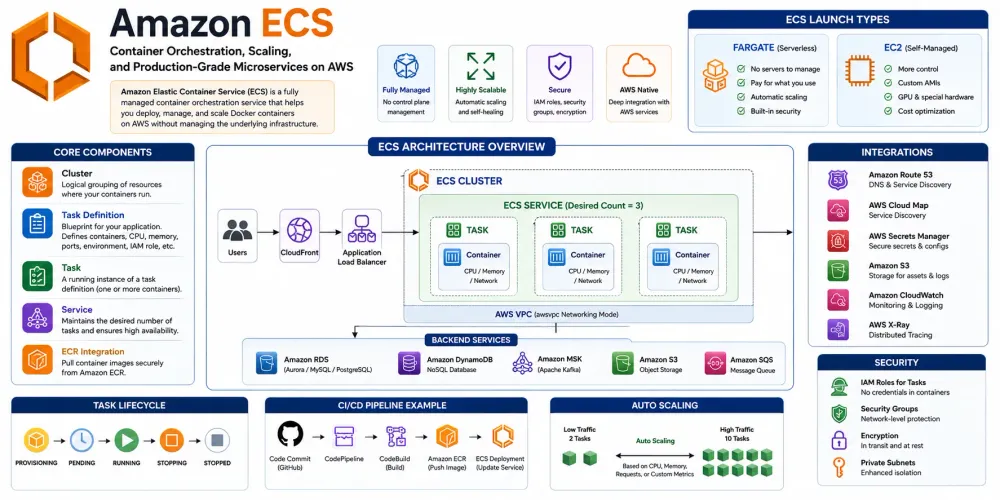
Amazon ECS: Container Orchestration, Scaling, and Production-Grade Microservices on AWS
Learn how Amazon ECS simplifies container deployment, orchestration, networking, and scaling on AWS. Explore ECS internals, Fargate, task scheduling, security architecture, CI/CD integration, and production-ready deployment patterns for modern cloud-native applications.

Introduction
Modern applications are increasingly built using containers and microservices. While containers simplify packaging and deployment, managing container infrastructure at scale introduces challenges such as scheduling, networking, service discovery, scaling, monitoring, and security.
Amazon Elastic Container Service (ECS) is AWS's fully managed container orchestration platform that enables organizations to run Docker containers at scale without managing complex orchestration systems.
ECS powers thousands of production workloads ranging from startups to large enterprises running millions of containers daily.
What is Amazon ECS?
Amazon ECS is a fully managed container orchestration service that helps deploy, manage, and scale containerized applications.
ECS supports:
- Docker Containers
- Microservices
- Batch Workloads
- Long Running Services
- Event-Driven Applications
- API Platforms
- AI/ML Applications
Key benefits:
- Native AWS Integration
- Managed Control Plane
- Built-in Scaling
- High Availability
- Deep Security Controls
Why AWS Built ECS
Traditional deployments required:
1
2
3
4
5
6
7
8
9
10
Developer
    │
    ▼
Virtual Machine
    │
    ▼
Install Application
    │
    ▼
Manual Scaling
Problems:
- Resource Waste
- Slow Deployments
- Configuration Drift
- Complex Scaling
Containers improved packaging:
1
2
3
4
Application
    │
    ▼
Docker Image
But orchestration remained difficult.
AWS introduced ECS to solve:
1
2
3
4
5
Scheduling
Networking
Scaling
Load Balancing
Monitoring
ECS Architecture
1
2
3
4
5
6
7
8
9
10
11
                ECS Control Plane
                         │
                         ▼
                  ECS Cluster
                         │
         ┌───────────────┼───────────────┐
         ▼               ▼               ▼
      Task A         Task B         Task C
         │               │               │
         ▼               ▼               ▼
     Container      Container      Container
The ECS control plane manages:
- Scheduling
- Placement
- Scaling
- Health Monitoring
AWS manages the control plane automatically.
Core Components
Cluster
A logical grouping of resources.
1
2
3
4
5
Production Cluster

Development Cluster

Testing Cluster
Example:
1
2
aws ecs create-cluster \
  --cluster-name production
Task Definition
Blueprint for running containers.
1
2
3
4
5
6
7
8
9
{
  "family": "backend-service",
  "containerDefinitions": [
    {
      "name": "backend",
      "image": "my-app:v1"
    }
  ]
}
Defines:
- CPU
- Memory
- Environment Variables
- Ports
- Logging
Task
A running instance of a task definition.
1
2
3
4
Task Definition
      │
      ▼
Running Task
Similar to:
1
2
3
4
Docker Image
      │
      ▼
Container
Service
Maintains desired task count.
Example:
1
Desired Tasks = 5
If one task crashes:
1
2
3
4
5
6
7
8
9
5 Running
    │
Task Dies
    │
4 Running
    │
ECS Creates New Task
    │
5 Running
ECS Launch Types
ECS supports two deployment models.
ECS on EC2
You manage servers.
1
2
3
4
5
6
7
ECS Cluster
     │
     ▼
EC2 Instances
     │
     ▼
Containers
Advantages:
- Maximum control
- Custom AMIs
- GPU Workloads
- Specialized Networking
ECS Fargate
Serverless containers.
1
2
3
4
5
6
7
8
9
10
Application
      │
      ▼
ECS Service
      │
      ▼
Fargate
      │
      ▼
AWS Manages Servers
Benefits:
- No EC2 Management
- Simpler Operations
- Pay Per Usage
Most modern deployments use Fargate.
Task Lifecycle
1
2
3
4
5
6
7
8
9
10
11
12
13
14
15
16
Task Definition
       │
       ▼
Provisioning
       │
       ▼
Pending
       │
       ▼
Running
       │
       ▼
Stopping
       │
       ▼
Stopped
ECS automatically manages lifecycle transitions.
ECS Networking
Each task receives networking resources.
1
2
3
4
5
6
7
8
Application Load Balancer
            │
            ▼
       ECS Service
            │
      ┌─────┴─────┐
      ▼           ▼
    Task1       Task2
Networking modes:
- Bridge
- Host
- awsvpc
Recommended:
1
awsvpc
Each task receives its own ENI.
ECS Service Discovery
Services can discover each other automatically.
1
2
3
4
5
6
7
Order Service
      │
      ▼
payment.internal
      │
      ▼
Payment Service
Uses:
- Cloud Map
- Route53
ECS Auto Scaling
Automatically scales tasks.
1
2
3
4
CPU > 70%
      │
      ▼
Add Containers
Example:
1
2
3
4
5
2 Tasks
   │
High Traffic
   │
8 Tasks
Policy Example:
1
2
aws application-autoscaling \
register-scalable-target
ECS + Load Balancer
Production architecture:
1
2
3
4
5
6
7
8
9
10
11
Internet
     │
     ▼
Application Load Balancer
     │
     ▼
ECS Service
     │
 ┌───┴───┐
 ▼       ▼
Task1   Task2
Benefits:
- Health Checks
- SSL Termination
- Traffic Distribution
ECS + ECR
Container workflow:
1
2
3
4
5
6
7
8
9
10
Developer
      │
      ▼
Docker Build
      │
      ▼
ECR
      │
      ▼
ECS Deployment
Push Image:
1
2
3
4
5
6
7
docker build -t app .

docker tag app:latest \
123456789.dkr.ecr.us-east-1.amazonaws.com/app:latest

docker push \
123456789.dkr.ecr.us-east-1.amazonaws.com/app:latest
Deploy Spring Boot Application
Dockerfile:
1
2
3
4
5
FROM eclipse-temurin:21

COPY target/app.jar app.jar

ENTRYPOINT ["java","-jar","app.jar"]
Build:
1
2
3
mvn clean package

docker build -t app .
Push:
1
docker push my-ecr-repo/app:latest
Deploy:
1
2
3
4
aws ecs update-service \
  --cluster production \
  --service backend \
  --force-new-deployment
Java SDK Example
List ECS Clusters:
1
2
3
4
5
6
7
EcsClient ecs = EcsClient.create();

ListClustersResponse response =
    ecs.listClusters();

response.clusterArns()
        .forEach(System.out::println);
Python Example
1
2
3
4
5
6
7
import boto3

ecs = boto3.client("ecs")

clusters = ecs.list_clusters()

print(clusters)
Security Architecture
IAM Roles
1
2
3
4
5
6
7
Task
  │
  ▼
IAM Role
  │
  ▼
DynamoDB
Avoid storing credentials inside containers.
Security Groups
1
2
3
4
ALB
 │
 ▼
ECS Tasks
Restrict traffic flow.
Secrets Manager
1
2
3
4
5
6
7
Database Password
      │
      ▼
Secrets Manager
      │
      ▼
Container
Store sensitive data securely.
ECS + DynamoDB Architecture
1
2
3
4
5
6
7
8
9
10
11
12
13
Users
   │
   ▼
CloudFront
   │
   ▼
ALB
   │
   ▼
ECS Service
   │
   ▼
DynamoDB
Popular for:
- SaaS Products
- APIs
- Mobile Backends
ECS + Aurora Architecture
1
2
3
4
5
6
7
8
9
10
Users
   │
   ▼
ALB
   │
   ▼
ECS Fargate
   │
   ▼
Aurora PostgreSQL
Common in enterprise applications.
CI/CD Architecture
1
2
3
4
5
6
7
8
9
10
11
12
13
GitHub
   │
   ▼
CodePipeline
   │
   ▼
CodeBuild
   │
   ▼
ECR
   │
   ▼
ECS
Deployment becomes fully automated.
Cost Optimization
- Use Fargate Spot.
- Right-size CPU and memory.
- Enable auto scaling.
- Use Graviton instances.
- Remove unused task definitions.
- Monitor CloudWatch metrics.
Best Practices
- Use Fargate for new workloads.
- Store secrets in Secrets Manager.
- Use IAM task roles.
- Configure health checks.
- Enable container insights.
- Use blue/green deployments.
- Use CloudWatch logging.
- Automate deployments.
Common Interview Questions
What is ECS?
A fully managed container orchestration platform on AWS.
Difference between ECS and EKS?
ECS is AWS-native orchestration. EKS is managed Kubernetes.
What is a Task Definition?
A blueprint describing how containers should run.
What is ECS Service?
A component that maintains desired task count.
What is Fargate?
Serverless compute for containers.
Real-World Example
A SaaS company serves:
- 10 Million Users
- 500 APIs
- 50 Microservices
Architecture:
1
2
3
4
5
6
7
8
9
10
11
12
13
14
CloudFront
      │
      ▼
Application Load Balancer
      │
      ▼
ECS Fargate Cluster
      │
 ┌────┼─────┐
 ▼    ▼     ▼
Auth Billing Orders
      │
      ▼
Aurora + DynamoDB
Peak traffic:
1
2
3
4
5
6
7
200 Containers
      │
      ▼
Auto Scaling
      │
      ▼
2,000 Containers
without manual intervention.
Conclusion
Amazon ECS is AWS's flagship container orchestration platform for deploying and scaling containerized applications. By combining managed orchestration, deep AWS integration, Fargate serverless compute, and powerful scaling capabilities, ECS enables teams to focus on building applications instead of managing infrastructure. It is a foundational service for modern microservices, APIs, AI platforms, and cloud-native applications running on AWS.
Enjoyed reading this content? Let the author know!
Your likes, comments, shares, and saves help creators reach more builders.

Loading recommendations
Loading article