
Amazon Aurora: Architecture, Scaling, High Availability, and Real-World Production Patterns
Learn how Amazon Aurora's cloud-native architecture separates compute from storage to deliver high performance, automatic failover, and enterprise-grade scalability. Explore Aurora internals, replication, security, global databases, and production deployment patterns with hands-on examples.

Introduction
Modern applications require databases that are highly available, fault-tolerant, scalable, and performant. Traditional relational databases often struggle with storage scaling, replication complexity, failover management, and operational overhead.
Amazon Aurora is AWS's cloud-native relational database engine designed to provide the compatibility of MySQL and PostgreSQL with the performance, availability, and scalability of a distributed cloud database.
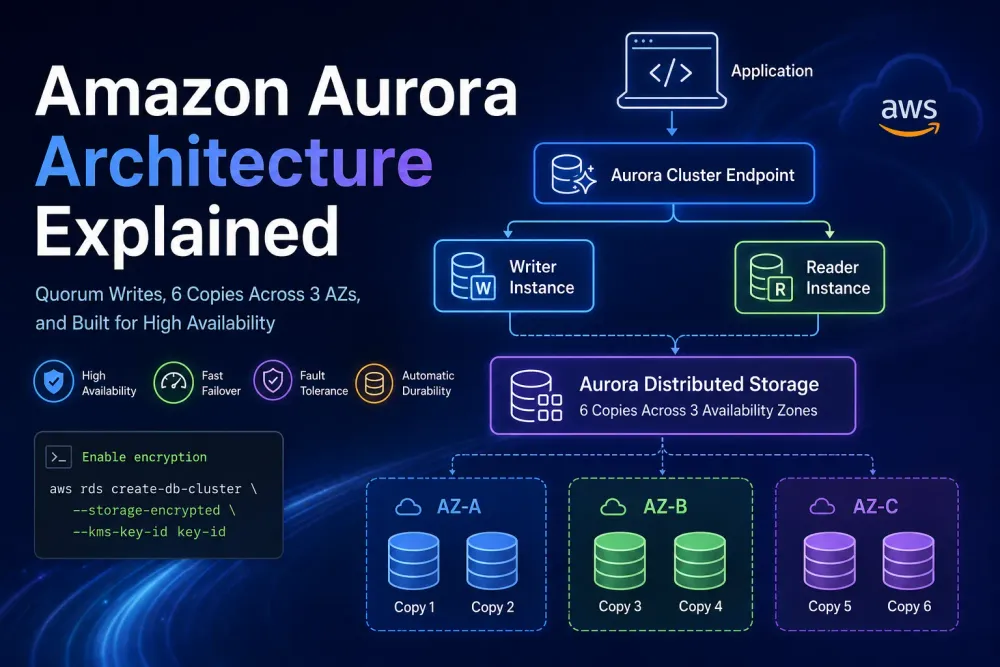
Aurora separates compute from storage and uses a distributed storage architecture that automatically replicates data across multiple Availability Zones (AZs), providing enterprise-grade reliability without the complexity of traditional database clustering.
What is Amazon Aurora?
Amazon Aurora is a fully managed relational database service that supports:
- Aurora MySQL
- Aurora PostgreSQL
Aurora provides:
- Up to 5x MySQL performance
- Up to 3x PostgreSQL performance
- Automatic backups
- Automated failover
- Multi-AZ replication
- Read scaling
- Serverless deployment options
- Global databases
Aurora is part of Amazon RDS but uses a completely different storage architecture than traditional MySQL or PostgreSQL deployments.
Why AWS Built Aurora
Traditional databases have several challenges:
Problems:
- Storage tied to compute
- Slow replication
- Manual failover
- Limited scalability
- Expensive clustering solutions
Aurora solves these by redesigning the storage layer.
Aurora Architecture
1
2
3
4
5
6
7
8
9
10
11
12
13
14
15
16
17
18
                    Application
                           │
                           ▼
                Aurora Cluster Endpoint
                           │
         ┌─────────────────┴─────────────────┐
         ▼                                   ▼
   Writer Instance                    Reader Instance
         │                                   │
         └──────────────┬────────────────────┘
                        ▼
             Aurora Distributed Storage
                        │
     ┌──────────┬──────────┬──────────┐
     ▼          ▼          ▼          ▼
   AZ-1       AZ-2       AZ-3      AZ-4
 Storage    Storage    Storage    Storage
 Segment    Segment    Segment    Segment
Aurora separates:
- Compute Layer
- Storage Layer
This architecture allows independent scaling.
Internal Storage Architecture
Unlike traditional databases:
1
2
3
4
Database Server
       │
       ▼
Local Disk
Aurora uses:
1
2
3
4
Database Instance
       │
       ▼
Distributed Storage Service
Aurora stores:
1
2
3
6 Copies
Across
3 Availability Zones
Example:
1
2
3
4
5
6
7
8
AZ-A → Copy 1
AZ-A → Copy 2

AZ-B → Copy 3
AZ-B → Copy 4

AZ-C → Copy 5
AZ-C → Copy 6
Benefits:
- Automatic durability
- Fast recovery
- No RAID management
- No manual replication
Aurora Storage Quorum Model
Aurora uses quorum writes.
Write operation:
1
2
3
4
5
6
7
8
9
10
Writer Instance
       │
       ▼
Storage Nodes
       │
       ▼
4 of 6 Acknowledgements
       │
       ▼
Commit Success
Read operation:
1
2
3
4
5
6
7
Reader
      │
      ▼
3 of 6 Copies
      │
      ▼
Response
Advantages:
- High availability
- Fast failover
- Fault tolerance
Request Flow
Write Request
1
2
3
4
5
6
7
8
9
10
11
12
13
14
15
16
Application
      │
      ▼
Writer Endpoint
      │
      ▼
Writer Instance
      │
      ▼
Storage Nodes
      │
      ▼
Quorum Commit
      │
      ▼
Success Response
Read Request
1
2
3
4
5
6
7
8
9
10
11
12
13
Application
      │
      ▼
Reader Endpoint
      │
      ▼
Aurora Replica
      │
      ▼
Distributed Storage
      │
      ▼
Query Result
Aurora Endpoints
Aurora exposes multiple endpoints.
Cluster Endpoint
1
2
3
4
app.company.com
       │
       ▼
Writer Node
Used for:
- INSERT
- UPDATE
- DELETE
Reader Endpoint
1
2
3
4
app.company.com/read
       │
       ▼
Read Replica Pool
Used for:
- SELECT Queries
- Reporting
- Analytics
Custom Endpoint
Used for:
1
2
BI Team
Analytics Cluster
Specific workloads can target dedicated readers.
Aurora Replicas
Traditional MySQL replication:
1
2
3
4
Master
  │
  ▼
Replica
Aurora replication:
1
2
3
4
Shared Storage
      │
      ▼
Multiple Readers
Benefits:
- Near real-time replication
- Low lag
- Fast scaling
Aurora supports:
1
15 Read Replicas
per cluster.
Aurora Serverless
Aurora Serverless automatically scales compute.
Architecture:
1
2
3
4
5
6
7
Application
      │
      ▼
Aurora Serverless
      │
      ▼
Auto Scaling Compute
Benefits:
- No capacity planning
- Pay per usage
- Ideal for sporadic workloads
Use Cases:
- Development environments
- SaaS products
- Internal tools
Aurora Global Database
Aurora supports multi-region replication.
1
2
3
4
5
6
7
8
9
10
11
12
13
US-East-1
     │
     ▼
Primary Cluster
     │
     ▼
Cross Region Replication
     │
     ▼
Europe Cluster
     │
     ▼
Asia Cluster
Benefits:
- Disaster Recovery
- Global Read Access
- Low-latency reads
Security Architecture
Encryption At Rest
1
2
3
4
Aurora
   │
   ▼
AWS KMS
Enable encryption:
1
2
3
aws rds create-db-cluster \
  --storage-encrypted \
  --kms-key-id key-id
Encryption In Transit
1
2
3
4
Application
      │ TLS
      ▼
Aurora
Use SSL/TLS for all database connections.
IAM Authentication
Instead of passwords:
1
2
3
4
5
6
7
8
9
10
Application
      │
      ▼
IAM Role
      │
      ▼
Temporary Database Token
      │
      ▼
Aurora
Benefits:
- No password management
- Short-lived credentials
Creating Aurora Cluster
AWS CLI:
1
2
3
4
5
aws rds create-db-cluster \
  --db-cluster-identifier prod-cluster \
  --engine aurora-postgresql \
  --master-username admin \
  --master-user-password MyPassword123
Create Database Instance
1
2
3
4
5
aws rds create-db-instance \
  --db-instance-identifier prod-writer \
  --db-cluster-identifier prod-cluster \
  --engine aurora-postgresql \
  --db-instance-class db.r7g.large
Java Example
1
2
3
4
5
6
7
8
9
10
11
import java.sql.Connection;
import java.sql.DriverManager;

Connection conn =
    DriverManager.getConnection(
        "jdbc:postgresql://aurora-endpoint:5432/appdb",
        "admin",
        "password"
    );

System.out.println("Connected");
Python Example
1
2
3
4
5
6
7
8
9
10
import psycopg2

conn = psycopg2.connect(
    host="aurora-endpoint",
    database="appdb",
    user="admin",
    password="password"
)

print("Connected")
Aurora + ECS Architecture
1
2
3
4
5
6
7
8
9
10
Users
   │
   ▼
Application Load Balancer
   │
   ▼
ECS Service
   │
   ▼
Aurora Cluster
Used by:
- SaaS platforms
- FinTech systems
- Enterprise applications
Cost Optimization
- Use Graviton instances.
- Enable storage auto scaling.
- Use reader endpoints efficiently.
- Use Aurora Serverless for low-traffic environments.
- Monitor slow queries.
- Enable Performance Insights.
Best Practices
- Use Multi-AZ deployments.
- Enable automated backups.
- Use IAM authentication.
- Enable encryption.
- Separate read and write workloads.
- Configure failover testing.
- Monitor replication lag.
- Use connection pooling.
Common Interview Questions
Why is Aurora faster than MySQL?
Aurora moves logging and replication into the distributed storage layer, reducing database overhead.
How many copies of data does Aurora maintain?
Six copies across three Availability Zones.
What is Aurora Reader Endpoint?
A load-balanced endpoint that distributes read traffic across replicas.
What is Aurora Global Database?
A multi-region Aurora deployment for disaster recovery and global applications.
Difference between RDS MySQL and Aurora?
Aurora uses a distributed storage engine, supports faster failover, better scalability, and higher throughput.
Real-World Example
A FinTech company processes:
- 100 million transactions/day
- 5 TB database size
- Global customers
Architecture:
1
2
3
4
5
6
7
8
9
10
11
12
13
14
15
16
Users
   │
   ▼
CloudFront
   │
   ▼
ALB
   │
   ▼
ECS Fargate
   │
   ▼
Aurora PostgreSQL
   │
   ▼
15 Read Replicas
During Black Friday traffic:
1
2
3
4
5
6
7
8
9
Normal Traffic
      │
      ▼
50,000 TPS

Peak Traffic
      │
      ▼
300,000 TPS
Aurora automatically scales storage and distributes reads across replicas while maintaining high availability.
Conclusion
Amazon Aurora is AWS's flagship cloud-native relational database that combines the familiarity of MySQL and PostgreSQL with the scalability, availability, and durability of a distributed storage architecture. By separating compute from storage and replicating data across multiple Availability Zones, Aurora delivers enterprise-grade performance with minimal operational overhead.
For cloud-native applications, microservices, SaaS platforms, and high-scale transactional systems, Aurora is one of the most important AWS database services to master.
Enjoyed reading this content? Let the author know!
Your likes, comments, shares, and saves help creators reach more builders.

Loading recommendations
Loading article