
What I Learned While Setting Up AWS Load Balancer Controller and VPC Lattice on EKS
This is a practical walkthrough of my recent experience working with AWS Load Balancer Controller and VPC Lattice in a real enterprise setup. From debugging LoadBalancer issues stuck in pending state to handling VPC Lattice controller failures and security dependencies, this blog focuses on the lessons that only come from hands-on implementation.


In one of my recent projects, I worked on implementing AWS Load Balancer Controller and AWS VPC Lattice in an Amazon EKS environment running on Fargate. The requirement was not only to expose services properly for north-south traffic, but also to establish cleaner and more scalable service-to-service communication inside the platform. This implementation gave me practical exposure to how these two capabilities complement each other—and, more importantly, what can go wrong if prerequisites are missed. At first glance, it looked like a straightforward setup—install a controller, apply some YAMLs, and everything should just work. But as always, the real learning started when things didn’t go as expected.
Why We Needed Both
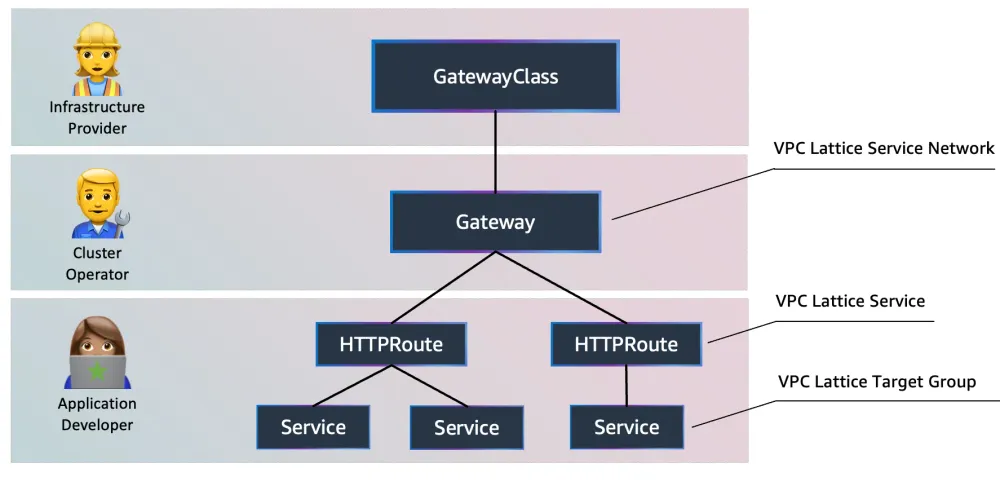
At a high level, the requirement was split across two different traffic patterns. For north-south traffic, we needed a reliable way to expose Kubernetes workloads through AWS networking constructs, and the AWS Load Balancer Controller helped us integrate Kubernetes services with AWS load balancing components such as NLB/ALB and target groups. For east-west or service-to-service communication, we used AWS VPC Lattice, which simplified internal routing using Gateway API resources like
Gateway and HTTPRoute. Together, they addressed two different but complementary networking needs in the same Kubernetes platform.The Environment Context
Our setup was not a simple default EKS cluster. We were operating in a more controlled enterprise environment with EKS on Fargate, private subnet-only networking, and restricted IAM and security operations. That meant the implementation was not just about installing a controller with Helm and applying YAML files. It required careful coordination across subnet tagging, IAM roles, security groups, controller configuration, and service network design. This is where both AWS Load Balancer Controller and VPC Lattice became powerful—but also sensitive to missing details.
What went smoothly
Installing the controller using Helm and setting up IAM roles was fairly standard. Once deployed, it did what it’s supposed to do—automatically creating and managing load balancer resources and target groups.
Where things got tricky
Lesson 1: Subnet tagging is EVERYTHING
We initially faced an issue where our LoadBalancer service was stuck in Pending.
After debugging for quite some time, the issue turned out to be very simple.
- We missed subnet tagging.
1
kubernetes.io/role/internal-elb = 1
That single tag made the entire setup start working.
Takeaway:
Don’t debug Kubernetes first—validate network prerequisites first.
Don’t debug Kubernetes first—validate network prerequisites first.
Lesson 2: IAM policy is never “complete”
Even after setting up IAM correctly, things didn’t fully work.
We later discovered we had to add:
1
"elasticloadbalancing:DescribeListenerAttributes"
Takeaway:
When things fail silently → check IAM permissions.
Controller logs + AWS API permissions go hand in hand.
When things fail silently → check IAM permissions.
Controller logs + AWS API permissions go hand in hand.
Lesson 3: Fargate needs extra care
In Fargate, you must explicitly pass:
- region
- VPC ID
Otherwise, the controller behaves unexpectedly.
Takeaway:
Fargate is not plug-and-play like EC2-based nodes—you must provide context.
Fargate is not plug-and-play like EC2-based nodes—you must provide context.
Lesson 4: Security team dependency is real
Even after everything was configured, traffic didn’t flow.
Why?
- Security group not created
- Ports not opened
We had to raise requests to security teams.
Takeaway:
In enterprise setups, your deployment is only 50% complete without network approvals.
In enterprise setups, your deployment is only 50% complete without network approvals.
Lesson 5: TargetGroupBinding is underrated
Instead of fully automating everything, we used:
- ClusterIP services
- Manual NLB + Target Group
TargetGroupBinding
This gave us better control in a governed environment.
Takeaway:
Full automation is not always ideal—controlled integration works better in enterprises.
Full automation is not always ideal—controlled integration works better in enterprises.
My Experience with AWS VPC Lattice
If Load Balancer Controller was about external traffic, VPC Lattice was about clean internal communication.
We used:
GatewayHTTPRoute- Service network
to enable service-to-service communication across workloads.
Where things got tricky (More Lessons )
Lesson 6: Controller configuration must be perfect
While installing the VPC Lattice controller, we faced CrashLoopBackOff issues.
The root cause?
We missed some required parameters:
awsRegionclusterVpcIdawsAccountIdclusterName
Takeaway:
If using Fargate → controllers need explicit configuration context.
If using Fargate → controllers need explicit configuration context.
Lesson 7: It’s not just Kubernetes
Unlike typical Ingress setups, VPC Lattice required:
- IAM policies
- OIDC provider
- Prefix lists for security groups
- Service network setup
Takeaway:
VPC Lattice is a platform-level feature, not just Kubernetes YAML.
VPC Lattice is a platform-level feature, not just Kubernetes YAML.
Lesson 8: Networking knowledge matters more than YAML
To make VPC Lattice work, we had to understand:
- how AWS-managed prefix lists work
- how security groups interact
- how DNS is dynamically assigned
Takeaway:
You need AWS networking knowledge, not just Kubernetes skills.
You need AWS networking knowledge, not just Kubernetes skills.
Lesson 9: Service discovery becomes cleaner
Once everything worked, the best part was:
- Services could call each other via Lattice DNS
- No manual service discovery complexity
- Clean routing using HTTPRoute
Takeaway:
VPC Lattice significantly improves service-to-service communication architecture.
VPC Lattice significantly improves service-to-service communication architecture.
Biggest Realization from This Project
The most important thing I learned was:
Kubernetes problems are often NOT Kubernetes problems.
They are usually:
- IAM problems
- Network problems
- Security policy problems
Once you start looking at the system holistically, troubleshooting becomes much easier.
Final Lessons (If You’re Doing This Too)
If you’re planning a similar setup, here’s my advice:
- Always validate subnet tags first
- Double-check IAM permissions early
- For Fargate, explicitly pass all required configs
- Involve network & security teams early
- Use Load Balancer Controller for external traffic
- Use VPC Lattice for internal communication
- Don’t assume defaults will work in enterprise setups
Enjoyed reading this content? Let the author know!
Your likes, comments, shares, and saves help creators reach more builders.

Loading recommendations
Loading article