
$40 to Reproduce Karpathy's autoresearch — Powered by Claude Code on Amazon Bedrock
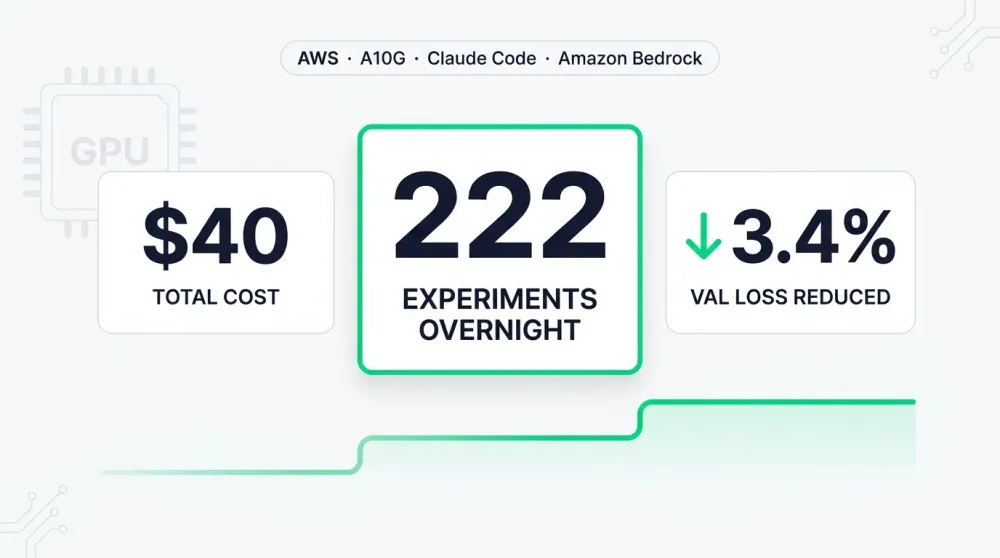
Reproducing Andrej Karpathy's autoresearch on AWS for ~$40, powered by Claude Code on Amazon Bedrock — 222 experiments overnight on a single A10G GPU, validation loss down 3.4%. Includes one-click deployment via SSM, the agent's full experiment trajectory, and key insights from 24.5 hours of autonomous ML research.

TL;DR
I reproduced Andrej Karpathy's autoresearch experiment on an AWS g5.xlarge instance (NVIDIA A10G, 24GB VRAM) using Claude Code connected through Amazon Bedrock . Over 24.5 hours, the agent ran 222 experiments, kept 35 improvements, and reduced validation loss (val_bpb) from 1.1498 to 1.1107 — a 3.4% improvement. Total cost: approximately $40-45 (GPU + Bedrock API).
💡 Want to jump right in? Skip to Quick Reproduction: 9 Steps to Start Experimenting
Why I Did This
On March 7, 2026, Andrej Karpathy open-sourced autoresearch — a framework that hands an AI coding agent a real LLM training loop and lets it experiment autonomously. The agent modifies code, trains for 5 minutes, checks if the result improved, keeps or discards, and repeats. You wake up to a log of experiments and a better model.
The project exploded — 21,000+ GitHub stars, and Fortune dubbed the methodology "The Karpathy Loop."
I wanted to answer three questions:
- Can autoresearch run on a mid-range GPU (not an H100)?
- Does the Claude Code + Amazon Bedrock integration work smoothly for this use case?
- Does an overnight autonomous run produce meaningful improvements?
How autoresearch Works
The Three-File Contract
| File | Role | Modified by |
|---|---|---|
| prepare.py | Data prep + evaluation metric | Immutable (neutral judge) |
| train.py | Model architecture + optimizer + training loop | AI Agent |
| program.md | Research directions and constraints | Human |
The Ratchet Loop
The agent runs a 9-step cycle:
- Read
program.mdfor research priorities - Examine current
train.pyand past results - Propose a hypothesis
- Modify
train.py - Git commit
- Train for exactly 5 minutes (wall-clock budget)
- If crash → log, revert, retry
- Evaluate val_bpb, record in
results.tsv - Improved → keep commit. Not improved →
git resetrevert.
Then start again from step 1. Never stop.
Infrastructure Setup
Hardware Choice
Karpathy's original experiment used an H100 (80GB VRAM). The AWS equivalent (
p5.4xlarge) costs ~$7.91/hr. I chose a more economical option:| Item | Configuration |
|---|---|
| Instance type | g5.xlarge |
| GPU | NVIDIA A10G, 24 GB VRAM |
| Cost | ~$1.24/hr (On-Demand) |
| Region | us-west-2 |
| AMI | Deep Learning OSS Nvidia Driver AMI GPU PyTorch 2.7 (Ubuntu 22.04) |
Connection: SSM Session Manager
Instead of SSH, I used AWS Systems Manager Session Manager:
- Zero inbound ports: Security group has no inbound rules — more secure than SSH
- No key management: No .pem files to manage
- IAM integration: Access controlled through IAM roles
1
aws ssm start-session --target <instance-id> --region us-west-2
AI Agent: Claude Code via Amazon Bedrock
A distinctive aspect of this experiment — I used Amazon Bedrock instead of the Anthropic API directly:
Model configuration:
- Primary model: Claude Sonnet 4.6 (
us.anthropic.claude-sonnet-4-6) — $3/$15 per MTok - Advanced reasoning model: Claude Opus 4.6 (
us.anthropic.claude-opus-4-6-v1) — $5/$25 per MTok, for complex reasoning tasks
Advantages:
- EC2 instance acquires Bedrock credentials automatically through its Instance Role — no API keys to manage
- Billing goes through the unified AWS bill
- Fine-grained IAM policy controls model access
IAM Policy for Bedrock:
1
2
3
4
5
6
7
8
9
10
11
12
13
14
15
16
17
18
19
{
  "Version": "2012-10-17",
  "Statement": [
    {
      "Effect": "Allow",
      "Action": [
        "bedrock:InvokeModel",
        "bedrock:InvokeModelWithResponseStream",
        "bedrock:ListInferenceProfiles",
        "bedrock:GetInferenceProfile"
      ],
      "Resource": [
        "arn:aws:bedrock:*:*:inference-profile/*",
        "arn:aws:bedrock:*:*:application-inference-profile/*",
        "arn:aws:bedrock:*:*:foundation-model/*"
      ]
    }
  ]
}
Claude Code environment (
~/.claude/.env):1
2
3
4
5
CLAUDE_CODE_USE_BEDROCK=1
AWS_REGION=us-west-2
ANTHROPIC_MODEL=us.anthropic.claude-sonnet-4-6
ANTHROPIC_DEFAULT_SONNET_MODEL=us.anthropic.claude-sonnet-4-6
ANTHROPIC_DEFAULT_OPUS_MODEL=us.anthropic.claude-opus-4-6-v1
Environment Details
AMI: Deep Learning OSS Nvidia Driver AMI GPU PyTorch 2.7 (Ubuntu 22.04)
This AMI (
ami-0ca70308d230e8a6e, us-west-2) is an AWS-maintained deep learning image that comes pre-installed with:| Component | Version | Notes |
|---|---|---|
| Ubuntu | 22.04 LTS | Base OS |
| NVIDIA Driver | Pre-installed | GPU driver, works out of the box |
| CUDA Toolkit | 12.8 | GPU compute framework |
| PyTorch | 2.9.1+cu128 | Deep learning framework (autoresearch dependency) |
| Python | 3.10+ | Runtime |
| SSM Agent | Pre-installed | Enables Session Manager connections |
Choosing this AMI eliminates the pain of manually installing NVIDIA drivers and CUDA — two steps that frequently cause issues on bare Ubuntu.
Components NOT pre-installed (must be added):
| Component | Purpose | Installation |
|---|---|---|
| uv | Python package manager (autoresearch uses it for dependency management) | curl -LsSf https://astral.sh/uv/install.sh \| sh |
| Node.js 22.x | Claude Code runtime dependency | curl -fsSL https://deb.nodesource.com/setup_22.x \| bash - && apt-get install -y nodejs |
| Claude Code | AI coding agent | npm install -g @anthropic-ai/claude-code |
⚠️ cloud-init gotcha:
On first boot, the Deep Learning AMI's cloud-init
modules:final stage runs extensive background tasks (compiling CUDA kernels, configuring the environment, etc.), which can take 15-20 minutes. If your User Data script includes cloud-init status --wait, the entire initialization will block on this.My practical recommendation: skip the cloud-init wait and install components manually via SSM. The SSM Agent typically comes online within 30-40 seconds of instance launch, at which point you can connect and run the setup steps yourself.
One-Click Deployment
I wrote a deployment script that automates the entire setup:
- Create IAM Role (SSM + Bedrock permissions)
- Create security group (zero inbound ports)
- Auto-detect and launch the latest Deep Learning AMI
- User Data auto-installs uv, Node.js, Claude Code, clones autoresearch
- Wait for SSM Agent to come online
AMI auto-detection:
The script does not hardcode an AMI ID (since IDs differ across Regions and AWS publishes new versions regularly). Instead, it queries the AWS API to find the latest Deep Learning AMI in the target Region:
1
2
3
4
5
6
7
AMI_ID=$(aws ec2 describe-images --region "$REGION" \
  --owners amazon \
  --filters \
    "Name=name,Values=Deep Learning OSS Nvidia Driver AMI GPU PyTorch 2*Ubuntu 22.04*" \
    "Name=state,Values=available" \
  --query "sort_by(Images, &CreationDate)[-1].ImageId" \
  --output text)
This does three things:
- Searches for AMIs published by AWS (
--owners amazon) in the target Region - Filters by name pattern
Deep Learning OSS Nvidia Driver AMI GPU PyTorch 2*Ubuntu 22.04* - Sorts by creation date and picks the latest one
In us-west-2, this currently resolves to
ami-0ca70308d230e8a6e (PyTorch 2.7, published 2026-04-27). The resolved AMI ID is then passed to aws ec2 run-instances --image-id "$AMI_ID" to launch the instance. This makes the script portable across Regions without manually maintaining AMI IDs.From script execution to SSM connection ready: about 5 minutes.
Quick Reproduction: 9 Steps to Start Experimenting
Here are the complete steps from zero to a running experiment. Experienced developers can follow these directly; detailed explanations are in the sections above.
Prerequisites:
- AWS account with Claude models enabled in Bedrock (see Running Claude Code and Claude Desktop on Amazon Bedrock )
- AWS CLI v2 installed locally (install guide )
- SSM Session Manager Plugin:
1
2
# macOS
brew install --cask session-manager-plugin
- IAM user with EC2, IAM, SSM, and Bedrock permissions
1
2
3
4
5
6
7
8
9
10
11
12
13
14
15
16
17
18
19
20
21
22
23
24
# 1. Clone the deployment scripts
git clone https://github.com/hanyun2019/autoresearch-on-aws.git
cd autoresearch-on-aws

# 2. One-click deploy (~5 minutes)
chmod +x setup.sh connect.sh cleanup.sh
./setup.sh
# Note the Instance ID printed at the end

# 3. Connect to the instance
./connect.sh

# 4. Wait for initialization (cloud-init takes 15-20 min on first boot)
sudo -u ubuntu -i
cat ~/autoresearch/.setup-complete    # Shows "READY" when done
# If not ready yet: tail -f /var/log/autoresearch-setup.log

# 5. Verify the environment
nvidia-smi && which claude

# 6. Start the experiment
cd ~/autoresearch
tmux new -s research
claude --dangerously-skip-permissions
First-time Bedrock wizard: For authentication, select "Use credentials already in my environment"; for models, select "Pin the working models."
After restarting, enter the prompt:
1
2
3
Hi have a look at program.md and let's kick off a new experiment!
let's do the setup first. Note: we're on a single A10G with 24GB VRAM,
so please adjust the model size and dataset accordingly.
The next steps are simple — you can detach tmux and go to sleep. The next morning, just check the results as follows:
1
2
3
4
5
# 7. Detach tmux and go to sleep: Ctrl+B, D

# 8. Next morning — check results
tmux attach -t research
cat results.tsv && git log --oneline
Once the experiment is fully complete, remember to stop the instance so you won't continue to be charged. Also, do a full cleanup when done, as shown below:
1
2
3
4
5
# 9. Stop the instance (~$1.24/hr)
aws ec2 stop-instances --instance-ids <instance-id> --region us-west-2

# Full cleanup when done
./cleanup.sh
Full scripts and experiment data: hanyun2019/autoresearch-on-aws
Adapting for A10G 24GB
The default configuration targets H100 80GB. Running it directly would OOM. After reading
program.md and train.py, Claude Code autonomously made these adjustments:| Parameter | Original (H100) | Adjusted (A10G) | Reason |
|---|---|---|---|
| DEPTH | 8 | 4 | Model dim 512 → 256, ~4x fewer params |
| DEVICE_BATCH_SIZE | 128 | 32 | Reduce activation memory |
| TOTAL_BATCH_SIZE | 2^19 (524K) | 2^17 (131K) | Match smaller batch |
| WINDOW_PATTERN | "SSSL" | "L" | Banded attention inefficient on A10G |
These changes brought baseline VRAM usage down to 3.6 GB, leaving plenty of room for the agent to explore larger configurations.
The Experiment
Launch
1
2
3
4
5
6
7
8
# Start Claude Code in bypass-permissions mode (autoresearch needs full autonomy)
claude --dangerously-skip-permissions

# Prompt
> Hi have a look at program.md and let's kick off a new experiment!
> let's do the setup first. Note: we're on a single A10G with 24GB VRAM,
> so please adjust the model size and dataset accordingly.
Phase 1: Exploring Hardware Boundaries (Experiments 1-6, ~1 hour)
The agent first probed the A10G's limits:
1
2
3
4
5
6
baseline (DEPTH=4, bs=32)     → val_bpb=1.1498, 3.6 GB  ✅ keep
DEPTH=12, bs=128              → OOM 22GB                 ❌ crash
DEPTH=8, bs=64                → OOM 20GB                 ❌ crash
DEPTH=8, bs=32                → val_bpb=1.2059, 11.4 GB  ❌ discard (slower)
DEPTH=4, bs=128               → val_bpb=1.1579, 14.0 GB  ❌ discard
DEPTH=6, 384-dim              → val_bpb=1.1749, 6.9 GB   ❌ discard
Key finding: Larger models performed worse within the 5-minute budget — slower per step, fewer total steps, insufficient convergence.
Phase 2: MLP Expansion Breakthrough (Experiments 7-18, ~2 hours)
The agent pivoted to structural changes and found the first win:
1
2
3
4
MLP 4x → 8x expansion        → val_bpb=1.1491  ✅ keep (wider FFN)
8x MLP + batch 2^16           → val_bpb=1.1422  ✅ keep (more steps)
GeLU replacing ReLU²           → val_bpb=1.1543  ❌ discard
SwiGLU                        → val_bpb=1.2289  ❌ discard (much worse)
Key finding: On this small model, plain ReLU² outperformed both GeLU and SwiGLU.
Phase 3: Model Scaling Breakthrough (Experiments 19-35, ~3 hours)
The single largest improvement came here:
1
2
3
ASPECT_RATIO=96 (384-dim)     → val_bpb=1.1233  ✅ keep (massive jump!)
ASPECT_RATIO=128 (512-dim)    → val_bpb=1.1262  ❌ discard (too slow)
DEPTH=5, ASPECT_RATIO=76      → val_bpb=1.1233  ❌ discard (tied but slower)
Key finding: Scaling from 256-dim to 384-dim (3 attention heads, 24.4M params) dropped val_bpb from 1.1422 to 1.1233 — the biggest single improvement in the entire run. But going to 512-dim was too slow.
Phase 4: Optimizer Tuning (Experiments 36-100, ~6 hours)
With the 384-dim model as the new base, the agent systematically tuned every hyperparameter:
1
2
3
4
5
6
WARMDOWN_RATIO=0.6            → val_bpb=1.1220  ✅ keep
MATRIX_LR=0.055               → val_bpb=1.1202  ✅ keep
WEIGHT_DECAY=0.05             → val_bpb=1.1160  ✅ keep
SCALAR_LR=1.2                 → val_bpb=1.1178  ✅ keep
FINAL_LR_FRAC=0.04            → val_bpb=1.1157  ✅ keep
gradient clipping norm=1.0    → val_bpb=1.1188  ✅ keep
Phase 5: Fine-Tuning and Window Pattern Breakthrough (Experiments 100-222, ~12 hours)
After hyperparameter tuning plateaued, the agent discovered a new breakthrough direction — window attention patterns:
1
2
3
4
5
6
7
8
9
10
QK norm before RoPE           → val_bpb=1.1154  ✅ keep
EMBEDDING_LR=0.9              → val_bpb=1.1175  ✅ keep
WD decay to 20% residual      → val_bpb=1.1156  ✅ keep
FINAL_LR_FRAC=0.03            → val_bpb=1.1152  ✅ keep
WINDOW_PATTERN=SL             → val_bpb=1.1149  ✅ keep (alternating short+full)
WINDOW_PATTERN=SSSL           → val_bpb=1.1141  ✅ keep (3 short + 1 full, breakthrough!)
SSSL short_window=512         → val_bpb=1.1122  ✅ keep (quarter context, massive gain!)
SSSL short_window=384         → val_bpb=1.1115  ✅ keep
WARMDOWN_RATIO=0.65 at SSSL   → val_bpb=1.1112  ✅ keep
EMBEDDING_LR=0.85 at SSSL     → val_bpb=1.1107  ✅ keep (final best)
Key finding: The agent had initially changed WINDOW_PATTERN from "SSSL" to "L" (concerned about efficiency on A10G), but later re-tried banded attention after scaling the model to 384-dim. SSSL with a smaller window (384 tokens) brought significant improvements. This shows that directions rejected early can become effective under a new configuration.
Results Summary
Experiment Summary
Over 24.5 hours of continuous autonomous operation, Claude Code (Sonnet 4.6 via Bedrock) completed 222 experiments on an NVIDIA A10G 24GB GPU. The ratchet mechanism kept 35 improvements, reducing validation loss (val_bpb) from a baseline of 1.1498 to a final best of 1.1107 — a cumulative improvement of 3.4%.
The improvement trajectory can be summarized as three key breakthroughs:
- MLP 8x expansion + smaller batch (experiments 11-16): val_bpb dropped from 1.1498 to 1.1422. The agent discovered that wider FFN layers combined with smaller batches (more training steps) were more effective than increasing model depth.
- Model width scaling to 384-dim (experiment 30): val_bpb jumped from 1.1422 to 1.1233 — the single largest improvement in the entire run. The agent found the sweet spot for "best model size within 5 minutes" on the A10G.
- SSSL window attention + short_window=384 (experiments 155-170): val_bpb dropped from 1.1152 to 1.1107. At hour 17, the agent re-enabled banded attention patterns that had been rejected early on, discovering they were effective on the larger model — a surprising "second wave" breakthrough.
Between these breakthroughs, the agent performed extensive optimizer tuning (learning rates, weight decay, warmdown ratio, gradient clipping, etc.), each yielding small but steady gains. The final best configuration: DEPTH=4, ASPECT_RATIO=96 (384-dim), MLP 8x, WINDOW_PATTERN=SSSL, short_window=384, EMBEDDING_LR=0.85, WARMDOWN_RATIO=0.65, MATRIX_LR=0.06, WEIGHT_DECAY=0.05.
Statistics
| Metric | Value |
|---|---|
| Total runtime | ~24.5 hours |
| Total experiments | 222 |
| Improvements kept | 35 (15.8%) |
| Discarded | 184 (82.9%) |
| Crashed | 4 (1.8%) |
| Starting val_bpb | 1.1498 |
| Final val_bpb | 1.1107 |
| Total improvement | -3.4% |
| VRAM usage | 3.6 GB → 6.4 GB |
Diminishing Returns
| Phase | Time | val_bpb improvement | Experiments | Avg improvement per exp |
|---|---|---|---|---|
| Exploration | 0-6h | -2.3% | ~30 | -0.077% |
| Optimization | 6-12h | -0.6% | ~60 | -0.010% |
| Fine-tuning | 12-17h | -0.07% | ~60 | -0.001% |
| Window breakthrough | 17-20h | -0.4% | ~40 | -0.010% |
| Convergence | 20-24.5h | -0.04% | ~30 | -0.001% |
Interestingly, a "second wave" of improvement appeared around hour 17 — the agent rediscovered the value of window attention patterns, yielding an additional 0.4% improvement. This suggests the ratchet loop can occasionally escape local optima.
Full Experiment Data
Raw data for all 222 experiments (including commit hash, val_bpb, VRAM usage, status, and description for each experiment) is publicly available in the GitHub repository:
Key Insights from the Agent
- Width matters more than depth (within a 5-minute budget): DEPTH=4 + 384-dim beat DEPTH=8 + 256-dim decisively
- 8x MLP expansion works: Wider FFN layers provide significant gains at small scale
- Simple activations win: ReLU² > GeLU > SwiGLU (at this scale)
- QK norm before RoPE beats after RoPE
- Optimal weight decay depends on model size: WD=0 was best for the tiny model; WD=0.05 was better after scaling up
- Window attention patterns become effective after scaling: SSSL pattern, initially rejected, brought significant gains on the 384-dim model
- Many "best practices" don't hold at small scale: Larger batches, deeper models, and fancier activations all underperformed simpler configurations
Cost Breakdown
| Item | Cost |
|---|---|
| EC2 g5.xlarge (~24.5h × $1.24/hr) | ~$30 |
| Bedrock API (Claude Sonnet 4.6, 222 experiments) | ~$10-15 |
| Total | ~$40-45 |
Compared to Karpathy's H100 experiment (p5.4xlarge ~$7.91/hr × 8h = ~$63), we ran more experiments (222 vs 83) at a similar cost, though at a smaller model scale.
Lessons Learned
What Worked Well
- SSM + Bedrock is a clean combination: Zero key management, unified IAM control, one-click deployment
- Claude Code's autonomy is impressive: It handled A10G adaptation, hardware boundary exploration, and systematic hyperparameter search on its own
- The ratchet mechanism works: 222 experiments, 35 improvements, codebase can only move forward
--dangerously-skip-permissionsis essential: autoresearch needs full autonomy; permission prompts break the loop
What Could Be Better
- Deep Learning AMI cloud-init is slow: First boot takes a long time;
cloud-init status --waitin User Data blocks. Consider running setup steps manually - Diminishing returns arrive fast, but surprises happen: The first 6 hours contributed most of the improvement, but a "second wave" breakthrough appeared at hour 17 with window attention patterns. Running for at least 20 hours may capture these delayed discoveries
- The creativity ceiling is real: The agent didn't invent any novel architectural ideas. Every improvement was something a human researcher would eventually find
Reflections on autoresearch
Karpathy is right — autoresearch automates the methodical iteration part of ML research. It won't replace creative thinking, but it can run through 100 "what if I tweak this parameter" experiments while you sleep.
The most thought-provoking observation on this project:
"If the next generation of engineers skips foundational research training because agents handle execution, the field will have plenty of compute and no one with the experience to point it in the right direction."
Writing a good
program.md requires having done the research yourself. The agent handles execution, but the judgment behind the research agenda remains human work.References
Enjoyed reading this content? Let the author know!
Your likes, comments, shares, and saves help creators reach more builders.

Loading recommendations
Loading article