
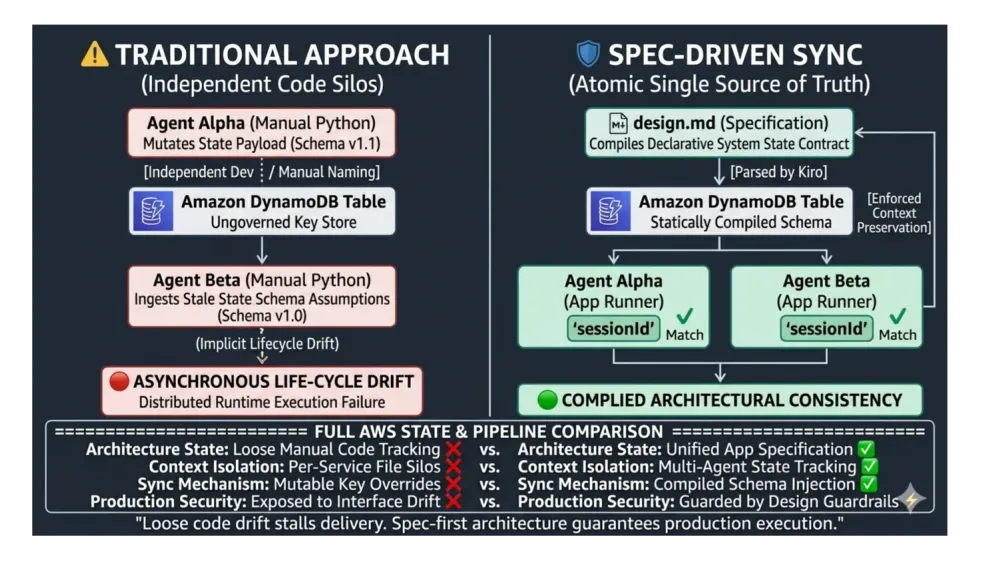
The AWS Multi-Service Synchronization Problem: How Spec-Driven Development with Kiro Prevents Architectural Drift
A practical pattern for keeping DynamoDB schemas, IAM policies, and API contracts aligned when building AI agent systems.

The Problem: When 3+ AWS Services Need to Stay Synchronized
You're building an AI system on AWS with:
- AWS Bedrock (2 different agents with different roles)
- DynamoDB (shared state between agents)
- S3 (output storage)
- IAM (separate policies per agent)
- FastAPI (API layer)
The synchronization nightmare:
Agent 1 writes to DynamoDB:
1
table.put_item(Item={'sessionId': '123', 'results': [...]})
Agent 2 reads from DynamoDB:
1
item = table.get_item(Key={'session_id': '123'})  # Typo: session_id vs sessionId
Result: Runtime error in production.
Why this happens:
- You update Agent 1's schema → forget to update Agent 2
- You tighten IAM policy for Agent 1 → Agent 2 can't read anymore
- You change API response format → frontend breaks
- 5 files need to change in sync → you update 4 of them
Traditional solution: Manual cross-referencing, hoping nothing drifts.
The cost: Hours debugging "why can't Agent 2 read what Agent 1 wrote?"
Solution: Single Source of Truth → Multi-File Consistency
Instead of writing code first, write one specification file that defines ALL components.
Step 1: Create design.md
1
2
3
4
5
6
7
8
9
10
11
12
13
14
15
16
17
18
19
20
21
22
23
24
25
26
27
28
29
30
# System Architecture


## Data Schema (DynamoDB)

Table: SharedState

- Partition Key: sessionId (string, UUID)

- Attributes:

  - agentResults (list)

  - processingStatus (PENDING | COMPLETE | FAILED)

  - timestamp (ISO 8601)


## Agents

1. Agent Alpha

   - Role: Data processor

   - Permissions: dynamodb:PutItem on SharedState

   - Bedrock Model: Claude 3.5 Sonnet


2. Agent Beta

   - Role: Data analyzer

   - Permissions: dynamodb:GetItem on SharedState, s3:PutObject on results-bucket

   - Bedrock Model: Claude 3.5 Sonnet


## API Endpoints

POST /sessions/start

- Input: {data: string}

- Triggers: Agent Alpha

- Returns: {sessionId: string}


GET /sessions/{sessionId}/results

- Reads: DynamoDB SharedState table

- Returns: {agentResults: list, processingStatus: string}
Step 2: Give This to Kiro
Prompt Pattern: Build iteratively, always referencing
design.md for consistency.Initial Setup:
1
2
3
4
5
6
7
8
9
I'm building a multi-agent system on AWS. Read design.md for the full specification.

Create the project structure:
- FastAPI backend
- Two agent modules: agent_alpha.py and agent_beta.py
- DynamoDB client wrapper
- Pydantic models matching the DynamoDB schema in design.md

Critical: Use the EXACT field names from design.md for all DynamoDB operations.
For Each Component:
1
2
3
4
Build [Agent Alpha / Agent Beta / API endpoints] per design.md:
- Use exact DynamoDB schema field names
- Add IAM policy comments (minimum permissions)
- Include AWS error handling (throttling, timeouts, etc.)
Why This Works:
By repeatedly referencing
design.md and emphasizing "exact field names," Kiro maintains consistency across all code. Agent Alpha's DynamoDB writes and Agent Beta's reads use identical field names—no manual synchronization needed. Step 3: What Kiro Guarantees
✅ Agent Alpha writes to DynamoDB:
1
2
3
4
5
6
table.put_item(Item={

    'sessionId': session_id,  # Matches spec: sessionId

    'agentResults': results,

    'processingStatus': 'COMPLETE',

    'timestamp': datetime.utcnow().isoformat()

})
✅ Agent Beta reads from DynamoDB:
1
2
3
response = table.get_item(Key={

    'sessionId': session_id  # Same key name as Agent Alpha

})
✅ IAM Policy for Agent Alpha:
1
2
3
4
5
{

  "Effect": "Allow",

  "Action": "dynamodb:PutItem",

  "Resource": "arn:aws:dynamodb:*:*:table/SharedState"

}
✅ IAM Policy for Agent Beta:
1
2
3
4
5
6
7
8
{

  "Effect": "Allow",

  "Action": ["dynamodb:GetItem", "s3:PutObject"],

  "Resource": [

    "arn:aws:dynamodb:*:*:table/SharedState",

    "arn:aws:s3:::results-bucket/*"

  ]

}
Key insight: Because Kiro built everything from design.md, the field names, table names, and permissions are guaranteed to match. No drift.
Case Study: How I Used This Pattern
I'm building a dual-agent system on AWS. Here's the architectural challenge I faced:
Requirement:
- Agent 1 processes data and logs findings to DynamoDB
- Agent 2 reads Agent 1's findings and generates reports to S3
- Both agents need different Bedrock models and IAM permissions
- An API layer exposes the workflow to a frontend
Without spec-driven approach:
- I'd write Agent 1 code → manually create DynamoDB schema
- Write Agent 2 code → hope I remembered the exact field names
- Write IAM policies → debug "Access Denied" errors for 2 hours
- Write API → realize I need to update Agent 1's output format
- Update Agent 1 → forget to update Agent 2 → production error
With spec-driven + Kiro:
- Wrote design.md (30 minutes)
- Defined DynamoDB schema once
- Defined IAM permissions per agent
- Defined API contracts
- Gave design.md to Kiro (5 minutes)
- Prompt: "Build this system with FastAPI + Bedrock + DynamoDB"
- Kiro generated:
agent_alpha.pywith correct DynamoDB writesagent_beta.pywith matching DynamoDB readsiam_policies.jsonwith least-privilege permissionsapi/routes.pywith endpoints matching the specrequirements.txtwith all dependencies
- Result:
- Zero field name mismatches
- Zero IAM permission errors
- Zero schema drift
- Working prototype in 45 minutes (vs 6+ hours manually)
(proof of concept: My GitHub repo has a
.kiro/ folder showing the entire workflow. The DynamoDB schema in design.md exactly matches the schema in both agents' code.)[GitHub link - https://github.com/JoshiAbhishek866/Sentinal-AI]
How to Apply This to Your AWS Projects
Pattern: Spec-First Multi-Service Development
Step 1: Before coding, answer these questions in design.md:
1
2
3
4
5
6
7
8
9
10
11
12
13
14
15
16
17
18
19
## Questions to Answer


1. **Data Schema**

   - What DynamoDB tables do I need?

   - What are the exact partition/sort keys?

   - What attributes will be written/read by each component?


2. **Permissions**

   - Which component needs read vs write access?

   - What's the minimum IAM policy for each?


3. **Service Integration**

   - How does data flow between services?

   - Agent A writes → DynamoDB → Agent B reads → S3

   - What happens if Agent A fails? Agent B?


4. **API Contracts**

   - What do the endpoints return?

   - Do the response formats match what the frontend expects?
Step 2: Write design.md with EXACT specifications
Bad spec (vague):
1
2
- Agent 1 processes data

- Results go to DynamoDB
Good spec (precise):
1
2
3
4
5
6
- Agent 1 processes data and writes to DynamoDB table "ProcessingResults"

  - Partition key: requestId (UUID string)

  - Attributes:

    - processedData (JSON object)

    - status (enum: PENDING | COMPLETE | FAILED)

  - IAM permission needed: dynamodb:PutItem
Step 3: Give design.md to Kiro as context
Task: Build Agent 1 that writes to DynamoDB exactly as specified in design.md. Include error handling for DynamoDB throttling and IAM permission errors (Context: design.md).
Task: Build Agent 1 that writes to DynamoDB exactly as specified in design.md. Include error handling for DynamoDB throttling and IAM permission errors (Context: design.md).
Step 4: Verify synchronization
After Kiro generates code, check:
- [ ] Do all DynamoDB writes use the same field names?
- [ ] Do all DynamoDB reads use the same key names?
- [ ] Do IAM policies grant minimum necessary permissions?
- [ ] Do API responses match the spec?
When to Use This Pattern
✅ Use for:
- Multi-agent AI systems (2+ agents sharing state)
- Microservices calling each other via DynamoDB/SQS/EventBridge
- Systems with 3+ AWS services that need tight coupling
❌ Don't use for:
- Single-service prototypes
- One-off scripts
- Projects where architectural flexibility > consistency
What Kiro Doesn't Do
Spec-driven development solves synchronization, but you still need to:
- Validate IAM policies in AWS IAM Policy Simulator (Kiro generates correct policies, but always audit for production)
- Add monitoring (CloudWatch dashboards, X-Ray tracing)
- Tune Bedrock prompts (Kiro generates good defaults, you optimize)
- Handle edge cases (What if DynamoDB is down? Bedrock quota exceeded?)
Kiro gets you to working code fast. Production hardening is still on you.
Try This Pattern
- Pick an AWS project with 2+ services that need to stay in sync
- Write design.md BEFORE coding
- Give design.md to Kiro and build the system
- Compare time vs building manually
Expected result: 3-5x faster than manual coding, with zero sync errors.
Enjoyed reading this content? Let the author know!
Your likes, comments, shares, and saves help creators reach more builders.

Loading recommendations
Loading article