
Stop Invalidating URLs. Start Invalidating Meaning.
CloudFront tag-based cache invalidation changes how you think about what's in your cache — not just how you clear it.

Here's something I've watched customers do for years: maintain a spreadsheet — sometimes literally — of which content lives at which URL paths, so they know what to invalidate when something changes. One customer had a runbook with 14 different wildcard patterns for a single product launch rollback. Fourteen. And they still missed assets in a
/resources/ prefix nobody remembered existed.URL-based invalidation forces you to answer the question "where does this content live?" at the exact moment you're least equipped to answer it — during an incident, a rollback, a legal takedown. You're reverse-engineering your content's location from memory, from logs, from grep.
The
/* wildcard exists because this is hard. But /* is a confession, not a solution. It says "I don't know what changed, so I'll nuke everything." Your cache hit ratio tanks. Your origin gets slammed. Every user pays the latency cost of re-fetching content that was perfectly fine.Let me give you a concrete version of this pain. Your legal team calls: "We need every AI-generated image off the site within the hour." How many URLs is that? They're scattered across
/blog/, /products/, /landing/, maybe /api/og-images/. Some are served at their original path, some through a resize proxy with query strings. You don't have a query that answers "show me all AI-generated assets" because your cache doesn't know what content is — only where it was put.Tag what content is, not where it lives
Tag-based cache invalidation flips the model. Instead of organizing your invalidation strategy around URL structure, you organize it around content identity. When your origin serves a response, it attaches tags — metadata that describes what that content is, who owns it, what state it's in.
A single cached object might carry:
type:image, generated-by:ai, owner:marketing, campaign:spring-2026. These aren't mutually exclusive. They're dimensions. And when you need to invalidate, you pick the dimension that matches your intent.That legal call about AI images? One command. You're not reconstructing URL paths. You're expressing what you mean: "everything generated by AI needs to go." The cache knows which objects match because you told it at cache time.
This is how content management systems have always modeled content — with attributes, taxonomies, lifecycle states. CloudFront is catching up to a mental model that content teams have used for years. The cache is finally speaking the same language as the people who manage what's in it.
Design your tag taxonomy before you cache
Here's the critical implementation detail: tags are attached when content enters the cache. On a cache miss, your origin includes cache tags in the response header. You cannot retroactively tag content that's already cached. This means your tag taxonomy needs to exist before your first deployment, not after your first incident.
I recommend a
namespace:value convention. Keep it flat and consistent:type:image,type:document,type:api-responseenv:prod,env:stagingteam:marketing,team:engineeringcampaign:spring-2026,campaign:product-launch-q3generated-by:ai,generated-by:humanstatus:published,status:under-review,status:draft
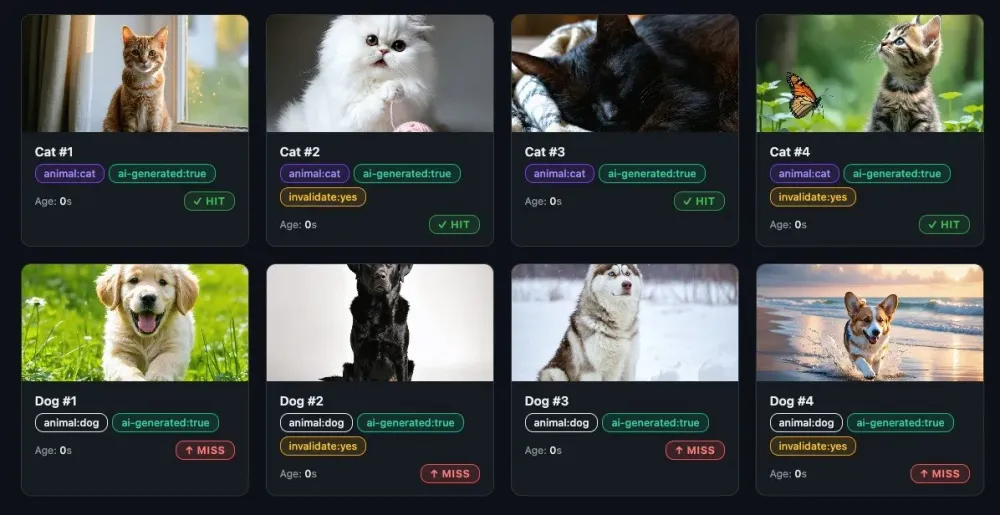
Here's what this looks like in practice. I built a demo with 8 AI-generated images, each tagged along multiple dimensions. After invalidating
#animal:dog, the dogs are evicted (MISS) while the cats remain cached (HIT) — no URLs specified, purely tag-driven. That's the screenshot at the top of this article.Resist the temptation to use tags as unique identifiers. A tag like
article-id:48291 defeats the purpose — you might as well use the URL. Tags work best as categories, not primary keys. Think "what group of content might I need to invalidate together?" and you'll land on the right granularity.The taxonomy is your invalidation strategy. If you can't express a plausible invalidation scenario as a tag query, your taxonomy has a gap. Design them together — sit with your content team, your ops team, and ask: "What are the reasons we've needed to clear cache in the last year?" Each reason should map cleanly to a tag or tag combination.
Wiring it up
Tags reach your cache through a response header. You configure
CacheTagConfig on your distribution with the header name your origin uses — then CloudFront associates those tags with each cached object on every miss.For S3 origins, attach tags as object metadata at upload time:
1
2
3
4
5
6
aws s3api put-object \
  --bucket my-bucket \
  --key images/product-hero.jpg \
  --body product-hero.jpg \
  --metadata '{"cache-tag":"type:image,campaign:spring-2026,generated-by:ai"}' \
  --content-type "image/jpeg"
S3 surfaces this as
x-amz-meta-cache-tag in the response. For custom origins (ALB, API Gateway, EC2), set the header directly in your application response:1
Cache-Tag: type:api-response,env:prod,team:engineeringOne critical caveat: tags are stored at cache time only. Objects that were cached before you enable
CacheTagConfig carry no tags — you'll need to invalidate /* once to re-cache everything with metadata attached. Plan your taxonomy before your first deployment, not after your first incident.And a note on multi-tag invalidation: when you pass multiple
#tag values in one call, it's OR logic — each matching set is evicted independently. There's no way to express "AI-generated AND under-review" as an intersection. If you need that precision, make it a single tag: status:ai-under-review.Real scenarios, real commands
Editorial emergency — content flagged for legal review needs to come down immediately:
1
2
3
aws cloudfront create-invalidation \
  --distribution-id EXXXXXXXXAMPLE \
  --paths "#status:under-review"
Campaign rollover — spring campaign ended, new creative is deploying:
1
2
3
aws cloudfront create-invalidation \
  --distribution-id EXXXXXXXXAMPLE \
  --paths "#campaign:spring-2026"
AI content audit — legal wants all AI-generated assets pulled while they review licensing:
1
2
3
aws cloudfront create-invalidation \
  --distribution-id EXXXXXXXXAMPLE \
  --paths "#generated-by:ai"
Environment promotion — staging content was cached during testing, clear it before going live:
1
2
3
aws cloudfront create-invalidation \
  --distribution-id EXXXXXXXXAMPLE \
  --paths "#env:staging"
Multiple tags in one call use OR logic — each tagged set is evicted independently:
1
2
3
aws cloudfront create-invalidation \
  --distribution-id EXXXXXXXXAMPLE \
  --paths "#generated-by:ai" "#status:under-review"
Each of these is a single API call that expresses intent. No wildcard guessing. No spreadsheet lookup. No "did we get everything?" anxiety.
The shift
URL-based invalidation asks "where is the content?" and requires you to know the answer at invalidation time. Tag-based invalidation asks "what is the content?" and requires you to know the answer at origin time — when you're best equipped to answer it, because you're the one serving it.
The real payoff isn't fewer API calls or cleaner automation, though you get both. It's that your invalidation logic becomes a first-class part of your content architecture. It's defined at the origin, encoded in response headers, carried through the cache layer as metadata. It's not reconstructed from memory during a 2 AM incident call.
Your cache finally knows what it's holding — not just where it put it.
Enjoyed reading this content? Let the author know!
Your likes, comments, shares, and saves help creators reach more builders.

Loading recommendations
Loading article