
Deploying EpicBook Application on AWS using Terraform (End-to-End DevOps Project)
In this project, I implemented a production-style deployment of a full-stack application (EpicBook) on AWS using Terraform. The goal was to automate everything — from infrastructure provisioning to application deployment with zero manual intervention (except SSH for debugging).

This project helped me understand real-world DevOps practices like:
- Infrastructure as Code (IaC)
- Secure VPC architecture
- Application deployment automation
- Debugging production issues
🏗️ Architecture Overview
1
User → Nginx (Port 80) → Node.js App (Port 8080) → RDS MySQL (Private)
Image001 Architecture Diagram
Components:
- VPC (10.0.0.0/16)
- Public Subnet → EC2 (App Server)
- Private Subnets (2 AZs) → RDS (MySQL)
- Internet Gateway
- Security Groups
- EC2 (Ubuntu)
- RDS (MySQL)
- Nginx + Node.js App
⚙️ Step 1: Infrastructure Provisioning using Terraform
✅ VPC Setup
- CIDR:
10.0.0.0/16 - Public subnet:
10.0.1.0/24 - Private subnets:
10.0.2.0/24(AZ1)10.0.3.0/24(AZ2)
✅ Internet Gateway + Route Tables
- Public subnet → Internet access
- Private subnet → isolated (RDS)
🔐 Security Groups
EC2 Security Group
- SSH (22) → My IP (dynamic via HTTP provider)
- HTTP (80) → Public
- HTTPS (443) → Public
- Custom TCP (8080) → Public
RDS Security Group
- MySQL (3306) → Only EC2 SG

Image002 File/Folder Structure
🖥️ Step 2: EC2 Setup with user_data.sh
Using user_data.sh, I automated:
- Node.js installation
- Git clone
- Dependency install
- Config file setup
- DB migration + seeding
- Nginx configuration
- PM2 setup

Image003 user_data.sh File
🗄️ Step 3: RDS Setup
- MySQL RDS
- Private subnet
- DB name:
bookstore - Connected via Security Group reference

Image004 RDS Setup
⚡ Step 4: Application Deployment Flow
- EC2 launches
- user_data.sh executes
- App installs and configures
- Waits for RDS
- Imports schema + seed data
- Starts app
- Nginx routes traffic
🧠 Challenges & Debugging (IMPORTANT)
This is where real learning happened 🔥
❌ Issue 1: AMI Not Found
Error:

Image005 AMI Error
1
Your query returned no results
✅ Fix:
Used correct AMI:

Image006 Fixed AMI Error
1
ami = "ami-xxxxxxxxxxxxxxxxb"
❌ Issue 2: RDS Subnet Error

Image007 RDS Subnet Error
Error:
1
DBSubnetGroupDoesNotCoverEnoughAZs
Cause:
Only 1 subnet used
Fix:
Created 2 private subnets in different AZs

Image008 Fixed RDS Subnet Issue

Image009 RDS Subnet
❌ Issue 3: RDS Password Too Short
Error:

Image010 RDS Password Error
1
MasterUserPassword is not valid
Fix:
Used password ≥ 8 characters
❌ Issue 4: Key Pair Not Found
Error:

Image011 Keypair Error
1
InvalidKeyPair.NotFound
Fix:
Used correct key name (without .pem)
I wrote “.pem” in the end of the keypair name, but that is invalid.
I wrote “.pem” in the end of the keypair name, but that is invalid.

Image012 Correct Format
❌ Issue 5: 403 Forbidden (Nginx)
Cause:
- Default Nginx config
- I was using “.env” instead of “config.json”
- The “config.json” file was having incorrect details.
Fix:
Configured reverse proxy:

Image013 Fixed Proxy Pass

Image014 Data from “config.json” not from “.env”

Image015 Wrong details in config.json file
1
2
3
4
in this file "/etc/nginx/sites-available/default"
  proxy_pass http://127.0.0.1:8080;
in "~/theepicbook/models/index.html" we checked the file using for db details
  const config = require(_dirname + "/../config/config.json")[env];
❌ Issue 6: App Not Running
Cause:
PM2 not starting properly
Fix:

Image016 Fixed PM2 Issue
- Run as ubuntu user
- Add:
1
2
pm2 save
pm2 startup
❌ Issue 7: DB Connection Refused
Error:
1
ECONNREFUSED 127.0.0.1:3306
Cause:
App using localhost
Fix:
Updated config.json with RDS endpoint

Image017 Edit with correct details
1
2
3
4
5
6
in "~/theepicbook/config/config.json" we need to change the value of "development" block:-
  - username = "whatever we gave at the time of creation using terraform"
  - password = "whatever we gave at the time of creation using terraform"
  - database = "bookstore"
  - host = "Check terraform output for this(RDS Endpint)"
  - dialect = "mysql"
❌ Issue 8: Data Not Showing
Cause:
No data in DB
Fix:
Imported:
- Schema
- Author seed
- Book seed

Image018 Import Schema and Seed Data
❌ Issue 10: Dynamic IP Problem
Solution:
Used Terraform HTTP provider:

Image019 No hard code public ip

Image020 Added provider http
1
2
3
4
in main.tf file
  - data "http" "my_ip"
in providers.tf file
  - add "http"
🔄 Step 5: Backend Setup (S3 + DynamoDB)
- S3 → store tfstate
- DynamoDB → state locking
Benefits:
- Remote state
- Team collaboration
- Safe deployments
🚀 Final Output
After deployment:
- EC2 Public IP → Web access
- Nginx → Reverse proxy
- App → Running on port 8080
- DB → Connected & seeded

Image021 “terraform apply” successful

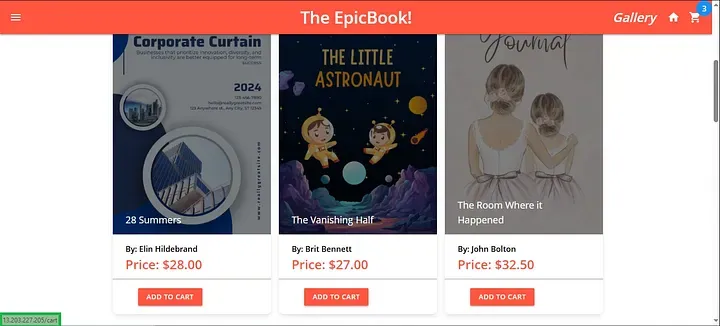
Image022 “WebApp Main Page”
1
We can see the IP in the bottom left highlighted with green rectangle, which is same as we get from terraform apply.
Image023 “books added in cart”
1
When we click on "Add to Cart" button, books get added in cart.
Image024 “Order Placed”
1
As we click on checkout button our order get placed.
🏆 Key Learnings
- Terraform automation
- Debugging real infra issues
- Networking concepts (VPC, SG)
- App deployment lifecycle
- Production best practices
💡 Improvements (Next Steps)
- Add Load Balancer (ALB)
- HTTPS with ACM
- Auto Scaling Group
- CI/CD (GitHub Actions)
- Use Secrets Manager
📢 Conclusion
This project gave me hands-on experience with:
- Cloud Infrastructure
- DevOps Automation
- Production Debugging
It’s not just deployment, it’s understanding the system end-to-end.
🙌 Final Note
This was a complete real-world DevOps project, and every error helped me learn something valuable.
🔗 Let’s Connect
If you found this useful, feel free to connect and share your thoughts!
Connect with me here on LinkedIn:
https://linkedin.com/in/bhupendrabhati/
https://linkedin.com/in/bhupendrabhati/
Enjoyed reading this content? Let the author know!
Your likes, comments, shares, and saves help creators reach more builders.

Loading recommendations
Loading article