
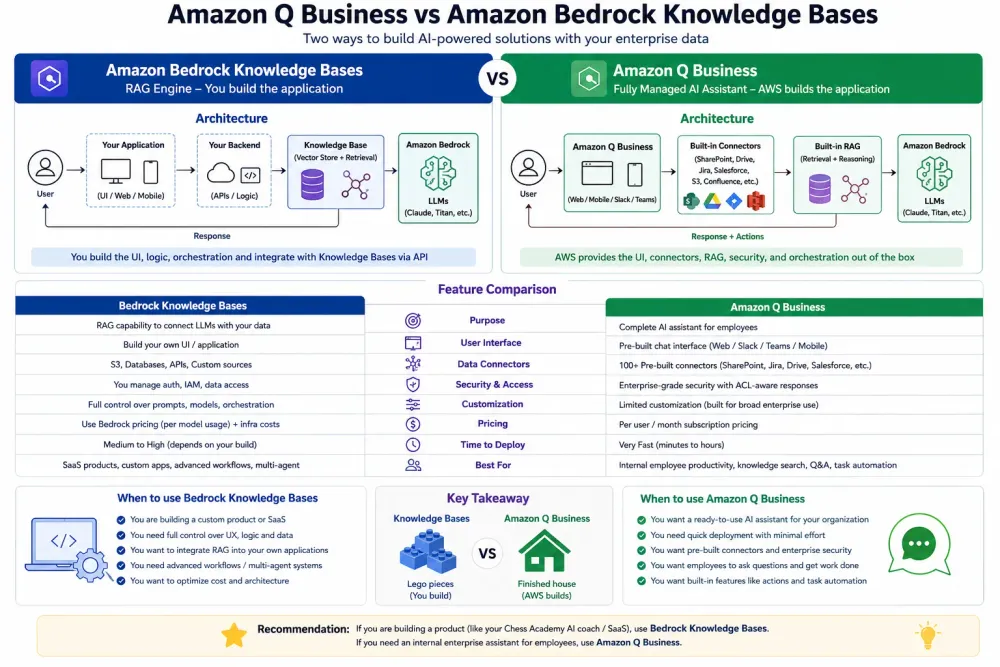
Amazon Q Business vs Bedrock Knowledge Bases
Both do document Q&A — but they solve different problems. A practical decision framework with real pricing, use cases, and when to use each.

Amazon Q Business vs Bedrock Knowledge Bases — Which One Does Your Enterprise Actually Need?
TL;DR: Both let your employees ask questions and get answers from company documents. But they solve fundamentally different problems, cost very differently, and the wrong choice will leave your team frustrated. Here's how to choose — with a decision framework and real numbers.
The Question I Keep Getting Asked
Every enterprise AI project I work on at STC starts with the same question:
"We want employees to search our internal documents using AI. Should we use Amazon Q Business or build with Bedrock Knowledge Bases?"
On the surface they look identical. Both do document Q&A. Both use RAG under the hood. Both are managed AWS services.
But they are built for completely different buyers, completely different use cases, and completely different teams.
What Each One Actually Is
Amazon Q Business is an enterprise productivity tool.
It's a ready-made AI assistant for your workforce — plug it into SharePoint, Confluence, Salesforce, S3, and 40+ other connectors, and employees can immediately ask questions across all of it. No code. No ML. No vector stores to manage. IT sets it up. Everyone uses it.
It's a ready-made AI assistant for your workforce — plug it into SharePoint, Confluence, Salesforce, S3, and 40+ other connectors, and employees can immediately ask questions across all of it. No code. No ML. No vector stores to manage. IT sets it up. Everyone uses it.
Bedrock Knowledge Bases is a developer building block.
It's a managed RAG service you use to build custom AI applications. You write the application logic, you control the UI, you decide how results are used. Developers build it. Developers own it.
It's a managed RAG service you use to build custom AI applications. You write the application logic, you control the UI, you decide how results are used. Developers build it. Developers own it.
Side-by-Side Comparison
| Amazon Q Business | Bedrock Knowledge Bases | |
|---|---|---|
| Who sets it up | IT admin, no code | Developer |
| Who uses it | All employees | End users of your custom app |
| Data connectors | 40+ (SharePoint, Confluence, Salesforce, Jira, S3...) | S3 only (native) |
| Customisation | Limited — configure, not code | Full — you build the app |
| UI | Built-in chat interface | You build your own |
| Access control | Inherits source permissions (user sees only what they're allowed) | You manage access yourself |
| Pricing model | Per user per month ($20 Lite / $25 Pro) | Pay per query + vector store |
| Setup time | Hours | Days to weeks |
| ML expertise needed | None | Moderate |
| Best for | Internal productivity tool | Custom customer-facing or developer-built apps |
The Decision Framework
Question 1: Who are the users?
Your own employees → Amazon Q Business
It's built for workforce productivity. Native SSO, permission-aware (a junior employee won't see HR documents they shouldn't), and deployable without engineering resources.
It's built for workforce productivity. Native SSO, permission-aware (a junior employee won't see HR documents they shouldn't), and deployable without engineering resources.
Your customers, or a custom app → Bedrock Knowledge Bases
You need control over the UI, the response format, the branding, and the integration. Q Business doesn't give you that.
You need control over the UI, the response format, the branding, and the integration. Q Business doesn't give you that.
Question 2: Where does your data live?
Multiple tools (SharePoint + Confluence + Jira + Salesforce + S3) → Amazon Q Business
It has native connectors for 40+ enterprise systems. Bedrock Knowledge Bases only ingests from S3 natively — you'd have to build pipelines to pull from other sources first.
It has native connectors for 40+ enterprise systems. Bedrock Knowledge Bases only ingests from S3 natively — you'd have to build pipelines to pull from other sources first.
Mostly S3 or docs you control → Either works, but Bedrock gives more flexibility.
Question 3: Do you need to customise the experience?
No — just need it to work → Amazon Q Business
You get a polished chat UI out of the box. Employees can use it immediately.
You get a polished chat UI out of the box. Employees can use it immediately.
Yes — custom UI, custom logic, custom integrations → Bedrock Knowledge Bases
You write the application. You control everything from chunk size to the system prompt to how citations are displayed.
You write the application. You control everything from chunk size to the system prompt to how citations are displayed.
Question 4: What's your budget model?
Predictable per-user cost → Amazon Q Business
$20/user/month (Lite) or $25/user/month (Pro). 100 employees = $2,000–2,500/month. Predictable. Easy to budget.
$20/user/month (Lite) or $25/user/month (Pro). 100 employees = $2,000–2,500/month. Predictable. Easy to budget.
Variable, usage-based cost → Bedrock Knowledge Bases
You pay per query + vector store + embeddings. At low volume it's cheaper. At high volume with many users it gets complex to predict.
You pay per query + vector store + embeddings. At low volume it's cheaper. At high volume with many users it gets complex to predict.
Real-World Scenarios
Scenario 1: Internal HR/Policy Bot
"Employees need to ask questions about HR policies, benefits, and company procedures stored in Confluence and SharePoint."
Use Amazon Q Business ✅
- Native Confluence and SharePoint connectors
- Permission-aware — employees only see what they're allowed to
- IT can deploy in a day
- No developer resources needed
Scenario 2: Customer-Facing Product Support Bot
"Customers visiting our website need to ask questions about our product documentation."
Use Bedrock Knowledge Bases ✅
- You need a custom UI matching your brand
- Q Business isn't designed for external users
- You need full control over the response format and citations
- Can integrate with your existing support workflows
Scenario 3: Contract Review Tool for Legal Team
"Legal team needs to search across hundreds of PDF contracts stored in S3."
Either works — but differently:
- Q Business: faster to deploy, built-in UI, permission controls
- Bedrock KB: more customisable, can integrate with your case management system, cheaper at low query volume
For a team of 10 lawyers doing occasional queries → Q Business is faster and simpler.
For a tool embedded in your legal case management platform → Bedrock KB.
For a tool embedded in your legal case management platform → Bedrock KB.
Scenario 4: Developer Documentation Search
"Developers need to search internal API docs, runbooks, and architecture docs in Confluence."
Use Amazon Q Business ✅
- Native Confluence connector
- Developers already know the source systems — they just need faster search
- Q Business also has IDE plugins (Amazon Q Developer) for in-editor help
Pricing Comparison — Real Numbers
Amazon Q Business
- Lite tier: $20/user/month — basic Q&A, no plugin support
- Pro tier: $25/user/month — plugins, admin controls, analytics
- 50 users × $25 = $1,250/month flat
Bedrock Knowledge Bases (same 50-user scenario)
- OpenSearch Serverless vector store: ~$700/month
- Claude 3 Haiku inference (50 users × 10 queries/day × 30 days): ~$45/month
- Titan Embeddings V2 (one-time ingestion): ~$5
- Total: ~$750/month — cheaper, but you built and maintain it
At low query volume, Bedrock KB is cheaper. At high user count with low technical overhead requirements, Q Business wins on total cost including engineering time.
Can You Use Both?
Yes — and some enterprises do.
Pattern: Q Business for employees + Bedrock KB for customers
- Internal workforce uses Q Business (HR, policies, internal docs)
- Customer-facing support bot built on Bedrock KB (product docs, FAQs)
This gives you the best of both: fast internal deployment with no code, and full control over the customer experience.
Quick Decision Guide
1
2
3
4
5
6
7
8
9
10
11
12
Do you need a custom UI or custom app logic?

    YES → Bedrock Knowledge Bases

    NO ↓


Do your users need to search non-S3 sources

(SharePoint, Confluence, Salesforce)?

    YES → Amazon Q Business

    NO ↓


Are users external customers?

    YES → Bedrock Knowledge Bases

    NO → Amazon Q Business
My Recommendation
Default to Amazon Q Business for internal enterprise use cases. It gets you to production in hours, not weeks, handles permissions correctly out of the box, and needs no developer to maintain it.
Default to Bedrock Knowledge Bases when you're building a product. You need the control, the customisation, and the integration flexibility.
The mistake I see most often: developers default to Bedrock KB for everything because they're comfortable with code — then spend weeks building an internal tool that Q Business would have delivered in a day.
Resources
- Amazon Q Business documentation
- Amazon Q Business pricing
- Bedrock Knowledge Bases documentation
- Amazon Q Business connectors list
- Part 1: Build a RAG Bot with Bedrock Knowledge Bases
- Part 3: Fine-Tuning vs RAG — How to Choose
I'm Meghana Rajagopal, lead Cloud & AI Delivery at STC (AWS Premier Partner) and AWS ML Engineer Associate. I write about practical AWS AI/ML solutions and architecture. Connect with me on LinkedIn .Follow for weekly AWS AI content.
Enjoyed reading this content? Let the author know!
Your likes, comments, shares, and saves help creators reach more builders.

Loading recommendations
Loading article