
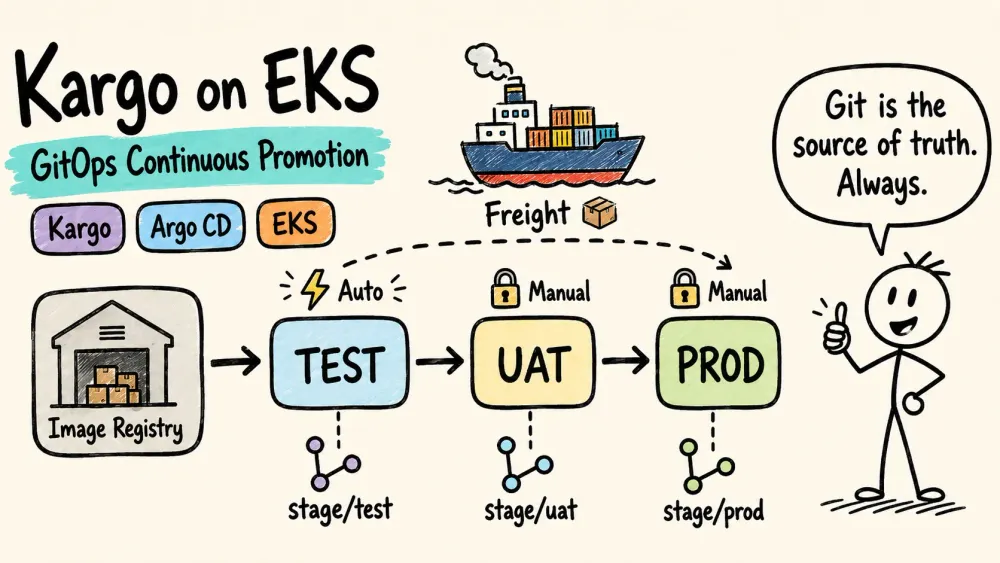
Kargo on EKS: A Deep Dive into GitOps Continuous Promotion
Kargo fills the "promotion gap" in GitOps: Argo CD syncs state to clusters, but has no opinion on how artifacts move between environments. This post explains how Kargo's Freight, Warehouse, and Stage primitives orchestrate container image promotion through a test → uat → prod pipeline — with practical lessons from a working PoC on EKS.

Kargo is Akuity's open-source continuous promotion engine for Kubernetes. It fills a specific gap in the GitOps ecosystem: while Argo CD excels at synchronizing desired state from Git to a cluster, it has no opinion on how artifacts move between environments. Kargo provides that missing orchestration layer.
This post explores how Kargo works, what problems it solves, and practical lessons from building a working PoC on EKS with a three-stage promotion pipeline (
test → uat → prod ).The Gap in GitOps
With Argo CD alone, promoting between environments typically requires:
- CI scripts that open PRs against deploy repos to bump image tags
- Manual edits to environment-specific manifests
- No built-in concept of "this exact artifact was verified in staging, now promote it to production"
- No artifact traceability — once a tag is written to Git, the connection between "what was tested" and "what is being deployed" lives only in CI logs
Kargo introduces two primitives that address this:
- Freight — an immutable, named artifact bundle representing a promotable unit
- Stages — a directed graph of environments through which Freight flows, with explicit gates
How Kargo and Argo CD Work Together
Kargo does not replace Argo CD — it extends it. In plain terms:
- Kargo = pipeline orchestrator — decides what version gets promoted where and when
- Argo CD = deployment executor — syncs the Git state to the cluster
The division of responsibility:
Responsibility | Owner |
|---|---|
Artifact discovery (new image tags, charts, commits) | Kargo |
Promotion decisions (what goes where, when) | Kargo |
Manifest rendering (kustomize-build, helm-template) | Kargo |
Git mutations (push rendered manifests to branches) | Kargo |
Cluster synchronization (apply manifests to namespaces) | Argo CD |
Health assessment (pod readiness, resource status) | Argo CD |
Drift detection and self-healing | Argo CD |
The integration point is the Argo CD Application resource. Kargo's
argocd-update step mutates the Application's targetRevision field (pointing it to a specific commit on a stage/* branch) and triggers a sync operation. Kargo interacts with Argo CD via the Kubernetes API — it directly patches the Application resource in the argocd namespace using its controller ServiceAccount. No separate Argo CD API credentials are needed when both run on the same cluster.The
kargo.akuity.io/authorized-stage: kargo-demo:test annotation on each Application is the authorization handshake — it tells Kargo "this Application is managed by the test Stage in the kargo-demo Project." Without it, Kargo refuses to touch the Application, preventing accidental mutations.After triggering a sync, the Stage reconciler monitors the Application's health status through Argo CD's standard health assessment. A Stage is considered
Healthy only when its associated Argo CD Application reports Synced + Healthy .System Architecture

How the Pieces Interact
The data flow is unidirectional:
- CI pushes a new container image tag to a registry (GHCR, ECR, Docker Hub, etc.)
- Warehouse polls the registry, discovers the new tag, and creates a Freight object
- Controller evaluates promotion policies — if the target Stage has auto-promotion enabled, it creates a Promotion object
- Controller executes the Promotion's steps — defined by the Stage's referenced PromotionTask (clone Git, render manifests, push to a branch, tell Argo CD to sync)
- Argo CD syncs the rendered manifests to the target namespace
- Controller optionally runs verification (via Argo Rollouts AnalysisTemplate)
- Once verified, the Freight becomes eligible for promotion to the next Stage
Kargo never deploys directly to the cluster. It mutates Git, and Argo CD does the actual deployment. This preserves the GitOps invariant: Git remains the single source of truth for cluster state.
Internal Components
Kargo installs as a set of controllers and services in its own namespace (one Project = one Kubernetes namespace = one promotion pipeline):
Component | Role |
|---|---|
kargo-controller | Core engine — Freight creation, Promotion execution, Stage health assessment, verification triggering |
kargo-management-controller | Project lifecycle — namespace provisioning, RBAC setup, ProjectConfig reconciliation |
kargo-api | Web UI + gRPC/REST API — authentication, Kargo-level RBAC, user-initiated Promotions |
kargo-webhooks-server | Admission webhooks — validates resources at creation time, prevents invalid state |
kargo-garbage-collector | CronJob — cleans up expired Freight, Promotions, and AnalysisRuns to prevent etcd bloat |
Core Concepts in Depth
Freight: The Unit of Promotion
A Freight object is an immutable record:
Plain text
Freight "90e67e35..."├── images:│ └── ghcr.io/hustshawn/k8s-demo:20250709-084626│ digest: sha256:dfb931f744...├── origin: Warehouse/kargo-demo├── status:│ ├── verifiedIn: {test: 2026-05-18T10:06:29Z}│ └── approvedFor: {uat: ..., prod: ...}
Key design decisions:
- Discovery is forward-only. The Warehouse only creates Freight for tags newer than the last known high-water mark. You cannot retroactively create Freight for older tags. However, promotion of existing Freight is not restricted — you can re-promote an older Freight that was already created, which is how Kargo handles rollbacks.
- Freight carries a provenance chain. Each Freight records which Warehouse produced it, which Stages it has been verified in, and which Stages it has been approved for.
- A Freight can contain multiple artifacts — for example, a container image AND a Helm chart version AND a git commit, bundled together as a single promotable unit.
Warehouse: Artifact Discovery
A Warehouse is a polling-based artifact watcher. It supports three subscription types:
Source | Use case |
|---|---|
image | Container registry tags (GHCR, ECR, Docker Hub, etc.) |
git | Git commits on a branch |
chart | Helm chart versions in an OCI or HTTP registry |
The
imageSelectionStrategy determines how "newest" is defined:- Lexical — alphabetical sort. Works for
YYYYMMDD-HHMMSStimestamps.
- SemVer — semantic version parsing with constraint support (e.g.,
^1.29.0).
- Digest — newest by creation timestamp from the registry manifest.
The
allowTags regex is critical in practice. Without it, registries polluted with cosign .sig tags, latest , or other non-versioned tags will confuse the selection strategy.The
discoveryLimit (default 5) controls how many tags are examined per poll. It does NOT mean "create Freight for all 5" — it means "look at the 5 most recent to determine which is newest."Stages: The Promotion Graph
Stages form a directed acyclic graph. Each Stage declares where its Freight comes from:
YAML
# Takes Freight directly from a Warehouse (first in chain)requestedFreight:- origin:kind: Warehousename: kargo-demosources:direct: true# Takes Freight that was verified in an upstream StagerequestedFreight:- origin:kind: Warehousename: kargo-demosources:stages: [test]
This is how Kargo enforces promotion order:
uat can only receive Freight that has been verified in test . You cannot skip stages.Stage lifecycle: A Stage progresses through states as Freight moves through it:
Progressing (promotion running) → Healthy (Argo CD reports synced and healthy) → Verifying (if verification is configured) → Verified (Freight eligible for downstream). If anything goes wrong: Failed (promotion step error) or Not Ready (verification failed).Fan-out / Fan-in: Pipelines are not required to be linear. A Freight can promote to multiple Stages independently (fan-out), and a downstream Stage can require verification in multiple upstream Stages (fan-in):
YAML
# Fan-out: us-west and us-east both take from test independently- name: us-westsources:stages: [test]- name: us-eastsources:stages: [test]# Fan-in: prod requires verification in ALL listed stages- name: prodsources:availabilityStrategy: Allstages: [us-west, us-east]
The
availabilityStrategy: All field makes the fan-in explicit — Freight must pass verification in every listed upstream Stage before becoming eligible. This models patterns like "deploy to each region, verify independently, then gate the global rollout."Control flow Stages — Stages with no promotion steps — can serve as pure synchronization points in complex pipelines. They aggregate verification signals from multiple upstream Stages without deploying anything themselves.
Git Layout: Branch-per-Stage
Before looking at how PromotionTasks work, it helps to understand the Git structure they operate on. Kargo's canonical pattern uses parallel branches that never merge:
Plain text
k8s-deploy-demo (Git repo)│├── main branch (source of truth — humans edit this)│ ├── base/│ │ ├── deployment.yaml│ │ ├── service.yaml│ │ └── kustomization.yaml ← images: field with newTag│ └── stages/│ ├── test/kustomization.yaml ← namespace: kargo-demo-test│ ├── uat/kustomization.yaml ← namespace: kargo-demo-uat│ └── prod/kustomization.yaml ← namespace: kargo-demo-prod│├── stage/test branch (Kargo-owned output)│ └── (fully rendered, flat YAML)│├── stage/uat branch (Kargo-owned output)│ └── (fully rendered, flat YAML)│└── stage/prod branch (Kargo-owned output)└── (fully rendered, flat YAML)
The design principles:
-
mainis the only branch humans touch. It contains the source kustomize overlays. Teams use normal PRs to modify it.
-
stage/*branches contain rendered output. Kargo runskustomize-buildand pushes the flattened result. Argo CD applies it directly — no kustomize processing at sync time.
- No cross-branch merging between
stage/*branches. The promotion chain is about which Freight (image tag) is allowed at each Stage, not about Git branch topology.
- Manifest changes propagate on next promotion. If you edit something in
base/onmain, the next time any Stage is promoted, Kargo re-renders frommainand picks up the change.
PromotionTask: Reusable Promotion Logic
With the Git layout in mind, a PromotionTask encodes the mechanics of how to promote. It is referenced by Stages, not executed directly.
A single PromotionTask serves all Stages via runtime variable injection:
${{ ctx.stage }} resolves to the current Stage name, and ${{ imageFrom(vars.imageRepo).Tag }} resolves to the image tag from the Freight being promoted. Steps are chained through outputs — for example, git-commit produces a commit SHA that argocd-update uses as desiredRevision .The most commonly used built-in steps:
Step | Purpose |
|---|---|
git-clone | Clone one or more branches into working directories |
kustomize-set-image | Update image tag in a kustomization.yaml |
kustomize-build | Render kustomize overlays into a flat output |
git-push | Push rendered manifests to the target branch |
argocd-update | Patch an Argo CD Application's targetRevision and trigger sync |
Kargo also provides steps for Helm workflows (
helm-update-image , helm-template ), generic YAML mutation ( yaml-update ), and external integrations ( http ). See the promotion steps reference for the full catalog.ClusterPromotionTask is the cluster-scoped variant. Platform teams define reusable promotion logic at the cluster level; application teams reference it without owning the implementation:
YAML
steps:- task:name: org-standard-gitops-deploykind: ClusterPromotionTask
This separates what to promote (owned by application teams — Warehouse subscriptions, Stage topology) from how to promote (owned by platform teams — Git branching model, rendering tool, Argo CD integration pattern).
ProjectConfig: Promotion Policies
Auto-promotion is configured at the Project level, not the Stage level:
YAML
apiVersion: kargo.akuity.io/v1alpha1kind: ProjectConfigmetadata:name: kargo-demonamespace: kargo-demospec:promotionPolicies:- stage: testautoPromotionEnabled: true
New Freight is automatically promoted to
test . Downstream stages ( uat , prod ) require manual promotion through the UI or CLI.This separation is intentional — it allows platform teams to control promotion velocity independently from Stage definitions. A
stageSelector field (label-based) is also available for bulk policies.Concurrency and Failure Handling
Promotions are serialized per Stage. Only one Promotion can execute at a time for a given Stage. If multiple Freight are eligible, Kargo promotes the newest one — it does not replay every intermediate Freight sequentially.
Failures are explicit, not hidden. If a promotion step fails:
- The Promotion is marked
Failed— visible in the UI and CLI
- No automatic retry or rollback. The Stage remains on its previous healthy Freight.
- Recovery requires either a new Freight arriving (triggering auto-promotion again) or manual re-promotion
This conservative design means operators always know the exact state of each Stage. There are no silent retries or partial rollbacks to reason about.
Verification: Argo Rollouts Integration
Kargo can run post-promotion verification by leveraging Argo Rollouts' AnalysisTemplate engine. This does NOT require converting Deployments to Rollouts — only the analysis execution machinery is used.
YAML
# Stage with verificationspec:verification:analysisTemplates:- name: http-health-check
YAML
# AnalysisTemplate: HTTP health checkapiVersion: argoproj.io/v1alpha1kind: AnalysisTemplatemetadata:name: http-health-checknamespace: kargo-demospec:metrics:- name: app-healthinitialDelay: 30sinterval: 10scount: 3successCondition: len(result.Hello) > 0failureLimit: 2provider:web:url: http://backend-app-svc.kargo-demo-test:5000/
The flow after a successful promotion:
- Promotion completes → Stage becomes
Healthy
- Controller creates an AnalysisRun
- AnalysisRun executes the metrics (HTTP calls, Prometheus queries, Jobs, etc.)
- If successful → Freight marked
verifiedInfor that Stage → eligible for downstream promotion
- If failed → Freight stays unverified → blocked from progressing
Practical considerations:
- Use
initialDelayto give new pods time to become ready before health checking begins.
- Verification results are cached per Freight. To re-run, use
kargo verify --project <p> --stage <s>.
- Argo Rollouts must be installed before (or restarted after) Kargo — the controller checks for Rollouts CRDs at startup.
Credential Management
Kargo discovers credentials automatically via labeled Secrets in the project namespace. You create a Secret with
repoURL , username , and password fields, then label it to indicate its purpose:-
kargo.akuity.io/cred-type=git— for Git push operations (matched byrepoURLagainst repos in PromotionTask steps)
-
kargo.akuity.io/cred-type=image— for registry access (matched byrepoURLagainst Warehouse subscriptions)
Secrets are scoped to the project namespace — no cross-project credential leakage. Kargo matches credentials to operations by
repoURL prefix, so one Secret can cover multiple repos under the same host.Installation
Kargo is installed via Helm:
Bash
helm upgrade --install kargo \oci://ghcr.io/akuity/kargo-charts/kargo \--version 1.10.4 \-n kargo --create-namespace \-f values.yaml \--set "api.adminAccount.passwordHash=$HASH" \--set "api.adminAccount.tokenSigningKey=$TOKEN_KEY"
Minimal values:
YAML
api:enabled: trueadminAccount:enabled: truetokenTTL: 24hcontroller:logLevel: INFOrollouts:integrationEnabled: true # enable Argo Rollouts verificationwebhooksServer:enabled: trueexternalWebhooksServer:enabled: false # only needed for webhook-based discovery
Prerequisites:
- Argo CD — Kargo's
argocd-updatestep targets it
- cert-manager — provisions TLS certificates for the webhook server
- Argo Rollouts (optional) — only if using verification gates
Operational Lessons
Tag filtering is non-negotiable. Without
allowTags , the Warehouse will discover cosign signature tags, latest , and other noise. Lexical sorting on polluted tag lists produces wrong results silently.The first Argo CD sync will fail. Until Kargo's first promotion creates the
stage/<name> branch, Applications show Missing . This is expected and self-resolves.Install order matters for Rollouts integration. If Argo Rollouts CRDs are not present when Kargo's controller starts, verification is silently disabled. Restart the controller after installing Rollouts.
Beyond Single-Cluster: Distributed Topology
This PoC runs everything on one EKS cluster. In production, Kargo's architecture supports a hub-spoke distributed model where the control plane and workload execution are decoupled.
The control plane (API, management controller, all Project/Stage/Freight data) runs on a hub cluster. Shard controllers are deployed as agents to remote workload clusters, each connecting back to the centralized control plane to receive work and report results.
Plain text
Hub Cluster (control plane)├── Kargo API + Management Controller├── Argo CD (manages spoke clusters)└── All Project/Stage/Freight dataSpoke Cluster A (shard: us-west)└── Kargo Controller (shard agent)└── Executes promotions for assigned ProjectsSpoke Cluster B (shard: us-east)└── Kargo Controller (shard agent)└── Executes promotions for assigned Projects
Key design properties:
- Shard controllers have no privileged access to the clusters where they run — they only execute promotion steps and report back. The blast radius of a compromised shard is limited.
- Multiple controller instances run in parallel, each responsible for a subset of Projects identified by shard labels (
controller.shardName).
- A controller can serve both its assigned shard AND unassigned resources by setting
isDefault: true.
This maps naturally to enterprise multi-account, multi-region Kubernetes deployments — and is the primary direction for further exploration beyond this PoC. Open questions: how does Argo CD's multi-cluster model compose with Kargo's shard model? Where do verification AnalysisRuns execute — on the hub or on the spoke where the workload runs?
Resources
Enjoyed reading this content? Let the author know!
Your likes, comments, shares, and saves help creators reach more builders.

Loading recommendations
Loading article