
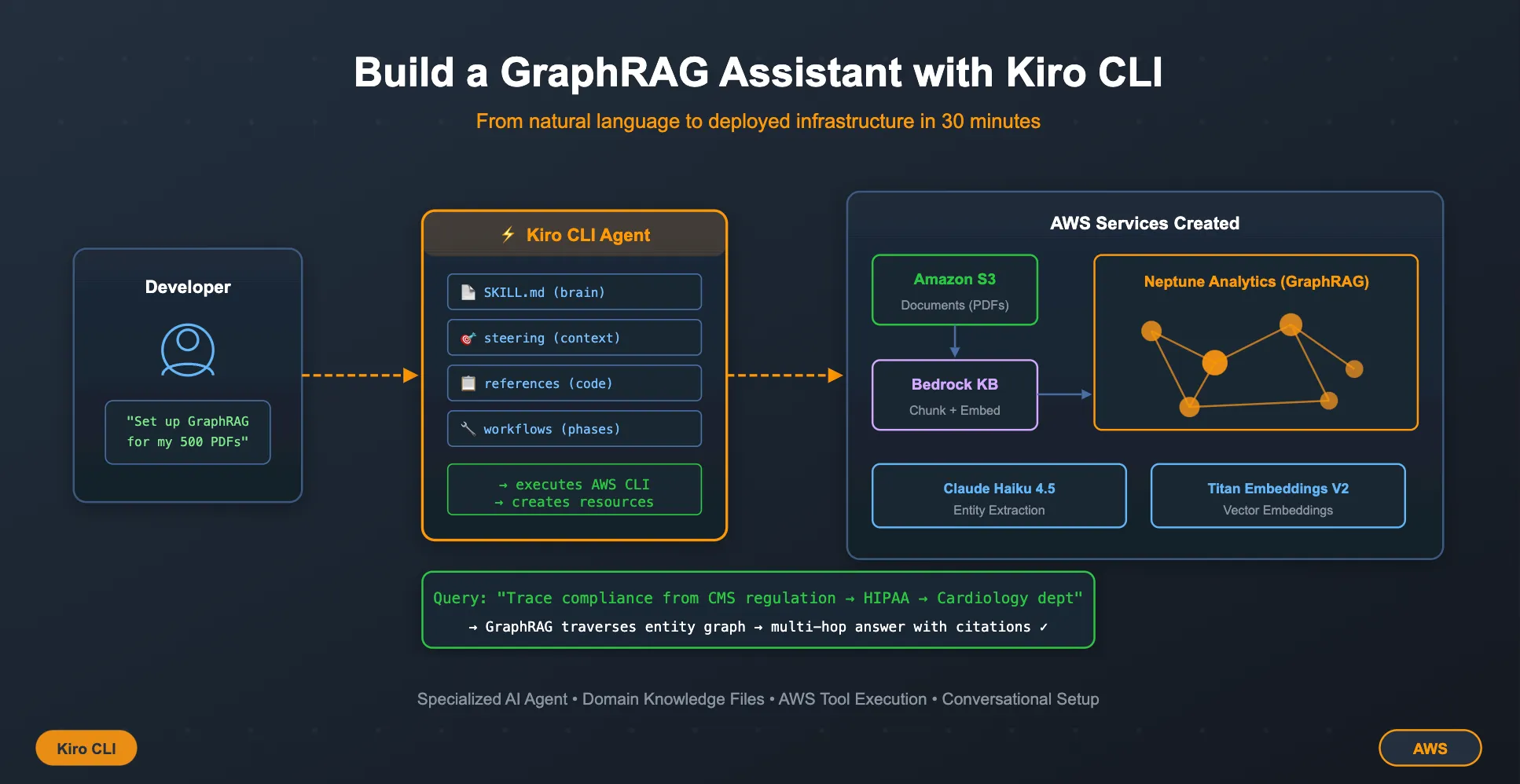
Kiro CLI as a Self-Service Learning Accelerator
Kiro CLI as a Self-Service Learning Accelerator — How I Replaced Demo Meetings with a Runnable Folder. Customers evaluating new AWS services often get stuck in a loop: read docs, schedule a demo, wait for answers, schedule another call. I packaged a Kiro CLI configuration — agents, skills, steering files, and workflows — into a single folder that customers run independently. They go from "What is GraphRAG?" to querying across interconnected documents in less than 30 minutes, on their own schedule.


Problem Statement
Vector RAG is powerful — but not powerful enough
Traditional Retrieval-Augmented Generation (RAG) improves generative AI by fetching relevant documents from a knowledge source. But it struggles with context fragmentation — when relevant information is spread across multiple documents or sources.
You ask: "Which departments need to update their procedures based on the Q3 policy amendment?" Vector RAG finds the amendment. Maybe it finds a procedure. But it can't connect the chain: amendment → policy → department charter → team lead. The information exists in your corpus — across 4 documents — but vector similarity alone can't follow the trail.
GraphRAG solves this by leveraging knowledge graphs that structure information as entities and their relationships. Unlike vector-only RAG that relies on embedding similarity, GraphRAG enables multi-hop reasoning — logical connections between different pieces of context — better entity linking, and contextual retrieval. This makes it valuable for complex document interpretation: legal contracts, compliance guidelines, research papers, and technical documentation that cross-reference each other.
(For deeper technical background, see Build GraphRAG applications using Amazon Bedrock Knowledge Bases )
GraphRAG has a learning curve
GraphRAG is available today in Amazon Bedrock Knowledge Bases with Neptune Analytics, but getting started has friction:
- Understanding when GraphRAG adds value vs when vector-only RAG suffices
- Setting up Neptune Analytics, IAM roles, entity extraction, and ingestion pipelines
- Knowing what chunking strategy, embedding model, and graph construction model to choose
- Seeing it work on real documents before committing to a production implementation
A customer came to us with exactly this situation. They had thousands of interconnected documents — policies referencing other policies, contracts referencing regulations — and needed to see GraphRAG work before they could get internal approval for Neptune Analytics.
The traditional enablement path:
1
Share blog links → Schedule call → Walk through slides → Answer questions → Schedule follow-up → Customer still hasn't touched the service
Elapsed time: 2-4 weeks. Hands-on experience: zero.
The Approach: Ship a Runnable Learning Environment
Instead of slides and meetings, I created a self-contained Kiro CLI folder:
1
2
3
4
5
6
7
8
9
10
11
12
13
14
15
graphRAG-starter/
├── .kiro/
│   ├── agents/graphrag-sa.json        ← AI assistant persona
│   └── steering/graphrag-project.md   ← Defaults (region, models, chunking)
├── skills/
│   └── bedrock-graphrag/
│       ├── SKILL.md                   ← Deep knowledge (15k chars)
│       └── references/
│           ├── iam-permissions.md     ← Copy-paste IAM policies
│           ├── api-examples.md        ← CLI + Python + CDK code
│           └── comparison-matrix.md   ← Decision framework
├── steering/
│   └── workflows/
│       └── bedrock-graphrag.md        ← Phased implementation guide
└── README.md                          ← One-command quick start
Let me walk through each file.
Step 1: The Agent Configuration
Create
.kiro/agents/graphrag-sa.json:1
2
3
4
5
6
7
8
9
10
11
12
13
14
15
{
"name": "graphrag-sa",
"description": "AI assistant specialized in Amazon Bedrock GraphRAG with Neptune Analytics. Helps you build, deploy, query, and optimize graph-enhanced knowledge bases for your document corpus.",
"instructions": "You are an AI assistant specializing in Amazon Bedrock Knowledge Bases with GraphRAG (Neptune Analytics). You help users build graph-enhanced RAG solutions from document corpora.\n\nYour knowledge comes from:\n- Skill: skills/bedrock-graphrag/SKILL.md (architecture, setup, querying, cost, troubleshooting)\n- References: skills/bedrock-graphrag/references/ (IAM policies, API examples, comparison matrix)\n- Workflow: steering/workflows/bedrock-graphrag.md (phased implementation guide)\n\nRead these files when you need technical depth. The SKILL.md is your primary knowledge source.\n\nKey behaviors:\n- Walk users step-by-step through setup when asked\n- Execute AWS CLI commands when asked (use the use_aws tool)\n- Be honest about limitations (no autoscaling, S3-only data source, 1000 file limit per data source)\n- Provide cost estimates when asked — but direct to AWS Pricing Calculator for precision\n- When comparing RAG vs GraphRAG, use the comparison-matrix.md reference\n- Default chunking: 300-500 tokens, 15% overlap\n- Default embeddings: Amazon Titan Embeddings V2\n- Default graph construction model: Claude Haiku 4.5 (production), Amazon Nova Lite (quick tests)\n- Supported regions: us-east-1, us-west-2, eu-west-1, eu-west-2, eu-central-1, ap-northeast-1, ap-southeast-1",
"tools": [
"read", "write", "shell", "grep", "glob",
"use_aws", "web_search", "fetch", "knowledge", "code", "subagent"
],
"allowedTools": ["read", "grep", "glob"],
"resources": [
"file://.kiro/steering/**/*.md",
"file://skills/bedrock-graphrag/SKILL.md"
],
"welcomeMessage": "Ready to help with Bedrock GraphRAG! I can:\n• Explain GraphRAG vs vector-only RAG\n• Walk you through setup (S3 → Knowledge Base → Neptune Analytics)\n• Run AWS commands to create resources\n• Help you query your knowledge base\n• Troubleshoot issues\n\nWhat would you like to do?"
}Key design decisions:
resources— tells Kiro which files to auto-load into contextallowedTools— tools the agent can use without asking permissiontools— full tool access includinguse_awsfor executing AWS commandsinstructions— the system prompt that shapes the agent's personality and behavior
Step 2: Project Steering (Auto-loaded Context)
Create
.kiro/steering/graphrag-project.md:1
2
3
4
5
6
7
8
9
10
11
12
13
14
15
16
17
18
19
20
21
22
23
24
25
26
27
28
29
30
31
32
33
34
35
36
37
# Bedrock GraphRAG — Project Context
You are working on building an Amazon Bedrock Knowledge Base with GraphRAG
(Neptune Analytics) to enable intelligent querying across a large document corpus.
## What You Can Ask This Agent
- "Explain GraphRAG vs vector-only RAG" — get the architecture comparison
- "Set up my S3 bucket" — create and configure document storage
- "Create the knowledge base" — walk through full KB setup with Neptune Analytics
- "Start ingestion" — sync your documents
- "Query the knowledge base: [your question]" — test your setup
- "What's this going to cost?" — get a cost estimate
- "Something's not working" — troubleshoot issues
## Your Configuration Defaults
- **Region**: us-east-1
- **Embeddings model**: Amazon Titan Embeddings V2 (1024 dimensions)
- **Graph construction model**: Claude Haiku 4.5 (best quality) or Amazon Nova Lite (faster/cheaper)
- **Chunking**: Fixed-size, 300-500 tokens, 15% overlap
- **File limit**: 1,000 files per data source (request increase to 10,000 via Service Quotas)
## For Large Document Corpora (10k+ files)
If you have more than 1,000 documents:
1. Organize S3 into folders of ≤1,000 files each
2. Create one data source per folder, OR
3. Request a limit increase to 10,000 via AWS Service Quotas
## Important Reminders
- **Cleanup**: Deleting a Knowledge Base does NOT delete the Neptune Analytics graph.
Delete the graph separately to stop charges.
- **S3 only**: GraphRAG only supports S3 as a data source (no Confluence, SharePoint, etc.)
- **No autoscaling**: Neptune Analytics memory is provisioned — right-size based on your volume.
- **Sync is full**: Re-syncing processes ALL documents, not just changed ones.This file auto-loads every time you start the agent. It sets defaults and reminds the agent of important constraints — think of it as "always-on context."
Step 3: The Skill File (Agent's Brain)
Create
skills/bedrock-graphrag/SKILL.md. This is the most important file — it's the agent's domain knowledge. Here's a condensed version (the full file is ~15KB):1
2
3
4
5
6
7
8
9
10
11
12
13
14
15
16
17
18
19
20
21
22
23
24
25
26
27
28
29
30
31
32
33
34
35
36
37
38
39
40
41
42
43
44
45
46
47
48
49
50
51
52
53
54
55
56
57
58
59
60
61
62
63
64
65
66
67
68
69
70
71
72
73
74
75
76
77
78
79
80
81
82
83
84
85
86
87
88
---
name: bedrock-graphrag
description: Use whenever someone is building, deploying, or querying a knowledge base
with Amazon Bedrock GraphRAG backed by Neptune Analytics.
---
# Bedrock GraphRAG with Neptune Analytics
## Architecture Overview
┌─────────────────────────────────────────────────────────────────────┐
│ Query Path │
│ User → RetrieveAndGenerate API → Vector Search + Graph Traversal │
│ ↓ │
│ Neptune Analytics (embeddings + graph) │
└─────────────────────────────────────────────────────────────────────┘
┌─────────────────────────────────────────────────────────────────────┐
│ Ingestion Path │
│ S3 (PDFs) → Bedrock KB Sync → Chunk → Embed → Extract Entities │
│ ↓ │
│ Neptune Analytics (stores vectors + entity graph) │
└─────────────────────────────────────────────────────────────────────┘
## How GraphRAG Differs from Vector-Only RAG
| Aspect | Vector-Only RAG | GraphRAG (Neptune Analytics) |
|--------|----------------|------------------------------|
| Search | Cosine similarity on chunk embeddings | Vector similarity + graph traversal |
| Cross-doc reasoning | Weak — chunks are independent | Strong — entities link chunks across documents |
| Multi-hop questions | Poor | Good — traverses entity→relationship→entity paths |
| Ingestion cost | Lower | Higher (embed + FM calls for entity extraction) |
| Best for | Independent documents, simple lookups | Interconnected documents, complex questions |
## When GraphRAG Wins
Choose GraphRAG when documents are interconnected and users ask multi-hop questions:
- Regulatory/compliance docs that reference each other
- Legal contracts with cross-references and amendments
- HR policies that cascade (company → division → team)
## Setup Guide
### Step 1 — Prepare S3 Data Source
- Only S3 is supported for GraphRAG
- Default limit: 1,000 files per data source
- Supported formats: PDF, TXT, DOCX, HTML, CSV, MD
### Step 2 — Create Knowledge Base (Console or CLI)
1. Create service role with S3 + Neptune + Bedrock permissions
2. Create KB with Neptune Analytics as vector store
3. Add S3 data source with entity extraction enabled
4. Choose embeddings model (Titan V2) and graph construction model (Claude Haiku 4.5)
### Step 3 — Sync Data Source
Bedrock reads docs → chunks → embeds → extracts entities → stores in Neptune Analytics
### Step 4 — Query
Use RetrieveAndGenerate API or Retrieve API
## Chunking Strategies
Recommended: 300-500 token chunks with 50-token overlap.
Fixed-size or semantic chunking works best for GraphRAG because entity extraction
operates per-chunk.
## Cost Considerations
1. Ingestion: Embeddings + graph construction FM calls (one-time per sync)
2. Storage: Neptune Analytics provisioned memory (ongoing)
3. Queries: FM invocation per RetrieveAndGenerate call
## Limitations
- No autoscaling for Neptune Analytics graphs
- S3-only data source
- 1,000 files per data source default
- No custom graph schema — entity extraction is fully automated
- Deleting KB does NOT delete the Neptune Analytics graph
- Sync is full — re-processes ALL documents
## Troubleshooting
| Issue | Fix |
|-------|-----|
| Sync fails with AccessDenied | Check IAM role permissions |
| Slow sync | Switch to Nova Lite for faster iteration |
| Poor query results | Tune chunk size (300-500 tokens) |
| High costs | Right-size Neptune memory, use Nova Lite for dev |Tip: The full SKILL.md in my repo includes detailed Python code examples, graph construction model comparison tables, and a demo script section. The more knowledge you pack in, the better the agent performs.
Step 4: Reference Files (Supplementary Knowledge)
These give the agent copy-paste-ready code when users ask for specifics.
skills/bedrock-graphrag/references/iam-permissions.md
1
2
3
4
5
6
7
8
9
10
11
12
13
14
15
16
17
18
19
20
21
22
23
24
25
26
27
28
29
30
31
32
33
34
35
36
37
38
39
40
41
42
43
44
45
# IAM Permissions for Bedrock GraphRAG

## Knowledge Base Service Role — Trust Policy

{
  "Version": "2012-10-17",
  "Statement": [{
    "Effect": "Allow",
    "Principal": { "Service": "bedrock.amazonaws.com" },
    "Action": "sts:AssumeRole",
    "Condition": {
      "StringEquals": { "aws:SourceAccount": "ACCOUNT_ID" },
      "ArnLike": { "aws:SourceArn": "arn:aws:bedrock:REGION:ACCOUNT_ID:knowledge-base/*" }
    }
  }]
}

## Permissions Policy

{
  "Version": "2012-10-17",
  "Statement": [
    {
      "Sid": "S3Access",
      "Effect": "Allow",
      "Action": ["s3:GetObject", "s3:ListBucket"],
      "Resource": ["arn:aws:s3:::YOUR_BUCKET", "arn:aws:s3:::YOUR_BUCKET/*"]
    },
    {
      "Sid": "BedrockModelAccess",
      "Effect": "Allow",
      "Action": ["bedrock:InvokeModel"],
      "Resource": [
        "arn:aws:bedrock:REGION::foundation-model/amazon.titan-embed-text-v2:0",
        "arn:aws:bedrock:REGION::foundation-model/anthropic.claude-3-haiku-20240307-v1:0"
      ]
    },
    {
      "Sid": "NeptuneAnalyticsAccess",
      "Effect": "Allow",
      "Action": ["neptune-graph:*"],
      "Resource": "arn:aws:neptune-graph:REGION:ACCOUNT_ID:graph/*"
    }
  ]
}
skills/bedrock-graphrag/references/api-examples.md
1
2
3
4
5
6
7
8
9
10
11
12
13
14
15
16
17
18
19
20
21
22
23
24
25
26
27
28
29
30
31
32
33
34
35
36
37
38
39
40
41
42
43
44
45
46
47
48
49
50
51
52
53
54
55
56
57
58
59
60
61
62
63
64
# API Examples for Bedrock GraphRAG

## Create Knowledge Base (CLI)

aws bedrock-agent create-knowledge-base \
  --name "my-graphrag-kb" \
  --role-arn "arn:aws:iam::ACCOUNT_ID:role/BedrockKBServiceRole" \
  --knowledge-base-configuration '{
    "type": "VECTOR",
    "vectorKnowledgeBaseConfiguration": {
      "embeddingModelArn": "arn:aws:bedrock:us-east-1::foundation-model/amazon.titan-embed-text-v2:0"
    }
  }' \
  --storage-configuration '{
    "type": "NEPTUNE_ANALYTICS",
    "neptuneAnalyticsConfiguration": {
      "graphArn": "arn:aws:neptune-graph:us-east-1:ACCOUNT_ID:graph/GRAPH_ID"
    }
  }' \
  --region us-east-1

## Create Data Source with Entity Extraction (CLI)

aws bedrock-agent create-data-source \
  --name "pdf-documents" \
  --knowledge-base-id "KB_ID" \
  --data-source-configuration '{
    "type": "S3",
    "s3Configuration": {
      "bucketArn": "arn:aws:s3:::my-graphrag-bucket",
      "inclusionPrefixes": ["documents/"]
    }
  }' \
  --vector-ingestion-configuration '{
    "chunkingConfiguration": {
      "chunkingStrategy": "FIXED_SIZE",
      "fixedSizeChunkingConfiguration": { "maxTokens": 400, "overlapPercentage": 15 }
    },
    "contextEnrichmentConfiguration": {
      "type": "BEDROCK_FOUNDATION_MODEL",
      "bedrockFoundationModelConfiguration": {
        "modelArn": "arn:aws:bedrock:us-east-1::foundation-model/anthropic.claude-3-haiku-20240307-v1:0",
        "enrichmentStrategyConfiguration": { "method": "CHUNK_ENTITY_EXTRACTION" }
      }
    }
  }' \
  --region us-east-1

## Query (Python)

import boto3
client = boto3.client('bedrock-agent-runtime', region_name='us-east-1')

response = client.retrieve_and_generate(
    input={'text': 'Which departments are affected by the policy update?'},
    retrieveAndGenerateConfiguration={
        'type': 'KNOWLEDGE_BASE',
        'knowledgeBaseConfiguration': {
            'knowledgeBaseId': 'YOUR_KB_ID',
            'modelArn': 'arn:aws:bedrock:us-east-1::foundation-model/anthropic.claude-sonnet-4-20250514-v1:0'
        }
    }
)
print(response['output']['text'])
skills/bedrock-graphrag/references/comparison-matrix.md
1
2
3
4
5
6
7
8
9
10
11
12
13
14
15
16
17
18
19
20
21
22
23
# Vector-Only RAG vs GraphRAG — Decision Framework

                     Are documents interconnected?
                    (cross-references, shared entities)
                           /            \
                         YES              NO
                          |               |
               Do users ask multi-hop     → Vector-Only RAG
               questions?
                    /          \
                  YES            NO
                   |              |
              GraphRAG         Vector-Only RAG

## Cost Comparison (10,000 documents)

| Component           | Vector-Only     | GraphRAG         |
|---------------------|-----------------|------------------|
| Embeddings          | ~$5-15          | ~$5-15           |
| Entity extraction   | $0              | ~$50-200         |
| Storage (monthly)   | ~$50-100        | ~$100-300        |
| Query FM (per 1000) | ~$5-20          | ~$5-20           |
| Total monthly       | ~$55-120        | ~$105-320        |
Step 5: Workflow Guide (Optional but Powerful)
Create
steering/workflows/bedrock-graphrag.md — this gives the agent a phased implementation approach:1
2
3
4
5
6
7
8
9
10
11
12
13
14
15
16
17
18
19
20
21
22
23
24
25
26
27
28
29
30
31
32
33
# Bedrock GraphRAG — Implementation Workflow
## Phase 1: Assess Your Use Case
Score your use case (1-5 each):
- Document interconnectedness (5 = heavily cross-reference)
- Query complexity (5 = multi-hop questions)
- Cross-document reasoning need (5 = must link across sources)
- Cost sensitivity (5 = very cost-sensitive, penalizes GraphRAG)
Interpretation: 18-25 → Strong GraphRAG candidate | 12-17 → Validate with POC | 5-11 → Vector-only
## Phase 2: Prepare Documents in S3
- Organize into folders of ≤1,000 files
- Supported: PDF, DOCX, TXT, HTML, CSV, MD
## Phase 3: Set Up Infrastructure
- Create IAM service role
- Create Knowledge Base with Neptune Analytics
- Add S3 data source with entity extraction
## Phase 4: Ingest and Validate
- Start sync (10-20 docs: ~15 min | 1,000 docs: 4-8 hours)
- Test with simple, two-doc, and multi-hop questions
## Phase 5: Tune and Optimize
- Poor answers? Adjust chunk size, model, or retrieval count
## Phase 6: Integrate with Application
- Use RetrieveAndGenerate or Retrieve APIs
## Phase 7: Go to Production
- Right-size Neptune memory, set up monitoring, automate syncThe customer runs:
1
kiro-cli chat --agent graphrag-sa
And gets an AI assistant with deep GraphRAG expertise that walks them through everything conversationally.
What the Customer Experiences
Phase 1: Understanding (5 min)
1
"I have 20,000 interconnected PDF documents. Explain GraphRAG vs regular vector RAG."The agent explains the architecture difference, provides a scoring framework, and gives a clear recommendation based on their document characteristics.
Phase 2: Assessment (5 min)
1
2
> "Help me assess if GraphRAG is right for my use case — HR policies, compliance regulations,
   and team charters that heavily cross-reference each other."
The agent scores their use case across 5 dimensions and gives a go/no-go recommendation.
Phase 3: Build (15 min)
The customer creates real AWS resources through conversation:
- S3 bucket for documents
- Sample interconnected documents (agent generates 5 healthcare docs that cross-reference each other)
- Neptune Analytics graph
- Bedrock Knowledge Base with entity extraction enabled
- Data source sync
Phase 4: Query and Validate (5 min)
Progressively complex queries demonstrate GraphRAG's value:
Simple (single doc):
"What are the patient data retention requirements?"
Multi-hop (two docs):
"How does the HIPAA compliance policy affect patient data handling in Cardiology?"
Entity chain (GraphRAG's differentiator):
"Trace the compliance chain from CMS regulation through HIPAA policy to the Cardiology department charter — what gaps exist?"
That last query — tracing across 5 documents — is where the customer sees why GraphRAG exists.
Phase 5: Cost + Cleanup (5 min)
1
2
"Estimate costs for 20,000 documents with 500 queries per day."
"Clean up everything we created."No surprise bills. Full resource deletion.
How the Kiro Configuration Works
Agent Definition
1
2
3
4
5
6
7
8
9
{
  "name": "graphrag-sa",
  "description": "AI assistant specialized in Amazon Bedrock GraphRAG with Neptune Analytics.",
  "tools": ["read", "write", "shell", "use_aws", "web_search", "fetch"],
  "resources": [
    "file://.kiro/steering/**/*.md",
    "file://skills/bedrock-graphrag/SKILL.md"
  ]
}
The agent has access to AWS CLI execution, file operations, and its knowledge base. It reads SKILL.md for architecture depth and references for code examples.
Skill File (SKILL.md)
The core knowledge base — covers:
- Architecture comparison (vector RAG vs GraphRAG)
- Setup prerequisites and regional availability
- Chunking strategy (300-500 tokens, 15% overlap)
- Model selection (Titan V2 embeddings, Claude Haiku for graph construction)
- Cost model (ingestion + storage + query)
- Limitations (S3-only, 1000 file limit, no autoscaling, full re-sync)
- Troubleshooting patterns
Written once. Used by every customer who runs the folder.
Workflow (bedrock-graphrag.md)
A phased implementation guide: Assess → Prepare → Build → Validate → Optimize. The agent follows this conversationally but lets customers jump to any phase.
Steering (graphrag-project.md)
Sensible defaults that customers override by editing one file:
1
2
3
4
- Region: us-east-1
- Embeddings: Amazon Titan Embeddings V2
- Graph construction: Claude Haiku 4.5
- Chunking: Fixed-size, 300-500 tokens, 15% overlap
It's Not Autopilot — It's a Conversation
A critical point: this is not a fully automated script that runs end-to-end without intervention. The agent operates as a collaborative partner, not an autonomous executor.
At every step, the agent:
- Asks clarifying questions — "What region do you want? How many documents? What's your latency tolerance?" It adapts the approach based on answers.
- Shows its reasoning — before executing any AWS command, the customer sees what will run and why. No black-box magic.
- Waits for confirmation — the customer decides when to proceed. They can pause, ask "wait, what does that IAM policy actually allow?", and get an explanation before moving forward.
- Adapts to detours — if the customer says "actually, explain Neptune Analytics pricing first," the agent pivots. It's a conversation, not a script.
This matters because:
- Customers learn by understanding each step, not by watching a script fly by
- Trust builds when you can see the reasoning — "I'm creating this IAM role because the Knowledge Base needs permission to read your S3 bucket and write to Neptune Analytics"
- Mistakes get caught early — the customer might say "wait, I need us-west-2 not us-east-1" before resources are created
- Each customer's path is different — one might spend 10 minutes on cost estimation, another skips straight to building
The experience feels like pair-programming with a domain expert, not running a deployment script. |
Reuse This Pattern
Any AWS service evaluation can be packaged this way:
- Agent — persona with the right tools and knowledge sources
- Skill — deep, opinionated knowledge (architecture, costs, limitations, troubleshooting)
- Workflow — phased journey from assessment to production
- References — copy-paste IAM policies, code examples, comparison matrices
- README — one-command quick start
The folder becomes a portable, shareable, self-service enablement tool.
Conclusion
The best enablement gives customers the right tools to discover value themselves. Kiro CLI configurations turn deep domain knowledge into a self-service experience that customers run on their own terms.
The customer got internal approval for Neptune Analytics within days — because they could demonstrate the value firsthand, not just describe it from a slide deck.
Enjoyed reading this content? Let the author know!
Your likes, comments, shares, and saves help creators reach more builders.

Loading recommendations
Loading article