
AWS dropped new free credentials that prove you can build (and boost your resume)
AWS just made four hands-on microcredentials free for everyone. A look at what they are, the one I did, and how to get the badge on your LinkedIn

Over my first few months as a Developer Advocate, I've been out at campuses and conferences around the country, talking to a lot of students. One thing comes up almost every time: "how do I get actual hands-on experience, and how do I prove it to someone hiring?"
Certifications are the usual answer, but exam cost is a real barrier for students. It's not the only factor, but it comes up enough that I've stopped pretending it doesn't.
AWS microcredentials are now free. They're hands-on, AWS-validated assessments. You get a Credly badge you can add to your LinkedIn the same way you would any AWS cert. I did my first one yesterday, passed, and it's already on my profile.
Here's the rundown.
What you actually get
A microcredential is a timed, hands-on lab. You get dropped into a live AWS environment with a business scenario, and you have 90 minutes to figure out what's broken or what needs building and fix it. I was never the biggest fan of the AWS certification exams, sitting through hours of long paragraphs just to answer multiple-choice questions at the end. I much prefer being hands-on in the actual console, and that's what you'll be doing here. If you're like me, you'll for sure prefer this too.
Pass it, and you get a Credly badge. That badge goes on your LinkedIn profile under Licenses & Certifications, the same spot where certs live. Recruiters see it. Your professor sees it. More importantly, it's verifiable. Anyone can click it and confirm it's legit.
What makes it worth doing:
- It's absolutely free.
- 90 minutes, so you can squeeze it in an afternoon.
- Hands-on, so when someone asks you about it in an interview you can actually talk about what you did. (I wish I'd had this when I did my AWS internship interview.)
What's available
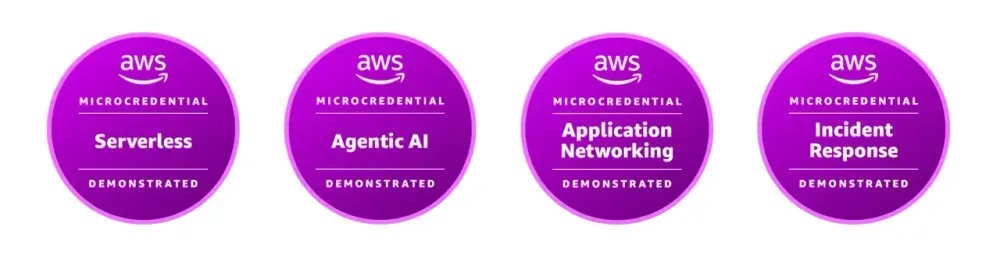
There are four right now, and more coming throughout 2026:
AWS Serverless Demonstrated . Lambda, API Gateway, Step Functions, DynamoDB, event-driven stuff, CI/CD. If you've built anything serverless in a class project or hackathon, this is the one.
AWS Agentic AI Demonstrated . Bedrock agents: supervisor and specialist agents, knowledge bases, Guardrails, hooking an agent up to a chat app. This is the one I did. More on it below.
AWS Incident Response Demonstrated . Security stuff: finding compromised resources, locking down databases, killing backdoor access, hardening the network. Good one for anyone interested in cloud security roles.
What it's like (Agentic AI)
I picked Agentic AI because it's what I've been building with lately. The scenarios felt like real tickets, for example an agent is misbehaving, figure out why and fix it. A knowledge base isn't returning the right info, debug it. Wire a Guardrail into an agent so it stops doing a thing it shouldn't.
This is the key part for me. You solve real AWS challenges in a live environment. It was legit the kind of work someone would be doing on the job.
It was challenging but fun. 90 minutes is tight if you've never touched Bedrock, but it's doable if you've done a SimuLearn or Cloud Quest track first.
Things to know before you start
A few rules that'll bite you if you don't read them:
- You can't pause or restart. Close the tab = start over. Clear your schedule first.
- If you fail, there's a 25-day wait before you can retry. So don't open it 5 minutes before a lecture to "see what it's like."
- Challenges are randomized, so a walkthrough won't prep you for every scenario. It's not easy, but it's not a trick exam either. Prep broad and you'll be in good shape.
If you've never touched an AWS account, start with the AWS Free Tier so you're not learning how to navigate the console during a timed exam. But don't let the "microcredential" name fool you. These go deep. My Agentic AI one covered multi-agent orchestration, knowledge base setup, Lambda environment variables, and Bedrock Guardrails.
For actual prep, AWS recommends their SimuLearn track for whichever domain you're doing. Same live-environment format as the real microcredential, so the muscle memory carries over. If you've never built in the domain before, plan on more than a weekend.
Getting it on your LinkedIn
Once you pass, the badge shows up in your Credly account. Here's mine if you want to see what it looks like. From there:
1) Claim the badge in Credly.

2) Copy the badge URL from Credly.
3) On LinkedIn, go to your profile → Add profile section → Licenses & Certifications, and paste the Credly URL as the credential URL.

Your turn
If you've got a Certifications/Skills section on your resume, this slots right in. If you don't, it's a solid first entry.
If you take one, drop a comment with which you picked.
Enjoyed reading this content? Let the author know!
Your likes, comments, shares, and saves help creators reach more builders.

Loading recommendations
Loading article