
Stop Writing Lambda Boilerplate
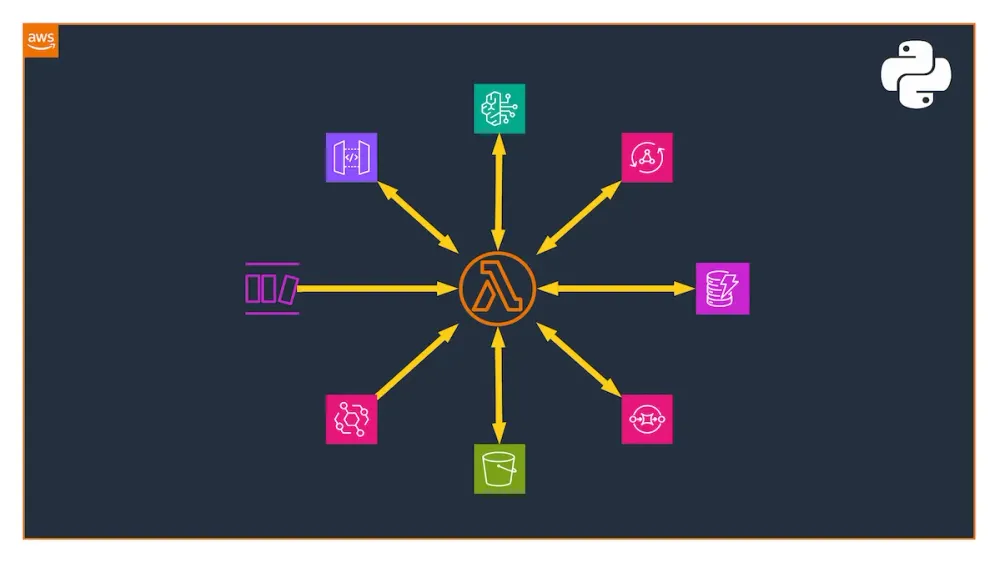
Introducing the aws-lambda-templates — a collection of production-ready Python Lambda templates for Bedrock Agent, REST API, GraphQL, DynamoDB Stream, EventBridge, S3, and SQS scenarios. These templates come pre-integrated with AWS Lambda Powertools, AWS CDK, Pydantic, and a robust testing infrastructure.

Every serverless developer knows the feeling. You spin up a new Lambda project, and before writing a single line of business logic, you're already copying boilerplate from a previous project: setting up AWS Lambda Powertools, wiring up structured logging, configuring X-Ray tracing, and building yet another Repository class for DynamoDB access.
This repetitive setup isn't just tedious — it's a source of inconsistency across projects and a hidden risk. Teams often skip best practices under time pressure, and the "quick Lambda" becomes the undocumented, untested function that nobody dares touch six months later.
That's why I built aws-lambda-templates — a collection of production-ready, plug-and-play Python Lambda templates for some of the common real-world scenarios on AWS.
The Problem with Lambda Bootstrapping
AWS Lambda's promise is simplicity: deploy a function, it scales. But production Lambda functions require significantly more than a handler file. You need:
- Structured logging that integrates with CloudWatch Insights
- Distributed tracing with AWS X-Ray
- Metrics for operational visibility
- Batch processing for event sources like SQS and DynamoDB Streams
- Strong typing to catch bugs at development time, not runtime
- Infrastructure as Code, so your function is reproducible and auditable
- Comprehensive tests with AWS service mocking
Most developers piece this together manually each time — or worse, they copy a "good enough" version from a previous project and gradually accumulate inconsistencies.
Introducing aws-lambda-templates
aws-lambda-templates is a GitHub template repository that gives you a complete, opinionated, production-grade starting point for Python Lambda development. It currently covers seven real-world scenarios out of the box:
- Bedrock Agent — Handle function-based actions from Amazon Bedrock Agents
- GraphQL API — Resolve AppSync GraphQL requests
- REST API — Handle API Gateway REST requests
- DynamoDB Stream — Batch-process stream events with failure handling
- EventBridge — React to events and call external APIs
- S3 to SQS — Queue messages on S3 object changes
- SQS to DynamoDB — Batch-process SQS messages into DynamoDB
Each template is a fully self-contained starting point. Pick your scenario, rename the project, and start writing business logic immediately.
What’s Pre-Wired for You
AWS Lambda Powertools
Every template integrates AWS Lambda Powertools for Python — AWS's first-party library for Lambda best practices. This gives you:
- Structured JSON logging with correlation IDs automatically injected
- CloudWatch EMF Metrics for operational dashboards without custom code
- AWS X-Ray Tracing with automatic subsegment creation
- Batch processing utilities for SQS and DynamoDB Streams, including partial failure handling
- Parameter and Secrets loading with caching built in
- Event source data classes for type-safe event parsing
You don't configure any of this — it's already there. More on that later.
Pydantic Data Modeling
All input/output models are defined using Pydantic , giving you automatic validation, serialization, and type safety.
Python
from uuid import uuid4from pydantic import BaseModel, Fieldfrom pydantic.alias_generators import to_camelclass Item(BaseModel, alias_generator=to_camel, populate_by_name=True):id: str = Field(description="Unique item identifier", default_factory=lambda: str(uuid4()))name: str = Field(description="Human-readable item name")
The
alias_generator=to_camel configuration means the JSON payload from API Gateway uses camelCase while the Python code uses snake_case — matching JSON conventions on the wire and Python conventions in code, with zero manual mapping.Infrastructure as Code with AWS CDK
Every template ships with a matching AWS CDK stack under
infra/stacks/ . Deploy any stack with a single command:Bash
make deploy STACK=api
No manual console clicks. No documentation to update. The infrastructure is the code.
Clean Architecture with the Repository Pattern
All database access is encapsulated in a
Repository class, separating your business logic from AWS service calls. This makes testing trivial and keeps your handler functions focused on what matters: the business logic.Testing That Actually Tests Things
The test suite uses:
- pytest for test orchestration
- moto for AWS service mocking (DynamoDB, SQS, S3 — all mocked locally)
- Hypothesis for property-based testing, automatically generating edge-case inputs
- coverage for coverage reporting
Run the entire suite with:
Bash
make test
Code Quality, Automated
- ruff for linting and formatting (replacing Flake8, isort, Black)
- pyright for static type checking
- pre-commit hooks to enforce quality before every commit
- Dependabot for automated dependency updates
Developer Experience
- Dev Containers support means you can open the repo in VS Code and have the entire development environment running in Docker — Python, Poetry, CDK, and all tools pre-installed—no setup required.
- MkDocs for auto-generated API documentation published to GitHub Pages
- GitHub Actions workflows for CI/CD and documentation deployment
- AI Agent guidelines (
AGENTS.md) providing context for AI coding assistants working in the repo
AWS Lambda Powertools — In Practice
Every template integrates AWS Lambda Powertools for Python as a first-class citizen — not as an afterthought bolted on after the fact. Here's how it actually shapes each template.
Batch Processing with Partial Failure Handling
This is where Powertools saves the most code — and prevents the most production incidents.
Without Powertools, batch processing from SQS or streams requires you to manually track which records succeeded and which failed, then construct a
batchItemFailures response telling Lambda which messages to retry. Get it wrong and you either re-process successfully handled messages (causing duplicates) or silently drop failed ones.The SQS template uses
BatchProcessor to handle this automatically:Python
from aws_lambda_powertools.utilities.batch import BatchProcessor, EventType, process_partial_responsefrom aws_lambda_powertools.utilities.batch.types import PartialItemFailureResponseprocessor = BatchProcessor(event_type=EventType.SQS)def handle_record(record) -> None:try:...except Exception as exc:logger.error("Failed to process record", exc_info=exc)raise # Re-raise so BatchProcessor marks it as a failed itemdef main(event, context) -> PartialItemFailureResponse:return process_partial_response(event=event,record_handler=handle_record,processor=processor,context=context,)
If
handle_record raises for one message, BatchProcessor catches it, logs the failure, continues processing the rest of the batch, and returns the correct batchItemFailures response. Your DLQ only receives the genuinely failed messages — not the whole batch.The same pattern applies to DynamoDB Streams, where handling partial failures is equally critical to prevent stream stalls:
Python
from aws_lambda_powertools.utilities.batch import BatchProcessor, EventType, process_partial_responseprocessor = BatchProcessor(event_type=EventType.DynamoDBStreams)def handle_record(record):try:...except Exception as exc:logger.error("Failed to process record", exc_info=exc)raise # Re-raise so BatchProcessor marks it as a failed itemdef main(event, context):return process_partial_response(event=event,record_handler=handle_record,processor=processor,context=context,)
Event Parsing and Handling
Lambda Powertools really shines here. Whether it’s handling a Bedrock Agent tool use, REST API request, or a GraphQL query, Powertools provides resolvers that eliminate custom event parsing.
The Bedrock Agent template uses the
BedrockAgentFunctionResolver and the @app.tool decorator:Python
from aws_lambda_powertools.event_handler import BedrockAgentFunctionResolverfrom aws_lambda_powertools.utilities.data_classes import BedrockAgentEventapp = BedrockAgentFunctionResolver()@app.tool(name="getItem", description="Gets item details by ID")def get_item(item_id: str) -> dict:...@app.tool(name="createItem", description="Creates a new item with name and optional description")def create_item(item_id: str, name: str, description: str | None = None) -> dict:...def main(event: BedrockAgentEvent, context: LambdaContext) -> dict:"""Lambda entry point for the Bedrock Agent handler"""return app.resolve(event, context)
The REST API template uses the
APIGatewayRestResolver and Flask-like decorators — meaning if you've used Flask or FastAPI, you'll feel right at home:Python
from aws_lambda_powertools.event_handler import APIGatewayRestResolverfrom aws_lambda_powertools.event_handler.api_gateway import Responseapp = APIGatewayRestResolver()@app.get("/items/<id>")def get_item(id: str) -> Response:"""Retrieve an item by ID"""...return Response(status_code=200, content_type="application/json", body=dumps(item))@app.post("/items")def create_item() -> Response:"""Create a new item from the request body"""body = app.current_event.json_body...return Response(status_code=201, content_type="application/json", body=dumps(item))def main(event: dict, context: LambdaContext) -> dict:"""Lambda entry point for the API Gateway handler"""return app.resolve(event, context)
The EventBridge template uses the
event_parser to ensure your events match your Pydantic models before your logic even runs:Python
from aws_lambda_powertools.utilities.parser import event_parserfrom aws_lambda_powertools.utilities.parser.models import EventBridgeModel@event_parser(model=EventBridgeModel)def main(event: EventBridgeModel, context) -> None:handle(event)
Combining Powertools with Pydantic
One of the most useful patterns across the templates is combining Powertools event data classes with Pydantic models for end-to-end type safety.
Powertools parses the raw Lambda event into a typed object (so you're not indexing into raw dicts). Pydantic then validates and deserializes the business payload within that event:
Python
from aws_lambda_powertools.event_handler import APIGatewayRestResolverfrom pydantic import ValidationErrorapp = APIGatewayRestResolver()@app.post("/items")def create_item() -> Response:# Powertools resolves the typed API Gateway envelopebody = app.current_event.json_body# Pydantic validates the business payloadtry:item = Item.model_validate(body)except ValidationError as exc:return Response(status_code=422, content_type="application/json", body=dumps({"error": "..."}))...return Response(status_code=201, content_type="application/json", body=dumps(item.dump()))
In the Bedrock Agent template, the same pattern applies via
BedrockAgentFunctionResolver — Powertools resolves the agent event, and typed function signatures replace manual parameter extraction:Python
# templates/agent/handler.pyfrom aws_lambda_powertools.event_handler import BedrockAgentFunctionResolverfrom aws_lambda_powertools.utilities.data_classes import BedrockAgentEventfrom aws_lambda_powertools.utilities.typing import LambdaContextfrom templates.agent.models import Itemrepository = Repository(settings.table_name)app = BedrockAgentFunctionResolver()@app.tool(name="getItem", description="Gets item details by ID")def get_item(item_id: str) -> dict:item = repository.get_item(item_id)if not item:return {"error": f"Item {item_id} not found"}return item@app.tool(name="createItem", description="Creates a new item with name and optional description")def create_item(item_id: str, name: str, description: str | None = None) -> dict:item = Item(id=item_id, name=name, description=description)repository.put_item(item.model_dump())return item.model_dump(by_alias=True, exclude_none=True)def main(event: BedrockAgentEvent, context: LambdaContext) -> dict:"""Lambda entry point for the Bedrock Agent handler"""return app.resolve(event, context)
Fetching Parameters and Secrets
In the EventBridge template, the handler calls an external API using an API token stored in the Secrets Manager. With Lambda Powertools, that adds exactly three lines of code:
Python
from aws_lambda_powertools.utilities.parameters import SecretsProvidersecret_provider = SecretsProvider()token = secret_provider.get(secret_name)
The same goes for loading configuration from the Parameter Store (
SSMProvider ), AppConfig ( AppConfigProvider ), or a DynamoDB table ( DynamoDBProvider ):Python
from aws_lambda_powertools.utilities.parameters import SSMProviderprovider = SSMProvider()configuration = provider.get(key)
Structured Logging That Travels With Your Request
The logger is initialized once at module level and injected into every handler via the
@logger.inject_lambda_context decorator. This automatically appends the Lambda context (function name, version, cold start flag, and AWS request ID) to every log line — without you writing a single line of configuration code.Python
from aws_lambda_powertools import Loggerlogger = Logger(service="api")@logger.inject_lambda_context(log_event=True)def handler(event: APIGatewayProxyEventV2, context: LambdaContext) -> dict:logger.info("Processing request", path=event.path, method=event.http_method)...
The output in CloudWatch is structured JSON from the first line:
JSON
{"level": "INFO","message": "Processing request","path": "/users","method": "GET","service": "api","function_name": "my-api-handler","cold_start": true,"aws_request_id": "abc-123"}
This matters at scale: CloudWatch Logs Insights can now query your logs by any of these fields. Finding all cold starts, or all errors on a specific path, becomes a one-line query instead of a regex hunt through raw strings.
Tracing Without Instrumentation Noise
X-Ray tracing is applied via two decorators that require no additional configuration:
Python
from aws_lambda_powertools import Tracertracer = Tracer(service=settings.service_name)# On methods — creates child subsegments in X-Ray@tracer.capture_methoddef handle_record(record: SQSRecord) -> None:repository.put_item(process(record.body))# On the Lambda handler — creates the root X-Ray segment@tracer.capture_lambda_handlerdef main(event: dict, context: LambdaContext) -> dict:...
The
@tracer.capture_lambda_handler decorator creates the root X-Ray segment, and @tracer.capture_method on Repository methods creates child subsegments — so your X-Ray service map shows handler → repository → DynamoDB as distinct, timed segments. You can see exactly where latency lives without writing a single xray_recorder.begin_subsegment() call.CloudWatch Metrics Without Custom Namespaces
Most Lambda functions either skip custom metrics entirely — relying on the default Lambda service metrics — or end up with a tangled mix of
boto3 CloudWatch put_metric_data calls scattered across the codebase. Neither approach is great in production.Powertools solves this with the Metrics utility, which uses CloudWatch Embedded Metric Format (EMF) to emit custom metrics as structured log lines. No boto3 calls, no extra latency, no IAM permissions beyond what CloudWatch Logs already has.Each template initializes a
Metrics instance at module level with a shared namespace and service name:Python
from aws_lambda_powertools import Metricsfrom aws_lambda_powertools.metrics import MetricUnitmetrics = Metrics(namespace=settings.metrics_namespace, service=settings.service_name)def process(event, context):...metrics.add_metric(name="Processed", unit=MetricUnit.Count, value=1)@metrics.log_metricsdef main(event: dict, context: LambdaContext) -> dict:return process(event, context)
The
@metrics.log_metrics decorator flushes all buffered metrics at the end of each invocation as a single EMF-formatted log line — CloudWatch automatically parses it and makes those metrics available in dashboards and alarms without any additional infrastructure.capture_cold_start_metric=True is a one-liner that adds a ColdStart metric to every function automatically. In production, tracking cold starts per function gives you a clear signal for when to invest in provisioned concurrency — no custom instrumentation needed.Getting Started in Under 5 Minutes
1. Create your repository
2. Rename the project
After cloning, run the setup command once:
Bash
make project NAME="new-name" DESCRIPTION="New description" AUTHOR="Your Name" EMAIL="you@example.com" GITHUB="yourusername"
This renames all references throughout the codebase in a single step.
3. Install and run
Bash
make install # Install dependencies via Poetrymake precommit # Install pre-commit hooksmake test # Run tests with coverage
4. Deploy
That's it. You're shipping production-grade Lambda code, not maintaining boilerplate.
Bash
make deploy STACK=api # Deploy the REST API scenario
Design Decisions Worth Noting
- Python 3.14+: The templates target the latest Python runtime. Lambda supports Python 3.14, and you should be using it.
- Poetry over pip/requirements.txt: Deterministic dependency resolution and lock files eliminate the "works on my machine" problem.
pyproject.tomlis the single source of truth for the entire project configuration.
- Makefile as the interface: All common operations — install, test, lint, deploy, docs — are exposed through
makecommands. This creates a consistent interface regardless of the underlying tools, making CI/CD pipeline configuration trivial.
- camelCase for JSON, snake_case for Python: AWS services speak camelCase; Python speaks snake_case. Pydantic's
alias_generator=to_camelbridges the gap automatically, keeping both sides idiomatic.
The Bedrock Agent Template
One template deserves special mention: the Bedrock Agent template. As generative AI workloads move to production on AWS, Lambda functions increasingly serve as the action executors behind Amazon Bedrock Agents. This template gives you a proper starting point for building agent action groups — with typed request/response models, error handling, and the exact response schema Bedrock expects.
It's production-ready for the AI-native workloads being built today.
Contributing
The repository is open source under the MIT license. Contributions are welcome — whether that's a new template scenario, improved infrastructure code, additional test coverage, or documentation improvements. Check out the contributing guidelines to get started.
If you're building on AWS Lambda and you find yourself writing the same setup for the third time, I hope
aws-lambda-templates saves you that time and helps you ship better, more consistent serverless code.Ready to start? Head over to the repository and click "Use this template":
👉 github.com/amrabed/aws-lambda-templates
Enjoyed reading this content? Let the author know!
Your likes, comments, shares, and saves help creators reach more builders.

Loading recommendations
Loading article