
Identity-Driven Access to Internal Resources Using AWS SSM. Part 2: Bastion Host with Active Directory
How SSM port forwarding expands PCI scope to developer laptops, and how to use a bastion host with Active Directory to keep the scope boundary inside AWS.

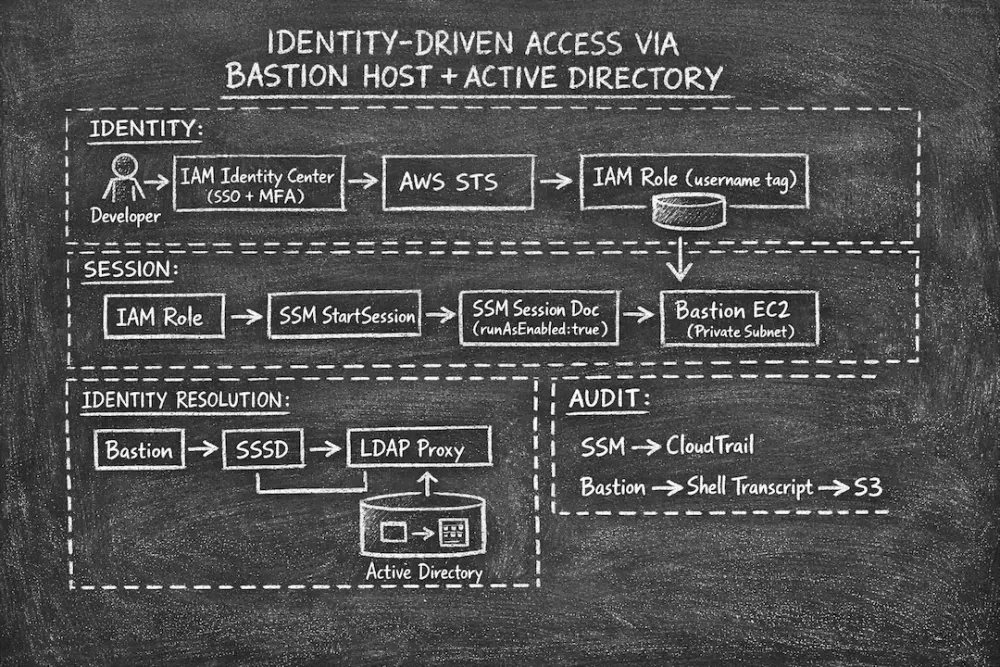
Identity-Driven Access via Bastion Host and Active Directory
It works well for most engineering workflows.
It can also be used in PCI environments - but with an important trade-off:
the tunnel terminates on the developer's laptop, which puts that machine into PCI scope.
the tunnel terminates on the developer's laptop, which puts that machine into PCI scope.
This article covers the second access pattern, which avoids that:
- An interactive shell on a bastion host via SSM Session Manager
- Linux user accounts resolved dynamically from Active Directory
- No SSH keys. No local accounts. No shared credentials.
- Centralized user lifecycle management - add or revoke access from a single directory.
Why Port Forwarding Expands PCI Scope
SSM port forwarding establishes a TCP tunnel to a private resource.
It is identity-driven, logged in CloudTrail, and scoped via ABAC.
It is identity-driven, logged in CloudTrail, and scoped via ABAC.
But the tunnel terminates on the developer's laptop.
That means the laptop is handling data that flows to and from PCI-scoped resources.
Under PCI DSS, any system that stores, processes, or transmits cardholder data or that can connect to one - is in scope.
Port forwarding can bring unmanaged developer workstations into the Cardholder Data Environment (CDE), significantly expanding the scope boundary and audit surface.
Under PCI DSS, any system that stores, processes, or transmits cardholder data or that can connect to one - is in scope.
Port forwarding can bring unmanaged developer workstations into the Cardholder Data Environment (CDE), significantly expanding the scope boundary and audit surface.
A bastion host keeps the scope boundary inside AWS.
The laptop only talks to the SSM control plane over HTTPS.
The actual connection to PCI resources terminates on the bastion (a managed, hardened, audited EC2 instance) not on the developer's machine.
The laptop only talks to the SSM control plane over HTTPS.
The actual connection to PCI resources terminates on the bastion (a managed, hardened, audited EC2 instance) not on the developer's machine.
Beyond the scope problem, PCI DSS also has specific requirements that a port-forwarding tunnel cannot satisfy on its own:
Individual accountability
Each session must be attributable to a named person.
Port forwarding ties the tunnel to an IAM identity, but the session on the other end may use a shared account.
The audit trail says who opened the tunnel, not what they did inside it.
Port forwarding ties the tunnel to an IAM identity, but the session on the other end may use a shared account.
The audit trail says who opened the tunnel, not what they did inside it.
Command-level logging
Auditors expect to see what was executed, not just that a connection was made.
Port forwarding sessions have no command history.
There is no shell transcript, no
Port forwarding sessions have no command history.
There is no shell transcript, no
who output, no way to replay what happened.Centralized user lifecycle
In-scope systems must reflect user provisioning and deprovisioning consistently and promptly.
Port forwarding delegates identity to IAM, but IAM does not manage Linux accounts on in-scope hosts.
Port forwarding delegates identity to IAM, but IAM does not manage Linux accounts on in-scope hosts.
No shared accounts
A port-forwarded RDS connection using a shared
IAM database authentication solves this for RDS, but not for every resource type.
admin database user does not meet the requirement.IAM database authentication solves this for RDS, but not for every resource type.
The bastion shell pattern closes all of these gaps - and keeps developer laptops out of scope.
Overview
This solution introduces a fully identity-driven shell access model.
Instead of tunneling a port, the developer gets an interactive shell on the bastion.
That shell runs as their own AD-linked Linux account.
That shell runs as their own AD-linked Linux account.
Access becomes:
- Per-session, per-user
- Fully logged at the command level
- Tied to a named individual - not an IAM role
- Instantly revocable by disabling the user in Active Directory
Key Benefits
1. Full Command-Level Audit Trail
SSM Session Manager logs the entire shell transcript to S3.
Every command executed on the bastion is recorded and attributable to the IAM identity that opened the session.
This satisfies PCI requirements for interactive session logging without any additional tooling.
2. Individual Accountability via RunAs
The SSM session document uses
runAsEnabled: true.SSM reads the
username tag from the IAM session (injected by Identity Center) and runs the shell as the matching Linux user.There is no way to open a session as a different user.
There is no shared
There is no shared
ec2-user or root shell.3. Centralized User Lifecycle via Active Directory
Linux user accounts are resolved from Active Directory via SSSD.
- Add a user: create them in AD. They can log in immediately.
- Remove a user: disable or delete them in AD. SSSD stops resolving them. No new sessions are possible.
- No bastion changes required for either operation.
No Terraform. No AMI rebuilds. No manual
/etc/passwd edits.4. Consistent UIDs Across Hosts
SSSD derives UIDs and GIDs algorithmically from the user's AD
objectSid via ldap_id_mapping=true.The same user always maps to the same UID on every bastion, across every region, across re-provisioning.
No UID registry. No coordination. No drift.
5. No Credentials on the Bastion
There are no:
- SSH key pairs to distribute or rotate
- Local passwords to manage
- Shared service accounts
- Baked-in credentials in the AMI
Authentication is handled entirely by the identity layer: IAM for the SSM session, Active Directory for the Linux account.
6. Prompt Deprovisioning
Disabling a user in Active Directory causes SSSD to stop resolving them on the next lookup.
cache_credentials = false in the SSSD configuration ensures stale credentials are never used.A disconnected bastion that cannot reach the directory will deny login - fail closed, not fail open.
Architecture - How the Pieces Fit Together
- Developer authenticates via IAM Identity Center with MFA
- AWS injects a
usernamesession tag into the IAM session (e.g.serhii.kaidalov) - Developer runs
aws ssm start-sessionwith theBASTION-RUNASdocument - SSM reads the
usernametag and instructs the agent to run the shell as that Linux user - The SSM agent calls
getpwnam("serhii.kaidalov")- this triggers SSSD - SSSD queries the LDAP proxy over TLS
- The proxy authenticates the lookup against Active Directory (with MFA if configured)
- SSSD returns the user entry; the shell is spawned as that user
- The session transcript streams to S3
Implementation
Step 1. Deploy the Bastion EC2 Instance
The bastion is a lightweight EC2 instance. It does not need to be large - it is a gateway, not a workload host.
Requirements:
- SSM Agent installed and running
- No inbound security group rules - zero
- Private subnet with outbound access to the LDAP proxy
- IAM instance role with SSM permissions
- Tag:
SSMBastion = true - SSSD installed and configured (see below)
SSM communicates outbound over HTTPS. No inbound port 22, no bastion security group exceptions.
Step 2. Create the SSM Session Document
Create an SSM document that enables
Standard_Stream sessions with runAsEnabled:1
2
3
4
5
6
7
8
{
"schemaVersion": "1.0",
"description": "Interactive shell session mapped to AD user identity",
"sessionType": "Standard_Stream",
"inputs": {
"runAsEnabled": true
}
}Name it something like
BASTION-RUNAS and restrict access to it via IAM (see Step 3).runAsEnabled: true is the critical setting.Without it, all sessions run as
ssm-user - a shared local account that provides no individual accountability.With it, SSM maps the IAM
username tag to a Linux user. If the user does not exist (or SSSD cannot resolve them), the session is denied.Step 3. Restrict IAM Access
1
2
3
4
5
6
7
8
9
10
11
12
13
14
15
16
17
18
19
20
21
22
23
24
25
26
27
28
29
30
31
32
33
34
{
  "Sid": "StartSessionOnlyToTaggedBastions",
  "Effect": "Allow",
  "Action": "ssm:StartSession",
  "Resource": "arn:aws:ec2:*:*:instance/*",
  "Condition": {
    "StringEquals": {
      "ssm:resourceTag/SSMBastion": "true"
    }
  }
},
{
  "Sid": "AllowBastionRunAsDocument",
  "Effect": "Allow",
  "Action": ["ssm:StartSession", "ssm:GetDocument"],
  "Resource": "arn:aws:ssm:*:*:document/BASTION-RUNAS"
},
{
  "Sid": "AllowSSMMessagesChannels",
  "Effect": "Allow",
  "Action": [
    "ssmmessages:CreateControlChannel",
    "ssmmessages:CreateDataChannel",
    "ssmmessages:OpenControlChannel",
    "ssmmessages:OpenDataChannel"
  ],
  "Resource": "*"
},
{
  "Sid": "AllowOnlyOwnSessionsLifecycle",
  "Effect": "Allow",
  "Action": ["ssm:TerminateSession", "ssm:ResumeSession"],
  "Resource": "arn:aws:ssm:*:*:session/${aws:userid}-*"
}
Step 4. Configure SSSD on the Bastion
SSSD is the Linux component that resolves users from an LDAP-compatible directory.
Install it:
1
2
3
4
5
# Amazon Linux / RHEL
sudo dnf install -y sssd sssd-ldap oddjob-mkhomedir

# Ubuntu / Debian
sudo apt-get install -y sssd sssd-ldap libpam-sss libnss-sss
Example
sssd.conf:1
2
3
4
5
6
7
8
9
10
11
12
13
14
15
16
17
18
19
20
21
22
23
24
25
26
27
28
29
30
31
32
[sssd]
config_file_version = 2
services = nss, pam
domains = corp.example.com
[nss]
filter_users = root,ubuntu,ec2-user
filter_groups = root
entry_negative_timeout = 0
memcache_timeout = 0
[pam]
reconnection_retries = 3
[domain/corp.example.com]
cache_credentials = false
enumerate = false
id_provider = ldap
auth_provider = ldap
ldap_uri = ldaps://ldap-proxy.internal:636
ldap_id_use_start_tls = false
ldap_tls_cacert = /etc/sssd/pki/ldap-ca.crt
ldap_search_base = dc=corp,dc=example,dc=com
ldap_user_search_filter = (&(objectClass=user)(!(userAccountControl:1.2.840.113556.1.4.803:=2)))
ldap_default_bind_dn = cn=svc-sssd,ou=serviceaccounts,dc=corp,dc=example,dc=com
ldap_default_authtok_type = password
ldap_default_authtok = <service-account-password>
ldap_schema = ad
ldap_id_mapping = true
use_fully_qualified_names = false
default_domain_suffix = corp.example.com
case_sensitive = falseSet permissions and enable home directory creation:
1
2
3
4
chmod 600 /etc/sssd/sssd.conf
systemctl enable --now sssd
authconfig --enablemkhomedir --update   # RHEL/Amazon Linux
pam-auth-update --enable mkhomedir      # Debian/Ubuntu
Key settings explained:
cache_credentials = falseCredentials are never cached locally. If the LDAP proxy is unreachable, authentication fails.
Intentional for PCI environments - a disconnected bastion must not allow login with stale data.
ldap_user_search_filter = (&(objectClass=user)(!(userAccountControl:1.2.840.113556.1.4.803:=2)))The
userAccountControl attribute is a bitmask. Bit 2 is ACCOUNTDISABLE.The LDAP OID
1.2.840.113556.1.4.803 performs a bitwise AND.This filter returns only users where the disabled flag is not set.
Disabling a user in Active Directory causes SSSD to stop resolving them on the next lookup.
ldap_id_mapping = trueUIDs and GIDs are derived algorithmically from the user's
objectSid.The same user always gets the same UID on every host. No manual assignment required.
userAccountControl bitmask reference:| Value | Flag | Meaning |
|---|---|---|
| 2 | ACCOUNTDISABLE | Account is disabled |
| 512 | NORMAL_ACCOUNT | Standard user account |
| 65536 | DONT_EXPIRE_PASSWORD | Password never expires |
Examples:
512- enabled account514 = 512 + 2- disabled account
Step 5. Connect the Bastion to Active Directory via an LDAP Proxy
Bastion hosts live in private subnets with no internet access.
They cannot reach an external directory directly.
They cannot reach an external directory directly.
The solution is to deploy an LDAP proxy in a shared services account or VPC.
The proxy exposes an internal LDAP endpoint reachable via VPC routing, and forwards requests upstream to the directory over LDAPS.
The proxy exposes an internal LDAP endpoint reachable via VPC routing, and forwards requests upstream to the directory over LDAPS.
Choosing an LDAP proxy
The right choice depends on your directory and whether you need MFA at the LDAP layer.
If you are already using Microsoft Entra ID Domain Services (Azure AD DS) with Secure LDAP and Duo for MFA, the Duo Authentication Proxy is a good fit - it bridges SSSD to Entra ID over LDAPS and enforces a second factor on every lookup, centralizing both directory access and MFA in one component.
Other options depending on your environment:
- Self-hosted OpenLDAP or FreeIPA - if your directory is already inside the VPC, you may not need a proxy at all; point SSSD directly at the LDAP endpoint
- AWS Directory Service (Managed AD) - runs entirely in your VPC, SSSD connects directly with no proxy needed
- Any LDAP-compatible proxy - as long as SSSD can reach it and it speaks standard LDAP/LDAPS, it works
The key constraint is that bastions with no internet access cannot reach an external directory directly.
A proxy deployed in a shared VPC with controlled egress bridges that gap cleanly.
A proxy deployed in a shared VPC with controlled egress bridges that gap cleanly.
Example
authproxy.cfg for Duo with Entra ID Domain Services:1
2
3
4
5
6
7
8
9
10
11
12
13
14
15
16
17
[ad_client]
host=<entra-ds-secure-ldap-endpoint>
service_account_username=svc-authproxy
service_account_password=<secret>
search_dn=dc=corp,dc=example,dc=com
transport=ldaps
ssl_verify_hostname=false
[ldap_server_auto]
ikey=<duo-integration-key>
skey=<duo-secret-key>
api_host=api-xxxx.duosecurity.com
client=ad_client
ssl_port=636
ssl_key_path=/opt/duoauthproxy/conf/server.key
ssl_cert_path=/opt/duoauthproxy/conf/server.crt
failmode=safefailmode=safe means: if the proxy cannot reach the directory, authentication fails closed.No one gets in on a broken auth path.
Step 6. Restrict Access by AD Group (Optional)
To control which users can log into a specific bastion, add an access filter to the SSSD domain config:
1
2
access_provider = ldap
ldap_access_filter = (memberOf=cn=bastion-access,ou=groups,dc=corp,dc=example,dc=com)
Only members of
bastion-access in AD can open a shell.Add or remove a user from that group in Active Directory. No bastion changes needed.
Example: Developer Workflow
Login
1
2
aws sso login --profile ssm-profile
aws sts get-caller-identity --profile ssm-profile
Start a Shell Session
1
2
3
4
5
aws ssm start-session \
  --profile ssm-profile \
  --region us-east-1 \
  --target i-xxxxxxxxxxxx \
  --document-name BASTION-RUNAS
Expected output
1
2
3
Starting session with SessionId: serhii.kaidalov@xxx.xxx-6sah2jz6rtuue32h8izih2sx3e
sh-5.2$ id
uid=1064201484(serhii.kaidalov) gid=1064200513(domain users) groups=1064200513(domain users)
The shell runs as the developer's own AD-linked Linux account.
No
No
sudo. No shared ec2-user. No SSH key.User Lifecycle Management
Because all user resolution flows through Active Directory, the full lifecycle is managed in one place:
| Event | Action in AD | Effect on bastions |
|---|---|---|
| New hire | Create user account | Resolvable on all bastions immediately |
| Role change | Add/remove group membership | ldap_access_filter enforced on next lookup |
| Offboarding | Disable account | SSSD stops resolving; no new sessions |
| Termination | Delete account | Account disappears from all bastions |
No Terraform. No AMI rebuilds. No manual
One directory. One source of truth.
/etc/passwd edits.One directory. One source of truth.
Security Controls Summary
| Control | Mechanism |
|---|---|
| Identity → Linux user mapping | SSM runAsEnabled + IAM username session tag |
| Linux user existence | SSSD resolves from AD; no static local accounts |
| User revocation | Disable in AD; SSSD stops resolving on next lookup |
| No shared accounts | runAsEnabled denies sessions if no matching user |
| No SSH keys | Sessions via SSM only, port 22 not open |
| No inbound network rules | Bastion SG has zero inbound rules |
| Command-level logging | SSM session transcripts streamed to S3 |
| Session timeout | Idle and max duration enforced via Session Manager preferences |
| Fail-closed auth | cache_credentials = false; LDAP proxy uses failmode=safe |
| IP restriction | ssm:StartSession denied outside approved IPs via SCP |
Comparison: Port Forwarding vs. Bastion Shell
| Port Forwarding (Part 1) | Bastion Shell (Part 2) | |
|---|---|---|
| PCI scope impact | Expands scope to developer laptop | Scope boundary stays in AWS |
| Interactive shell | No | Yes |
| Command-level audit | No | Yes |
| User management | IAM | IAM + Active Directory |
| Linux account required | No | Yes (resolved from AD) |
| Access revocation | Disable IAM user | Disable IAM user AND/OR Disable AD account |
| Propagation speed | Immediate | Next SSSD lookup |
| Best for | Dev/UAT workflows | PCI-scoped systems |
Conclusion
SSM port forwarding replaces VPN for most engineering workflows.
But PCI environments require more:
- Named, individual accounts on every in-scope host
- Command-level audit trails
- Centralized, promptly-effective user deprovisioning
The bastion shell pattern with Active Directory-backed identity delivers all of this - without SSH keys, without local accounts, without per-host user management.
The question shifts from:
"Is this user on the VPN?"
to:
"Does this user exist in our directory, are they enabled, and are they authorized for this specific bastion - right now?"
And when the answer is no, access is denied immediately.
At the directory level. Across every host. Automatically.
Enjoyed reading this content? Let the author know!
Your likes, comments, shares, and saves help creators reach more builders.

Loading recommendations
Loading article