
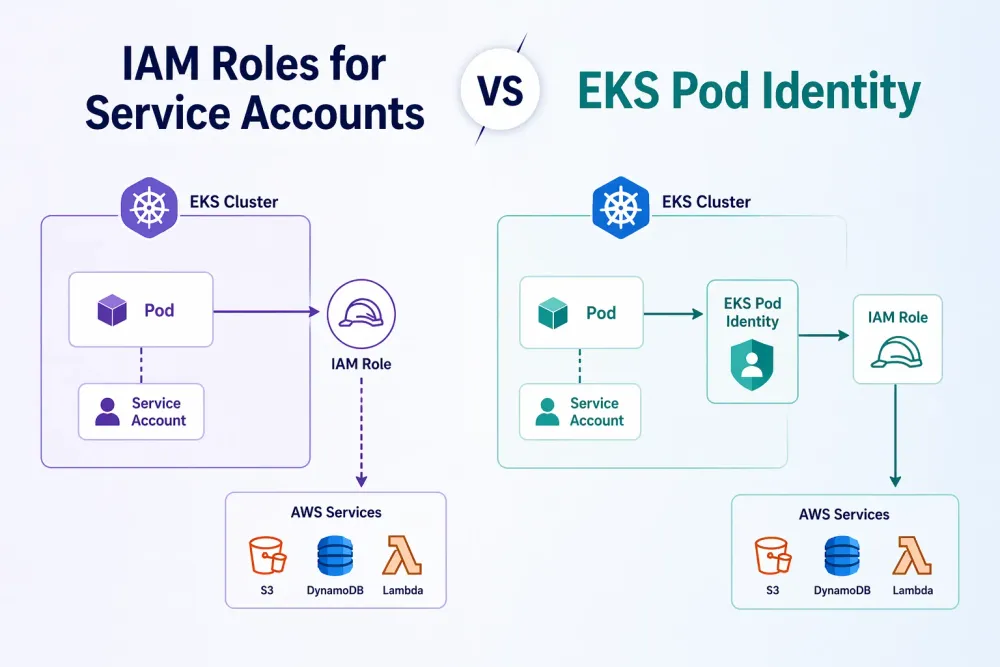
IRSA vs Pod Identity: Rethinking Workload Identity in Amazon EKS
A deep dive into architecture, security models, and Terraform implementations for secure AWS access from Kubernetes workloads

Modern cloud native applications rarely operate in isolation. A typical workload running on Amazon EKS often needs to interact with AWS services such as S3 for storage, DynamoDB for persistence, or Secrets Manager for sensitive configuration. The real challenge is not whether these workloads need access, but how to provide that access securely without relying on long lived credentials or embedded secrets. This is where AWS native identity mechanisms become important.
Over the years AWS has introduced two primary approaches to solve this problem:
- IAM Roles for Service Accounts (IRSA) is based on OIDC federation and it was introduced in 2019.
- EKS Pod Identity is a newer agent based association model introduced in 2023.
Both approaches are designed to eliminate static credentials and enforce least privilege access at the workload level. However, the way they achieve this goal is fundamentally different. Each comes with its own architectural model, operational considerations and scaling characteristics.
In this blog we will go deeper into how these mechanisms work internally, how they differ in architecture, and how to decide which one fits your platform better.
Problem Statement
In Amazon EKS, workloads often need secure access to AWS services such as S3, DynamoDB, or Secrets Manager. Without IRSA or Pod Identity, teams usually fall back to insecure or inefficient patterns:
- Node IAM roles: This is simple but risky because all pods on a node inherit the same permissions, which leads to over privileged access.
- Hardcoded credentials: This increases the risk of credential leakage and makes rotation difficult.
- Sidecar credential brokers: This improves security but adds operational complexity and extra moving parts to maintain.
As environments scale, especially across multiple clusters, these limitations become harder to manage. There is a clear need for:
- Fine grained IAM permissions per workload
- Elimination of static credentials
- Strong workload isolation
- A scalable identity model for multi cluster setups
IRSA and EKS Pod Identity were introduced to solve exactly these challenges, each with a different architectural approach.
IAM Roles for Service Accounts (IRSA)
IRSA is built on the concept of OIDC federation with AWS STS AssumeRoleWithWebIdentity. It allows Kubernetes pods to securely obtain temporary AWS credentials without storing any static secrets.
Service Account → JWT Token → AWS STS AssumeRoleWithWebIdentity → Temporary Credentials → AWS Services Access

The following is the step by step working flow of IRSA:
Step 1: EKS Cluster with OIDC Provider Setup
- An OIDC identity provider is associated with the EKS cluster
- This OIDC issuer acts as a trusted token provider for AWS IAM
- Kubernetes service accounts are mapped to IAM roles using this trust relationship
Step 2: Service Account Configuration
- A Kubernetes service account is created for the workload
- The service account is annotated with an IAM role ARN
Step 3: Pod Creation and Token Mounting
When a pod starts in Kubernetes cluster:
- Kubernetes automatically injects a projected service account token
- The token is a JWT token signed by the cluster OIDC issuer that is bound to the service account identity
- The token is mounted inside the pod filesystem
Step 4: Application Initiates AWS API Call
When application inside the pod initiates the AWS API call:
- AWS SDK detects IRSA environment variables
- It retrieves the service account JWT token from the mounted path
- The SDK prepares an authentication request to AWS STS
Step 5: AssumeRoleWithWebIdentity Call
- The pod calls AWS Security Token Service using
AssumeRoleWithWebIdentity
- The request includes OIDC JWT token and an IAM Role ARN
Step 6: AWS STS Validation Process
AWS STS performs multiple validations:
- Verifies the OIDC token signature using the registered OIDC provider
- Validates claims inside the token:
-
subensures the correct service account identity -audmust matchsts.amazonaws.com
Checks IAM trust policy conditions:
- Service account namespace and name match
- OIDC provider is trusted
Step 7: Temporary Credentials Issued
If validation succeeds AWS STS generates temporary security credentials that includes:
- Access Key ID
- Secret Access Key
- Session Token
IRSA Example Configuration
1. OIDC provider for EKS
Plain text
resource "aws_iam_openid_connect_provider" "eks" {url = aws_eks_cluster.eks.identity[0].oidc[0].issuerclient_id_list = ["sts.amazonaws.com"]}
2. IAM role
Plain text
resource "aws_iam_policy" "irsa_s3_read_policy" {name = "irsa-s3-get-object-policy"description = "Allow read access to specific S3 bucket"policy = jsonencode({Version = "2012-10-17"Statement = [{Effect = "Allow"Action = ["s3:GetObject"]Resource = ["arn:aws:s3:::my-demo-bucket/*"]}]})}resource "aws_iam_role" "irsa_role" {name = "irsa-demo-role"assume_role_policy = jsonencode({Version = "2012-10-17"Statement = [{Effect = "Allow"Principal = {Federated = aws_iam_openid_connect_provider.eks.arn}Action = "sts:AssumeRoleWithWebIdentity"Condition = {StringEquals = {"${replace(aws_iam_openid_connect_provider.eks.url, "https://", "")}:sub" = "system:serviceaccount:default:irsa-sa""${replace(aws_iam_openid_connect_provider.eks.url, "https://", "")}:aud" = "sts.amazonaws.com"}}}]})}resource "aws_iam_role_policy_attachment" "irsa_attach" {role = aws_iam_role.irsa_role.namepolicy_arn = aws_iam_policy.irsa_s3_read_policy.arn}
3. Kubernetes resources
Plain text
apiVersion: v1kind: ServiceAccountmetadata:name: irsa-sanamespace: defaultannotations:eks.amazonaws.com/role-arn: arn:aws:iam::123456789012:role/irsa-demo-role---apiVersion: v1kind: Podmetadata:name: irsa-demonamespace: defaultspec:serviceAccountName: irsa-sacontainers:- name: appimage: amazonlinux:2command:- /bin/sh- -c- |yum install -y awscli && \aws s3 cp s3://my-secure-bucket/test.txt /tmp/test.txt && \cat /tmp/test.txt && \sleep 3600
This configuration binds the
irsa-sa service account in default namespae to the irsa-demo-role , allowing only that workload to assume the role via OIDC. As a result, pods using this service account can securely fetch objects from my-demo-bucket using temporary credentials, with access strictly limited to s3:GetObject on that bucket.IRSA Pros and Cons
The following are some pros of IRSA:
- Works outside EKS : Since IRSA is based on standard OIDC federation, it is not tightly bound to EKS. You can implement the same pattern on self managed Kubernetes clusters as long as you configure an OIDC provider and establish trust with AWS IAM. This makes it a portable solution across different Kubernetes environments.
- Fine grained trust policies: IRSA allows very precise control using IAM conditions. You can restrict access based on; service account name, namespace and OIDC claims such as
subandaud. This enables strict least privilege enforcement at the workload level.
- No additional components required: IRSA does not require any agents or DaemonSets inside the cluster. It relies purely on native Kubernetes token projection and AWS STS that keeps the runtime architecture simpler.
- Direct integration with AWS IAM: Since IRSA directly uses IAM roles and policies, it integrates cleanly with existing AWS security practices such as auditing, policy management, and role based access control.
The following are some cons of IRSA:
- Requires OIDC provider setup: Before using IRSA, you must configure an IAM OIDC provider for the cluster. This is an additional step that can be error prone forenvironments with multiple clusters or strict security controls.
- Tight coupling between AWS and Kubernetes configuration: IRSA requires coordination between Kubernetes manifests (service account annotations) and AWS IAM roles and policies. This creates operational overhead because changes in one system often require updates in the other.
- Per cluster OIDC dependency: Each EKS cluster has its own OIDC issuer that causes: - Separate IAM trust relationships per cluster - Reduced reusability of IAM roles across clusters - Increased management overhead in multi cluster environments
- Debugging and observability: When something fails, debugging involves multiple layers that makes troubleshooting less straightforward compared to simpler identity models: - Kubernetes token projection - OIDC token validation - IAM trust policy conditions - STS responses
EKS Pod Identity
EKS Pod Identity is designed to simplify how Kubernetes workloads access AWS services by removing the need for OIDC federation setup and service account annotations. Instead, it introduces an EKS managed identity mapping layer along with a Pod Identity Agent running inside the cluster.
At a high level, it replaces direct OIDC based federation with an agent mediated credential flow backed by AWS STS.
Pod → Pod Identity Agent → STS AssumeRole → Temporary Credentials → AWS Services Access

The following is the step by step working flow of IRSA:
Step 1: Pod Identity Agent Deployment
- Pod Identity Agent is installed as a DaemonSet
- This agent runs with permissions to call AWS STS
- It acts as a credential broker for pods on that node
Step 2: IAM Role Creation
- An IAM role is created with a trust policy allowing
pods.eks.amazonaws.com
Step 3: Pod Identity Association
- An association is created using AWS APIs between: - EKS cluster - Kubernetes namespace - Service account - IAM role
Step 4: Application Initiates AWS API Call
Application initiate the AWS API call inside the pod:
- The AWS SDK attempts to obtain credentials
- It queries the local credential endpoint exposed by the agent
Step 5: Request Intercepted by Pod Identity Agent
- The request is intercepted by the Pod Identity Agent running on the node. The agent identifies: - Pod identity - Namespace - Service account
Step 6: Role Resolution via EKS Control Plane
- The agent communicates with EKS control plane to: - Resolve the correct IAM role for the pod - Validate the association
Step 7: STS AssumeRole Call
- The agent calls AWS STS using
AssumeRole
- The request is made on behalf of the pod.
Step 8: Temporary Credentials Issued
- AWS STS returns: - Access Key ID - Secret Access Key - Session Token
Step 9: Credentials Delivered to Pod
- The Pod Identity Agent returns credentials to the pod
- AWS SDK automatically consumes them
- The application uses these credentials to call AWS services
- Access is controlled by IAM role permissions
Pod Identity Example Configuration
1. EKS Pod Identity Agent addon
Plain text
resource "aws_eks_addon" "identity_agent" {cluster_name = "my-eks-cluster"addon_name = "eks-pod-identity-agent"addon_version = "v1.3.4-eksbuild.1"resolve_conflicts_on_create = "OVERWRITE"resolve_conflicts_on_update = "OVERWRITE"preserve = false}
2. IAM role
Plain text
resource "aws_iam_role" "pod_identity_role" {name = "pod-identity-role"assume_role_policy = jsonencode({Version = "2012-10-17"Statement = [{Effect = "Allow"Principal = {Service = "pods.eks.amazonaws.com"}Action = "sts:AssumeRole"}]})}resource "aws_iam_policy" "s3_read_policy" {name = "pod-identity-s3-read"policy = jsonencode({Version = "2012-10-17"Statement = [{Effect = "Allow"Action = ["s3:GetObject"]Resource = "arn:aws:s3:::my-secure-bucket/*"}]})}resource "aws_iam_role_policy_attachment" "attach_s3" {role = aws_iam_role.pod_identity_role.namepolicy_arn = aws_iam_policy.s3_read_policy.arn}resource "aws_eks_pod_identity_association" "example" {cluster_name = "my-eks-cluster"namespace = "default"service_account = "pi-sa"role_arn = aws_iam_role.pod_identity_role.arn}
3. Kubernetes resources
Plain text
apiVersion: v1kind: ServiceAccountmetadata:name: pi-sanamespace: default---apiVersion: v1kind: Podmetadata:name: pi-demospec:serviceAccountName: pi-sacontainers:- name: appimage: amazonlinux:2command:- /bin/sh- -c- |yum install -y awscli && \aws s3 cp s3://my-secure-bucket/test.txt /tmp/test.txt && \cat /tmp/test.txt && \sleep 3600
This configuration binds the
pi-sa **** service account in the default namespace to the pod-identity-role using EKS Pod Identity, ensuring that only this workload can assume the IAM role through the Pod Identity agent. As a result, pods using this service account can securely retrieve objects from my-secure-bucket using short-lived AWS credentials, with access strictly limited to s3:GetObject on that bucket.Pod Identity Pros and Cons
The following are some pros of Pod Identity:
- Simpler setup : Eliminates the need to configure OIDC providers, issuer URLs, and trust conditions. This reduces both setup time and the chances of subtle misconfigurations.
- Better multi-cluster scalability: IAM roles do not need per-cluster trust relationships, making it easier to reuse the same roles across multiple EKS clusters without duplication.
- Cleaner separation of concerns: Kubernetes defines who (service account), IAM defines what (permissions), and EKS handles the mapping. This makes responsibilities clearer across teams.
The following are some cons of Pod Identity:
- EKS-only feature: Works only with Amazon EKS and cannot be used in self-managed Kubernetes or other cloud environments, limiting portability.
- Requires agent add-on: Depends on the Pod Identity agent running on each node, which adds an extra component to install, monitor, and maintain.
- Slightly less transparent flow: Credential exchange is handled internally by the agent, so the exact flow is less visible compared to IRSA’s explicit token-based process.
IRSA vs Pod Identity

Migration Strategy (IRSA → Pod Identity)
- Inventory existing IRSA usage
Plain text
kubectl get sa -A -o jsonpath='{range .items[*]}{.metadata.namespace}{" "}{.metadata.name}{" "}{.metadata.annotations.eks\.amazonaws\.com/role-arn}{"\n"}{end}'
- Install Pod Identity agent add-on
Plain text
aws eks create-addon \- cluster-name <CLUSTER-NAME> \- addon-name eks-pod-identity-agent
- Verify add-on is active
Plain text
aws eks describe-addon \- cluster-name <CLUSTER-NAME> \- addon-name eks-pod-identity-agent
- Create IAM role for Pod Identity (trust pods.eks.amazonaws.com): Update trust policy to allow:
Plain text
"Principal": { "Service": "pods.eks.amazonaws.com" }
- Attach required IAM policies : Ensure required permissions are attached to the role. For example: s3:GetObject.
- Create Pod Identity association (SA → IAM role)
Plain text
aws eks create-pod-identity-association \- cluster-name <CLUSTER-NAME> \- namespace <NAMESPACE-NAME> \- service-account <SERVICE-ACCOUNT>\- role-arn <ROLE-ARN>
- Test with a sample pod
Plain text
kubectl run test-pod - image=amazonlinux:2 - serviceaccount=my-sa - sleep 3600kubectl exec -it test-pod - aws sts get-caller-identity
- Remove IRSA annotation from ServiceAccount
Plain text
eks.amazonaws.com/role-arn: <REMOVE>
- Restart workloads to pick new identity
Plain text
kubectl rollout restart deployment <APP-NAME>
- Validate application access : Confirm no AccessDenied and correct role usage.
- Gradually repeat for all workloads: Migrate service by service to avoid impact.
- Cleanup IRSA: - Remove unused IAM roles - Delete OIDC provider
Conclusion
IRSA and EKS Pod Identity both solve the same core problem of giving Kubernetes workloads secure access to AWS services without using static credentials. IRSA is a mature and flexible approach based on OIDC that works across different environments, but it comes with higher setup and operational complexity. Pod Identity simplifies this by removing OIDC and using an agent-based model, making it easier to manage and scale within EKS.
The right choice depends on your needs. If portability and standards-based identity are important, IRSA is a strong option. If you want a simpler and more scalable solution within EKS, Pod Identity is a better fit. Understanding both approaches helps you design a secure and maintainable access model for your workloads.
Happy Learning!!!
Enjoyed reading this content? Let the author know!
Your likes, comments, shares, and saves help creators reach more builders.

Loading recommendations
Loading article