
I Used an AI Agent to Run My LLM Training Experiments
I taught my AI agent to read training alerts, kill diverging runs, and find the optimal learning rate - all without me touching the keyboard.

I Used an AI Agent to Run My LLM Training Experiments
What if an AI agent could do the tedious part of hyperparameter tuning for you - launch experiments, watch the metrics, kill bad runs, and converge on the best config?
We'll train a GPT from scratch, wire up smart alerts that detect diverging runs, and let an AI agent drive the whole loop. Copy-paste, run, done - under 2 minutes on your laptop.
📋 This tutorial assumes basic PyTorch knowledge. No GPU or cloud account needed.
⚡ Want to skip the walkthrough? The complete, runnable script is in the Complete Code section at the bottom. The steps below explain how it works.
🏛️ How It All Fits Together
Before diving into code, here's the architecture:
1
2
3
4
5
6
7
8
9
10
11
12
13
14
15
16
17
18
19
20
21
22
23
24
25
26
┌─────────────────────────────────────────────────────────┐
│                    AI CODING AGENT                       │
│           (Kiro / Claude Code / Cursor)                 │
│                                                         │
│  "Try LR=1.0" ──→ reads terminal ──→ sees TRACKIO ERROR│
│  "Try LR=0.1" ──→ reads terminal ──→ sees TRACKIO ERROR│
│  "Try LR=0.01" ─→ reads terminal ──→ no errors ✅      │
│  "Report: best LR = 0.01, val_loss = 2.11"             │
└────────────┬────────────────────────────┬───────────────┘
             │                            │
             ▼                            ▼
┌────────────────────┐      ┌─────────────────────────┐
│   train.py         │      │   Trackio Dashboard     │
│                    │      │   http://127.0.0.1:7860 │
│ • TinyGPT model    │      │                         │
│ • trackio.log()    │─────→│ • Live loss curves      │
│ • trackio.alert()  │      │ • Alert timeline        │
│                    │      │ • Run comparison         │
└────────────────────┘      └─────────────────────────┘
         │
         ▼ (optional)
┌────────────────────┐
│  Hugging Face Jobs │
│  (cloud GPU)       │
│  hf jobs uv run .. │
└────────────────────┘
The trick isn't making the agent smarter. It's making your training script speak the agent's language - structured alerts instead of raw log streams.
🧰 The Stack
| Tool | Role |
|---|---|
| 🧠 AI Coding Agent (Kiro, Claude Code, etc.) | The "researcher" brain - reads alerts, decides next experiment |
| 📊 Trackio | Free, local-first experiment tracking with structured alerts and JSON CLI |
| 🚀 Hugging Face Jobs (optional) | Cloud GPU compute - pay-per-second, one-liner launch |
> 💡 For this tutorial, everything runs locally on CPU. Zero cost.
How is this different from Optuna or Ray Tune?
Those are great for systematic hyperparameter optimization (grid search, Bayesian, etc.). This is a different workflow: giving an AI coding agent the ability to run experiments the way a human researcher would - try something, watch what happens, adjust. The alert-based pattern works for any experiment, not just parameter sweeps. The agent can also modify the code itself (try a different optimizer, change the architecture) - something HPO frameworks can't do.
🎯 The Problem
Hyperparameter tuning looks like this:
1
2
3
4
5
6
7
1. Pick a learning rate
2. Launch training
3. Stare at logs for 10 minutes
4. Realize it's diverging
5. Ctrl+C
6. Pick a new learning rate
7. Repeat until you lose the will to live
What if an AI agent did steps 1–7 for you? That's what we're building.
🔑 The Key Insight: Alerts as Domain Knowledge
Instead of making the AI agent parse raw loss numbers from streaming logs (expensive, error-prone, token-heavy), we bake our domain knowledge into the script:
> "If validation loss goes up 3 times → this learning rate is too high. Fire an alert."
The agent just watches for
[TRACKIO ERROR] in the terminal. Simple, reliable, cheap. Sending raw loss numbers to an LLM eats up its context window. A single alert line costs almost nothing.📦 Step 1: Install Dependencies
You need Python 3.10+ and uv (the fast Python package manager).
1
2
3
4
5
6
7
8
# macOS / Linux
curl -LsSf https://astral.sh/uv/install.sh | sh

# Windows (PowerShell)
powershell -c "irm https://astral.sh/uv/install.ps1 | iex"

# Or via pip on any OS
pip install uv
That's it. No virtual env setup needed -
uv run handles everything inline.🏗️ Step 2: The Model + Data
We'll train a tiny GPT - a 2-layer, 64-dimensional character-level transformer on Shakespeare. Small enough to train on CPU in ~30 seconds, but real enough to show learning rate sensitivity.
| Parameter | Value | Why |
|---|---|---|
| Layers | 2 | Fast to train, still shows LR sensitivity |
| Embedding dim | 64 | Tiny but functional |
| Heads | 4 | Standard ratio (dim/heads = 16) |
| Block size | 64 | Short context, fast batches |
| Dataset | Tiny Shakespeare (~1MB) | Auto-downloads, no setup |
1
2
3
4
5
6
7
8
9
10
11
12
13
14
15
16
17
18
19
20
21
22
23
24
25
26
import torch
import torch.nn as nn

class TinyGPT(nn.Module):
    def __init__(self, vocab_size, n_embd=64, n_head=4, n_layer=2, block_size=64):
        super().__init__()
        self.block_size = block_size
        self.tok_emb = nn.Embedding(vocab_size, n_embd)
        self.pos_emb = nn.Embedding(block_size, n_embd)
        layer = nn.TransformerEncoderLayer(
            d_model=n_embd, nhead=n_head, dim_feedforward=n_embd * 4,
            dropout=0.0, batch_first=True,
        )
        self.transformer = nn.TransformerEncoder(layer, num_layers=n_layer)
        self.ln_f = nn.LayerNorm(n_embd)
        self.head = nn.Linear(n_embd, vocab_size, bias=False)

    def forward(self, idx):
        B, T = idx.shape
        tok = self.tok_emb(idx)
        pos = self.pos_emb(torch.arange(T, device=idx.device))
        x = tok + pos
        mask = torch.triu(torch.ones(T, T, device=idx.device), diagonal=1).bool()
        x = self.transformer(x, mask=mask)
        x = self.ln_f(x)
        return self.head(x)
The dataset auto-downloads on first run from Karpathy's char-rnn repo. Character-level tokenization keeps things simple - see the full script at the bottom for the
load_data() and get_batch() functions.📊 Step 3: The Training Loop with Trackio
We integrate three Trackio features into a standard PyTorch training loop:
| Trackio Feature | What It Does | Why It Matters for Agents |
|---|---|---|
trackio.init() | Creates a tracked run with config | Agent can query configs later |
trackio.log() | Logs metrics each step | Streams to dashboard in real-time |
trackio.alert() | 🚨 Fires structured alerts | Agent reads these to decide: kill or continue |
1
2
3
4
5
6
7
8
9
10
11
12
13
14
15
16
17
18
19
20
21
22
23
24
25
26
27
28
29
30
31
32
33
34
35
36
37
38
39
40
41
42
43
44
45
46
47
48
49
50
51
52
53
54
55
56
57
58
59
60
61
62
63
64
65
66
67
68
69
70
71
72
73
74
75
76
77
78
79
80
81
import trackio
from torch.nn import functional as F

def train(learning_rate: float, max_steps: int = 300, val_interval: int = 25):
    device = "cuda" if torch.cuda.is_available() else "cpu"
    block_size, batch_size = 64, 32

    train_data, val_data, vocab_size, stoi = load_data(block_size)
    model = TinyGPT(vocab_size).to(device)
    optimizer = torch.optim.AdamW(model.parameters(), lr=learning_rate)

    # ✅ 1. Initialize Trackio run
    trackio.init(
        project="nanogpt-lr-search",
        name=f"lr-{learning_rate}",
        config={
            "learning_rate": learning_rate,
            "max_steps": max_steps,
            "model": "TinyGPT-64d-2L",
            "dataset": "tinyshakespeare",
        },
    )

    prev_val_loss = None
    # Note: this counter never resets - a more robust approach would
    # track consecutive increases or use a moving average.
    val_loss_increases = 0

    try:
        for step in range(max_steps):
            model.train()
            xb, yb = get_batch(train_data, block_size, batch_size)
            xb, yb = xb.to(device), yb.to(device)
            logits = model(xb)
            loss = F.cross_entropy(logits.view(-1, vocab_size), yb.view(-1))
            optimizer.zero_grad()
            loss.backward()
            optimizer.step()

            # ✅ 2. Log training metrics
            trackio.log({"train/loss": loss.item(), "train/lr": learning_rate})

            # Validation every N steps
            if step % val_interval == 0 and step \> 0:
                model.eval()
                val_losses = []
                with torch.no_grad():
                    for _ in range(5):
                        xv, yv = get_batch(val_data, block_size, batch_size)
                        xv, yv = xv.to(device), yv.to(device)
                        vloss = F.cross_entropy(model(xv).view(-1, vocab_size), yv.view(-1))
                        val_losses.append(vloss.item())
                val_loss = sum(val_losses) / len(val_losses)

                trackio.log({"val/loss": val_loss})

                # ✅ 3. Alert if validation loss increases
                if prev_val_loss is not None and val_loss \> prev_val_loss:
                    val_loss_increases += 1
                    trackio.alert(
                        title="Validation loss increased",
                        text=f"Val loss: {prev_val_loss:.4f} -\> {val_loss:.4f} "
                             f"at step {step} (lr={learning_rate})",
                        level=trackio.AlertLevel.WARN,
                    )

                    # 3 strikes and you're out
                    if val_loss_increases \>= 3:
                        trackio.alert(
                            title="Training unstable - terminating",
                            text=f"Val loss increased {val_loss_increases}x. "
                                 f"LR {learning_rate} too high.",
                            level=trackio.AlertLevel.ERROR,
                        )
                        return False  # ❌ Unstable

                prev_val_loss = val_loss

        return True  # ✅ Stable
    finally:
        trackio.finish()  # Always cleanup, even on exceptions
🔄 Step 4: The Autonomous Search Loop
Tries learning rates from high to low, stopping at the first stable one:
1
2
3
4
5
6
7
8
9
10
11
12
13
14
15
16
17
def lr_search():
    learning_rates = [1.0, 0.1, 0.01, 0.001]

    print("=" * 50)
    print("  Autonomous Learning Rate Search")
    print("=" * 50)

    for lr in learning_rates:
        print(f"\n\>\>\> Testing LR = {lr}")
        stable = train(learning_rate=lr, max_steps=300, val_interval=25)

        if stable:
            print(f"\n✓ First stable LR found: {lr}")
            return lr

    print("\nNo stable LR found.")
    return None
> Note: this finds the highest stable learning rate, not necessarily the optimal one. For true optimization, you'd compare final val losses across all stable runs. But for a quick search, "first stable from the top" is a solid heuristic.
🚀 Step 5: Run It
Option A: Just run the search
1
uv run --with trackio --with torch python train.py --search
Option B: Run with live dashboard (recommended 🔥)
Open two terminals:
1
2
# Terminal 1 - Launch the dashboard
uv run --with trackio trackio show --project "nanogpt-lr-search"
1
2
# Terminal 2 - Run the training
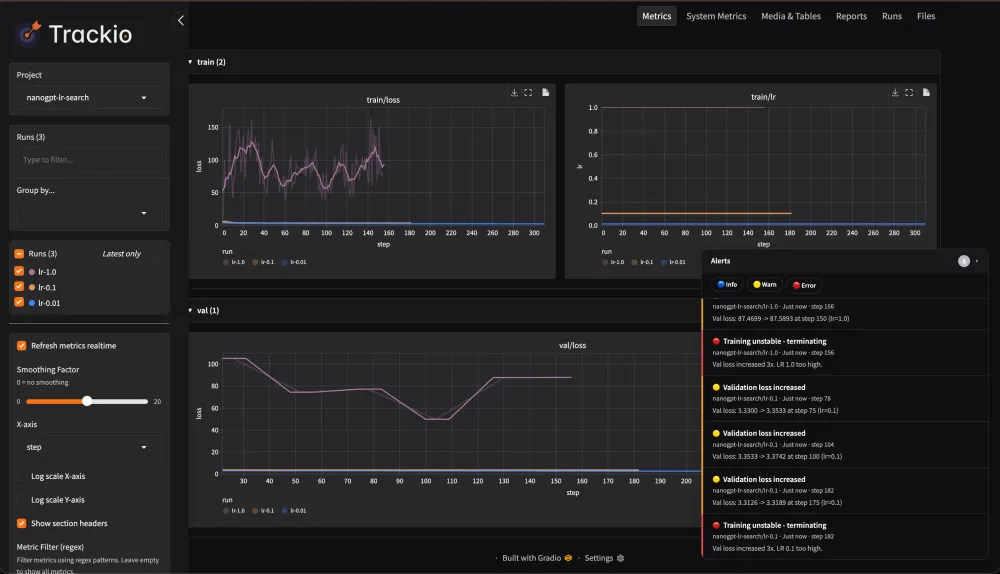
uv run --with trackio --with torch python train.py --searchThen open http://127.0.0.1:7860 in your browser. You'll see metrics streaming in real-time as each run progresses.
> 💡 The full search (4 learning rates) takes ~2 minutes on a modern laptop CPU.
<!-- 📸 TODO: Add a screenshot of the Trackio dashboard showing all 3 runs overlaid -->
📈 Step 6: The Results
Here's what actually happened when I ran this:
| LR | Steps Before Termination | Final Val Loss | Alerts Fired | Outcome |
|---|---|---|---|---|
| 🔴 1.0 | ~175 | 85.38 | 3 WARN + 1 ERROR | Terminated - loss exploded |
| 🟡 0.1 | ~175 | 3.32 | 3 WARN + 1 ERROR | Terminated - loss oscillating |
| 🟢 0.01 | 300 (complete) | 2.11 | 0 | ✅ Stable training |
| ⚪ 0.001 | (not needed) | - | - | Skipped - 0.01 already worked |
Terminal Output (actual)
1
2
3
4
5
6
7
8
9
10
11
12
13
14
15
16
17
18
19
20
21
22
23
24
25
26
==================================================
  Autonomous Learning Rate Search
==================================================

\>\>\> Testing LR = 1.0
  step    0 | train_loss: 4.3287
  step   25 | val_loss:   170.5540
  step  100 | val_loss:   77.9265
[TRACKIO WARN] Validation loss increased: Val loss: 74.2645 -\> 77.9265
[TRACKIO WARN] Validation loss increased: Val loss: 71.0552 -\> 85.3800
[TRACKIO ERROR] Training unstable - terminating: Val loss increased 3x. LR 1.0 too high.
  [TERMINATE] LR 1.0 unstable after 3 increases

\>\>\> Testing LR = 0.1
  step    0 | train_loss: 4.3450
  step   75 | val_loss:   3.3964
[TRACKIO WARN] Validation loss increased: Val loss: 3.3699 -\> 3.3964
[TRACKIO ERROR] Training unstable - terminating: Val loss increased 3x. LR 0.1 too high.
  [TERMINATE] LR 0.1 unstable after 3 increases

\>\>\> Testing LR = 0.01
  step    0 | train_loss: 4.3131
  step  275 | val_loss:   2.1395
  [DONE] LR 0.01 completed 300 steps

✓ First stable LR found: 0.01
🔍 Step 7: Query Results Programmatically
An AI agent (or you) can query results via the Trackio CLI - this is what makes it "LLM-friendly" (structured JSON output that agents parse trivially):
1
2
# Get all alerts
trackio get alerts --project "nanogpt-lr-search" --json
1
2
3
4
5
6
7
8
9
10
11
{
"alerts": [
{
"run": "lr-1.0",
"title": "Training unstable - terminating",
"text": "Val loss increased 3x. LR 1.0 too high.",
"level": "error",
"step": 182
}
]
}1
2
# Get validation loss for the winning run
trackio get metric --project "nanogpt-lr-search" --run "lr-0.01" --metric "val/loss" --json1
2
3
4
5
6
7
8
9
10
11
{
"run": "lr-0.01",
"metric": "val/loss",
"values": [
{"step": 26, "value": 2.688},
{"step": 52, "value": 2.538},
{"step": 130, "value": 2.383},
{"step": 208, "value": 2.207},
{"step": 286, "value": 2.139}
]
}☁️ Going Further: Scale to Cloud GPUs
Everything above runs locally. When you're ready to train real models, swap to Hugging Face Jobs:
1
2
3
4
5
6
7
hf jobs uv run \
    --flavor a100-large \
    --timeout 6h \
    --with trackio \
    --with torch \
    --secrets HF_TOKEN \
train.py --search| Flag | What It Does |
|---|---|
--flavor a100-large | Picks the GPU (A100 80GB) |
--timeout 6h | Max runtime (you pay per second) |
--secrets HF_TOKEN | Passes your HF token securely (not in shell history) |
To send metrics to a remote dashboard, add
space_id to trackio.init():1
2
3
4
5
6
trackio.init(
project="nanogpt-lr-search",
name=f"lr-{learning_rate}",
space_id="your-username/nanogpt-experiments", # 👈 add this
config={...},
)This auto-creates a free Hugging Face Space with a live dashboard you can share with anyone.
> ⚠️ Note: if your HF Space is public, anyone with the URL can see your metrics.
🧠 Going Further: Let the AI Agent Drive
Here's the prompt you'd give your AI coding agent:
1
2
3
4
5
6
7
8
9
10
You are an autonomous ML researcher. Your goal is to find the optimal
learning rate for training a GPT model.

1. Run train.py with learning rates: 1.0, 0.5, 0.1, 0.01, 0.001
2. After each run, check the trackio alerts:
   - If you see "[TRACKIO ERROR]" → the LR is too high, move to the next one
   - If the run completes with no errors → that's the best LR
3. Use: uv run --with trackio --with torch python train.py --lr \<value\>
4. After finding the best LR, report the final val/loss by running:
   trackio get metric --project "nanogpt-lr-search" --run "lr-\<best\>" --metric "val/loss" --json
The agent reads terminal output, sees
[TRACKIO WARN] and [TRACKIO ERROR] prefixes, and makes decisions. No log parsing. No token-heavy metric streaming. Just structured alerts.🔮 What to Try Next
| Experiment | What to Change | Difficulty |
|---|---|---|
| Optimizer search | Try SGD, Adam, AdamW, Lion | Easy - swap torch.optim |
| Batch size sweep | Test 16, 32, 64, 128 | Easy - add to config |
| Architecture search | Vary layers (1–6), dims (32–256) | Medium |
| Custom optimizer | Write a new optimizer, let the agent test it | Advanced |
| Parallel runs | Launch multiple HF Jobs simultaneously | Advanced |
The training script stays the same. You just change what the agent is told to search over.
📋 Complete Code
Here's the full
train.py - copy, paste, run:1
2
3
4
5
6
7
8
9
10
11
12
13
14
15
16
17
18
19
20
21
22
23
24
25
26
27
28
29
30
31
32
33
34
35
36
37
38
39
40
41
42
43
44
45
46
47
48
49
50
51
52
53
54
55
56
57
58
59
60
61
62
63
64
65
66
67
68
69
70
71
72
73
74
75
76
77
78
79
80
81
82
83
84
85
86
87
88
89
90
91
92
93
94
95
96
97
98
99
100
101
102
103
104
105
106
107
108
109
110
111
112
113
114
115
116
117
118
119
120
121
122
123
124
125
126
127
128
129
130
131
132
133
134
135
136
137
138
139
140
141
142
143
144
145
146
147
148
149
150
151
152
153
154
155
156
157
158
159
160
161
162
163
164
165
166
167
168
169
170
171
172
173
174
175
176
"""
Minimal GPT training with Trackio alerts for autonomous LR search.
Trains a tiny transformer on Shakespeare - runs in ~30s per run on CPU.
Usage:
uv run --with trackio --with torch python train.py --search
uv run --with trackio --with torch python train.py --lr 0.01 --steps 500
"""
import trackio
import torch
import torch.nn as nn
from torch.nn import functional as F
import argparse
import urllib.request
import os
# ---- Model ----
class TinyGPT(nn.Module):
def __init__(self, vocab_size, n_embd=64, n_head=4, n_layer=2, block_size=64):
super().__init__()
self.block_size = block_size
self.tok_emb = nn.Embedding(vocab_size, n_embd)
self.pos_emb = nn.Embedding(block_size, n_embd)
layer = nn.TransformerEncoderLayer(
d_model=n_embd, nhead=n_head, dim_feedforward=n_embd * 4,
dropout=0.0, batch_first=True,
)
self.transformer = nn.TransformerEncoder(layer, num_layers=n_layer)
self.ln_f = nn.LayerNorm(n_embd)
self.head = nn.Linear(n_embd, vocab_size, bias=False)
def forward(self, idx):
B, T = idx.shape
tok = self.tok_emb(idx)
pos = self.pos_emb(torch.arange(T, device=idx.device))
x = tok + pos
mask = torch.triu(torch.ones(T, T, device=idx.device), diagonal=1).bool()
x = self.transformer(x, mask=mask)
x = self.ln_f(x)
return self.head(x)
# ---- Data ----
def load_data(block_size=64):
data_path = os.path.join(os.path.dirname(__file__), "shakespeare.txt")
if not os.path.exists(data_path):
url = "https://raw.githubusercontent.com/karpathy/char-rnn/master/data/tinyshakespeare/input.txt"
print("Downloading Shakespeare dataset...")
urllib.request.urlretrieve(url, data_path)
with open(data_path, "r") as f:
text = f.read()
chars = sorted(set(text))
stoi = {c: i for i, c in enumerate(chars)}
encode = lambda s: [stoi[c] for c in s]
data = torch.tensor(encode(text), dtype=torch.long)
n = int(0.9 * len(data))
return data[:n], data[n:], len(chars), stoi
def get_batch(data, block_size=64, batch_size=32):
ix = torch.randint(len(data) - block_size, (batch_size,))
x = torch.stack([data[i:i+block_size] for i in ix])
y = torch.stack([data[i+1:i+1+block_size] for i in ix])
return x, y
# ---- Training with Trackio ----
def train(learning_rate: float, max_steps: int = 300, val_interval: int = 25):
device = "cuda" if torch.cuda.is_available() else "cpu"
block_size, batch_size = 64, 32
train_data, val_data, vocab_size, stoi = load_data(block_size)
model = TinyGPT(vocab_size).to(device)
optimizer = torch.optim.AdamW(model.parameters(), lr=learning_rate)
trackio.init(
project="nanogpt-lr-search",
name=f"lr-{learning_rate}",
config={
"learning_rate": learning_rate,
"max_steps": max_steps,
"model": "TinyGPT-64d-2L",
"dataset": "tinyshakespeare",
"block_size": block_size,
"batch_size": batch_size,
"device": device,
},
)
prev_val_loss = None
val_loss_increases = 0 # Note: cumulative, not consecutive
try:
for step in range(max_steps):
model.train()
xb, yb = get_batch(train_data, block_size, batch_size)
xb, yb = xb.to(device), yb.to(device)
logits = model(xb)
loss = F.cross_entropy(logits.view(-1, vocab_size), yb.view(-1))
optimizer.zero_grad()
loss.backward()
optimizer.step()
trackio.log({"train/loss": loss.item(), "train/lr": learning_rate})
if step % 50 == 0:
print(f" step {step:4d} | train_loss: {loss.item():.4f}")
if step % val_interval == 0 and step \> 0:
model.eval()
val_losses = []
with torch.no_grad():
for _ in range(5):
xv, yv = get_batch(val_data, block_size, batch_size)
xv, yv = xv.to(device), yv.to(device)
vloss = F.cross_entropy(model(xv).view(-1, vocab_size), yv.view(-1))
val_losses.append(vloss.item())
val_loss = sum(val_losses) / len(val_losses)
trackio.log({"val/loss": val_loss})
print(f" step {step:4d} | val_loss: {val_loss:.4f}")
if prev_val_loss is not None and val_loss \> prev_val_loss:
val_loss_increases += 1
trackio.alert(
title="Validation loss increased",
text=f"Val loss: {prev_val_loss:.4f} -\> {val_loss:.4f} at step {step} (lr={learning_rate})",
level=trackio.AlertLevel.WARN,
)
if val_loss_increases \>= 3:
trackio.alert(
title="Training unstable - terminating",
text=f"Val loss increased {val_loss_increases}x. LR {learning_rate} too high.",
level=trackio.AlertLevel.ERROR,
)
print(f" [TERMINATE] LR {learning_rate} unstable after {val_loss_increases} increases")
return False
prev_val_loss = val_loss
print(f" [DONE] LR {learning_rate} completed {max_steps} steps")
return True
finally:
trackio.finish()
# ---- Autonomous search ----
def lr_search():
learning_rates = [1.0, 0.1, 0.01, 0.001]
print("=" * 50)
print(" Autonomous Learning Rate Search")
print("=" * 50)
for lr in learning_rates:
print(f"\n\>\>\> Testing LR = {lr}")
stable = train(learning_rate=lr, max_steps=300, val_interval=25)
if stable:
print(f"\n✓ First stable LR found: {lr}")
return lr
print("\nNo stable LR found.")
return None
if __name__ == "__main__":
parser = argparse.ArgumentParser(description="Autonomous LR search with Trackio alerts")
parser.add_argument("--lr", type=float, default=None, help="Single LR to test")
parser.add_argument("--steps", type=int, default=300, help="Max training steps")
parser.add_argument("--search", action="store_true", help="Run autonomous LR search")
args = parser.parse_args()
if args.search:
lr_search()
elif args.lr is not None:
train(learning_rate=args.lr, max_steps=args.steps)
else:
parser.print_help()Troubleshooting
uvnot found after install? Restart your terminal or runsource ~/.bashrc/source ~/.zshrc.- Port 7860 already in use? The dashboard will auto-pick the next available port.
- First run is slow?
uvdownloads torch (~2GB) on first run. Subsequent runs use the cache. - Want to clear old runs? Delete
~/.cache/huggingface/trackio/and start fresh. - Version issues? Pin deps:
uv run --with "trackio\>=0.10" --with "torch\>=2.0" python train.py --search
🏁 TL;DR
| What | How |
|---|---|
| Train a GPT from scratch | TinyGPT on Shakespeare, 300 steps |
| Track experiments | trackio.init() + trackio.log() |
| Detect bad runs | trackio.alert() when val loss increases |
| Auto-terminate | Agent reads [TRACKIO ERROR], kills run |
| Live dashboard | trackio show --project "nanogpt-lr-search" |
| Scale to cloud | hf jobs uv run --flavor a100-large train.py |
Two commands. One script. An AI agent that does the boring part of hyperparameter tuning for you.
Enjoyed reading this content? Let the author know!
Your likes, comments, shares, and saves help creators reach more builders.

Loading recommendations
Loading article