
Agent skills and CLI tools: ditch the MCP overhead
Agent skills and CLI-based tool configurations let you connect your AI coding assistant to Jira, GitHub, Slack, and more — saving tokens, reducing context overhead, and eliminating the need for MCP servers in most everyday workflows.

If you've been running Model Context Protocol (MCP) servers to connect your AI coding assistant to Jira, Slack, or your incident management tools, you know the cost: more infrastructure, more context overhead, and more things that can break.
Agent skills and CLI-based tool configurations give you a faster path. You can wire your assistant to the tools your team uses every day — directly from your project, without spinning up a separate server.
What are agent skills?
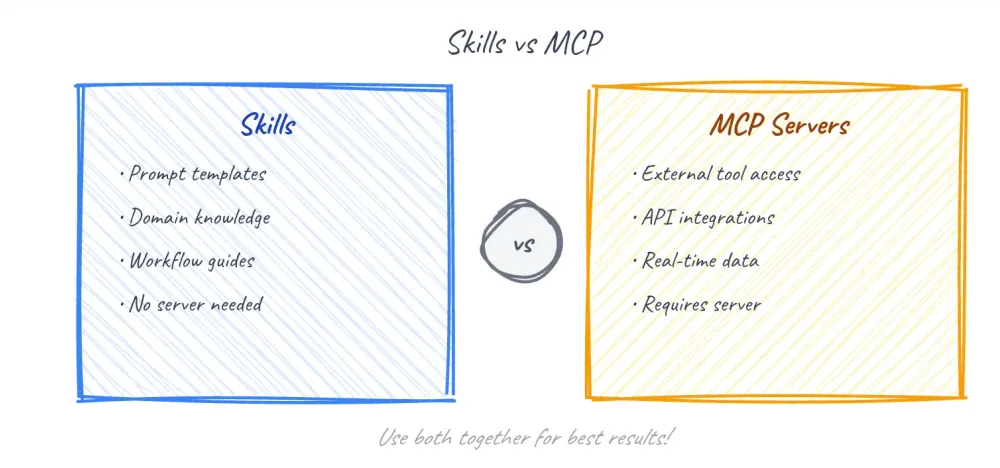
Agent skills are project-scoped tool definitions that your AI coding assistant reads directly from your repository. You define what the tool does, how to call it, and what parameters it accepts. The assistant uses that definition at inference time — no server required.
Each skill lives in its own folder and is defined by a
SKILL.md file — a Markdown file with YAML frontmatter that tells your assistant what the skill does and when to use it. The assistant loads only the compact skill metadata at session start — the full instructions load on demand, when the skill is actually needed. This is fundamentally different from MCP, where all tool definitions load into context regardless of whether you use them.You can also provide project-level context and assistant behavior instructions in a configuration file in your project root. Common options include:
-
CLAUDE.md— the project-level context file for Claude Code, used to define project context and assistant behavior
-
.kiro/— the configuration directory used by Kiro for spec-driven agent workflows
-
.cursorrules— the configuration file used by Cursor to define assistant behavior and tool access
-
.github/copilot-instructions.md— the configuration file used by GitHub Copilot for project-level instructions
-
AGENTS.md— a general-purpose configuration file recognized by several AI coding assistants
The MCP tradeoffs developers run into
MCPs work well for some use cases, but they introduce real friction — especially when working with large data payloads. Here's where they struggle:
- Context window bloat — MCP tool definitions consume context space before your assistant has done any work
- No streaming or polling support — MCPs aren't designed for integrations that require continuous data flow or periodic checks
- Unfiltered tool results — large payloads from tool responses go directly into the context window with no processing step
- No result transformation — you can't filter, reshape, or summarize tool output before it reaches your assistant
- No local filesystem access — Remote MCPs operate over a network boundary and can't interact with local files directly (not the case when using built-in tools or a locally running MCP server)
A custom CLI solves all of these problems. The challenge has always been teaching your coding agent to use it reliably.
Agent skills change that. You can now teach your coding assistant to be an expert user of your custom CLI — defining exactly how to call it, what parameters it accepts, and how to interpret the output. Skills augment your assistant's capabilities without the overhead that MCPs introduce.
Two examples to get you started
Jira ticket creation
The following Bash function creates a Jira issue using the Jira REST API:
Bash
# Create a Jira issue in the specified project.jira-create() {curl -X POST \-H "Content-Type: application/json" \-u "$JIRA_USER:$JIRA_API_TOKEN" \--data "{\"fields\": {\"project\": { \"key\": \"$1\" },\"summary\": \"$2\",\"issuetype\": { \"name\": \"Task\" }}}" \"https://$JIRA_DOMAIN.atlassian.net/rest/api/2/issue"}
Set
JIRA_USER , JIRA_API_TOKEN , and JIRA_DOMAIN as environment variables before running this function.GitHub pull request creation
The following command uses the GitHub CLI to open a pull request from your current branch:
Bash
# Open a pull request against the main branch.gh-pr() {gh pr create \--title "$1" \--body "$2" \--base main}
More integrations that follow the same pattern
The CLI skill pattern works across a wide range of developer tools. You can apply the same approach to:
- Slack — post messages to channels using an incoming webhook and a
curlcall
- PagerDuty — trigger incidents via the Events API using a routing key
- Linear — create issues using the GraphQL API with a lightweight
curlwrapper
- Datadog — send custom metrics to the REST API using your Datadog API key
Each integration follows the same structure: a shell function wrapping a
curl call, described in a SKILL.md file inside a named skill folder. Your assistant loads only the compact skill metadata at session start — the full instructions load on demand, when the skill is actually needed.Skills beyond integrations
It's worth stepping back from the MCP comparison for a moment, because skills aren't only for connecting to external tools.
Consider a skill that generates presentations in your organization's style — pulling in the right color palette, slide structure, and tone automatically. This has nothing to do with MCPs. You'd never push something like that to a shared server, and you wouldn't want to. It's personal, it's opinionated, and it reflects how you work.
That's exactly what skills are built for. You define the skill once — in a
SKILL.md file in your skills directory — and your assistant becomes an expert at that task. It knows your preferred structure, your formatting conventions, and when to apply them. No infrastructure, no server, no sharing required unless you choose to.Skills you build for yourself might include:
- Presentation generation — create slides in your team's style from a brief or outline
- Code review templates — apply your team's review checklist to any pull request
- Meeting prep — generate an agenda and background doc from a calendar invite
- Status update drafts — turn a list of completed tasks into a formatted weekly update
These personal skills travel with you across projects, load only when relevant, and cost you nothing in context overhead when you're not using them. They're the part of the skills story that has nothing to do with MCPs — and everything to do with how you actually work day to day.
When MCPs still make sense
Agent skills work well for stateless, script-friendly integrations. MCPs remain the right choice when you need:
- Persistent connections or session state
- Complex authentication flows that don't fit a CLI pattern
- Shared tooling across multiple projects or teams
- Real-time bidirectional communication
What this means for your workflow?
This is where the real shift happens.
For most day-to-day developer tasks — creating a ticket, opening a pull request, triggering an alert, or posting a status update — you no longer need a running MCP server. You define the skill once, commit it to your repo, and your assistant has access every time it opens your project.
That means less infrastructure to maintain, less context consumed by protocol overhead, and fewer moving parts between you and the task you're trying to complete. Your assistant stays focused on your code, not on managing connections.
For teams using Claude Code, Kiro, Cursor, or GitHub Copilot, this pattern is already available today. You can start with a single integration — a Jira ticket or a pull request — and expand from there. The configuration lives in your repository, travels with your code, and works the same way for every developer on your team.
This is a meaningful change in how AI-assisted development works in practice. The overhead that once made MCP servers feel necessary for common integrations is now optional for most workflows. For everyday developer work, agent skills are the simpler, faster, and more portable choice.
Try defining one skill in your next project and see how it changes your day. Share your experience in the comments below.
Prerequisites
Before you get started, make sure you have the following:
- A terminal with Bash or a compatible shell
-
curlinstalled (version 7.68 or later)
- API credentials for the tools you want to integrate
- A
CLAUDE.mdfile (or equivalent configuration file) in your project root
- An AI coding assistant that supports agent skills (Claude Code, Kiro, Cursor, or GitHub Copilot)
Next steps
- Review the agent skills documentation for your AI coding assistant
- Explore the GitHub CLI documentation for additional automation options
- Review the Jira REST API documentation for full issue management options
- Share feedback on what integrations matter most to your team
Enjoyed reading this content? Let the author know!
Your likes, comments, shares, and saves help creators reach more builders.

Loading recommendations
Loading article