
Local Observability for Amazon Bedrock and Strands Agents with SideSeat
SideSeat is a local, OpenTelemetry-native development workbench for Amazon Bedrock and Strands Agents. It captures every model invocation, tool call, loop iteration, and response in real time, with full message content, token counts, latency, and cost. This guide shows how to instrument Bedrock and Strands in minutes, inspect traces at full fidelity and connect Claude Code or Kiro CLI via MCP so your coding agent can reason from actual execution history instead of your description of it.

When you build AI systems on Amazon Bedrock, most failures are not infrastructure failures. They are reasoning errors, tool orchestration mistakes, prompt regressions, or subtle context drift.
Traditional logs do not explain those failures.
SideSeat is a local, OpenTelemetry-native development workbench for Amazon Bedrock and Strands Agents. It captures every model invocation, tool call, loop iteration, and response in real time, with full message content, token counts, latency, and cost.
No accounts. No external telemetry. Your prompts and data remain on your machine.
This guide shows how to instrument Bedrock and Strands in minutes, inspect traces at full fidelity, group runs into sessions, and connect Claude Code or Kiro CLI via MCP so your coding agent can reason from actual execution history instead of your description of it.
Website: https://sideseat.ai
The Problem: AI Fails Differently
AI systems built on LLMs fail differently from traditional software.
The failure is rarely a crash. It is more often:
- A tool called with subtly wrong arguments
- A reasoning loop that runs longer than expected
- A response that sounds correct but is factually wrong
- A prompt regression introduced during iteration
There is no stack trace. There is only output.
Without execution-level visibility, debugging becomes guesswork.
SideSeat records the complete execution path of every run: what the model received, what it decided, which tools were invoked, what they returned, and what the entire run cost.
When something breaks, you inspect the trace, not your memory.
What You'll Build
By the end of this guide, you'll have:
- SideSeat running at
http://localhost:5388 - Amazon Bedrock calls fully traced with message content, token counts, and cost
- A Strands agent emitting per-loop traces with tool call inspection
- Sessions that group related traces across conversations
- Claude Code or Kiro CLI connected via MCP (Model Context Protocol) to query your execution history directly - without describing what went wrong
Prerequisites
- Node.js 18+
- Python 3.9+
- AWS credentials configured (
aws configureor environment variables) - Amazon Bedrock access for at least one Claude model - enable it in the Bedrock console under Model access and verify your IAM role includes
bedrock:InvokeModel
Time to first trace: Under five minutes from a clean environment.
Step 1: Start SideSeat
1
npx sideseat
SideSeat starts at
http://localhost:5388 and streams updates to the browser in real time. No account, no API key, and your prompts, tool outputs, and model responses never leave your machine - including proprietary system prompts, PII, and confidential documents.
Node.js is only needed to run the
npx sideseat launcher - SideSeat itself and all instrumentation are written in Rust.Traces are stored locally in DuckDB. On macOS the data directory is
~/Library/Application Support/SideSeat/, on Linux it follows XDG (~/.local/share/sideseat/), and on Windows it uses %APPDATA%\SideSeat\. Override with SIDESEAT_DATA_DIR if you need a custom path.Open
http://localhost:5388. After a few instrumented runs, the home dashboard shows a live summary of your activity:Dashboard after a few Strands Agents runs: total traces, sessions, and cost in the top cards; token volume and latency charts updating as new traces arrive; a live activity feed with per-trace cost at the bottom. This view is useful for spotting cost or latency spikes across a development session.
Step 2: Install the Python SDK
1
2
3
4
5
# pip
pip install sideseat

# uv (a fast Python package manager - https://docs.astral.sh/uv/)
uv add sideseat
The SDK uses OpenTelemetry (the open standard for distributed tracing) to capture spans and export them to SideSeat's local endpoint automatically - no manual configuration required. A JavaScript SDK is also available for Node.js applications:
npm install @sideseat/sdk.Step 3: Instrument Amazon Bedrock
Two lines added before any
boto3 usage are all that's needed. Every subsequent Bedrock call is traced automatically - no decorators, no manual spans:1
2
3
from sideseat import SideSeat, Frameworks
SideSeat(framework=Frameworks.Bedrock)The SDK instruments
bedrock-runtime by wrapping its API methods, so converse, converse_stream, and invoke_model are all captured without any changes to your existing call sites. Calls made outside a client.trace() block are still traced - each one becomes its own individual trace.Note:SideSeat(...)is a global singleton. Call it once before anyboto3usage and it instruments the entire process. A second call returns the existing instance.
Single call
1
2
3
4
5
6
7
8
9
10
11
12
13
14
15
import boto3
from sideseat import SideSeat, Frameworks

SideSeat(framework=Frameworks.Bedrock)

bedrock = boto3.client("bedrock-runtime", region_name="us-east-1")

response = bedrock.converse(
    modelId="us.anthropic.claude-haiku-4-5-20251001-v1:0",
    system=[{"text": "Answer in one sentence."}],
    messages=[{"role": "user", "content": [{"text": "What is the speed of light?"}]}],
    inferenceConfig={"maxTokens": 128},
)

print(response["output"]["message"]["content"][0]["text"])
Each call produces one trace. Open it in SideSeat to see the exact system prompt, full message history, model response, finish reason, token counts, latency, and cost - the raw content, not a summary. When iterating on a prompt, comparing two traces shows precisely what changed between the run that worked and the run that didn't.
Grouping calls into a trace
Wrap multiple
converse calls in client.trace() to group them under a single root span. Use this for multi-turn conversations and tool-use loops where you want to see the whole interaction in one view:1
2
3
4
5
6
7
8
9
10
11
12
13
14
from sideseat import SideSeat, Frameworks
import boto3
client = SideSeat(framework=Frameworks.Bedrock)
bedrock = boto3.client("bedrock-runtime", region_name="us-east-1")
model_id = "us.anthropic.claude-haiku-4-5-20251001-v1:0"
with client.trace("trip-planning"):
messages = [{"role": "user", "content": [{"text": "Plan a 5-day trip to Japan."}]}]
response = bedrock.converse(modelId=model_id, messages=messages)
messages.append(response["output"]["message"])
messages.append({"role": "user", "content": [{"text": "Tell me more about Kyoto."}]})
response = bedrock.converse(modelId=model_id, messages=messages)The
with client.trace(...) block flushes and records the trace even if an exception is raised inside it - the exception is re-raised normally after the span is closed.Grouping traces into a session
A session links multiple traces from the same user or logical conversation thread. Pass the same
session_id and user_id across traces and SideSeat stitches them together in the Sessions view, even across separate process invocations:1
2
3
4
5
6
7
8
9
10
11
12
13
14
15
16
17
18
19
20
21
22
23
24
25
26
27
from sideseat import SideSeat, Frameworks
import boto3
client = SideSeat(framework=Frameworks.Bedrock)
bedrock = boto3.client("bedrock-runtime", region_name="us-east-1")
model_id = "us.anthropic.claude-haiku-4-5-20251001-v1:0"
session_id = "sess-abc"
user_id = "user-123"
# Trace 1: Trip planning
with client.trace("trip-planning", session_id=session_id, user_id=user_id):
messages = [{"role": "user", "content": [{"text": "Plan a 5-day trip to Japan."}]}]
response = bedrock.converse(modelId=model_id, messages=messages)
messages.append(response["output"]["message"])
messages.append({"role": "user", "content": [{"text": "Tell me more about Kyoto."}]})
response = bedrock.converse(modelId=model_id, messages=messages)
# Trace 2: Same session, new topic
with client.trace("food-recommendations", session_id=session_id, user_id=user_id):
messages = [{"role": "user", "content": [{"text": "What are the must-try dishes in Tokyo?"}]}]
response = bedrock.converse(modelId=model_id, messages=messages)
messages.append(response["output"]["message"])
messages.append({"role": "user", "content": [{"text": "What about street food in Osaka?"}]})
response = bedrock.converse(modelId=model_id, messages=messages)trip-planning and food-recommendations are two independent traces, each with its own multi-turn conversation. Both appear together under session sess-abc in the Sessions view with combined token counts and cost.Step 4: Instrument Strands Agents
Strands Agents is an open-source framework built by Amazon. Unlike a raw
converse() call - which is a single round-trip - a Strands agent is a loop. The model runs, decides whether to call tools, executes them, re-enters the model with updated context, and repeats until it decides to return. Each iteration is a separate LLM call with a different prompt.This loop is where most agent bugs live. The model might call the right tool with the wrong arguments. A tool might return data the model misinterprets. The context window might accumulate enough history to change how the model reasons. Without visibility into each iteration, you're diagnosing a loop by looking only at its final output.
Install Strands and SideSeat:
1
pip install strands-agents sideseat
Then add two lines before creating your agent:
1
2
3
from sideseat import SideSeat, Frameworks

SideSeat(framework=Frameworks.Strands)
Strands emits OpenTelemetry spans for every agent step. SideSeat receives them, normalizes the data, and reconstructs the full conversation timeline - which tools were called, in what order, with what inputs and outputs.
Agent with tool use
1
2
3
4
5
6
7
8
9
10
11
12
13
14
15
16
17
18
19
20
21
22
23
24
25
26
27
28
29
30
31
32
33
34
35
36
37
from sideseat import SideSeat, Frameworks
from strands import Agent, tool
from strands.models import BedrockModel
SideSeat(framework=Frameworks.Strands)
def temperature_forecast(city: str, days: int = 3) -> dict:
"""Get the temperature forecast for a given city and number of days.
Args:
city: The name of the city
days: Number of days for the forecast
"""
return {
"city": city,
"days": days,
"forecast": [
{"day": i + 1, "condition": "Sunny", "high": 25 + i, "low": 15 + i}
for i in range(days)
],
}
model = BedrockModel(
model_id="us.anthropic.claude-haiku-4-5-20251001-v1:0",
region_name="us-east-1",
)
agent = Agent(
model=model,
tools=[temperature_forecast],
system_prompt="You are a weather assistant. Use the forecast tool for weather data.",
trace_attributes={"user.id": "demo", "session.id": "session-001"}, # optional
)
response = agent("Provide a 3-day weather forecast for New York City.")
print(response)trace_attributes is optional. Pass user.id and session.id to enable per-user filtering and session grouping in SideSeat; omit it if you don't need those views.When the agent calls
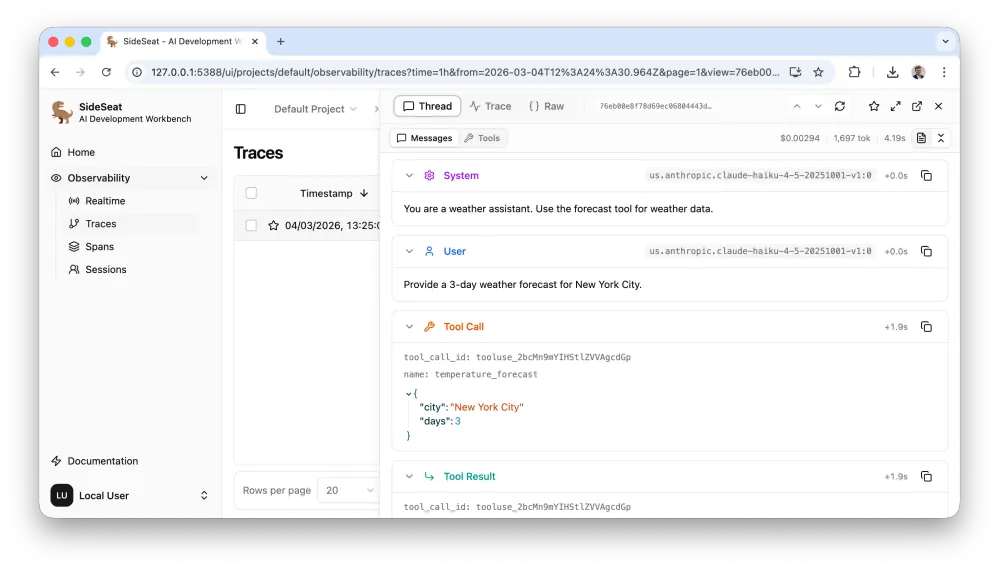
temperature_forecast and returns a wrong answer, the trace shows the exact JSON arguments the model passed, the exact tool response, and the exact message the model saw when formulating its answer - making it immediately clear whether the bug is in the tool, the prompt, or the model's reasoning.Step 5: Navigate SideSeat
Once your first instrumented run completes, open
http://localhost:5388 to see what was captured.


Traces view
Each row is one trace (
with client.trace() or one Strands agent run). Columns show the root span name, model, framework, total tokens, total cost, and duration. Filter by model, framework, error state, or date range to narrow to the run you're investigating.Trace detail
Click any trace to open the three-panel view. The left panel shows the full message thread. The center panel shows the span tree: for a multi-turn tool-use run, the root trace with child spans for each agent loop iteration. The right panel shows span metadata - model, framework, session ID, timestamps, and token counts.
Sessions view
If your traces carry a
session.id, SideSeat groups them by session. The session list shows combined cost and span count across all traces in the session. Selecting a session opens the cost breakdown panel - use it to find which specific tool call or loop iteration is driving cost, and whether prompt caching is working as expected.Step 6: Connect Coding Agents via MCP
Without MCP, debugging an agent failure means copying the output, pasting it into your coding agent, and trying to describe what was supposed to happen. The coding agent works from your description, which is always incomplete. With MCP connected, you skip that step entirely - the coding agent queries SideSeat directly, reads the actual trace, and reasons from the real execution.
SideSeat includes a built-in MCP (Model Context Protocol) server available at:
1
http://localhost:5388/api/v1/projects/default/mcp
Claude Code
1
claude mcp add --transport http sideseat http://localhost:5388/api/v1/projects/default/mcp
Or add to
.mcp.json in your project root:1
2
3
4
5
6
7
8
{
"mcpServers": {
"sideseat": {
"type": "streamable-http",
"url": "http://localhost:5388/api/v1/projects/default/mcp"
}
}
}Once connected, you can ask things like:
- "Look at my last five Strands traces - which tool call is taking the most time?"
- "Find traces where the agent looped more than three times and explain what went wrong."
- "Compare token costs between my bedrock-haiku and bedrock-sonnet runs this week."
Kiro CLI
1
kiro-cli mcp add --name sideseat --url http://localhost:5388/api/v1/projects/default/mcp
Or add to
.kiro/settings/mcp.json:1
2
3
4
5
6
7
{
"mcpServers": {
"sideseat": {
"url": "http://localhost:5388/api/v1/projects/default/mcp"
}
}
}How SideSeat Works
Zero configuration. The SDK configures OpenTelemetry automatically - no
TracerProvider, no exporter setup, no sampling rules. Call SideSeat(...) once and every subsequent API call is captured.OpenTelemetry native - no lock-in. The Python SDK sets up a standard
TracerProvider that exports spans to http://localhost:5388 using the OpenTelemetry protocol. If you already instrument with OpenTelemetry, point your existing exporter at SideSeat with no SDK changes. When you're ready for production, redirect the same exporter to AgentCore, Langfuse, or any other OpenTelemetry-compatible backend.Full message content, not summaries. SideSeat stores the complete raw span including all message content. Every trace shows exactly what the model received and returned - full system prompt, full conversation history, full tool inputs and outputs. Nothing is truncated or aggregated away.
Framework-agnostic. SideSeat handles Bedrock, Strands, LangGraph, CrewAI, AutoGen, Vercel AI SDK, and more. Experiment across frameworks without fragmenting your trace history.
Development vs. Production: SideSeat and AgentCore Observability
Development and production observability answer different questions.
Production monitoring asks: is the system healthy? What is the error rate over the last hour? Which users are seeing failures? AWS Bedrock AgentCore Observability is built for this - a fully managed service backed by CloudWatch and S3, designed for governance, compliance, and aggregate visibility at scale.
Development observability asks: what exactly happened on this specific run? What did the model receive, decide, and return? SideSeat is built for the development phase - zero-latency local storage, full message content, no infrastructure to manage. The questions you're asking during development require inspecting individual traces at full fidelity, not reading aggregate dashboards.
| SideSeat | AgentCore Observability | |
|---|---|---|
| Runs on | Your machine (or shared server) | AWS managed service |
| Setup | npx sideseat | AWS console / Terraform |
| Storage | Local DuckDB (~/Library/Application Support/SideSeat/ on macOS) | CloudWatch, S3 |
| Primary question | What happened on this run? | Is the system healthy? |
| Best for | Development, debugging, iteration | Production monitoring, compliance, audit |
| Cost | Free, open-source | AWS service pricing |
| Protocol | OpenTelemetry (OTLP) | OpenTelemetry (OTLP) |
Because both use OpenTelemetry, the same instrumentation works in both environments. In development, traces go to SideSeat.
In practice the phases work like this:
- Build locally: every run is traced, full message content, instant feedback
- Debug with evidence: the SideSeat UI or your MCP-connected coding agent reads real traces
- Ship to production: redirect to AgentCore for long-term monitoring, alerting, and audit
If you're using AgentCore services (memory, code interpreter, S3 session management) alongside Strands, SideSeat captures the full picture - so you can see exactly how AgentCore features behave before relying on them in production.
Resources
- Website: https://sideseat.ai
- Docs: https://sideseat.ai/docs/
- GitHub: https://github.com/sideseat/sideseat
- Video walkthrough: https://www.youtube.com/watch?v=JqTcJ2OCLQI
- Strands Agents: https://strandsagents.com
- Amazon Bedrock: https://aws.amazon.com/bedrock/
- AgentCore Observability: https://aws.amazon.com/bedrock/agentcore/
Enjoyed reading this content? Let the author know!
Your likes, comments, shares, and saves help creators reach more builders.

Loading recommendations
Loading article