
Automating End-to-End Salesforce Data Analysis and Report Distribution Quick Flows and Integrations
Many organizations rely on Salesforce to manage customer accounts, opportunities, activities, and statuses. However, significant time and effort are often dedicated to manually analyzing data and generating reports. With Quick Flows, you can streamline and automate these routine tasks without writing a single line of code. In this session, you will learn how to build a comprehensive end-to-end workflow that automates Salesforce data analysis.

Episode Overview
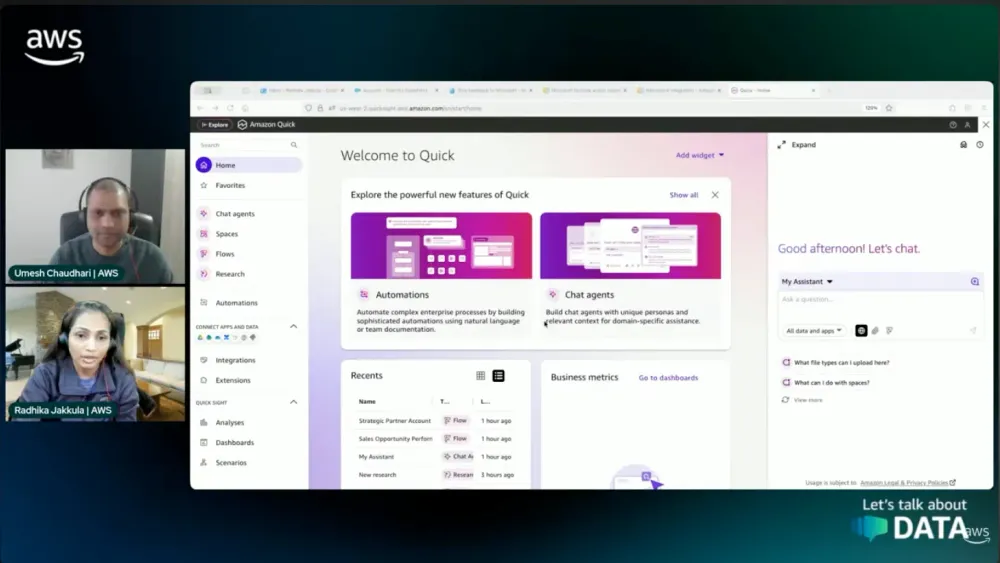
Hosted by Umesh, this episode featured Radhika Jakula, a Senior Analytics Specialist Solutions Architect at AWS (EMEA Startups, based in London). The session demonstrated how Amazon Quick (QuickSuite) can automate Salesforce data analysis and report distribution — moving beyond traditional BI into agentic AI-powered workflows. Radhika walked through live demos of integrating Salesforce and Microsoft Outlook with QuickSuite, then combining them into an automated Quick Flow that retrieves, analyses, and emails a sales opportunity summary — all triggered from a two-line natural language prompt.
Amazon Quick & QuickSuite Explained
QuickSuite is the evolved, rebranded version of Amazon QuickSight — combining classic BI (dashboards, reports, datasets) with generative AI and workflow automation in a single workspace. "Quick" is simply the shorthand name. Key components include Chat Agents, Spaces, Integrations, Quick Flows, Quick Research, and Quick Automate.
The End-to-End Demo
Radhika demonstrated a complete automated pipeline: connect Salesforce (via OAuth/connected app), integrate Microsoft Outlook (via Microsoft Entra/Azure app registration), then build a Quick Flow — generated entirely from a natural language prompt — that fetches all Salesforce opportunities, analyses KPIs, formats an executive email summary (with colour-coded opportunity priorities), and sends it via Outlook. A human-in-the-loop step was included before sending, supporting safe, reviewable automation.
Bullet Point Highlights
- Amazon Quick = QuickSuite: Evolved from QuickSight; adds agentic AI, NLP Q&A, workflow automation, and third-party integrations on top of classic BI
- Salesforce Integration: Set up via OAuth connected app; supports querying, creating, updating Salesforce objects (accounts, opportunities, tasks)
- Outlook Integration: Set up via Microsoft Entra (Azure AD) app registration; requires client ID, secret, and Microsoft Graph delegated permissions
- Quick Flows: Automate repeatable multi-step tasks using natural language prompts — no manual step-by-step configuration required
- Flow Steps Available: Chat Agent, Research, Web Search, General Knowledge, UI Agent, Create Image, Reasoning Groups, Data Insights (dashboards/topics), Application Actions, and Input forms
- Human-in-the-Loop: Flows can pause for human review before irreversible actions (e.g., sending emails to senior leadership)
- Real-World Use Cases: Zendesk ticket classification → Slack notifications; account manager pipeline monitoring; Jira ticket updates based on AI classification
- Data Quality: Flows can detect incomplete Salesforce fields and auto-create tasks or calendar blocks for owners to fix them
- Security: Inherits QuickSight enterprise-grade security; agents respect IAM roles and row/column-level permissions; all actions logged in AWS CloudTrail
Pro Tip from Radhika: Start with clean data (Quick Index is the foundation), begin with 1–2 integrations, and scale complexity gradually
Hosts of the show
Umesh Chaudhari - Data & AI | Streaming @AWS
Guests
Radhika Jakkula - Sr. Analytics SA - Startups
Links from today's episode
Amazon QuickSuite Learning Series https://lets-talk-about-data-aws.com/s407-learning
Amazon Quik Flows https://lets-talk-about-data-aws.com/s407-flows
Amazon Salesforce Integration Demo https://lets-talk-about-data-aws.com/s407-demo
Amazon Quick Suite Knowledge Hub https://lets-talk-about-data-aws.com/s407-hub
Microsoft Outlook Integration https://lets-talk-about-data-aws.com/s407-integration
SalesForce Integration https://lets-talk-about-data-aws.com/s407-sf-int
Enjoyed reading this content? Let the author know!
Your likes, comments, shares, and saves help creators reach more builders.

Loading recommendations
Loading article