
Track your brand's visibility in AI search with a citation analysis tool
Open-source serverless tool that queries AI search engines, extracts brand mentions with Amazon Bedrock, and scores your visibility against competitors.

Track your brand's visibility in AI search with a citation analysis tool
by Matias Undurraga and Christian Wolff on 17th February 2026
AI assistants now influence how customers discover brands. When someone asks ChatGPT for hotel recommendations or Perplexity for software comparisons, the AI cites specific sources. Those citations determine which brands get discovered. Traditional SEO tools track Google rankings, but there's no equivalent for AI search. Which sources get cited? Is your brand mentioned? How do you compare to competitors? Without answers, you can't optimise.
This post shows you how to deploy an open-source citation analysis tool that tracks your brand's visibility across AI search platforms. You'll configure keyword tracking, interpret citation patterns, and identify the content gaps that keep you invisible. Success in Generative Engine Optimisation (GEO) means being the authoritative source that AI answer engines cite, and this tool helps you measure where you stand.
Important: This solution is sample code for demonstration and educational purposes. It isn't intended for production use without additional security review and testing. Work with your security and compliance teams to meet your organisational requirements before deploying to production environments.
Why AI search visibility is hard to measure
Traditional search engines provide transparent rankings. Google Search Console shows where your content appears for specific keywords. AI search platforms work differently. When someone asks ChatGPT or Perplexity about hotels in a specific city, the AI cites specific sources, but there's no dashboard showing which ones. Your brand might never appear when users ask Gemini to compare options in your category, and you'd have no way to know.
Marketing teams face four specific problems:
- No visibility into AI citations – Unlike Google Search Console or SEMrush, there's no dashboard showing your AI visibility score. You can't see which sources AI models cite when answering questions about your industry.
- SEO doesn't translate – You might rank first on Google for "enterprise cloud solutions" but never appear when users ask AI assistants about the same topic.
- Share of voice is unmeasurable – Understanding your visibility compared to competitors requires manually querying multiple AI platforms with dozens of keywords, an approach that doesn't scale.
- No trend tracking – Brand visibility in AI responses changes as models are updated and retrained, but there's no automated way to track these changes over time.
These gaps make it difficult to adapt digital strategies for AI-driven discovery.
What this means for your business
A hotel chain using this tool might discover that when travellers ask AI assistants for recommendations in key markets, the AI consistently cites TripAdvisor reviews and travel blogs but never their own property pages. That's a content gap they can act on. A B2B software company might find that AI models cite G2 and Capterra reviews when recommending solutions, but their product documentation isn't structured in a way that makes it citable. The tool surfaces these patterns. What you do with them is up to you.
How the tool works
The LLM Search Citation Analysis tool is an open-source, serverless application that tracks brand visibility across AI search platforms. The tool queries multiple AI providers with your target keywords, analyses which sources they cite, extracts brand mentions using Amazon Bedrock , and provides visibility metrics through a web dashboard. The system runs entirely on AWS serverless infrastructure with automatic scaling and pay-per-use pricing.
The tool queries Perplexity, OpenAI (GPT-5 mini with web search), Google Gemini, and Anthropic Claude simultaneously. Each provider has different training data, search integrations, and citation behaviours. Understanding these differences helps you optimise for the platforms your customers use.
Amazon Bedrock with Claude Sonnet 4.5 identifies when your brand and competitors are mentioned in AI responses. The system captures sentiment (positive, negative, neutral), ranking position, and context. Eight industry presets (hotels, restaurants, airlines, retail, fashion, automotive, technology, finance) provide starting points you can customise.
Here's a simplified example of the brand extraction approach:
1
2
3
4
5
6
7
8
9
10
11
12
13
14
15
16
17
18
19
20
prompt = f"""Analyse this AI search response and extract brand mentions.

Response text:
{response_text}

FIRST PARTY BRANDS: {first_party_brands}
COMPETITOR BRANDS: {competitor_brands}

CLASSIFICATION RULES:
1. Match by brand family or parent company
2. Use your knowledge of which brands own which properties
3. When uncertain about ownership, classify as "other"

For each brand mentioned, provide:
- name: Brand name as mentioned
- classification: first_party, competitor, or other
- sentiment: positive, negative, or neutral
- ranking_context: How the brand is positioned

Return JSON array of brand mentions."""
Amazon Bedrock processes this prompt and returns structured data that the system stores in DynamoDB for analysis.
The tool identifies which websites, publications, and pages AI models reference when answering questions about your keywords. Amazon Bedrock AgentCore browser tools crawl cited pages to analyse their content structure, helping you understand what makes content citable by AI.
Track your brand's visibility compared to competitors across keywords and providers. The dashboard shows where you are winning, where you are losing, and where opportunities exist. Schedule automated analysis runs with Amazon EventBridge to track how your visibility changes over time. Measure the impact of content updates, PR campaigns, and SEO improvements on your AI visibility.
Architecture
The citation analysis system uses AWS Step Functions to orchestrate a workflow that queries AI providers, analyses responses, and extracts insights.

Citation Analysis Architecture Diagram
The workflow proceeds through six steps:
- Parse keywords – AWS Lambda reads your active keywords from Amazon DynamoDB and validates the input.
- Query AI providers – AWS Step Functions invokes a Lambda function that queries OpenAI, Perplexity, Gemini, and Claude in parallel. Each provider returns search results with citations. The function implements exponential backoff retry logic to handle rate limits.
- Extract brand mentions – Amazon Bedrock with Claude Sonnet 4.5 analyses each AI response to identify brand mentions, sentiment, and competitive positioning.
- Deduplicate citations – A Lambda function normalises URLs and removes duplicate citations across providers, storing unique citations in Amazon DynamoDB .
- Crawl cited pages – Amazon Bedrock AgentCore browser tools crawl each cited URL, capturing screenshots and extracting content structure for analysis.
- Generate summary – A final Lambda function aggregates results and stores execution statistics.
The web dashboard (React with Amazon Cognito ) displays visibility scores, citation patterns, competitor comparisons, and trend data. The Schedule section lets you configure automated analysis runs using Amazon EventBridge Scheduler .
Reading the results
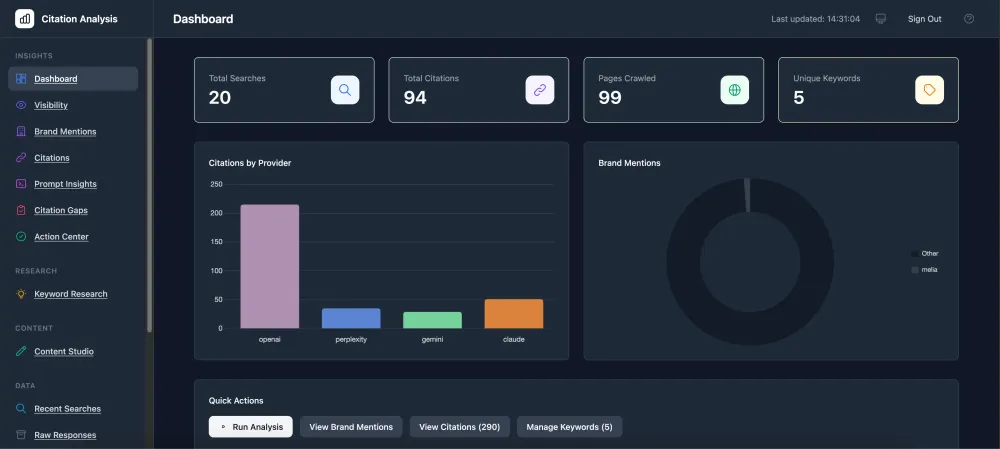
The dashboard organises analysis across several sections:

Citation Analysis Dashboard overview
Insights
- Dashboard – Overview stats: total searches, citations, pages crawled, and keyword count
- Visibility – Your visibility score across providers and keywords, with trend charts
- Brand Mentions – Every mention of your brand and competitors, with sentiment and context

Brand Mentions page
- Citations – All URLs cited by AI models, ranked by frequency
- Prompt Insights – How AI models frame their responses to your keywords
- Citation Gaps – Sources that cite competitors but not you (your PR target list)

Citation Gap Analysis page
- Action Center – Prioritised recommendations based on your data
Research – Keyword Research uses AI to expand your keyword list and identify competitor terms you might be missing.
Content Studio – Content Studio generates content briefs and outlines based on citation gap analysis, helping you create content that AI models are more likely to cite.

Content Studio Recommendations
Data – Recent Searches shows your analysis history. Raw Responses lets you explore the full AI responses stored in S3.
Operations – Run Analysis triggers new analysis runs. Schedule configures automated recurring analysis.
Configuration – Settings manages keywords, brand tracking configuration, and API provider keys.
Industry applications
The tool includes eight industry presets with pre-configured brand lists:
- Hotels – Track visibility when travellers ask AI for accommodation recommendations
- Restaurants – Monitor how AI dining assistants recommend places to eat
- Airlines – See which carriers AI suggests for route and price queries
- Retail – Understand how AI shopping assistants recommend products
- Fashion – Track brand visibility in style and clothing recommendations
- Automotive – Monitor AI responses to vehicle comparison queries
- Technology – See which vendors AI cites for software and hardware recommendations
- Finance – Track visibility in AI responses about financial products and services
Each preset includes example competitor brands you can customise. For industries not listed, select Custom Industry to define your own entity types and brand lists from scratch.
Deployment
The citation analysis tool is available as an open-source project on GitHub with complete infrastructure as code using AWS CDK.
Repository: aws-samples/sample-llm-search-citation-analysis-with-amazon-bedrock
Prerequisites
AWS account requirements:
- Amazon Bedrock access with Claude models enabled in us-east-1
- IAM permissions to create Lambda, DynamoDB, S3, Step Functions, API Gateway, Cognito, and CloudFront resources
- AWS CDK bootstrapped in your account
AI provider API keys (configured after deployment):
- OpenAI with web search access (GPT-5 mini)
- Perplexity
- Google Gemini
- Anthropic Claude for web search (separate from Bedrock)
Development tools:
- Node.js 20 or later
- Python 3.12
- AWS CLI configured with credentials
- AWS CDK CLI
Estimated deployment time is 10 to 15 minutes.
Deployment steps
Clone the repository and run the automated deployment script:
1
2
3
git clone https://github.com/aws-samples/sample-llm-search-citation-analysis-with-amazon-bedrock.git
cd sample-llm-search-citation-analysis-with-amazon-bedrock
./scripts/deploy.sh
The script checks prerequisites, installs dependencies, builds the Lambda layer, compiles TypeScript, and deploys the CDK stack. Deployment takes approximately 8 to 10 minutes. When complete, the script displays the dashboard URL and next steps.
Configure your first analysis
After deployment, open the dashboard URL shown in the deployment output. Create a user account via the AWS CLI (self-registration is disabled by default for security):
1
2
3
4
5
aws cognito-idp admin-create-user \
  --user-pool-id <your-pool-id> \
  --username user@example.com \
  --user-attributes Name=email,Value=user@example.com \
  --desired-delivery-mediums EMAIL
Sign in with the temporary password sent to your email, then set a permanent password.
Configure your API keys by navigating to Settings > AI Providers. For each provider you want to use, select Add Key, enter your API key, and select Save. The dashboard shows which providers are configured and enabled. You can disable providers temporarily without removing their keys. API keys are stored securely in AWS Secrets Manager.
Next, add keywords by navigating to Settings > Keywords. Add keywords that represent how customers search for your products or services. Keywords should be natural language queries like "best hotels in Barcelona" or "enterprise project management software".
Configure brand tracking by navigating to Settings > Brand Tracking. Select an industry preset, add your brand names under First Party Brands, and add competitor brands. The system uses these lists to classify brand mentions in AI responses.
Choose Run Analysis from the dashboard to start a Step Functions execution. The workflow queries your configured AI providers, extracts brand mentions, and crawls cited URLs. Analysis typically completes in 3 to 5 minutes for 10 keywords, depending on how many citations are found and crawled.
The dashboard displays visibility scores by provider, brand mention frequency and sentiment, citation sources with analysis, and share of voice compared to competitors.
Cost estimate
Monthly costs for analysing 100 keywords across 4 providers weekly (approximately 1,600 searches per month):
AWS infrastructure: $25–50/month
| Service | Estimated cost | Notes |
|---|---|---|
| DynamoDB | $5–15 | PAY_PER_REQUEST billing |
| Lambda | $2–5 | Mostly free tier eligible |
| S3 | $2–5 | Storage and requests |
| CloudFront | $1–5 | Data transfer |
| Step Functions | $1–2 | State transitions |
| Other (API Gateway, Cognito, WAF, Secrets Manager) | $10–20 |
AI provider API costs are billed separately by each provider. Check current pricing before deployment.
Cost optimisation tips:
- Start with fewer keywords and scale up
- Disable providers you don't need in Settings
- Use longer intervals between scheduled runs
Troubleshooting
"Bedrock model access denied" – Request access to Claude models in the Amazon Bedrock console. Navigate to Bedrock > Model access > Manage model access > Request access for Anthropic Claude models. Access is typically granted within minutes.
"Unable to load data" in dashboard – The frontend was built before the stack existed. Rebuild with the API URL:
1
2
./scripts/build-web.sh
cdk deploy --require-approval never
"Rate limit exceeded" during analysis – The Lambda functions implement exponential backoff, but analysing many keywords simultaneously may hit provider limits. Reduce the maxConcurrency setting in the Step Functions state machine from 3 to 1, or space out your analysis runs.
Crawler Lambda timeout – Some websites take longer to load. The crawler has a 5-minute timeout. If specific URLs consistently fail, increase the timeout in the stack definition or exclude problematic domains.
Testing and validation
After deployment, open the CloudFront URL and verify you can sign in. Add a single test keyword and run an analysis. Monitor the Step Functions execution in the AWS console to verify each step completes. If any step fails, check the Lambda function logs in CloudWatch.
Considerations
Security – API keys are stored in AWS Secrets Manager with encryption at rest. These keys access paid services, so monitor your provider dashboards for unexpected usage and set up billing alerts. Consider rotating keys periodically.
Rate limits – Each AI provider has different limits. The solution implements exponential backoff, but high-volume analysis may still encounter throttling. Start small and scale gradually, or spread analysis across multiple scheduled runs.
Data retention – The solution stores AI responses, citations, and crawled content in DynamoDB with point-in-time recovery. Raw responses are also stored in S3. Review your retention requirements and implement TTL policies if needed.
Cost drivers – Primary costs come from AI provider API calls (external to AWS), DynamoDB capacity, Lambda execution (especially the crawler), and S3 storage. Monitor with AWS Cost Explorer and disable providers you don't need.
Accuracy – AI model responses vary based on training data and model updates. Citation patterns may change without notice. Use this tool for directional insights rather than precise measurements, and validate important findings manually.
Clean up
To avoid incurring future charges, delete the CloudFormation stack:
1
cdk destroy
S3 buckets and DynamoDB tables use a RETAIN deletion policy to prevent accidental data loss. After running
cdk destroy, manually delete these resources using the AWS CLI or console:- S3 buckets – access-logs, keywords, screenshots, raw-responses, web (all prefixed with
citation-analysis-and your account ID) - DynamoDB tables – SearchResults, Citations, CrawledContent, Keywords, BrandConfig, KeywordResearch, ContentStudio, ProviderConfig, QueryPrompts (all prefixed with
CitationAnalysis-) - Secrets Manager – API key secrets for each provider (prefixed with
citation-analysis/)
Conclusion
AI search is changing how customers discover brands. If you can't measure your visibility in ChatGPT, Perplexity, and Gemini responses, you can't improve it. This tool gives you that measurement capability and a starting point for optimising your content for the AI-first era.
By deploying this solution, you gain visibility into which sources AI models cite, how your brand appears compared to competitors, and where content gaps exist. The serverless architecture scales automatically and costs only what you use. Combined with Amazon Bedrock for brand extraction and analysis, you have a foundation for understanding and improving your AI search presence.
Next steps
- Deploy the solution from the GitHub repository
- Learn more about Amazon Bedrock
- Explore AWS Step Functions for workflow orchestration
- Read about serverless application patterns on AWS
About the authors
Matias Undurraga is an Enterprise Technologist at AWS based in Zürich, Switzerland. He works with customers across Europe to guide cloud adoption, platform strategy, and AI/ML implementation. He specialises in helping organisations transform their digital strategies for the AI-first era.
Christian Wolff is a Solutions Architect at AWS based in London, United Kingdom. He works with Travel and Hospitality customers, focusing on generative AI adoption and AI-assisted development, helping teams understand what's possible with tools like Bedrock, Q and Kiro. He is a lead contributor to the UK Travel & Hospitality Future of Search initiative.
Enjoyed reading this content? Let the author know!
Your likes, comments, shares, and saves help creators reach more builders.

Loading recommendations
Loading article